- Android 17 strengthens security with Live Threat Detection, Google Play Protect local rules, and anti-scam protections during calls and messages.
- The system protects OTPs, financial apps, and the local network with new permissions, temporary blocks, and smart alerts to curb account theft and vishing.
- Defenses against physical theft of the mobile phone are improved, with remote biometric locking, IMEI on the lock screen and a more accessible Advanced Protection mode.
- AI in Android focuses on detecting fraud in Messages and calls, keeping the processing on the device to combine security and privacy.

Android is undergoing a true security revolution. With Android 17 and the latest features released by Google, the system has become brimming with New defenses against scams, malware, mobile phone theft and spam which almost always act automatically and, in many cases, directly from the device itself without needing an internet connection.
All this change isn't happening by chance. Cybercriminals have stepped up their game and are now using increasingly sophisticated techniques: calls where they impersonate your bank, messages with irresistible offers, apps that change their icons to go unnoticed… Faced with this, Google has decided to take a stand and turn Android 17 into a kind of permanent “anti-scam mode”, relying on artificial intelligence, stricter permissions, and advanced protections against theft.
Android 17: The leap in security and privacy that focuses on scams

At 'The Android Show: I/O Edition', Google presented the new version of its mobile operating system, Android 17, with a special focus on the features of device security, privacy, and integrityIt's not just about minor tweaks: there are profound changes designed to curb financial fraud, block malware, and make life as difficult as possible for thieves.
One of the major new developments is the arrival of Gemini Intelligence with capabilities to integrated agent in the most powerful Android devicesBeyond typical AI functions, this system is also used to enhance threat detection and better understand suspicious app and communication behavior.
Android 17 also incorporates new social and productivity features, such as improvements to the use of Quick Share directly from apps like WhatsApp or Instagram, but Google's message is clear: Security becomes as important a priority as the user experience.Everything has been redesigned with the idea of anticipating fraud, not just reacting when it's too late.
Along with these new features, Google has introduced specific adjustments ranging from USB protection on Pixel devices to operating system verification, as well as much finer control over location, contacts, and how apps communicate with the local network, and the management of security patches.
Anti-fraud and anti-malware defenses: Android 17 and the new Google Play Protect
One of the key fronts of Android 17 is the fight against the malicious apps and scams through appsGoogle has focused on strengthening Google Play Protect, which is now more aggressive and smarter at detecting unusual behavior.
Many malicious developers resort to tricks like hiding their app's icon, changing it to a seemingly harmless one, or abusing accessibility permissions. To stop this in its tracks, Google Play Protect's real-time threat detection will alert you every time it detects a threat. deceptive behavior patterns, such as icon changes or sudden app disappearanceThis feature will begin rolling out to Pixel phones starting with the Pixel 6 and certain new models from other manufacturers.
Google Play Protect already scanned all apps before installation, whether they came from Google Play or external sources. With the latest update, this system now uses local rules based on machine learning They search for text and binary patterns associated with malware families. If an app matches any of these patterns, the user is alerted before it is installed.
These rules are frequently updated and stored directly on the device, allowing for a Fast and private protection against new types of malware and their variantsThe user doesn't depend so much on constant cloud uploads to know if something is dangerous, because the mobile phone is already capable of detecting a good part of the threats on its own.
Furthermore, Android 17 will remove access to accessibility services for all apps that are not clearly identified as legitimate accessibility tools. With this, Google is trying to cut off one of the favorite attack vectors of scammers, who requested accessibility permissions for take control of the device, read SMS codes or manipulate other applications from the shadows.
Live Threat Detection and dynamic monitoring: the system monitors in real time
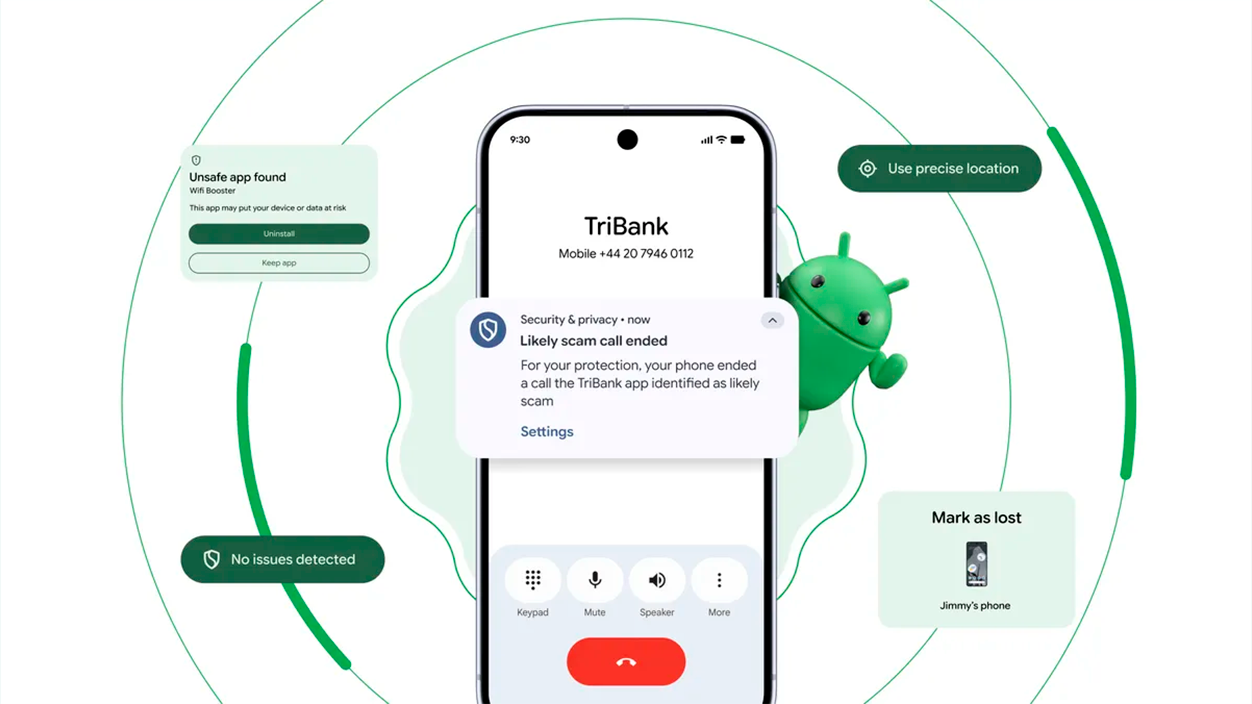
Another key piece of Android 17's anti-scam strategy is the real-time threat detection (Live Threat Detection)Powered by artificial intelligence, this feature focuses on monitoring how applications behave once installed, not just during download.
Dynamic signal monitoring analyzes things like sudden changes in an app's behavior: whether it starts hiding its icon, abuses accessibility permissions, tries to forward SMS messages for no reason, or performs system-level sensitive operations that do not match their apparent function. When a typical malware or scam pattern is detected, the system can alert the user and block the threat.
This approach is especially useful for slowing down Applications that disguise themselves as banking, investment, or technical support toolsAlthough they manage to bypass initial controls, Android 17 keeps a much closer watch on them over time, reducing the window in which they can operate undetected.
Live Threat Detection is deeply integrated with Google Play Protect, so the information learned from millions of devices can be used to... Continuously improve the identification of new scams and malware variantsAll of this, according to Google, with a strong emphasis on maintaining local processing whenever possible, in order to protect privacy.
In parallel, Android 17 will disable support for Chrome WebGPU and device-to-device unlocking in certain contexts, precisely for close potential entry points for sophisticated attacks that could take advantage of new types of graphics processing or cross-authentication methods.
Protection against theft and fraudulent use of your mobile phone
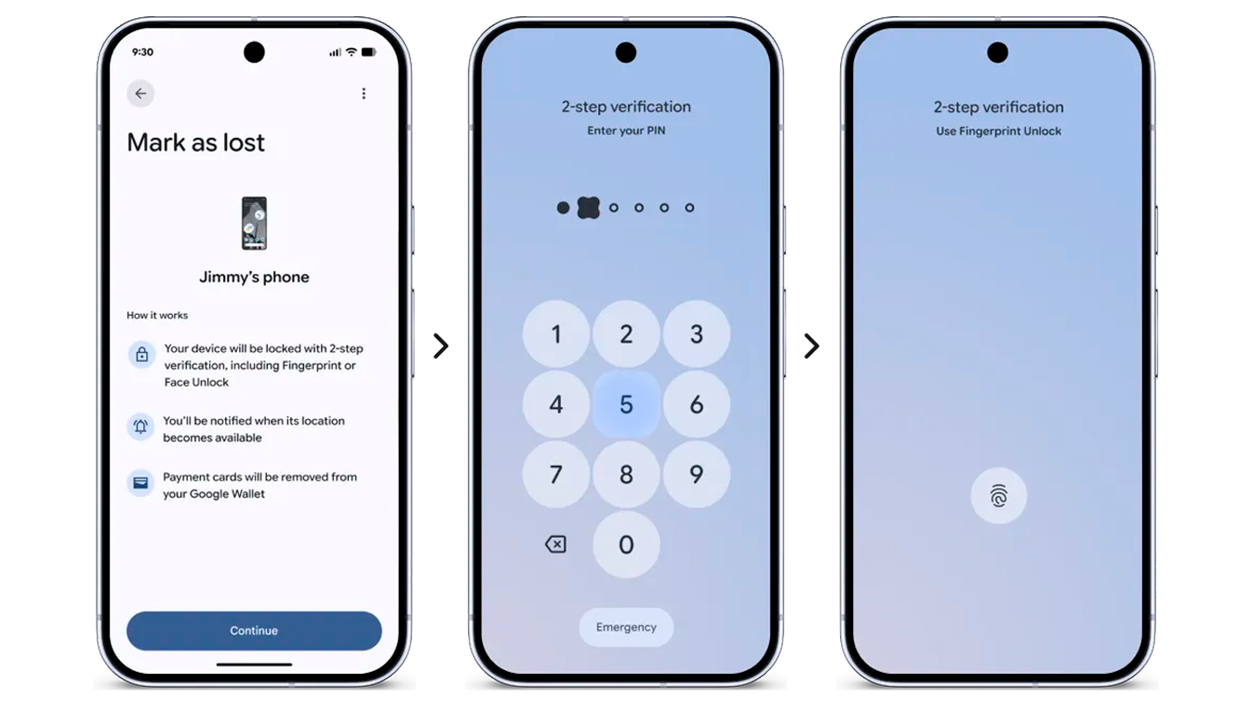
Anti-fraud security isn't limited to apps: it also encompasses protection against physical theft of the deviceGoogle has been expanding the defenses that debuted in Android 16 with Advanced Protection mode and is now taking another step with Android 17.
Among the new features, the ability to biometrically lock a phone marked as lost within the Find Hub network stands out. This means that even if the thief has obtained your PIN or password, the system can prevent them from unlocking the phone without your fingerprint or face, greatly increasing the level of protection.
Android's default anti-theft protections, initially tested in Brazil, will be extended to more regions with Android 17, and also to older devices that can be updated to this versionThey include features such as theft detection lock (when the system interprets that someone has snatched the phone) and simplified remote locking.
To facilitate device recovery and promote good security practices such as How to back up data on AndroidAndroid will allow the IMEI number to be displayed on the lock screen, provided the user enables it. This will allow authorities, manufacturers, and mobile operators to... Easily verify who the rightful owner is.This feature will be available from Android 12 onwards.
Google is also tightening the factory reset process and is considering introducing control questions or additional steps So that a thief can't simply format the phone and resell it as if nothing happened. The idea is to make the stolen device much less attractive as loot.
One-time passwords (OTP) and SMS access blocking
One of the most delicate points in any scam is the moment when the attacker tries to gain control of a one-time password (OTP) sent by SMS or via WebOTP to access a bank account, messaging service, or payment platform.
With Android 17, Google introduces a specific protection: the system will automatically delay until three hours access to the applications to SMS messages containing OTP codes. During that time, apps will not be able to automatically read those messages, which greatly reduces the effectiveness of account hijacking attacks.
The same logic will apply to WebOTP messages, which many services use for automatic identity verification. This way, even if a malicious application manages to infiltrate the device, it will be much more difficult for it to succeed. capture the verification code in time necessary to complete the robbery.
In addition, one-time codes received via SMS will be hidden on the lock screen for three hours, so that neither a potential attacker nor anyone nearby can see them at a glance. It's a small change that provides a extra layer of security in situations of theft or curious glances in public places.
This OTP protection is in addition to other measures already in place, such as advanced message encryption and device integrity verification, which allow the system to distinguish between a legitimate Android and one modified for malicious purposes.
Phone calls: automatic blocking and real-time alerts during scams
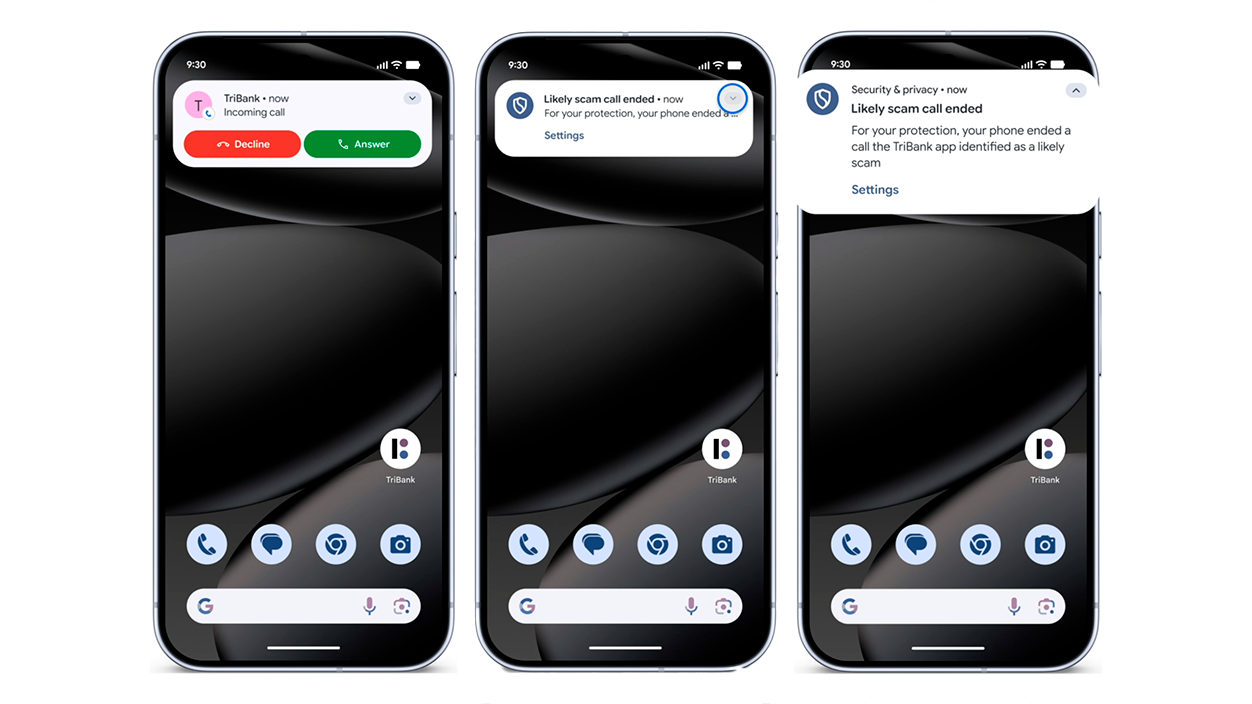
The so-called vishing, that is to say the Telephone scams where the criminal impersonates your bank, your phone company, or a public institutionIt has skyrocketed. It's not enough to be wary of hidden numbers: many attackers use numbers that appear legitimate or impersonate well-known entities.
To address this, Google has announced a series of features that activate automatically during calls with unknown numbers. Among them, the following stand out: Automatic blocks that prevent disabling Google Play ProtectInstalling unverified applications or granting sensitive permissions during the call, especially if there is suspicion of tampering.
Android will also display a warning when it detects that the user continues to share their screen after ending the call, a situation that scammers try to exploit. snooping through the device's contents or guiding the victim to perform dangerous operationsThe system will prompt you to end that sharing with a single tap.
Google has also expanded a feature designed to strengthen security during calls: if you open a banking or financial app while sharing screen with an unsaved numberThe mobile will show you an automatic warning and give you the option to end the call and stop sharing your screen immediately.
This warning includes a 30-second pause before allowing you to continue, precisely to break the sense of urgency that scammers often create (“do it now or you’ll lose your money”). According to Google, this brief window helps the victim regain control and consider whether What they're asking makes sense..
For now, this feature has begun rolling out in the UK to users with Android 11 or higher, initially with banks like Monzo, NatWest, and Revolut, and is expanding to more types of apps, including peer-to-peer (P2P) payment apps. Google intends to roll it out to more regions as the results are tested.
Google Messages: AI to detect scams in real time
SMS, MMS, and RCS scams have also become more creative: from fake job offers to cryptocurrency scams or toll road notifications. To combat this wave, Google has equipped its Messages app with a AI-based scam detection feature.
This tool analyzes in real time the typical conversational patterns of fraud in messages from unknown numbers. If it detects something suspicious, the app displays a clear warning on the screen, urging the user to be careful, ignore the message, block the number, and report it to Google.
Google insists that all processing is done on the device itself, without sending message content to its servers, thus maintaining a high level of privacy and user controlAI is being trained to recognize new types of fraud, such as cryptocurrency scams, fake technical support, or scams involving nonexistent gift cards.
Initially, this scam detection feature in Messages is available in English in the United States, United Kingdom, and Canada, with plans to expand to other countries and more languages. For phone calls, Google has announced that this AI technology will also be available to Pixel 9 and later models in the United States.
Google itself has shared data on perceived security: in a survey conducted with YouGov among users in the United States, Brazil, and India, it was observed that many perceive less likelihood of receiving spam messages and scams On Android, especially on Pixel devices, Google performs better than other systems like iOS. Counterpoint Research has also highlighted Google's strong performance in filtering unwanted calls and messages.
Key Verifier and protection against identity theft
Another sensitive point in the world of scams is the identity theft through SIM swappingwhere an attacker obtains your phone number on another SIM card and impersonates you. To mitigate these types of scenarios, Google will launch a feature called Key Verifier in Google Messages.
Key Verifier allows two people to visually verify each other's identity using encrypted keys and scannable codes in their conversations. The goal is that, if someone tries to impersonate a known contact from another device, it will be much easier to detect that something is amiss.
This feature will be available on Android 10 or higher and integrates with the rest of the Messages app's protections, creating an additional layer against Fraud attempts that rely on impersonating family members, friends, or trusted companiesIt doesn't eliminate the risk completely, but it seriously makes life difficult for the scammer.
In addition, Google has launched pilot programs to warn users about the risks of sharing their screen with a supposed "technician" when they are actually a scammer trying to access codes, bank statements, or other sensitive data. These features are expected to be rolled out to more banks and countries in the future.
All this reinforcement goes hand in hand with other existing protections in Android, such as caller ID and spam filtering in the Phone app, which allows Filter unwanted calls and show the likely identity of the caller.as well as automatically blocking the most obvious spam attempts.
Stricter permissions: location, contacts, and local network under control
Android 17 also introduces significant changes in terms of privacy and permissions managementThe goal is clear: to ensure that apps only access what they really need and for the shortest possible time, reducing the attack surface.
In the case of location, the system will now display a Light indicator when an app is using locationThis is similar to the method already used for the camera and microphone. This way, the user knows instantly if an application is tracking their location.
Android 17 also includes a new button that allows you to share the exact location temporarily An app is open only while performing a specific task (for example, sending your location to a friend so they can find you). After that specific use, the app loses access.
Regarding contacts, a system-level selector is introduced that grants temporary, session-based read access only to the specific data fields the user chooses to share. This prevents an app that only really needs to share contacts from accessing the entire data field. a specific number or an email I ended up accessing the entire agenda, and it facilitates the Backing up contacts on Android.
The local network is also strengthened: Android 17 will protect access to the local network with a runtime permission integrated into the Nearby Devices categoryThis makes it more difficult for malicious applications to take advantage of unrestricted access to the home network to gather information or move laterally between devices.
Verification of operating system and other technical security layers
A less flashy but very important new feature is the operating system verificationAndroid 17 will allow users to verify that they have a legitimate version of Android installed, which is key to ensuring the integrity of the device when manipulated ROMs or hidden modifications are suspected.
This system verification is accompanied by another similar mechanism to check the authenticity of the official Google appsThis reduces the risk of falling for malicious clones or adulterated versions that seek to steal data or introduce backdoors.
On a more technical level, Android 17 incorporates a post-quantum protocol to prepare for future security threats related to quantum computing, strengthening encryption against possible more advanced attacks that are not yet common, but could become so in the coming years.
A new 'FEATURE_NEURAL_PROCESSING_UNIT' declaration has also been added so that apps that need to access a neural processing unit (NPU) can use it without problems or blocks. This is key for advanced AI applications that run on the device and that, in many cases, are related to threat detection, recognition of suspicious patterns, or security improvements.
Finally, among the advanced settings is a specific button to disable 2G networks, which are traditionally less secure and easier to intercept. This helps the system to prevent attacks that exploit outdated networks to spy on communications or force security outages in the connection.
Advanced protection and security for high-risk profiles
For users who need even more security—such as investigative journalists, public officials, or other vulnerable individuals—Google has strengthened the Advanced Protection mode, which groups together several high-level security functions.
Until now, this mode was activated from the program's website, but with newer versions of Android, it's possible to enable it directly from the device settings. Doing so ensures that all the strictest security options are activated at the same time, without the user having to go one by one.
This Advanced Protection includes USB protection on Pixel devices, which prevents unauthorized or potentially dangerous connections when the phone is connected via cable to other devices. Google plans to extend this protection to more brands in the near future.
The so-called “intrusion logging” is also being deployed, which allows for more detailed monitoring of unauthorized access attempts, system tampering, or suspicious configuration changesThis information is useful for both security researchers and advanced users.
The result is a more robust environment, designed to withstand targeted and highly sophisticated attacks, which often combine social engineering with the exploitation of technical vulnerabilities. While no system is impenetrable, Android 17 significantly raises the bar for what an attacker needs to succeed.
Experience improvements that also provide security
Although the star of Android 17 is its anti-scam defenses, Google hasn't neglected the user experience. There are a number of new features designed to make the system more user-friendly. more comfortable, more social and, incidentally, also safer.
Android 17 will allow the creation of chat bubbles from any appWhether you're using a mobile phone, foldable device, or tablet, this makes it easy to manage multiple chats simultaneously without losing sight of other tasks. It also prevents you from constantly opening and closing apps, a situation where many scams take advantage of distractions.
The EyeDropper API, meanwhile, will allow capturing any color displayed on the screen without requiring full capture permissions. This reduces the risk of design or graphic editing apps requesting excessive permissions that can later be exploited for unclear purposes.
In terms of connectivity, the Handoff API will make it possible to resume what you were doing on another Android device, such as continuing a document on a tablet after starting it on your phone, thanks to synchronization with CompanionDeviceManager. All of this has been designed with particular attention to permissions, so that switching between devices doesn't pose any problems. opening unnecessary doors to malicious apps.
There are also interesting details like Pause Point, a feature that appears when you launch a particularly distracting app and gives you ten seconds to breathe, set a usage timer, or exit it. If you want to disable this feature, you have to restart the device, which introduces a extra barrier when giving in to impulsivenessIt's not a direct anti-fraud measure, but it does help users maintain more control over their digital behavior.
Google has also announced a revamped emoji system with a more natural, three-dimensional design, and major new features for photography and video in collaboration with Instagram and Adobe Premiere for Android. All of this is combined with Quick Share, which is now compatible with Apple's AirDrop and will allow file sharing between Android and iOS via QR codes and the cloud, while maintaining strict security controls during the exchange.
Taken together, Android 17 and the latest Google features point to an ecosystem where users are much better protected against scam calls, suspicious messages, malicious apps, and device theft. Simply being careful isn't enough: the system itself implements safeguards, warnings, and smart blocks that, if used effectively, can make the difference between falling for a scam and detecting it in time.

Index
- 1 Android 17: The leap in security and privacy that focuses on scams
- 2 Anti-fraud and anti-malware defenses: Android 17 and the new Google Play Protect
- 3 Live Threat Detection and dynamic monitoring: the system monitors in real time
- 4 Protection against theft and fraudulent use of your mobile phone
- 5 One-time passwords (OTP) and SMS access blocking
- 6 Phone calls: automatic blocking and real-time alerts during scams
- 7 Google Messages: AI to detect scams in real time
- 8 Key Verifier and protection against identity theft
- 9 Stricter permissions: location, contacts, and local network under control
- 10 Verification of operating system and other technical security layers
- 11 Advanced protection and security for high-risk profiles
- 12 Experience improvements that also provide security

I am a technology enthusiast who has turned his "geek" interests into a profession. I have spent more than 10 years of my life using cutting-edge technology and tinkering with all kinds of programs out of pure curiosity. Now I have specialized in computer technology and video games. This is because for more than 5 years I have been writing for various websites on technology and video games, creating articles that seek to give you the information you need in a language that is understandable to everyone.
If you have any questions, my knowledge ranges from everything related to the Windows operating system as well as Android for mobile phones. And my commitment is to you, I am always willing to spend a few minutes and help you resolve any questions you may have in this internet world.