- The degree of compression depends strictly on the type and format of the original files.
- Configuring solid files and using extensive dictionaries optimizes weight reduction.
- The RAR and RAR5 formats offer superior compression performance compared to the ZIP standard.

You've probably experienced this: you try to send a document by email or free up some hard drive space, only to realize the files are incredibly large. For these situations, WinRAR becomes the ideal tool. allowing us Compress files with WinRAR and reduce its volume considerably if we know how to navigate its settings.
The first thing to understand is that there's no magic formula to reduce any file by an exact percentage. The reality is that The final result varies depending on the original content and format.because some files can be compressed a lot, while others don't even flinch.
The reality of data compression
It is essential to understand that Some files already come with their own built-in compression methods, hence Trying to compress them further is virtually impossibleWe're talking about image formats like JPEG or PNG. MP3 audio filesThis includes videos in AVI or WMV format, and even modern Office documents such as .docx or .xlsx. In these cases, the percentage reduction will be minimal.
On the contrary, There are other types of data that can be reduced by up to 90%.This is where our ability to manage the type of compression comes into play, allowing us to choose from applying nothing to forcing the maximum mode to squeeze every available byte.
Step-by-step setup for maximum savings
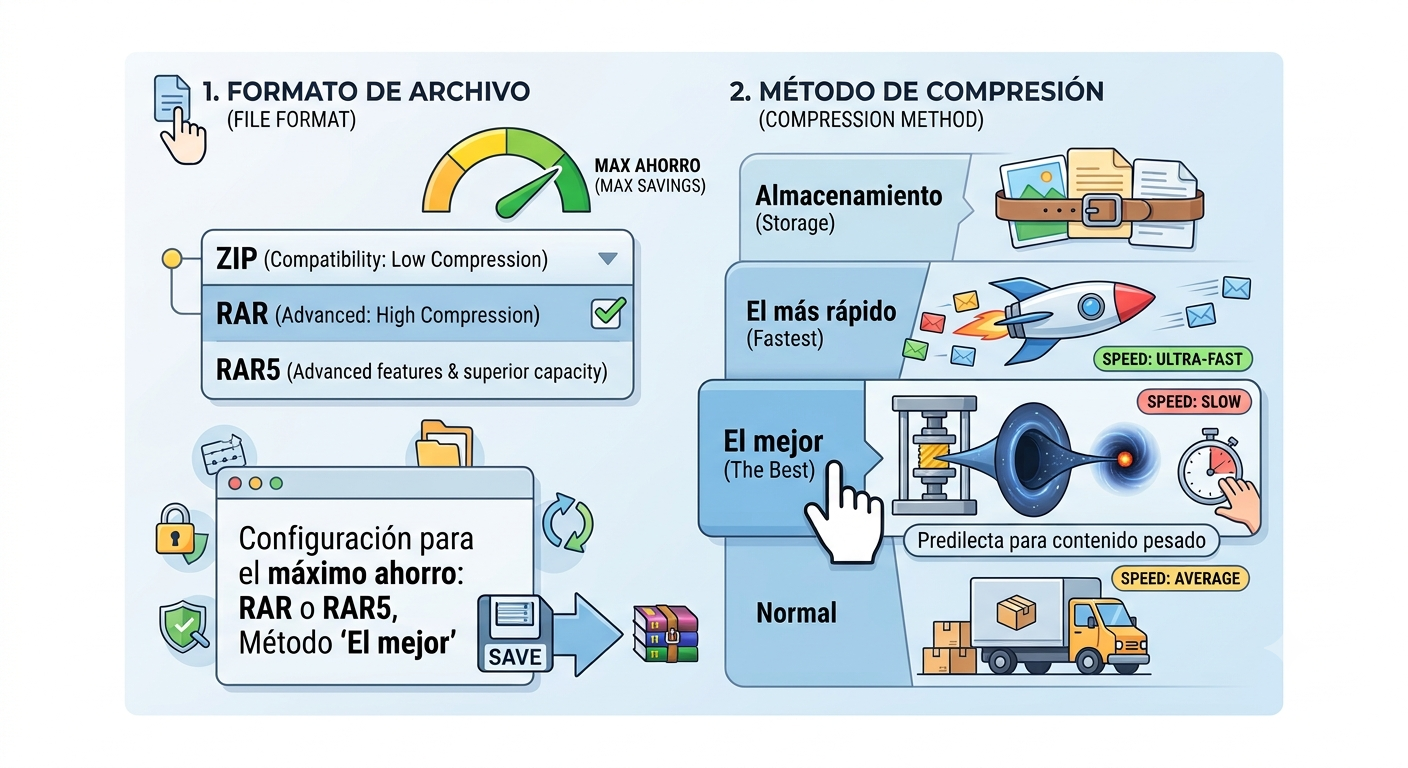
When we open the dialog box to create a file, the first thing we should look at is the format. Although ZIP is very useful if we don't know if the recipient has the program installed, Ideally, you should use RAR or RAR5because they offer advanced features and a far superior compression capacity.
Regarding the compression method, The software offers several scales: Storage, Fastest, Fast, Normal, Good, and BestFor those looking to reduce weight to the limit, the "Best" option is the one to choose, although we must bear in mind that the process will be slower than at the lower levels.
- StorageIdeal for joining files without compressing them.
- The fastest: Perfect for daily backups where speed is paramount.
- The bestThe preferred option for distributing large content over the internet.
- NormalThe standard for everyday email attachments.
Advanced tricks: Dictionaries and Solid Files
If we've opted for RAR or RAR5, we have two advantages: the dictionary size and robust compression. The dictionary is basically the memory the program uses to find repeating patterns; The larger it is, the better it will compress large files.However, it will require more RAM and time. 4 MB is generally recommended for RAR and 32 MB for RAR5.
On the other hand, Checking the "Create solid file" box is a masterstroke When we have many similar small files, WinRAR treats them all as a single data stream, improving the compression rate, although this makes editing the file later slower and riskier if the file becomes corrupted.
For those who want to use shredder, they can go to the "Advanced" tab and click the compression button. If using the RAR4 format, it's possible Selecting the "Force" option in the available fields pushes the algorithm to work at the absolute limit of its capabilities..
Interesting alternatives to WinRAR
Although WinRAR is king for many, there are other free options that are just as good. For example, 7-Zip usually produces smaller files Thanks to its native .7z format, configuring it at the "Ultra" level and using the 64 MB dictionary with LZMA, although its compatibility is somewhat lower than that of RAR. For those looking for other alternatives to 7-ZipThere are various competitive tools.
We also have jZipA simpler but effective tool. To achieve maximum reduction with this program, the best approach is Select the BZip2 compression method and set the level to "Ultra"which will give us a very competitive result without excessive complications.
Taking into account everything analyzed, Achieving maximum weight reduction involves selecting the RAR5 format, applying the "Best" compression method, enabling solid file creation, and adjusting the dictionary size. depending on the capacity of our memory, knowing that the greater the space saved, the more time and resources the computer will dedicate to the process.

I am a technology enthusiast who has turned his "geek" interests into a profession. I have spent more than 10 years of my life using cutting-edge technology and tinkering with all kinds of programs out of pure curiosity. Now I have specialized in computer technology and video games. This is because for more than 5 years I have been writing for various websites on technology and video games, creating articles that seek to give you the information you need in a language that is understandable to everyone.
If you have any questions, my knowledge ranges from everything related to the Windows operating system as well as Android for mobile phones. And my commitment is to you, I am always willing to spend a few minutes and help you resolve any questions you may have in this internet world.