- Implementation of a private artificial intelligence ecosystem by combining Ollama as a model engine and Open WebUI as a graphical interface.
- Ability to run advanced language models completely offline, guaranteeing absolute privacy of sensitive data.
- Integration of advanced features such as Retrieval Augmented Generation (RAG) to interact with personal documents and the use of MCP protocols.
¿How to connect Open WebUI with Ollama to use local models without internet? You've probably noticed that tools like Claude or Gemini are amazing, but there's a small problem: everything you write is sent to remote servers. For those who use confidential customer data For business strategies, the cloud can be a little intimidating. Luckily, these days you don't need to be a computer genius to build your own artificial intelligence at home, without a single byte leaving your computer.
The combination of Ollama and Open WebUI is, quite simply, the ideal pair for those looking for Total privacy and zero cost per token. While one handles the dirty work of running the models, the other offers a pretty and usable face, very similar to ChatGPT, allowing you to manage chats, upload documents, and even talk to the AI without needing to touch a single command line once configured.
What exactly are we talking about? Understanding Ollama and Open WebUI
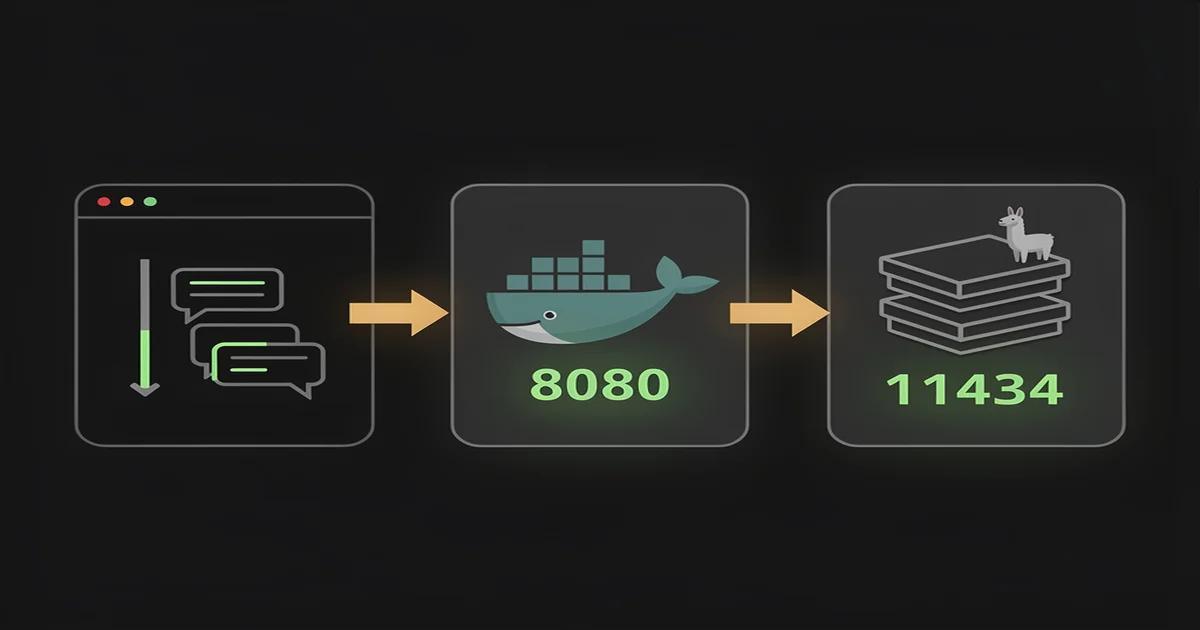
To avoid any confusion with the names, let's make it clear that Ollama is the engineIt's the tool that downloads model files (like the popular GGUF files) and runs them using your processor or graphics card. It's the technical foundation that exposes an API on port 11434 so other applications can communicate with the model.
On the other hand, Open WebUI is the visual layerIt's an open-source frontend, typically installed via Docker, that transforms that boring black terminal into an intuitive panel. Thanks to this, you can have conversation history, organize your favorite prompts and manage multiple users if you want to set up a server for your work team.
There are other alternatives like LM Studio or Jan, which are great for quick, individual use. However, Open WebUI wins out when we need advanced features such as native RAG, user management, or the ability to add plugins via Python, making it the most robust option for professional environments.
Hardware requirements and recommended models
You don't need to spend a fortune on hardware, although having a good GPU helps prevent the AI from responding at a snail's pace. For lightweight models with 7 or 8 billion parameters, with 16 GB of RAM It's usually enough for a decent experience. If you have a Mac with Apple Silicon (M1, M2, M3 or M4)You're in luck, because unified memory makes these models fly.
If you're serious and want breakneck speed, a card NVIDIA with at least 8 GB of VRAM (like an RTX 3060 or 4060) is the safe bet. For those seeking the highest quality, models like the 70B Llama 3.3 come very close to GPT-4's capabilities, although they require machines with 64 GB of RAM or massive GPUs to avoid getting frustrated with the latency.
As for the models, Llama 3.2 is fantastic for its balance between speed and intelligence. If you're looking for something specialized in coding, DeepSeek is a gemMeanwhile, Mistral and Qwen 2.5 offer amazing performance in multiple languages, including Spanish from Spain, making them very efficient options for everyday use.
Step-by-step guide for installation

The fastest way is via Docker. First, download and install Ollama from its official website. Once that's done, open your terminal and run a command like ollama pull llama3.2 for make sure you have a model Ready to use. Don't forget to run ollama serve so that the API is active and listening.
To set up the interface, run the following Docker command: docker run -d -p 3000:8080 --add-host=host.docker.internal:host-gateway -v open-webui:/app/backend/data --name open-webui ghcr.io/open-webui/open-webui:mainThis command is key because the flag host.docker.internal This is what allows the web container to find the Ollama engine that is running on your operating system.
Now all you have to do is open your browser and go to http://localhost:3000The first user to register will automatically become the system administrator. From there, you can go to the connection settings and verify that Ollama is linked. If everything went well, you will see that the deployment of models It magically appears in the top selector.
Mastering the RAG: Talk to your own documents
One of the most powerful features is RAG (Recovery Augmented Generation). Essentially, it allows AI to... Analyze your PDF, Word, or Markdown files without uploading them to any cloud service. To activate it, go to your profile, enter the Workspace, and create a knowledge collection by uploading your documents.
One important technical detail is that you will need an embedding model, such as nomic-embed-textwhich you can download with ollama pull nomic-embed-textOnce configured in the admin panel, you can easily access your documents in any chat. typing the # key and selecting the corresponding file or collection.
If you notice that the AI gets confused or cuts off responses, try to adjust fragment size (chunks). If you're using small models with reduced context windows, lowering the chunk size from 1500 to 800 tokens usually solves the problem, leaving enough room for the AI to process the question and answer based on the document.
Advanced features: Voice, Pipelines, and MCP
Open WebUI is not just a chat; it's an extensible platform. You can add voice recognition using Whisper To speak to the AI, use text-to-speech (TTS) for it to respond. The most pragmatic approach is to use Whisper locally for input and the OpenAI API for clean, natural audio output.
If you are a developer, the Pipelines and Functions They will allow you to work wonders. You can create filters in Python to clean sensitive data before it reaches the model or add action buttons that run specific scripts. Furthermore, support for the Model Context Protocol (MCP) It allows your local AI to connect to external tools like GitHub or Slack.
For those who want to bring this to a team environment, the ideal thing to use is Docker ComposeThis allows managing Ollama and Open WebUI as separate services in a single YAML file, facilitating backups of data volumes and allowing Docker's internal network to resolve service names without IP complications.
Setting up this system is the best way to regain control over our information. By combining the power of Ollama with the versatility of Open WebUI, we create a professional tool that doesn't depend on subscriptions or external connections, allowing us to experiment with the AI cutting edge in the complete privacy of our own hardware.

Passionate about technology since he was little. I love being up to date in the sector and, above all, communicating it. That is why I have been dedicated to communication on technology and video game websites for many years. You can find me writing about Android, Windows, MacOS, iOS, Nintendo or any other related topic that comes to mind.