- FreshRSS allows you to centralize video and news subscriptions, bypassing Google's algorithms.
- There are specialized extensions like Youlag to improve the viewing experience and interface.
- It is possible to integrate YouTube channels by manually generating RSS feeds or through automatic detection by the tool.

If you're fed up with algorithms deciding which videos you watch and want to regain control of your time, setting up your own news aggregator is the ideal solution. FreshRSS presents itself as a very powerful tool and open source that allows us to read content from various websites without having to jump from one tab to another, keeping our privacy safe.
For video lovers, integrating YouTube into this system is a real success, as it allows manage news from your favorite creators without needing to be logged into a Google account. This means you can escape the recommendation bubble and see exactly what's been published, whether from your computer or mobile device.
How to add YouTube channels to FreshRSS
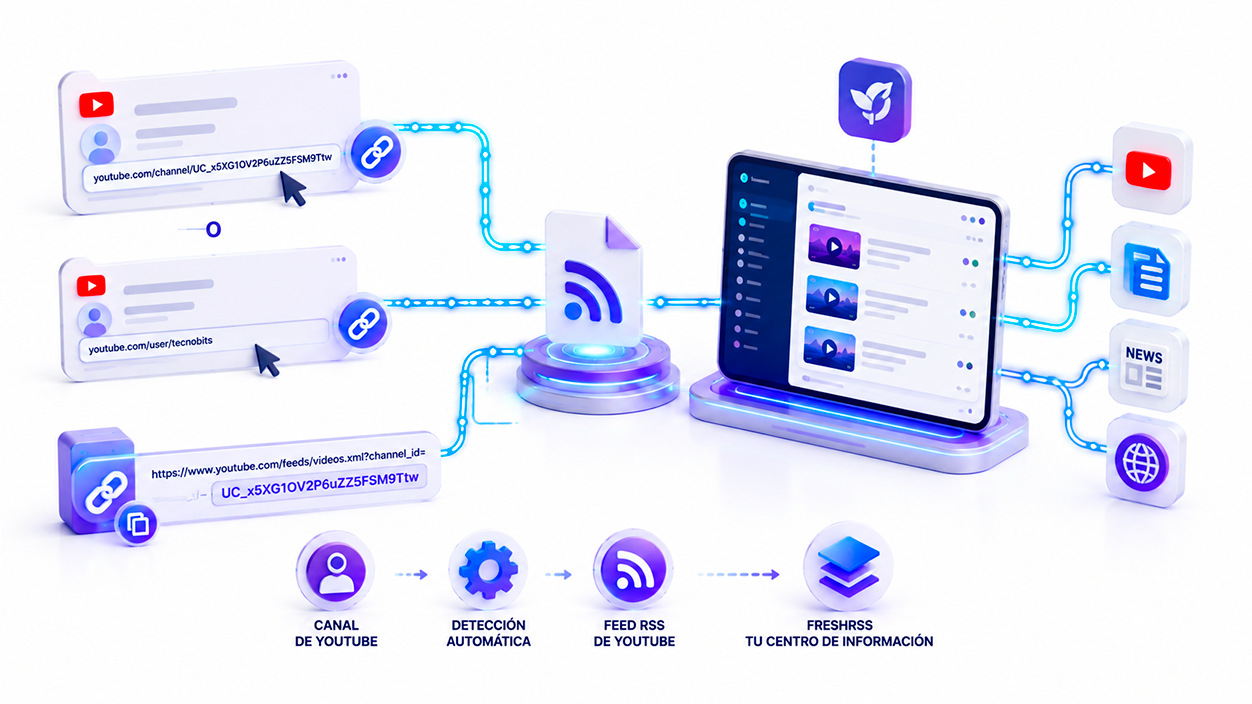
Using YouTube RSS feeds allows Only watch videos posted by channels that truly interest you...without recommendations, personalized advertising, or algorithms that alter the content order. Furthermore, you can group all your channels together with blogs, news, and other sources within FreshRSS, making it a unique information hub completely under your control.
To achieve this, there are several ways to get YouTube videos to appear in your feed. The simplest is to take advantage of... automatic URL detection offered by some extensions, where you simply need to paste the channel link (in whatever format). /channel/ID o /user/nombre) and the system takes care of finding the corresponding XML feed.
If you prefer to do it manually or don't have any extensions installed, you can generate the RSS feed manuallyYou just need to copy the channel ID (that string of letters and numbers that appears at the end of the channel URL) and paste it at the end of the address https://www.youtube.com/feeds/videos.xml?channel_id=In this way, any RSS reader will be able to interpret the new videos as blog posts.
Improving the experience with the Youlag extension
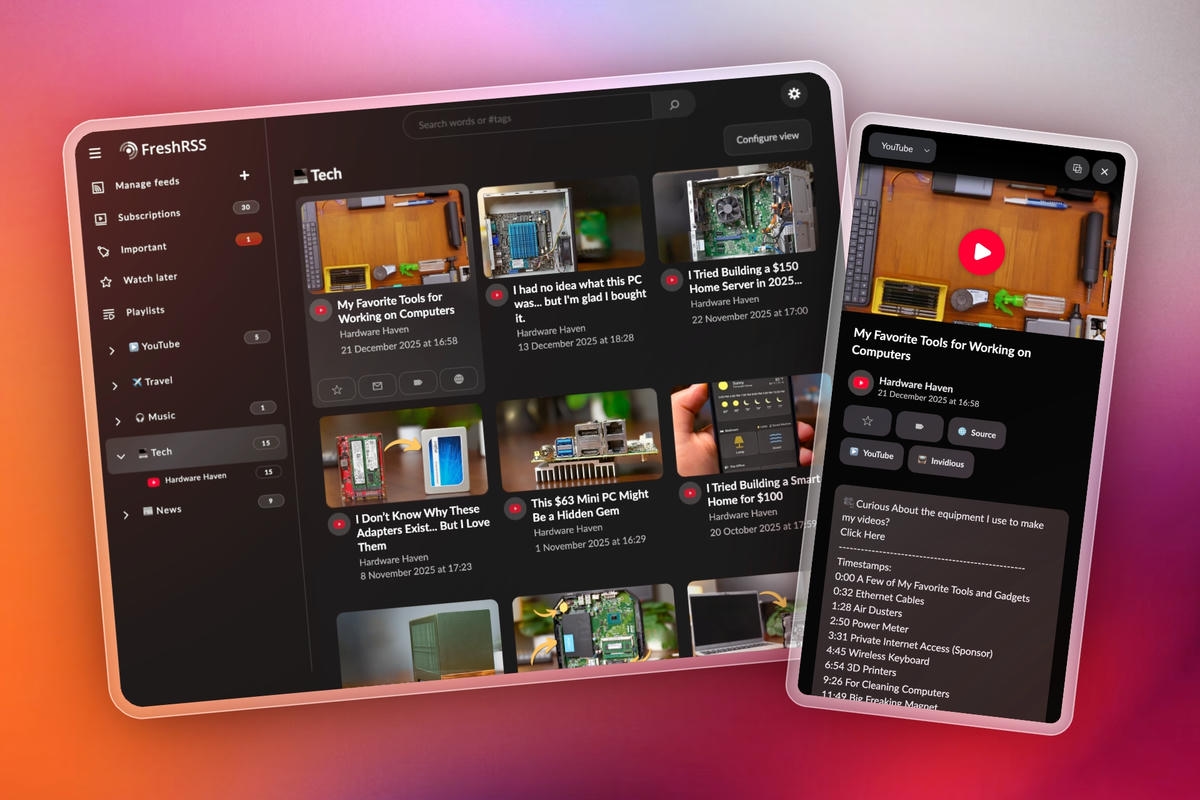
While FreshRSS is great, its native interface is more text-based. This is where it comes in. Youlag, an extension specifically designed to transform the way you browse video feeds. This tool makes the experience much more modern and visual, very similar to what you would find on the video platform itself, but without the distractions or advertising.
One of Youlag's strengths is its ability to integrate instances of InvidiousThis allows videos to be played without going through Google's servers. It also includes a full-screen mode and a mobile-optimized design that facilitates one-handed navigation, making it content consumption becomes much smoother and natural.
Among its most recent features, one stands out. Picture-in-Picture mode simulatorThis is fantastic because it lets you keep scrolling through your feed while the video floats in a bottom corner of the screen. It also lets you block those annoying YouTube Shorts, so you only see the longer, relevant content you're actually interested in.
Other extensions and video management
In addition to Youlag, there's the standard YouTube extension for FreshRSS. This is installed simply by uploading the corresponding directory to the folder. /extensions from your server and activating it from the control panel. Its main function is Embed videos directly into the feedThis prevents you from having to click on an external link that takes you to the YouTube website.
For those seeking extreme privacy, these tools are key to stay connected with its creators without leaving a trace in the Google ecosystem. Since FreshRSS is a web-based application, you can access all your lists and subscriptions from any device, as long as your instance is properly configured.
Installation and deployment of FreshRSS
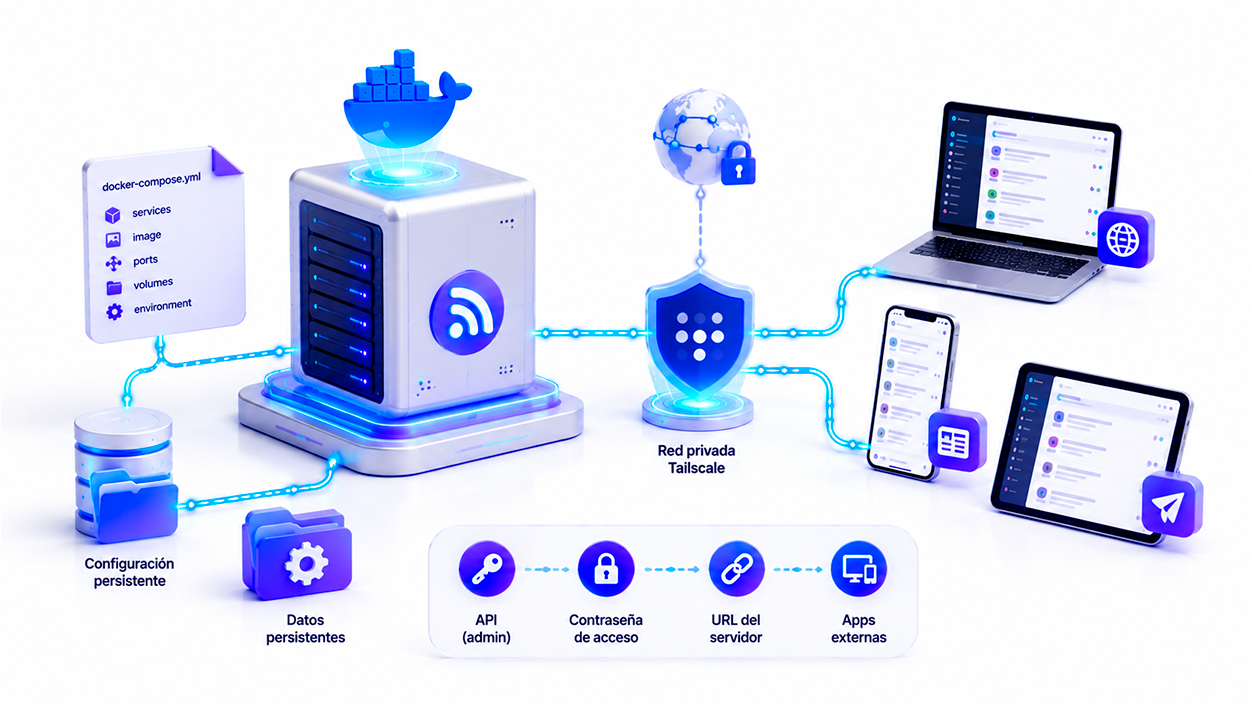
To get all this up and running, the best thing to do nowadays is to use DockerThrough a file docker-compose.ymlYou can quickly start the service using the LinuxServer image. You just need to define the access port and configuration paths on your Linux system so that everything is stored persistently.
If you don't want to expose your server to the entire internet, a very smart option is to use Tailscale to create a private networkThis way you can check your news from your mobile phone outside the home without needing to configure complicated reverse proxies or SSL certificates, since the connection travels encrypted through the Tailscale tunnel.
Once installed, you can connect FreshRSS to external applications such as NetNewsWire or Newsflash. To do this, you need to go to the API administration. create a specific password for access and configure the server URL in the third-party app. This allows you to have a much more polished and native interface on your mobile device while the server does all the dirty work in the background.
Advanced tricks: Scraping and maintenance
What happens if a website doesn't have RSS? FreshRSS has an ace up its sleeve: the scraping using HTML and XPathAlthough it's an advanced and somewhat delicate function (if the website changes its design, the feed breaks), it allows you to extract information from almost any corner of the web. You just need to inspect the page's code and copy the XPath path of the element that we want to continue.
For everything to run smoothly, basic maintenance is vital. It is recommended optimize the database periodically From the file menu, create frequent backups of the configuration folder and the SQLite database. This way, if something happens to the container, you won't lose all your subscriptions organized by category.
Having your own news reading system is the best way to to safeguard our intellectual independenceBy eliminating algorithms and centralizing everything in one place, from YouTube videos to the most obscure blogs, we regain the ability to decide what to read and when to read it, without intrusive advertising and with complete control over our data.

I am a technology enthusiast who has turned his "geek" interests into a profession. I have spent more than 10 years of my life using cutting-edge technology and tinkering with all kinds of programs out of pure curiosity. Now I have specialized in computer technology and video games. This is because for more than 5 years I have been writing for various websites on technology and video games, creating articles that seek to give you the information you need in a language that is understandable to everyone.
If you have any questions, my knowledge ranges from everything related to the Windows operating system as well as Android for mobile phones. And my commitment is to you, I am always willing to spend a few minutes and help you resolve any questions you may have in this internet world.