- A modern, fast, and active replacement for Neofetch written in C.
- Compatible with Windows (via winget, scoop or choco), Linux, macOS and Android.
- Highly customizable through JSONC configuration files and flexible modules.

Surely you've been in a situation where you want to show off your equipment or simply need to see your machine's technical specifications at a quick and stylish glance. That's what this is for. Fastfetch, a command-line tool that extracts information from the system and present it in a visually appealing way, recapturing the essence of what the legendary Neofetch did but taking it to another level of efficiency.
Unlike its predecessor, this program is developed primarily in the C language, which means that it is incredibly fast and it consumes very few resources. Whether you're an advanced Linux user or just trying out new things on Windows, Fastfetch is designed to be versatile and compatible with a huge number of platforms, from Android to FreeBSD.

What exactly is Fastfetch and why should you use it?
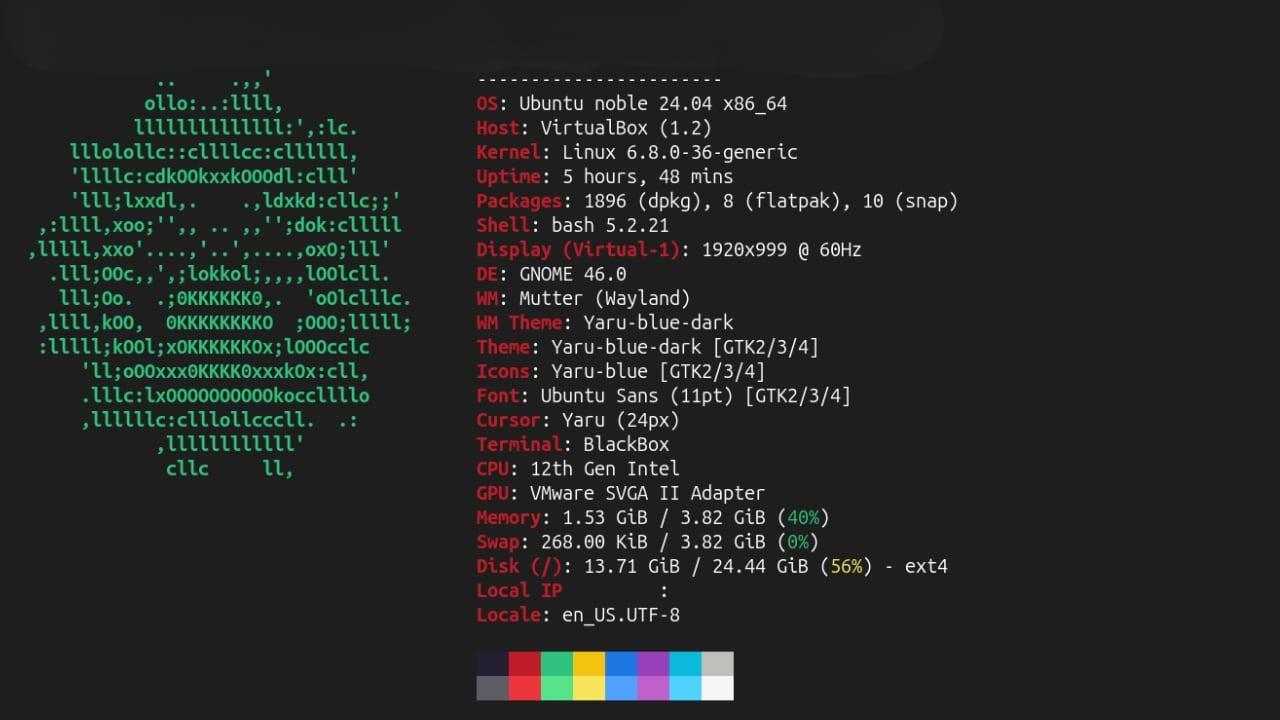
Basically, it's a modern and active replacement for those who missed it. Neofetch, which has stopped receiving maintenanceFastfetch is not only faster, but it is much more accurate when displaying the data. For example, while other tools may round up RAM inaccurately, Fastfetch offers exact figures with decimalsavoiding common errors in hardware reading.
Besides its speed, it stands out for its customization capabilitiesYou are not forced to use the default settings; you can change the logos, the colors, which modules you want to see and which you don't, and even run custom shell commands to add data that the program doesn't detect natively.
How to install Fastfetch on Windows

If you're using a Microsoft system, you have several options to get it working. The easiest way for many is to use package managers. You can use winget running the command winget install FastfetchOr if you prefer other popular alternatives, you also have those available. scoop y Chocolatey with their respective installation commands.
For those who don't want the hassle of package managers, there's the option of going directly to the page of GitHub Releases Download the executable file (.exe) or the compressed file. Once downloaded, simply run it and you'll have the tool working on your device.
An important detail: if when you try to open the program you get an error indicating that it cannot run on your PC, it is very likely that you need to install or update the Microsoft Visual C++ RedistributableIn very old versions of Windows, it might also be necessary to install the module manually. Universal CRT so that everything runs smoothly.
Installation on other operating systems
If you're working with Linux, the installation process varies depending on your distribution. Ubuntu and Debian (recent versions), you can use apt install fastfetchFor users of Arch LinuxThe command is pacman -S fastfetchwhile in Fedora it is used dnf install fastfetch.
On macOS, the fastest option is via Homebrew with the command brew install fastfetchEven if you are a user of AndroidYou can install it using the Termux app with F-Droid, first by running the package update and then the software installation.
Settings and customization tips
Once you have the program installed, simply type fastfetch in the terminal to see the basic output. But if you want to get creative, you can use the command fastfetch --gen-config to create a configuration file This initial file is usually saved in the user's folder. It uses the following format: JSONCwhich allows you to add comments, which is ideal for editing it with an editor like VSCode.
For those who want to explore all the possibilities, run fastfetch -c all.jsonc It will show absolutely all supported modules. You can also play with the logos using --list-logos to see which ones you have available and --print-logos To view them. If you want to change the logo size, the commands --logo-width y --logo-height they allow you adjust the dimensions to your liking.
For Windows users who use Windows TerminalIt is possible to enable the Sixel image protocol, although it requires additional steps depending on whether you installed the program via MSYS2 (where you will need ImageMagick) or via the direct binary from GitHub, in which case you will need to convert the image to Sixel format manually.
Fastfetch is a powerful and lightweight tool that has come to fill the void left by Neofetch, offering a higher speed and total flexibility to display our hardware and software data, being compatible with virtually any current operating system and allowing a fully customized aesthetic through JSONC files.
Index

I am a technology enthusiast who has turned his "geek" interests into a profession. I have spent more than 10 years of my life using cutting-edge technology and tinkering with all kinds of programs out of pure curiosity. Now I have specialized in computer technology and video games. This is because for more than 5 years I have been writing for various websites on technology and video games, creating articles that seek to give you the information you need in a language that is understandable to everyone.
If you have any questions, my knowledge ranges from everything related to the Windows operating system as well as Android for mobile phones. And my commitment is to you, I am always willing to spend a few minutes and help you resolve any questions you may have in this internet world.