- Properly linking Twitch to your game account is essential for Drops to register and rewards to be applied smoothly.
- Tracking your progress and claiming your Twitch Drops inventory are mandatory steps for the rewards to reach your account.
- Stumble Guys uses Scopely ID and Pokémon GO uses the Pokémon Trainer Club, so each game manages rewards from its own platform.
- Reviewing links, active accounts, and campaign deadlines prevents most common mistakes and lost rewards.
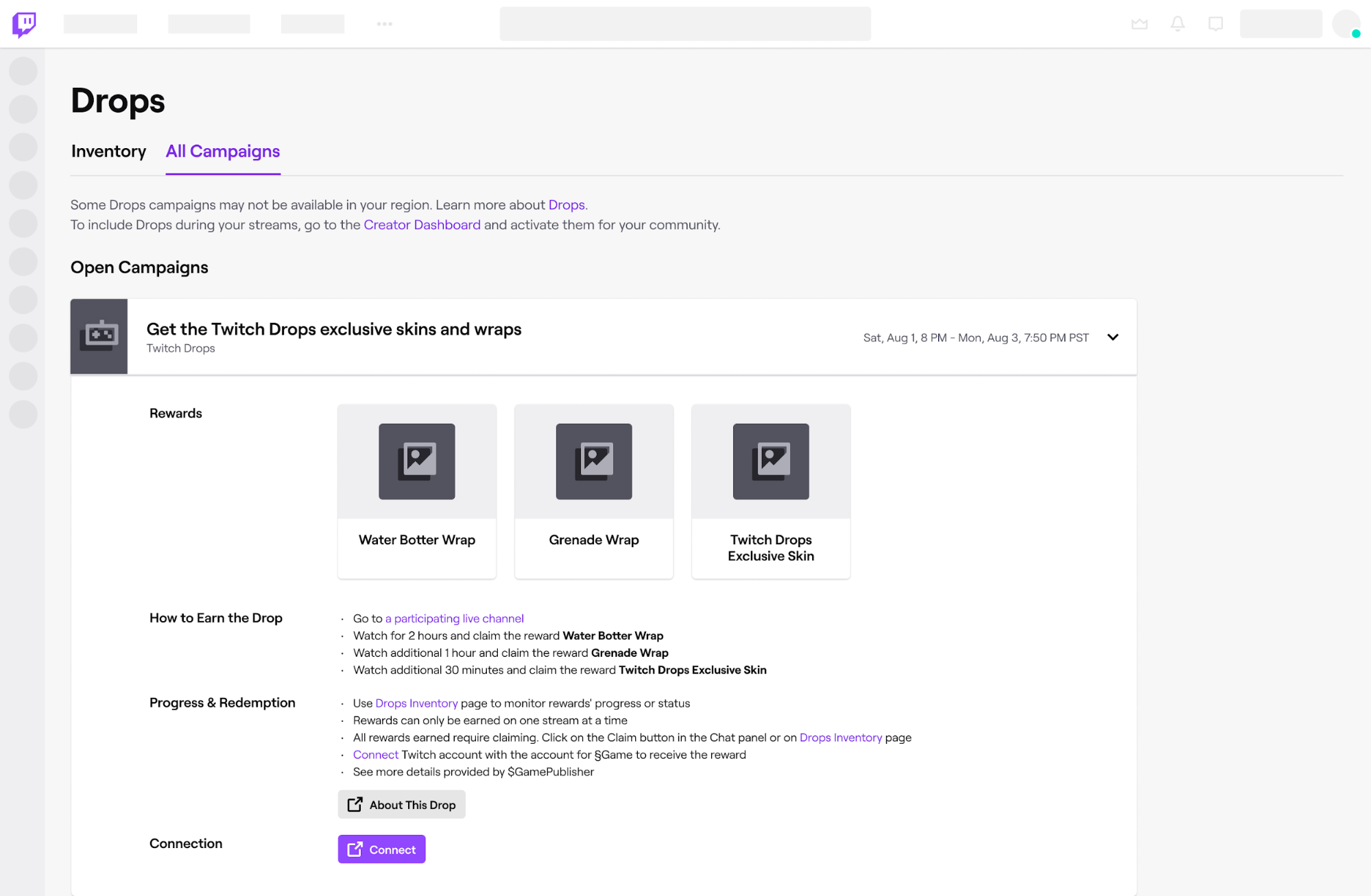
¿How do I link my Twitch account to get rewards? If you're one of those people who spends hours watching live streams, you'll be interested to know that Link your Twitch account to your games It can give you a good handful of free rewards. From exclusive cosmetics in titles like Stumble Guys to special research in Pokémon GO, it all depends on having your accounts properly linked.
Although it may sound simple, in practice the process is sometimes a real mess: multiple websites, multiple logins And a couple of steps that, if done incorrectly, will leave you without a reward. In this guide, you'll see, clearly and in detail, how the entire Twitch Drops system works, how to link your accounts with Scopely (Stumble Guys) and the Pokémon Trainer Club (Pokémon GO), what problems commonly arise, and how to solve them.
What are Twitch Drops and how do they work?
Twitch Drops are in-game rewards that are unlocked Simply by watching Twitch streams of certain titles or official channels. Developers partner with Twitch so that, by watching a live stream for a minimum amount of time, you can obtain exclusive items, missions, or advantages.
In the case of Stumble Guys, these Drops can be skins, gestures, effects, or special items which are only obtainable during promotional campaigns. For Pokémon GO, during events like the Pokémon World Championships, Drops translate into temporary special investigations with very juicy rewards within the game.
The general mechanics are always the same: You link your Twitch account to the game or publisher accountYou watch a live stream with the "Drops enabled" tag, meet the required time limit, and claim the reward from your Twitch inventory. The reward is then transferred to the associated game.
How to link Twitch with Stumble Guys (Scopely account)
To earn Drops from Stumble Guys, it is essential that Link your Twitch account to your Scopely accountwhich is the identification platform used by the game. Everything is managed from the official website set up for this purpose.
The process begins by entering the linking page: https://www.stumbleguys.com/twitchFrom there, your username and account status in the game are checked, and both the Scopely ID connection and the Twitch link are managed.
Step 1: Validate your Stumble Guys username
The first thing you do on the Stumble Guys page is Enter your game username To check the status of your account, the website will then show you different possible scenarios depending on your game settings.
Scenario A: the user does not existIf you enter a name that doesn't correspond to any Stumble Guys account, a message will appear explaining that the user couldn't be found. In that case, you'll have to First, create your account from within the game itself. before anything can be linked, because without a Stumble Guys profile there is no way to associate a Scopely ID or receive Drops.
Scenario B: The user exists, but is not associated with a Scopely IDIf your game account is valid but you haven't yet linked it to Scopely, the website will display a animated pop-up window with a step-by-step guide to linking your game progress to a Scopely ID. When you close that window, you'll see a message confirming that your username has been found, but that You still need to link the game to Scopely. to continue with the process.
Scenario C: User already linked to Scopely IDIf you already did your homework, the page will detect that you The Stumble Guys account is correctly linked to a Scopely IDAt that point, you're ready to move on to the login and Twitch linking part.
Step 2: Log in with your Scopely ID
Once your user account is verified, the Stumble Guys website itself will ask you to Log in with your Scopely ID accountIt's important to make sure it's exactly the same account you use within the game, because the rewards will be sent to that profile.
If you use multiple email addresses or have more than one account, take a moment to check that The Scopely account you connect matches This is the profile you find in the Stumble Guys settings on your device. A mistake here could result in rewards ending up on a profile you don't even use.
Step 3: Connect to Twitch
After logging in with your Scopely ID, the page will offer you the option to Log in with your Twitch accountClicking will open the typical Twitch authorization window where you will have to accept that the platform shares the necessary basic information with Scopely.
In this step it is crucial that you do not close the window prematurely: complete the process to the endAccept the permissions and return to the Stumble Guys page when automatically redirected. Once finished, your Twitch and Scopely accounts will be linked, and you'll be able to participate in the Drops campaigns associated with the game.
How to get Drops in Stumble Guys step by step
Once you have everything set up, the fun begins: earn rewards for watching broadcastsFor Stumble Guys, Drop campaigns are usually active from specific dates (for example, from August 22nd in one of the recent campaigns) and focus on live streams that have Drops enabled.
The first step is to locate the correct broadcasts. You must search Stumble Guys (STG) streams with the tag “Drops enabled” or “Drops Enabled”. Often, the official website or game advertisements include a direct link to the list of participating channels so you don't have to search.
Once you find a valid live stream, make sure you are connected to Twitch with the account you linked to Scopely and that the link has already been established, as explained earlier. Only then will the viewing time associated with your player profile be recorded.
During the broadcast, you must keep the live stream open for the minimum time Set the campaign time (for example, 30 minutes, 1 hour, etc., depending on the specific Drop). You don't need to be typing in the chat, but the tab must be open and the player must be running for Twitch to track your progress.
Check your Drops progress on Twitch
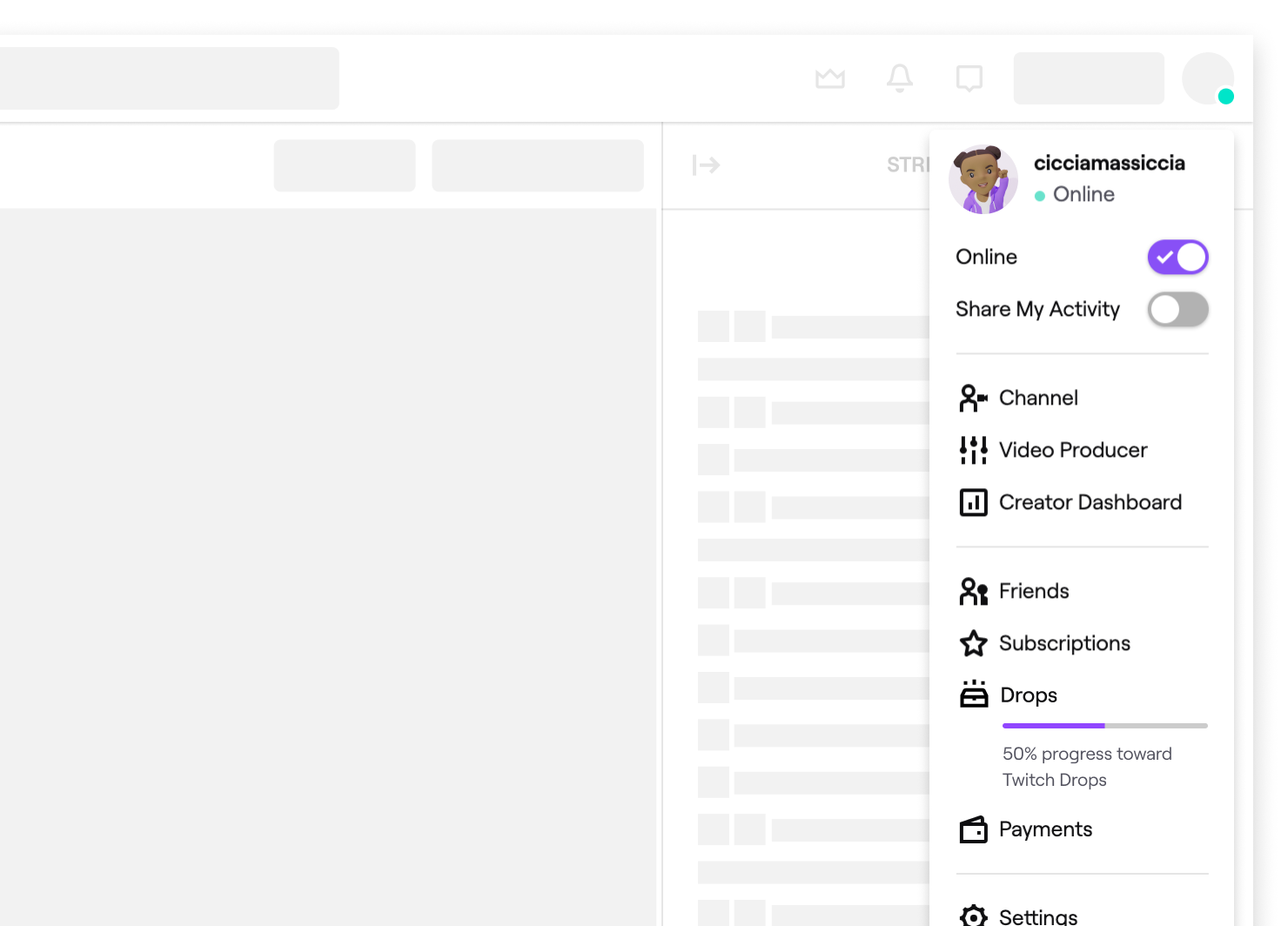
While watching a live stream with Drops active, you can track your reward progress directly from the Twitch interface. To do this, go to your Drops Inventory by entering your profile menu (top right corner) and selecting the “Drops” option, or by directly accessing: https://www.twitch.tv/drops/inventory.
They will appear on that page progress bars for each campaign whichever one you're currently participating in. You'll see the percentage completed and the remaining time you need to watch to get the Drop. If everything is properly linked, the bar will fill up as the minutes pass.
Claim your Stumble Guys rewards
When you complete the requirements of a campaign (for example, watching the stream for the required 30 minutes), Twitch will show you a Notification that you have a Drop ready to claimIt could be a popup within the player itself or a notification in your account's notification area.
To redeem it, return to the Twitch Drops Inventory pageThere you'll see a list of all available rewards. Next to each one, you'll see a "Claim" button. Click that button to mark the Drop as obtained and process its submission to the game.
It is important not to forget this part: if you do not claim the Drop within the deadlineIn some campaigns, the reward may expire or remain pending without being applied to the game. Check your inventory, especially after long periods of viewing.
Verify that the accounts are correctly linked
For prizes to be sent from Twitch to Stumble Guys, your Twitch account must be linked to the exact same Scopely ID you use in-gameIf you've followed the steps from the official website, everything should be ready by now, but it's always a good idea to double-check if you don't see the Drops appearing.
After claiming your Drops on Twitch, log into Stumble Guys and check your inventory, your skin collection, or the specific section where campaign rewards usually appear. If you don't see the items, Log out of the game and log back inor restart the app/client. Sometimes a session refresh is needed for the server to recognize the new rewards.
If nothing appears, check that the email or username of the The Scopely ID you linked to Twitch must be the same which you see in the game settings. Any difference (for example, an old account you no longer use) will cause the prize to be sent to another profile.
Troubleshooting Stumble Guys Drops
If you find errors when claim or receive DropsThere are several support paths you can follow. For general issues with the Drops system (e.g., progress bars that aren't advancing, problems with your Twitch inventory, etc.), it's best to consult the Twitch help section about Drops or open a ticket with their technical support.
If the problem is specific to Stumble Guys, like rewards that don't appear in your account Even if you claimed them on Twitch, you'll need to contact the game's support team. Provide as much information as possible: username, platform, screenshots of your Twitch inventory, and campaign details.
Frequently asked questions about linking with Scopely
Sometimes, when trying to link Twitch and Scopely, error messages may appear. Some of the Most common reasons why the account cannot be linked These are them:
- Scopely's account already has an associated Twitch profileIn that case, you'll need to unlink your old Twitch account (if possible) before connecting your new one.
- The Twitch account is linked to another Scopely IDIf you used that same Twitch account with another profile, the system will not allow you to associate it with a new one to avoid conflicts.
- The email address associated with your Twitch account matches a different Scopely ID from the one you're currently using. This can cause locks or confusion in the linking system.
It can also happen that, when clicking on “Link Twitch”, a specific error messageIn many cases, simply try again: press the button again, follow the authorization steps, and the problem usually disappears without further action.
Regarding the delivery time of the rewards, Stumble Guys campaigns are configured so that the Twitch Drops arrive almost instantly after you claim them. in your Twitch inventory. If you were already in the game when you did this, you may need to restart the client for them to appear correctly.
Regarding availability, these rewards can be enjoyed at mobile (Android and iOS), PlayStation 4 and 5, Xbox One and Series, and SteamThe Nintendo Switch version is not included in recent campaigns and therefore does not receive the Drops.
Drops in Pokémon GO during the Pokémon World Championships

Pokémon GO has also jumped on the Twitch Drops bandwagon, especially during the Pokémon World ChampionshipsIn these special events, watching official broadcasts and approved co-broadcasts can unlock timed in-game research.
In one of the recent campaigns, two different timed investigations were offered: one called “Pokémon World Championships 2024”, associated with the official Pokémon GO channel, and another called “Greetings from Anaheim”, which was obtained by watching authorized co-streamers with active Drops.
Prerequisites: required accounts
Before you start watching live streams, you should make sure you have both a Twitch account as a Pokémon Trainer Club (PTC) accountIf you are missing any, you will have to create them on their corresponding websites:
- Twitchhttps://twitch.tv
- Pokémon Trainers Clubhttps://www.pokemon.com
Once you have them, log in to Twitch with the user you will use to watch the broadcasts, as that is the account that will be used to track your Drop progress.
Link Twitch to your Pokémon Trainer Club account
The next step is to connect your Twitch account to your Pokémon Trainer Club profile, which is linked to your Pokémon GO progress. To do this, go to the official rewards page: https://rewards.pokemon.com.
On that page you will see two main boxes. In the first one, you will have to Log in with your Pokémon Trainer Club (PTC) account using your usual username and password. This ensures that any future codes or rewards are associated with your correct profile.
In the second box, you will be offered the option to Connect your Twitch accountClicking this will open the Twitch authorization window, where you'll need to agree to allow the Pokémon rewards website to be associated with your account. Once you complete this process, your Pokémon Trainer Club and your Twitch account will be linked.
Watch the official broadcast and co-broadcasts
To obtain the research “Pokémon World Championships 2024”, you will need to enter the official Pokémon GO channel on Twitch: https://www.twitch.tv/pokemongo y Watch the broadcast for 30 minutesMake sure the Drops campaign is active and that the Drops tag appears in the live stream description.
For the second investigation, “Greetings from Anaheim”, you will need to search Pokémon GO co-streamers who have Drops enabledYou can go to the Pokémon GO category on Twitch, check which channels have "drops" in their title or tags, and choose one. Any approved streamer should work, as long as the campaign is still active.
As with Stumble Guys, it's recommended that you keep the stream open, connected with the same Twitch account that you linked to the Pokémon Trainers ClubYou don't need to have the volume at maximum or be constantly interacting, but the broadcast must be running.
Monitor your Drops inventory on Twitch
To make sure everything is going well, open the Twitch Drops inventory page in another tab: https://www.twitch.tv/drops/inventoryYou should see one there. progress bar associated with Pokémon GO campaigns linked to the World Championships.
As you watch for a few minutes, the bar will fill up until it reaches 100%. When it's full, Twitch will allow you to... claim the reward directly from that same pageDo it as soon as you see the button available so you don't forget.
Get the code on the Pokémon rewards website
Once you've claimed the Drops on Twitch, return to https://rewards.pokemon.com and look for the "View inventory" option or something similar. In that section you should be able to see the code associated with the temporal investigation that you have unlocked.
Sometimes the code doesn't appear immediately and may take a few minutes, so it's advisable to wait. Have a little patience and refresh the page after a whileWhen you finally see the code, copy it, because you'll use it in the official Pokémon GO store.
Redeem the code in the Pokémon GO shop
With the code in hand, go to the official Pokémon GO store website to redeem offers: https://store.pokemongo.com/offer-redemptionThere you will have a field where you can Paste the code you obtained on the rewards page.
After entering and confirming the code, it will be redeemed and the corresponding Timed Research will be added to your Pokémon GO account. To view and begin completing it, open the game on your mobile device and go to the Research Tasks section; the new mission should appear there.
Sometimes, this whole process of websites, logins, and codes can be somewhat more complicated than one might expectBut by following the correct sequence, the system works and the research is added without any problem.
General tips and best practices for Drops
Whether you're looking for Drops for Stumble Guys, Pokémon GO, or other games, there are a number of good practices that will help you avoid mistakes no longer lose rewards due to carelessness.
First, get into the habit of always checking that You are logged into Twitch with the correct accountEspecially if you share the device with other people or have multiple accounts. A simple user switch can cause all your progress to be associated with the wrong profile.
Second, try to link only one Twitch account per game or service accountDrops systems typically block duplicate relationships to prevent abuse, so constantly switching accounts may cause error messages or linking blocks.
Third, always have the Official inventory and rewards links (such as the Twitch Drops page or the specific rewards websites for each game). These will allow you to instantly confirm if everything is registering correctly and if the campaigns are still active.
And finally, stay alert to the official campaign announcements and deadlinesMany Drops are only available during specific events or special weekends; if you arrive late, even if you have everything linked, you will no longer be able to get those particular rewards.
Mastering the Drops system and the links between Twitch and your games not only saves you headaches, it also allows you Make the most of special events and get exclusive content without spending extra money. Once you get the hang of the connection steps, logins, and inventory checks, everything flows much more smoothly, and watching your favorite live streams becomes even more cost-effective.

Passionate about technology since he was little. I love being up to date in the sector and, above all, communicating it. That is why I have been dedicated to communication on technology and video game websites for many years. You can find me writing about Android, Windows, MacOS, iOS, Nintendo or any other related topic that comes to mind.