- Automation of document management through advanced OCR and intelligent tagging.
- Flexible deployment on Docker compatible with diverse hardware, from Mini PCs to Raspberry Pi.
- Replacing the physical file with a searchable digital system that drastically reduces search time.
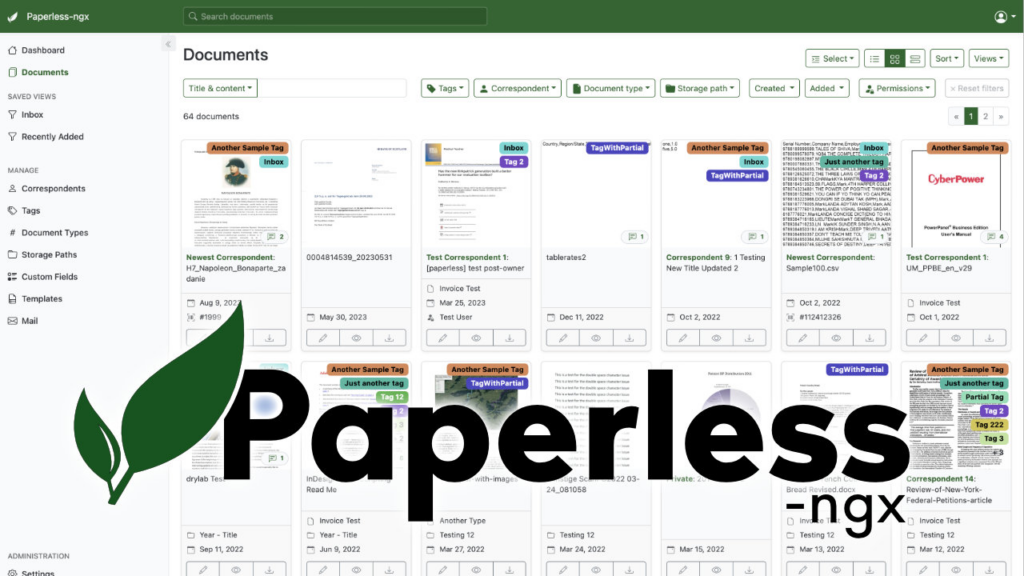
Have you ever wasted an entire morning looking for an old contract or that washing machine receipt that just broke down? It's a classic problem: we all have drawers that look like battlefields overflowing with papers. Luckily, there are solutions. Organize invoices with Paperless-ngx is one of them.
It's an open-source gem designed to transform that chaos of physical documents into a smart digital archiveIt's not simply about saving PDFs, but about creating an ecosystem where information is instantly accessible, allowing us to free up physical and mental space while maintaining absolute control over our personal or business documentation.
What exactly is Paperless-ngx and how does it help us?
Basically, it's a document management system that applies a philosophy of total efficiency. Its main function is eliminate dependence on paperallowing us to scan payslips, contracts, and invoices and then dispose of the originals, provided it's permitted by our country's laws. But what truly makes this tool stand out is its ability to Optical Character Recognition (OCR).
Thanks to OCR, the system does not just store the file, but Read the actual content of the document. If you need to find all your electricity company's invoices, simply type the company name into the search bar and the system will find every relevant document, even if the file name is generic. Furthermore, the software Learn from our habitsIf it detects that a document mentions your landlord, it will automatically label it as "Housing" or "Contract" without you having to lift a finger.
For those who manage businesses, the impact of organizing invoices with Paperless-ngx is huge. Imagine an accounting firm that prints thousands of pages a year; the time wasted on numbering, filing, and searching for receipts is a huge waste of time. productive burden Enormous. Going from a system of dusty binders to one where finding a document takes time. just a few seconds It completely changes the work dynamic, eliminating the stress of tax audits.

Technical Deployment: Docker and Hardware
To implement this invoice organization system with Paperless-ngx, the most sensible and clean option is to use Docker ComposeThis avoids cluttering the base operating system and greatly simplifies updates. Regarding the database, although options like SQLite or MariaDB exist, PostgreSQL is the recommendation standard practice to ensure the stability and performance of metadata.
In terms of hardware, there is a lot of flexibility. It can be installed on a Powerful Mini PC (for example, with 16 GB of RAM and an SSD) to get an instant response, or even in a Raspberry Pi if the volume of documents is moderate. However, if you are using older or limited hardware, you must be patient: the OCR process is demanding and It may take several minutes per file the first time they are uploaded. It's not the speed of a professional server, but for home or small office use it's more than adequate.
For those seeking ultimate simplicity, there is a automated installation script which is located in the official GitHub repository. This wizard guides the user through the configuration questions, starting the service in a matter of minutes on distributions like Debian or Ubuntu Server. If you have problems with initial access, you can always create a superuser administrator through the Docker terminal.
Advanced Organizational Features
Once installed, the magic happens when you drag and drop documents into the web interface. To organize invoices with Paperless-ngx, the system generates a thumbnail, extracts metadata, and uses engines like Tesseract 5 to convert the image into actionable text. But the real power lies in the tag and workflow management.
- Multi-user and Permissions: It is possible to create different profiles with restricted access levels, ideal for some users to only be able to read documents without modifying them.
- Interlocutors and Types: We can define who issues the document (company, person or institution) and categorize it by type, thus refining the search filters.
- Custom Fields: It allows you to add specific metadata that is not included by default, optimizing indexing.
- Triggers and Actions: Automatic rules can be configured so that, if a condition is met, the system assigns a specific label without human intervention.
In addition, the tool allows share documents using links with an expiration date, which is extremely useful for sending proof to a third party without giving them access to our entire file. By allowing the download of the original files, it also functions as a secure backup systempreventing the loss of a physical document from becoming a tragedy.


Important Considerations Before Organizing Invoices with Paperless-ngx
Not everything is automatic, and there are three critical points we must consider. First, OCR is not infallible; very old, stained, or scanned crooked They can generate junk text. This requires that, initially, there be a human supervision to clean the metadata and allow the system to learn correctly.
Second, data security is paramount. We can't entrust a lifetime's worth of documentation to a single hard drive. It's imperative to configure automatic backups to an external NAS or USB drive using tools like Borg or Restic. Without a backup, the digital file is as vulnerable as a cardboard binder in a fire.
Finally, we need to manage the flow of incoming paper. Although the goal is full digitization, some official notifications still arrive in envelopes. The ideal strategy is digitize in less than five minutes and send the original to an inactive archive box that is reviewed annually. In this way, we maintain the agility of the digital environment without violating any document preservation standards.
In short, organizing invoices with Paperless-ngx presents itself as the ideal alternative to prohibitively expensive business management systems or cloud services that make us dependent on a monthly fee. By combining the power of Tesseract and Docker With an intuitive interface, we managed to transform an unmanageable mountain of papers into an efficient database where any invoice can be located in record time, optimizing productivity and eliminating the stress of physical filing.

Editor specialized in technology and internet issues with more than ten years of experience in different digital media. I have worked as an editor and content creator for e-commerce, communication, online marketing and advertising companies. I have also written on economics, finance and other sectors websites. My work is also my passion. Now, through my articles in Tecnobits, I try to explore all the news and new opportunities that the world of technology offers us every day to improve our lives.