
Want to clean up your Gemini workspace without risking losing valuable data? Learning how to use your tools is essential for staying organized. If you have a bunch of Skills created and no longer use some, you've probably thought about deleting them, but Perhaps you're afraid of losing your chat historyIn this article, we'll explain step by step how to delete a Gemini Skill without deleting your conversations.
Is it possible to delete a Gemini Skill without deleting your conversations?

The Skills or abilities created in Gemini These are customized instructions that allow automate repetitive tasks or maintain a consistent response style Over time, you accumulate skills. That's why it's normal to build up skills as the months go by. If you want to delete one, you're probably wondering: is it possible to delete a Gemini skill without deleting your conversations? The short answer is yes.
Gemini treats Skills and chat history as two separate data packagesThese skills are instructions saved in Gemini to perform specific tasks, whether on the web, in the mobile app, or even in Chrome. By using them, you avoid having to explain to Gemini each time how you want it to perform a repetitive task.
This means that when you delete a Skill, What you delete is the instruction template, not the conversation logs. where you used it. Past chats will still be available in your account and you can access them through your Gemini history whenever you want.
Of course, keep in mind that Skills require the "Keep active" option to be enabled. To function correctly, Gemini needs to remember which Skills you've created in order to suggest or apply them. However, deleting a Skill doesn't erase your conversations; it simply allows the feature to operate normally.
How to delete a Gemini Skill without deleting your conversations
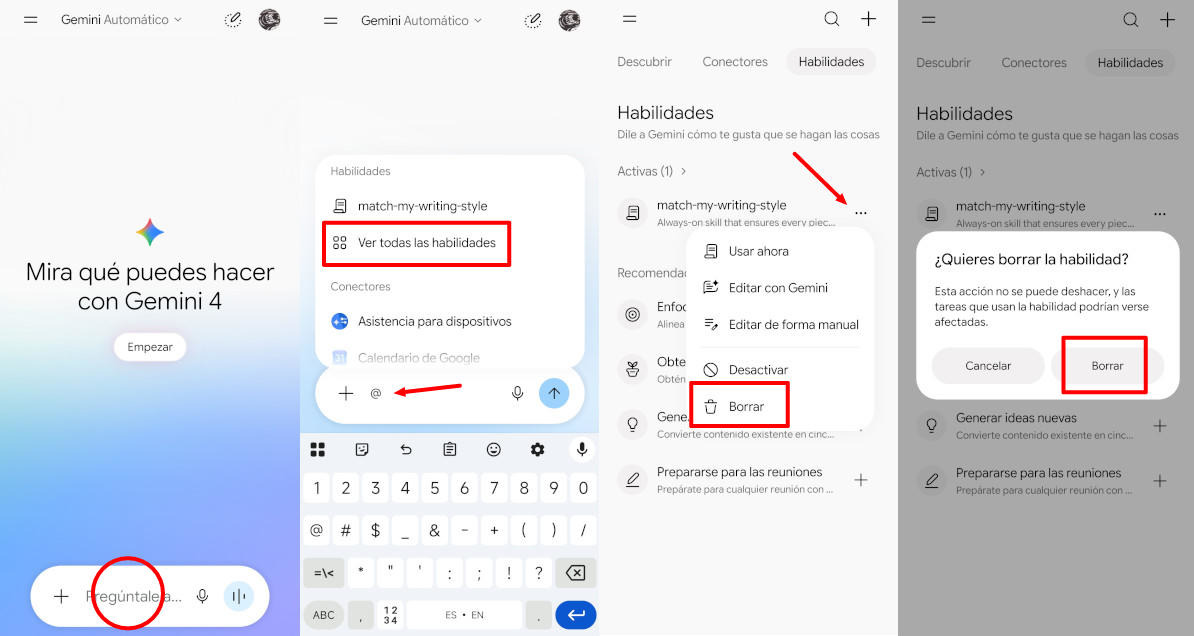
Remove a Gemini Skill without deleting your conversations It's a fairly simple process and is integrated into the same conversation interface.Here are the detailed steps to do it safely:
- Open Gemini and, in the text box where you write the prompts, type a forward slash (/) to display the menu of available Skills.
- There you will see the option “Explore Skills” or “Browse Skills”. Clicking on it will take you to the management page where all the skills you have created are listed.
- Locate the skill you want to remove in that list.
- To remove it, simply click on the three dots icon (More options) and select Delete.
- Confirm the action and the Skill will disappear from your list of available skills.
- Done. Here's how to delete a Gemini Skill without deleting your conversations.
As a result, Your previous conversations that used that Skill will remain intact in the historySimply put, if you reopen one of them, Gemini will no longer have access to the specific instructions for that Skill to follow the thread with that particular behavior.
What if you deactivate it instead of deleting it?
Have you considered that you don't need to delete a Gemini Skill without erasing your conversations, but can simply deactivate it? If you want to prevent Gemini from using it automatically or from it appearing in suggestions, The best option is to disable it instead of deleting it.Some versions of the interface allow you to toggle a Skill's state between active and inactive. You can find this option by following the same path as before.
However, if your version of Gemini doesn't show this switch, you can go to the general settings. In Chrome, for example, there's an option in AI settings in ChromeThis feature allows you to completely disable Skills, preventing them from appearing in the Gemini panel. It's a simple way to silence them without losing the ability to reactivate them later.
How to remove a Gemini skill without deleting your conversations in Google Chrome
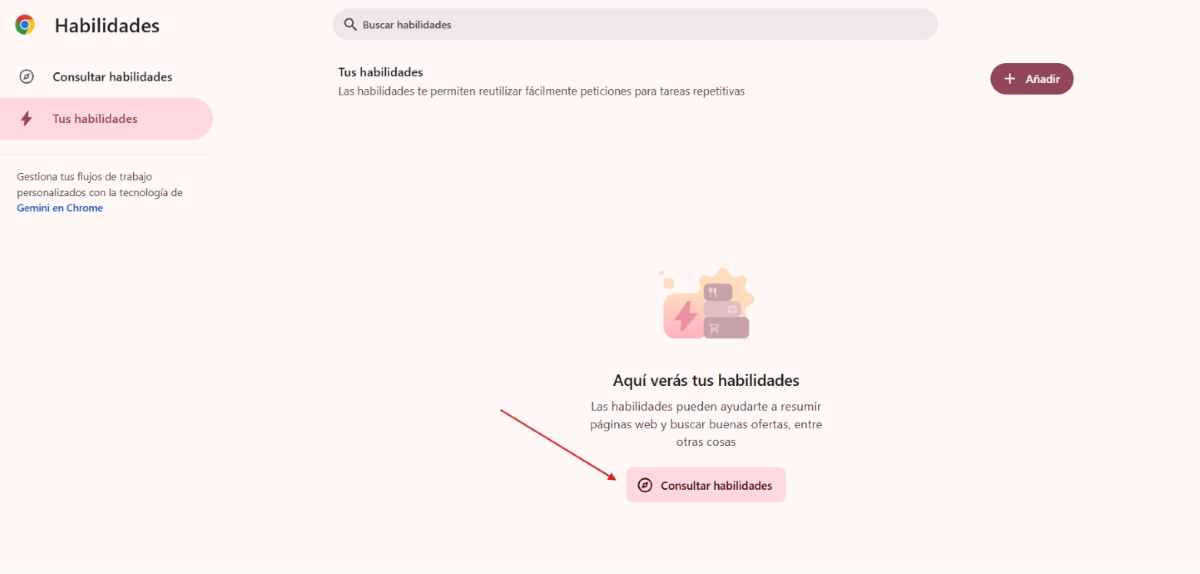
On the other hand, it is possible Remove a Gemini Skill without deleting your conversations from Google ChromeThis applies if you've created skills directly in Chrome for use with Gemini in the browserChrome has a dedicated page for this option, accessible via the address bar. Once there, follow these simple steps to manage and individually delete the Skills you've saved:
- Locate the Skill you want to delete.
- Click on the three-dot icon in the upper right corner.
- Select Delete and you're done.
It's possible that in the future Google will include a feature that allows you to delete multiple Skills at once from the "Clear browsing data" dialog, by adding a specific checkbox for Skills. When this feature is generally available, It will allow you to select a time range and delete all created Skills. during that period without touching the conversation history or other browsing data.
Keep this in mind before deleting a Gemini Skill without deleting your conversations

However, it's important to keep a few things in mind when removing a Gemini Skill without deleting your conversations. If a Skill was set to apply automatically in certain contexts, When you remove her, Gemini stops behaving that way in future interactionsThese past conversations will be saved, but the model will not be able to remember the specific instructions for the deleted Skill.
On the other hand, if you want to protect your privacy and want Delete both the Skills and the conversation history Remember that you'll have to do this separately. Deleting Skills from the management pages doesn't delete chats. So, to delete your conversation history, you must go directly to Gemini's activity settings or your Google account's data management.
Conclusion
In conclusion, Yes, it is possible to delete a Gemini Skill without deleting your conversations.The procedure is very easy and you can access it directly from the text box. Remember that, although you have the option to delete it, you can also temporarily disable it from the Gemini interface or on the dedicated Google Chrome page.
Don't forget that Skills are configuration tools, not conventional data containers: you can delete, edit, recreate, or deactivate them as many times as you wantwithout fear of losing those valuable conversations that you worked so hard to maintain.
Index

From a young age, I've been fascinated by all things scientific and technological, especially those advancements that make our lives easier and more enjoyable. I love staying up-to-date on the latest news and trends, and sharing my experiences, opinions, and tips about the devices and gadgets I use. This led me to become a web writer a little over five years ago, focusing primarily on Android devices and Windows operating systems. I've learned to explain complex concepts in simple terms so my readers can easily understand them.