
Does Proton Pass fill in the password on the wrong website? It's not the only password manager that makes this mistake. But it is one of the few that has granular URL matching controls to limit where and when a credential is offeredIn this post we'll tell you what they are and how to use them so you don't have any more surprises with your passwords.
Why does Proton Pass fill in the password on the wrong website?
If you notice that Proton Pass is automatically filling in your password on the wrong website, you're not alone in wondering how to fix it. For a long time, this was one of the most frequent complaints on Proton Pass user forums. It particularly affected those who had a custom domain with dozens of self-hosted servicesThey saw all the available passwords suddenly appear in every corner.
And that's because, by default, many password managers (including Proton Pass) used a top-level domain-based matching logicThis means that if you save an entry for ejemplo.comThe manager will also suggest it in blog.ejemplo.com, tienda.ejemplo.com o admin.ejemplo.comFor mass-market services like Google or Amazon, this makes sense; the problem arises when you're a subdomain administrator.
Think about it: in a homelab environment or on a corporate intranet, it's common to have different credentials for git.midominio.net y admin.midominio.netIf the manager mixes them up, the risk is not just the inconvenience of choosing poorly. A compromised subdomain could expose credentials to third parties.That's why it's so worrying to see Proton Pass filling in the password on the wrong website.
The good news is that the platform has taken steps and, since the end of 2026, has been rolling out granular URL matching controlsThis way, you can limit where and when your credentials are offered. Interested? Let's take a look at these options so you don't have any more surprises or problems with your online passwords.
The new URL matching rules in Proton Pass
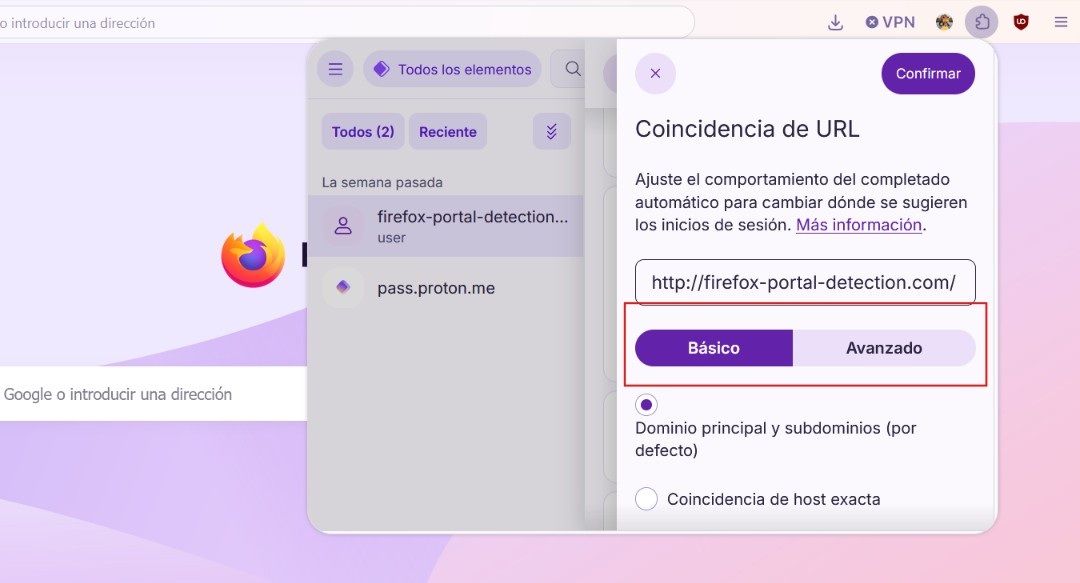
Does Proton Pass fill in the password on the wrong website? Not anymore! Now the manager It allows you to configure, for each individual entry, how autocomplete should behave.And it's not just a single global setting, but more granular options for each URL. When editing a login, you'll find options ranging from the most permissive to the most restrictive.
The default option is Main domain and subdomainsAnd it's the one that most closely resembles the old behavior. It remains very useful for personal accounts that switch between different subdomains of the same provider.
On the other hand, if you want to Proton Pass only requires you to enter a password at a specific URLThere is the option Exact host matchWith this, you limit autocomplete strictly to the exact hostname you have saved. If your entry is, for example, admin.midominio.netProton Pass will not offer it in blog.midominio.net nor anywhere else.
Additionally, you will find the option Never complete this exact URLThis is especially useful on sensitive forms and account recovery pages. Enabling this option forces manual password entry, eliminating the risk of accidental submission.
Options for more technical users
Proton has added options for more advanced users who are frustrated when Proton Pass fills in their password on the wrong website. It now supports wildcard patterns and granular expressions. How does it work?
Simply put: let's assume you manage dozens of internal services that follow a predictable structure (servicio1.intra.midominio.com, servicio2.intra.midominio.comNow you can create a rule that groups only those that share credentials, without needing to create an entry for each host.
Proton Pass fills in the password on the wrong website: how to limit the URL and avoid surprises
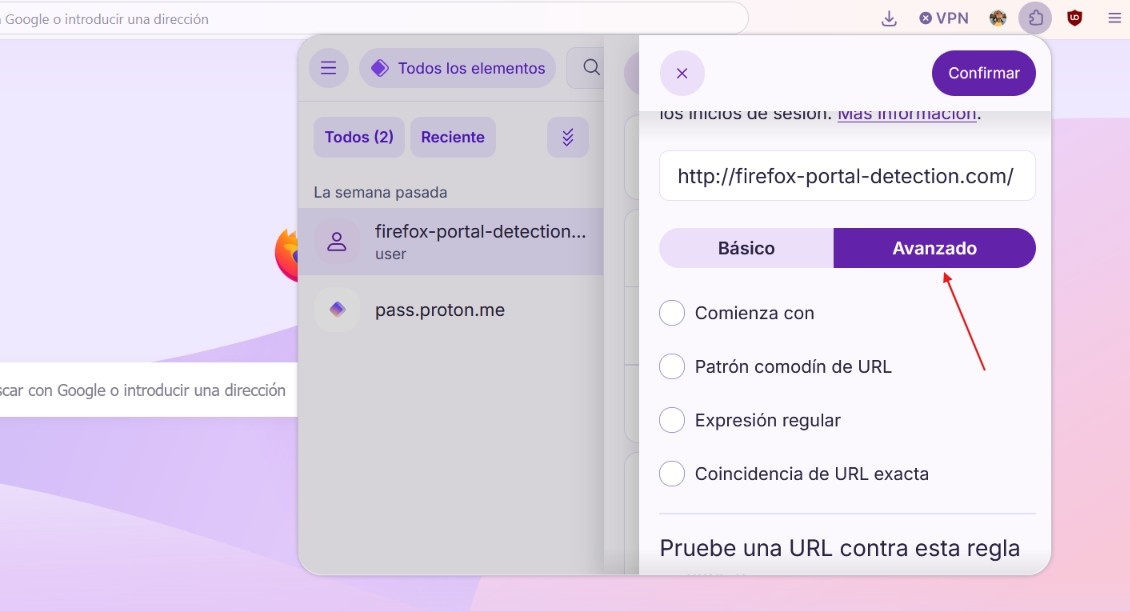
Indeed, there are now control options for when Proton Pass fills in the password on the wrong website. The process for using them and limiting the URL is simple. Start by Open the Proton Pass extension in your browser and locate the entry that is giving you problems.
Next, click the Edit button and, in the Website section, click the Settings icon (gear). From there, you can apply a Basic or Advanced setting to that particular URL. basic adjustment You can select one of three options: Primary domain and subdomains, Exact host match, and Never populate this exact URL.
And if you move on to advanced adjustmentYou'll find four options to add more specific limits. These are: Start with, URL wildcard pattern, Regular expression, and Exact URL match. Select the one you prefer, apply the corresponding settings, and click Confirm to save the changes.
With this, you no longer have to silently watch as Proton Pass fills in the password on the wrong website. As a recommendation, you should review your critical entries today. For example, the primary email accounts, banking, service managers, and administration panels They should have, at a minimum, an exact host match.
For their part, the accounts for leisure services or shopping They might be able to keep the primary domain match without too much drama. And for those old entries If you saved a password with a generic or incomplete URL, take five minutes to correct the URL and adjust the rule. Remember that using a password manager shouldn't result in silently exposing your credentials on the wrong site.
Proton Pass and your digital security
If you use these new controls, you'll rarely see ProtonPass automatically fill in the password on the wrong website. The arrival of these new URL matching rules is significant. Taking advantage of them can be key. prevent your passwords from being exposed on compromised websites.
So don't rely too much on autocomplete and take advantage of your extension. Proton PassIt's true that the service is still relatively young compared to its competitors, but updates like this show that it's maturing in the right direction. Now it offers you a fine control over where your credentials are displayed, instead of assuming that all subdomains are equally reliable.

From a young age, I've been fascinated by all things scientific and technological, especially those advancements that make our lives easier and more enjoyable. I love staying up-to-date on the latest news and trends, and sharing my experiences, opinions, and tips about the devices and gadgets I use. This led me to become a web writer a little over five years ago, focusing primarily on Android devices and Windows operating systems. I've learned to explain complex concepts in simple terms so my readers can easily understand them.