- The KB5094126 update introduces improvements to CPU performance and Bluetooth LE audio support, although it contains critical bugs.
- Serious issues with audio connectivity, Wi-Fi, and BitLocker recovery loops have been reported on various devices.
- The main solution to sound problems involves blocking the update of the conflicting driver and reinstalling the manufacturer's driver.
It's probably happened to you: you update the system hoping to improve your PC and, suddenly, the sound disappears completely Or the Wi-Fi decides to take a vacation. That's what's happening. This is happening with the Windows 11 patch KB5094126.Although it promises to bring interesting improvements, it has left more than one user with a silent keyboard and the BitLocker recovery screen waving.
Don't worry, you're not the only one this deployment has caused problems for. Among others incompatible driver errors Between power management issues and problems, this update has become a headache for many, especially those using HP computers or Conexant ISST audio setups. Let's take a closer look at what's going wrong and how you can get your computer working properly again.

The new features of KB5094126 (and its pitfalls)
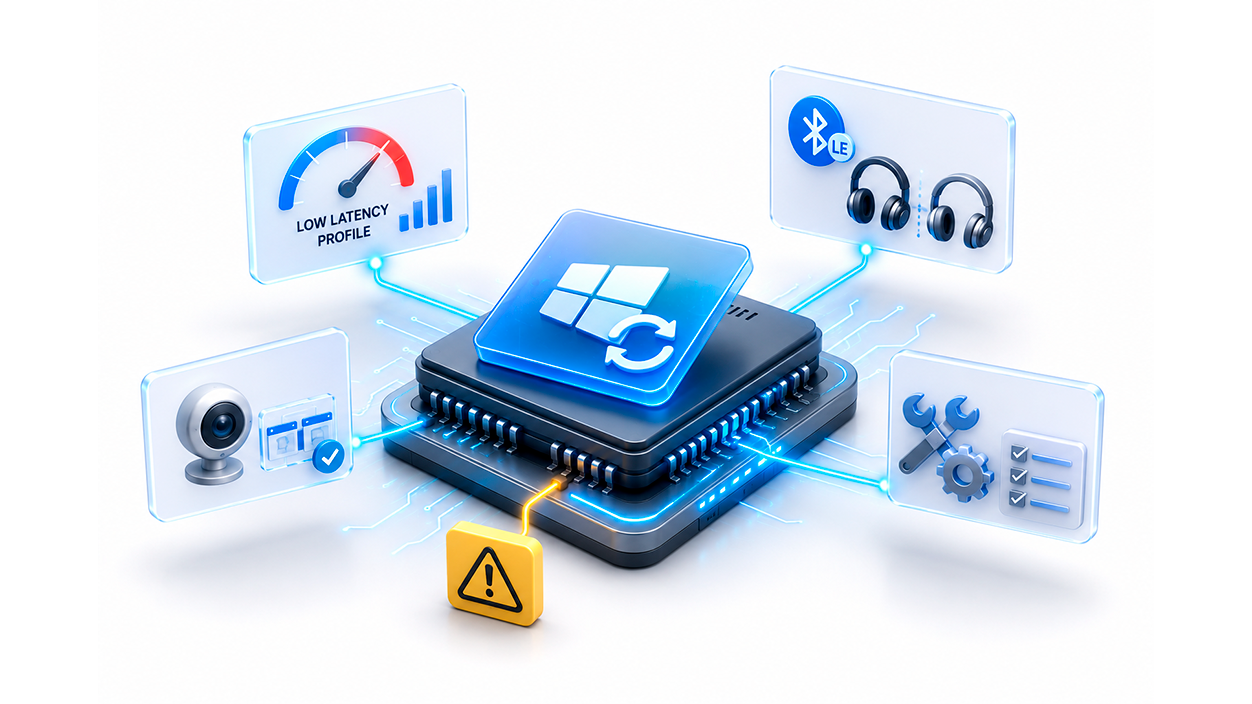
In theory, Microsoft wanted to give us a power boost with the so-called Low Latency ProfileBasically, the system causes the processor to briefly increase its frequency for a couple of seconds when opening menus or the search bar, making everything feel smoother. The problem is that, if you have a very thin laptop, these power spikes can cause the fan to run faster or the battery to drain a little faster than usual.
Another gem is Bluetooth LE Audio Sharing, which lets you connect two headphones at once. However, here's the catch: Not all devices are compatibleIf you go to your device settings and don't see the option to Use LE AudioThe problem is that your hardware simply can't do that trick, no matter how many times you install the update.
They have also enabled the webcam to be used by several applications simultaneously, although It is disabled by default.To activate it, you need to navigate to the camera settings and manually enable it. Additionally, a basic diagnostic tool has been included to determine if the camera's fault is due to software or hardware failure.
Critical bugs and vulnerabilities fixed
It's not all good news. This patch fixes approximately 208 vulnerabilities, including one critical security breach (CVE-2026-45657) which could allow remote kernel-level code execution. In other words, installing it is vital for security, but the operational risk is real.
Users have reported that, after restarting, some computers enter a BitLocker recovery loopIt requests the encryption key even if the user believed it was disabled. This is compounded by flaws in OneDrive integration, empty folders in the file explorer, and errors when trying to empty the recycle bin, making the experience utterly chaotic for business environments.
In the specific case of HP laptops, the following have been documented Blue Screens of Death (BSOD) and total loss of local area network (LAN) connectivity, even though the internet continues to function via Wi-Fi. This is a scenario where stability has been seriously compromised in favor of security patches.
How to troubleshoot audio and Wi-Fi problems
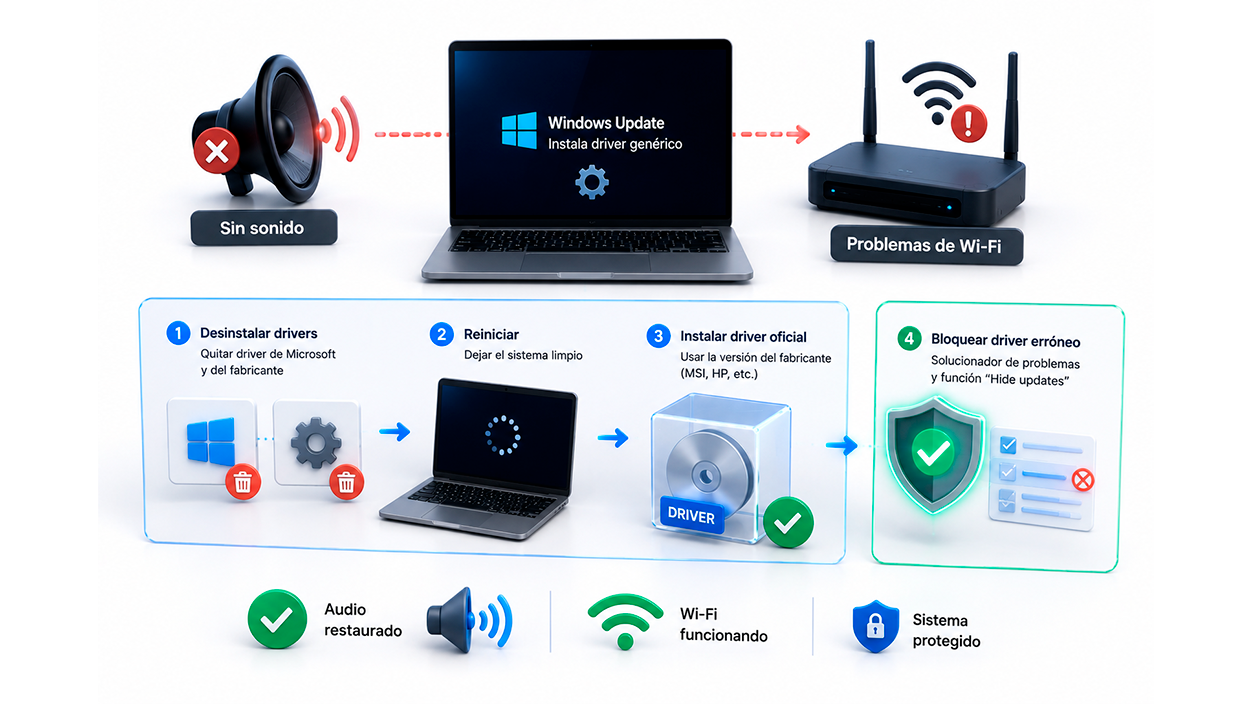
If you've lost sound, it's most likely that Windows Update has decided install a generic Microsoft driver It doesn't play well with your hardware (like MSI or Conexant chips). The system overrides the manufacturer's driver, resulting in either complete silence or the mute buttons and keyboard LEDs ceasing to function.
To fix it, the most effective strategy is clean the driversFirst, uninstall both the driver provided by Microsoft and the original driver from the manufacturer, following steps similar to How to uninstall audio drivers in WindowsOnce the computer is clean and you have restarted, reinstall the official version from your brand (MSI, HP, etc.).

However, to prevent Windows from automatically reinstalling the incorrect driver, you can use the tool of Windows troubleshooter and use the "Hide updates" function. This way, you specifically block the update of the conflicting audio driver while still receiving critical system security patches.
Tips for IT administrators and startups
For those managing multiple teams, it's best not to roll out the update blindly. It's recommended to implement a deployment ring systemFirst the IT team, then a few selected users, and after a 72-hour trial, the rest of the office. This prevents the entire company from losing audio or being locked out by BitLocker at the same time.
It is essential to have BitLocker recovery keys backed up Use a password manager or Microsoft Entra ID. Don't rely on the employee having written the password down, because when the system goes into recovery mode, every minute of downtime is lost money.
If the equipment is old, pay attention to the Secure Boot certificatesThis update automatically renews them, which is crucial for your PC to continue receiving patches in the future. If you see a yellow or red warning in your device's security settings, you may need a BIOS/UEFI update directly from the manufacturer.
Taking all this into account, the KB5094126 update is a double-edged sword, balancing hacker protection with somewhat erratic stability. The most sensible course of action is validate the audio and network drivers Before updating, secure the encryption keys and, if the sound fails, block the generic driver to force the system to use the manufacturer's driver.

Index

I am a technology enthusiast who has turned his "geek" interests into a profession. I have spent more than 10 years of my life using cutting-edge technology and tinkering with all kinds of programs out of pure curiosity. Now I have specialized in computer technology and video games. This is because for more than 5 years I have been writing for various websites on technology and video games, creating articles that seek to give you the information you need in a language that is understandable to everyone.
If you have any questions, my knowledge ranges from everything related to the Windows operating system as well as Android for mobile phones. And my commitment is to you, I am always willing to spend a few minutes and help you resolve any questions you may have in this internet world.