- Google has launched a mobile mini-game to capture the original 151 Pokémon from its search engine.
- The browser language must be set to English to activate the feature.
- Players receive rewards such as Master Balls for capturing legendaries.
- You must be logged in to your Google account to save your progress to the virtual Pokédex.

Remember the excitement of catching Pokémon in the classic Game Boy games? Whether you grew up with Pokémon Red, Blue, or Yellow, or are just a fan of the franchise, this new Google feature will put a smile on your face. From your mobile, You can start a real Pokémon hunt and complete the original Pokédex., all without installing any new apps and using only the world's most famous search engine.
Google has decided to celebrate nostalgia with a minigame hidden in your mobile browser that allows users from all over the world to capture all 151 Pokémon from the first generation. This feature is not only fun, but also a tribute to the beginnings of the franchise and an easy way to relive that adventure from our browser. If you want to know more about how to download other Pokémon games, you can check out our guide on How to download Pokémon for mobile.
What is the Pokémon game on Google about?
Google's new minigame no downloads required, no complicated registrations or paymentsThis is a hidden feature in the mobile search engine that appears when you enter the name of a first-generation Pokémon (those from Kanto, like Pikachu or Bulbasaur) into the search bar.
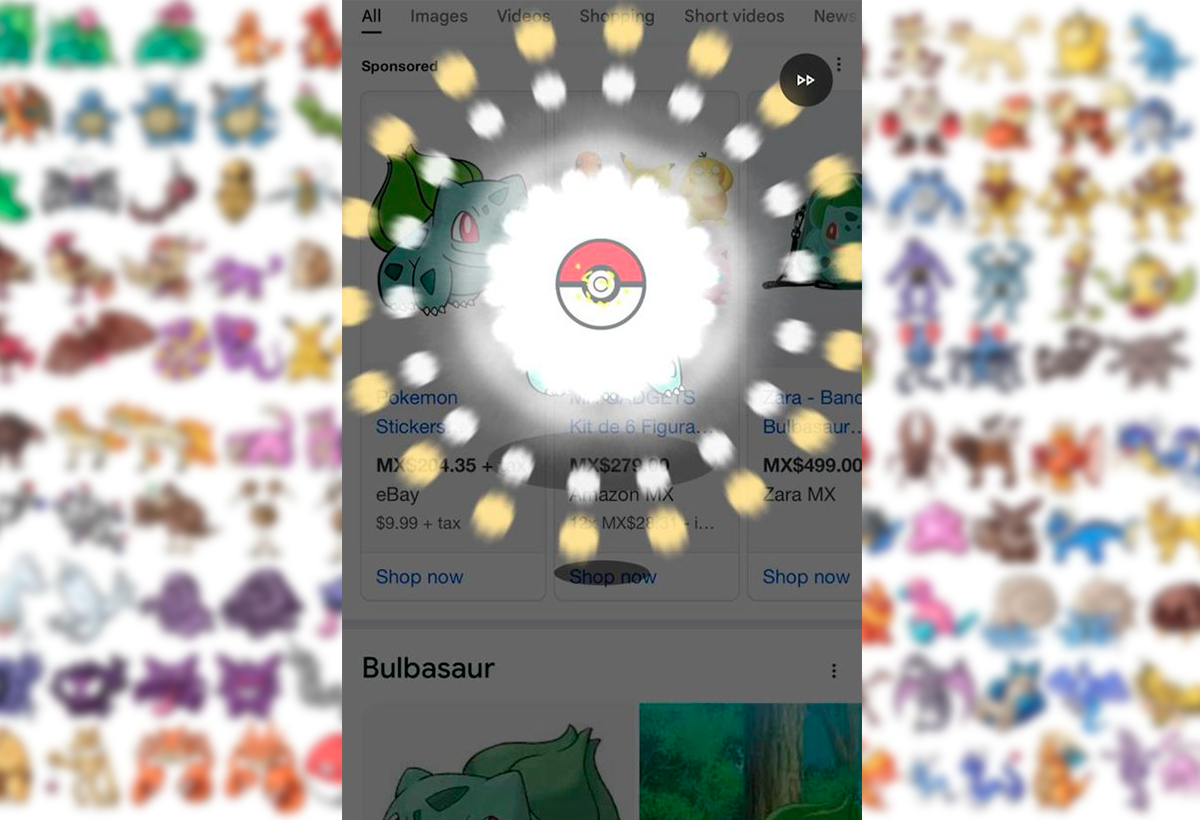
If you are lucky enough to be in the right language and using a compatible device, A small Pokéball will appear at the bottom right of the screen.. When touched, An animation very similar to the classic capture mechanics of the original video games will be activated.
Each creature caught will be added to your virtual Pokédex, which you can consult at any time. So the goal is clear: catch all 151 original Pokémon, from the most common ones like Pidgey or Rattata, to the legendary ones like Mewtwo and Articuno.
The more you catch, the more rewards you will unlock, such as the famous Master Balls that allow you to ensure the capture of rare or difficult Pokémon. You can also check out our guide on How to train a Pokémon in Pokémon GO to improve your experience.
Requirements to play: what do you need?
Before you start catching Pokémon, there are a few details you need to keep in mind. This feature is currently It is only available from mobile devices, either from the installed Google app (on Android or iOS) or through the Chrome browser or any other compatible browser.
But there is a trick: : the language must be set to English. Many users have reported that The Pokeball does not appear if the browser or Google app language is set to Spanish.To change it, follow these steps:
- Access your Google account.
- Go to settings from your profile picture.
- Select the option to change the language and choose “English.”
You don't need to master English to enjoy the game, as the mechanics are simple and intuitive. Once this setting is made, just search for a Pokémon's name on Google from your device and start the capture.
How exactly do you play?
The game follows a fairly simple logic that tests your memory and your love for the franchise. Here's a step-by-step guide to catching Pokémon on Google Search:
- Open Google from your mobile and make sure you are with logged into your account, so you can save your progress.
- Change Google's language to English if you haven't already.
- Write the name of a Pokémon from the first generation, like “Squirtle”.
- A Pokéball will appear in the lower right corner. Press it.
- You will see a capture animation. If it is successful, That Pokémon will be added to your Pokédex.
Silhouettes of Pokémon you haven't yet collected will appear in the virtual Pokédex.. This makes it easier to identify which creatures you still need to catch, especially those with hard-to-remember names, like the different Nidoran evolutions or Eevee forms. Remember, if you're looking for information about the card game, you can visit our page about Pokémon Pocket.
Reward system and use of Master Balls

As you progress through your collection, Google will reward you with special toolsFor example, after capturing 5 Pokémon, you will receive a Master Ball. These special Poké Balls allow you to catch Legendary Pokémon. that you wouldn't otherwise be able to catch.
Master Balls cannot be used freelyThe game will prompt you to claim the reward once you earn it, and then you'll need to specifically search for the Legendary Pokémon you want to use it on. If you try this before you have a Master Ball, the game won't let you capture it.
have been included small clues in the form of riddles or descriptions like "Lizard Pokémon" to help you remember the Pokémon's name. Plus, there are visual references like silhouettes that jog the memory of any fan of the series.
Essential tips for completing your Pokédex
If you have set out to complete the Pokédex 100%, There are some tricks you can follow:
- Start with the most common ones: such as Caterpie, Zubat, or Spearow. Many legendary and special Pokémon will only appear after a certain amount of progress.
- Save the Master Balls for rare Pokémon: don't waste them on common creatures.
- Check out the clues in the form of silhouettes to find out which Pokémon you are missing.
- If you don't remember the names, Google “list of original 151 Pokémon.” While it may seem like cheating, it’s helpful to refresh your memory.
It is also important to remember that This minigame does not have a confirmed end date. Google and The Pokémon Company have not announced how long it will be available, so It is better to start as soon as possible in case it is a temporal experience.
A nostalgic collaboration and a nod to fans

This isn't the first time Google has collaborated with The Pokémon Company on a similar experience. In 2014, during the famous April Fools' Day, they launched an update to Google Maps that allowed people to find Pokémon in various locations around the world. That joke planted the seed for what later became Pokémon GO.
This new game can be considered a tribute to long-time fans and also an original way to engage new generations from the search engine we all use every day. The excitement of seeing the classic animation of the Poké Ball vibrating before confirming the capture is a detail few can ignore.
For now, The minigame is only available on mobile. While you can search for Pokémon from a desktop computer, the Poké Ball and capture option are not activated. This makes it a mobile-only experience, perfect for hang out from anywhere.
The ability to complete the Kanto Pokédex from the palm of your hand, with just a Google search, is a great way to relive the magic of the original games. It is an exercise in memory, strategy and fun that does not require any installation. and returns to the simplest and most beloved mechanics of the franchise.


I am a technology enthusiast who has turned his "geek" interests into a profession. I have spent more than 10 years of my life using cutting-edge technology and tinkering with all kinds of programs out of pure curiosity. Now I have specialized in computer technology and video games. This is because for more than 5 years I have been writing for various websites on technology and video games, creating articles that seek to give you the information you need in a language that is understandable to everyone.
If you have any questions, my knowledge ranges from everything related to the Windows operating system as well as Android for mobile phones. And my commitment is to you, I am always willing to spend a few minutes and help you resolve any questions you may have in this internet world.