- Circle to Search has popularized contextual on-screen search, but its availability is limited and its future points towards replacement by features integrated into Gemini such as Tell Me About This.
- Perplexity is preparing an experience very similar to Circle to Search within its own app, offering accurate and cited answers without depending on Google's implementation on each device.
- Tools like Launchpad, Pixel Search, and office solutions with MiCTS expand the options for performing quick searches and automating tasks without resorting to voice assistants.
- The combination of visual search, generative AI, and on-screen gestures is redefining the daily use of Android and opening up an ecosystem of alternatives for all types of users.

You may also be at that point where you feel you don't need a full-fledged voice assistant like Google Assistant, but you do Quick tools for searching, automating, and navigating your mobile device without having to constantly say "Hey Google." For example, "Circle to Search." Android has a ton of features and apps that fill that gap: gestures, shortcuts, contextual on-screen searches, and powerful AI-powered shortcuts. In this article, we'll review them. The best alternatives to Circle to Search on Android.
In recent months, solutions such as Launchpad, Circle to Search, Pixel Search, or even newer offerings like Perplexity and Gemini with features like "Tell Me About This." In addition, Google could completely change how we use gesture search on Android, removing Circle to Search and replacing it with other tools more integrated into its AI ecosystem. Let's take a close look at the real alternatives available on Android today if you want something similar to Circle to Search, what Google and other players are preparing, and how you can use it in your daily life.
What exactly is Circle to Search and why has it become so popular?
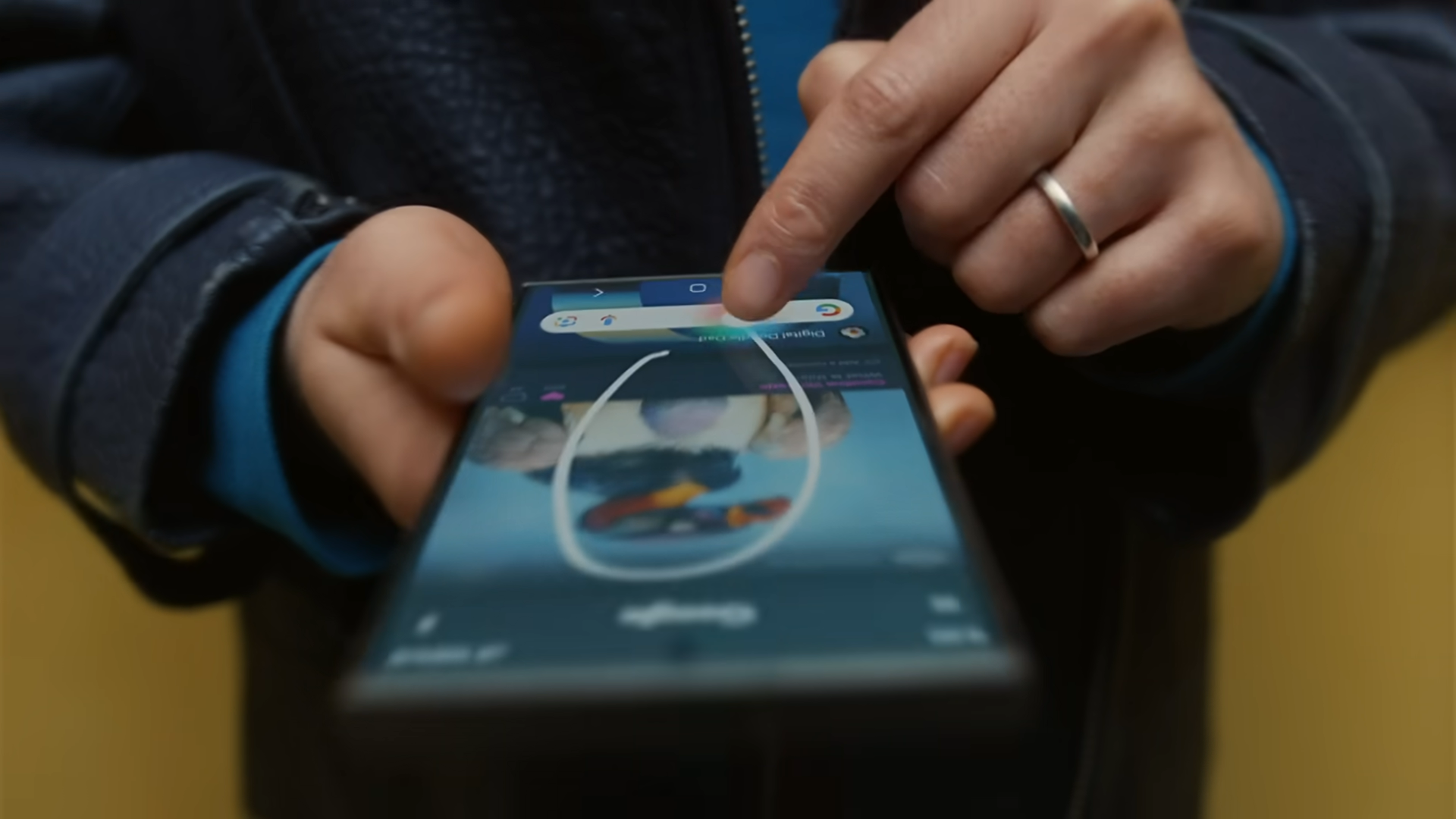
Circle to Search, known in Spanish as “Surround to search”It's a visual and contextual search function built into Android that has quickly become popular among users of recent phones like the Pixel and Galaxy S24. Its magic lies in the fact that it allows you to select any element on the screen with a gesture (a circle, an underline, a tap) and launch an instant search without leaving the application you are in.
In practice, this function allows you to “point the finger and ask” Instead of copying, pasting, or opening your browser, if you see a word you don't understand, a person you don't recognize, a product you like, or a building that catches your eye, simply circle or highlight it, and Android will send that content to Google's AI to provide you with relevant information.
One of the great strengths of Circle to Search is that it is deeply integrated into the operating system itselfIt's not a separate app or a clunky shortcut: it activates with a gesture or a button, appears over what you were viewing, and when you finish, you return to the exact same point without interruption. This seamlessness has led many people to naturally incorporate it into their daily mobile usage.
Furthermore, Circle to Search relies on the Gemini's generative artificial intelligence To understand the context of what you select and complete your searches with rich results: similar products, translations, detailed explanations, approximate locations of landscapes or buildings, etc. All this without having to manually navigate through a bunch of pages.
This function is especially well utilized in tasks such as identify objects, find purchase alternatives, recognize monuments, or translate on-screen textAnd it's not limited to static photos: it can also work with content within apps like YouTube, helping to locate or understand elements you see in a video.
Current limitations of Circle to Search on Android
Despite its usefulness, Circle to Search has a number of limitations that explain why many users are looking elsewhere. alternatives or complements for Android. The first is compatibility: currently, this feature is only available on a few specific models, mostly:
- Pixel 8
- Pixel 8 Pro
- Samsung Galaxy S24
- Samsung Galaxy S24+
- Samsung Galaxy S24 Ultra
Google's idea is to expand it to more devices, but the pace is slow and Android fragmentation remains a problemThere are thousands of models, with different versions of the system and very aggressive customization layers, which is why many people are looking for how extending the lifespan of an Android phone.
The second limitation is geographical. In some markets, such as USACircle to Search and associated features like Multisearch + Gen AI are active from the start, while in other European countries they have encountered stricter regulatory requirements related to AI. This considerably delays its rollout, although Google has made it clear that its intention is to expand its availability gradually.
There are also user experience details that haven't been fully refined, such as accidental full screenshots When trying to make the circular gesture, or a certain adaptation curve so that the user understands when to use this tool instead of a "classic" search. These are small frictions, but relevant when you aim to make a gesture a routine.
Tell Me About This: Google's official alternative within Gemini
References to a new feature called “Tell Me About This” (translated as “Tell me about this”), which directly aims to become the potential replacement for Circle to Search within the ecosystem of Gemini.
The general idea is very similar: allow the user to obtain contextual information about what appears on the screenThe key difference lies in how it's invoked and where the results are displayed. Instead of relying on system-level gestures like circling or underlining, Tell Me About This is integrated within the Gemini assistant's own interface.
It would work something like this: you hold down the power button or open the Gemini app, and a [icon/button] appears at the top of the conversation interface. Specific shortcut to analyze what's on the screenWhen you tap it, the UI adapts so you can circle or select a specific area, just like you did with Circle to Search, but this time the answers appear directly in the Gemini chat window.
This has several implications. For one thing, Duplication of functions is reducedInstead of having a gesture search tool that opens Google results and, on the other hand, a separate assistant with advanced AI, everything is unified in the Gemini experience. Furthermore, it gains flexibility: once Gemini gives you an answer about what you've surrounded, you can rephrase the question, ask for more details, request translations, summaries, or comparisons without having to repeat the gesture or change context.
At the moment, Tell Me About This is being testing with a small group of users And Google hasn't officially confirmed that it will retire Circle to Search. However, the coexistence of two tools that do virtually the same thing but rely on the same AI makes little sense in the long run, and many analysts assume that the transition to Gemini as the single point of entry is just a matter of time.
Perplexity: a Circle to Search-like experience within its own app
Beyond Google, one of the projects generating the most buzz in the world of AI is Perplexity, which not only competes as a search engine with AI, but is also preparing its own version of a Circle to Search-style feature for mobile devices.
As explained by its CEO, Aravind Srinivas, Perplexity is developing a feature that allows users point to any element on the screen from within the app and ask about it.while keeping the entire experience within Perplexity. In a demo video posted on X (formerly Twitter), a user is seen discussing the greatest tennis players of all time; at one point, they circle Roger Federer's name on the screen and ask, "What is this guy's net worth?" From the circle, the AI understands the context and responds with the appropriate information.
The key is that Everything is done without leaving the Perplexity appOn phones that already have Google's Circle to Search, it's possible to perform the gesture on the Perplexity app, but this opens the Google interface and takes the user out of the conversation with Perplexity's AI. By integrating a similar function within the app itself, Perplexity achieves a much more coherent and seamless experience.
Although the response in the video takes around 12 seconds—slightly longer than Google's built-in solution—the final result is very competitive. Analysts like Jack Wallen of ZDNet have even concluded that Perplexity offers more accurate answers, better quotes, and superior conversation tracking. It surpasses Gemini in certain complex tasks. This has led many users to use it as a replacement for both the classic search engine and traditional voice assistants.
What's interesting for the Android ecosystem is that this approach It does not depend on specific hardware or on Google deciding whether or not to activate a feature on your mobile model. Any Android device capable of running the Perplexity app could enjoy a similar circle-to-search experience, without changing devices or waiting for system updates.
The only detail left is the name: the term “Circle to Search” is a trademark registered by GoogleSo Perplexity will have to choose a different name for its feature when it officially launches. There's no firm release date either, but everything points to it being one of the company's major initiatives to bring conversational AI to everyday use on Android phones.
Launchpad, Pixel Search, and other ways to search without talking to your phone
In addition to screen-centric offerings like Circle to Search or its version of Perplexity, some users are opting for more classic but equally efficient alternatives to speed up the search and access to functions without relying on "Hey Google".
Launchpad
A gesture-based tool that allows launch quick searches and actions with swipes, taps, or custom combinations. The approach of Launchpad It's not just about AI: it gives you ultra-fast access to apps, commands, and searches without having to navigate through menus. For those who want to get straight to the point, it's a very interesting option.
Pixel Search
Another very powerful, though somewhat more technical, alternative is Pixel Searcha universal search solution that Requires root accessThis tool can scan virtually all the content on your device (apps, settings, files, etc.) and offers a unique search box to locate anything in seconds. For those willing to root their device, it's a way to achieve a truly comprehensive search without being limited by the specifics of each manufacturer.
Overall, there is a whole community of users who support combine these utilities with automation workflows (using apps like Tasker, for example) to create shortcuts that perform complex actions with a single gesture or tap. This way, you can have a very smooth and personalized experience without having to use the voice assistant for every task.
The emerging trend is clear: more and more people want interact with AI and the operating system in a more gestural and contextual waywithout having to talk to your phone in public or manually open apps for everything. Circle to Search was a highly visible first step, but the playing field is much broader.
Impact of these alternatives on daily life with Android
Beyond brands and trade names, what really matters is how these tools change the way we use our mobile phones every dayAnd the truth is that features like Circle to Search or Tell Me About This are redefining our relationship with information.
Think about everyday situations: you're reading an article and you come across an unfamiliar concept, or you see an actor on a list of films and you want to know what else they've worked on. Instead of opening your browser, typing in the name (if you even remember it), and scrolling through the results, you can point it out on the screen and ask the question directlyThis saving of steps translates into fewer interruptions and a much smoother experience.
Another common scenario is shopping. Circle to Search and its alternatives allow Browse a product and find purchasing options, similar models, reviews, and technical data without having to search for it manually. For those who consume a lot of content on social media, videos, or photos, it's a very convenient way to go from "I like this" to "where can I find something similar?"
There is also a clear educational component: having a tool at hand capable of to explain, translate, or contextualize any fragment of text or image As you can see, informal learning is greatly simplified. You can clarify doubts about technical terms, cultural references, or complex concepts practically on the fly.
And, perhaps most importantly, these functions allow interact with AI in a less intrusive and more natural wayThere's no need to talk to your phone or set up complicated routines with a voice assistant; simply interact with what you're already seeing. For many users, this approach will be more convenient and less "geeky" than walking around shouting commands out loud.
With everything that's happening—the possible phased retirement of Circle to Search, the arrival of Tell Me About This, the experiments at Perplexity, and parallel solutions like Launchpad or Pixel Search—the landscape of Alternatives to Circle to Search on Android are more alive than ever.Whether your mobile phone isn't officially compatible or you simply want to go beyond what Google offers, you now have a wide range of options to search and automate quickly, visually, and without relying so much on a traditional voice assistant.

Index
- 1 What exactly is Circle to Search and why has it become so popular?
- 2 Current limitations of Circle to Search on Android
- 3 Tell Me About This: Google's official alternative within Gemini
- 4 Perplexity: a Circle to Search-like experience within its own app
- 5 Launchpad, Pixel Search, and other ways to search without talking to your phone
- 6 Impact of these alternatives on daily life with Android

Editor specialized in technology and internet issues with more than ten years of experience in different digital media. I have worked as an editor and content creator for e-commerce, communication, online marketing and advertising companies. I have also written on economics, finance and other sectors websites. My work is also my passion. Now, through my articles in Tecnobits, I try to explore all the news and new opportunities that the world of technology offers us every day to improve our lives.