
Installing an alternative store on Android opens the door to countless exclusive applicationsMore privacy and greater control over your device. However, there are some precautions you should take before leaving the official Google Play ecosystem. In this article, we'll teach you everything you need to know before taking this step: from the risks to the best available options.
Everything you need to know before installing an alternative app store on Android
Installing an alternative app store on Android is a simple process that offers the user a bit more freedom. Why? For one thing, it allows you to... access open source applications and download older versions. On the other hand, you can access tools that are no longer available on the Google Play Store.
However, before installing an alternative store on Android, you should consider the safety and maintenance responsibilities that this entailsNext, let's look at some security risks, which permissions you'll need to enable, and what you should do to keep these apps updated. Then, we'll explore the best options currently available.
1. Security risks
First, remember that The greatest danger lies not in the store itself, but in the contents it may contain.This may be the greatest risk to your safety. So please keep the following in mind:
- Malware review: Google Play uses Play Protect to scan downloads in real time. While it's true that alternative app stores apply certain security filters, open repositories have less stringent controls.
- File modification (modified APKs): Some of these alternatives offer free apps that are originally paid. But many of them include injected malicious code.
- Phishing and clones: Don't put your trust in apps from unrecognized stores. It's common for some to mimic the interface of legitimate stores to steal personal information.
2. Android System Permissions
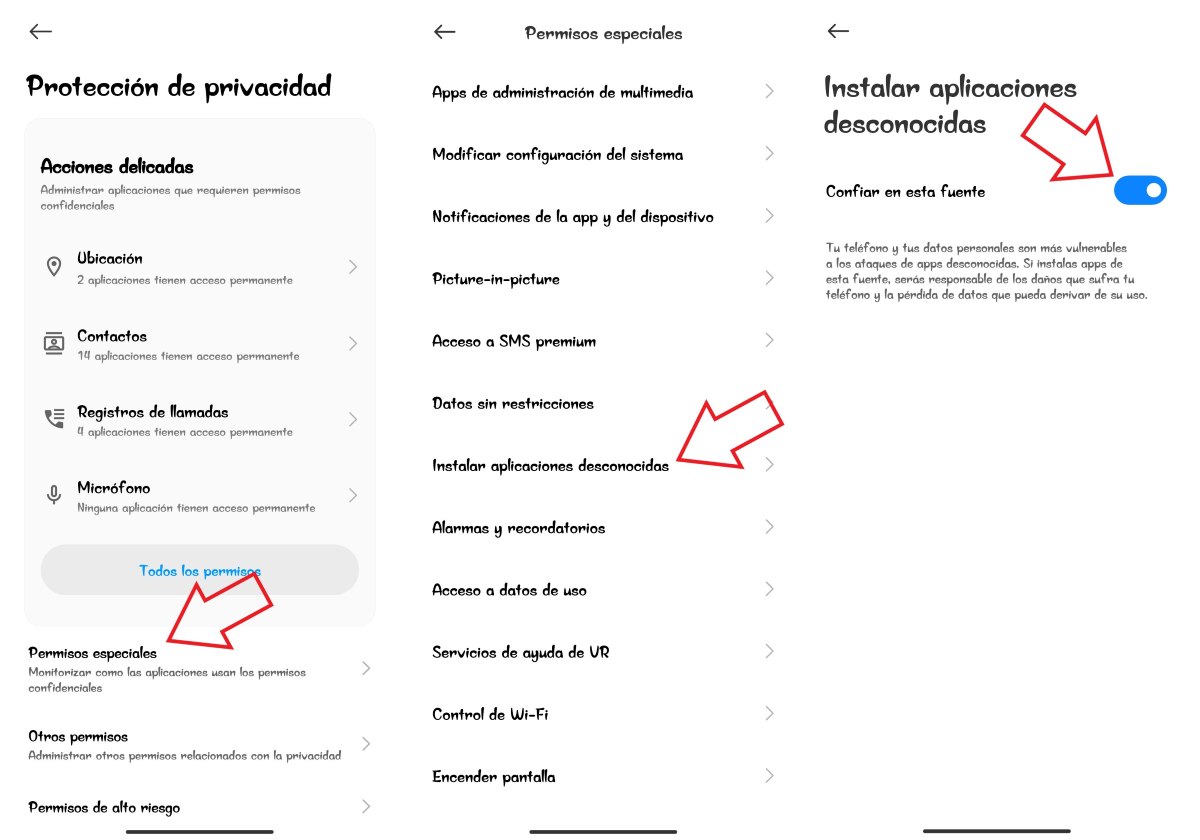
To install an alternative store on Android, you first need to which adjusts key permissions on your mobileTo do this, you can authorize each application separately, for example, by authorizing only your browser or the app store client. This option appears directly when you try to install the APK. You can also grant these permissions from your phone's settings. Do this:
- Enter the Settings from the mobile phone.
- Go to Privacy protection – Special permits.
- Install unknown applications.
- Grant permission to the browser or client you will use to install the application.
Important reminder: Grant installation permission only to the executable file from the trusted store. If you downloaded an APK from a browser, revoke the browser's permission immediately after installing it.
3. Security Updates and Patches
Keep in mind that when installing an alternative store on Android, it's likely that the The Play Store may not detect your updates or may even refuse to update them. This is due to a digital signature conflict (since the developer is not the same). Therefore, you will be responsible for ensuring the store handles automatic updates, or you will have to do it manually to avoid being stuck with outdated versions.
4. Dependence on Google Play Services
Many apps from these alternative stores They use Google APIs to function correctlyThese include push notifications via FCM, integrated maps, account authentication, and more. So, if you use these stores on a device without Google services, some features may not respond or may close instantly when you try to open them.
Recommended alternative stores
If you're thinking about installing an alternative app store on Android, you need to know the most recommended and secure options for users. These are the most recognized and safest:
- F-Droid: It is open source and has a very high level of security, as they audit the source code.
- Aurora Store: It's an alternative to Google Play. It's also safe, since it downloads packages directly from Google's servers.
- APKMirror / Uptodown: They are web repositories of APKs and have a high level of security, as they verify the original cryptographic signatures.
- Obtainium: This is a direct download manager. You can download it with complete confidence because it gets updates directly from GitHub or the developer's website.
Additional tip: Before installing an alternative store on Android or any APK of dubious origin, you can scan the file with VirusTotal.com to analyze it with dozens of antivirus engines before running it on your personal device. You won't be wasting time; rather, you'll be investing in your security.
Why consider installing an alternative store on Android?
Despite the risks and drawbacks, Many people decide to install an alternative store on Android.Why? The main reasons for choosing them can be summarized as follows:
- Privacy and unlinking from Google: For those who want to keep their identity private or don't want to share their usage history and location, these stores are the best option. You don't need to sign in with a Google account, and your daily usage habits won't be collected.
- Access to Free and Open Source Software: Platforms like F-Droid They exclusively offer open-source applications, ensuring transparency. Furthermore, they have no aggressive and annoying advertising and are not burdened with intrusive subscriptions.
- You avoid censorship and bypass geographical restrictions: The Google Play Store applies regional restrictions and blocks due to political or commercial factors. By installing an alternative app store on Android, you can download tools or games that were only available in certain regions or that, for other reasons, have been removed from the Play Store.
- Version control and compatibility: If an update changed an app's interface, removed a feature, or introduced problems, stores like APKMirror or Uptodown let you download the specific version that works best for you. You can also install versions that are no longer supported on older devices that Google Play no longer supports.
In conclusion, alternative app stores offer more freedom, customization, and access to exclusive tools on Android. However, Taking advantage of these benefits requires responsibility.However, if you inform yourself about the potential risks, verify the authenticity of the sources, and manage system permissions, you can use them safely.

Index