It's true that WhatsApp is a messaging app designed to connect us with other people. However, it's not just for that. You can send messages to yourself and thus turn that chat into your personal assistant or notepad. In this article, we'll teach you how to send messages to yourself on WhatsApp and what it's used for.
How to send messages to yourself on WhatsApp?

The best part about messaging yourself on WhatsApp is that you will always have that chat at hand. Since this is generally one of the apps we use most throughout the day, you can use this chat as a personal notebook, for reminders, a shopping list, a private cloud for storing photos or videos, etc.
The messages you send to yourself on WhatsApp They look the same as the chats you have with other people.However, you won't be able to make video calls, mute notifications, block or report your number, see your last seen time, or know if you're online (although that would be a little weird, wouldn't it?). Below, we'll show you how to easily send messages to yourself on WhatsApp.
Through direct access to your number
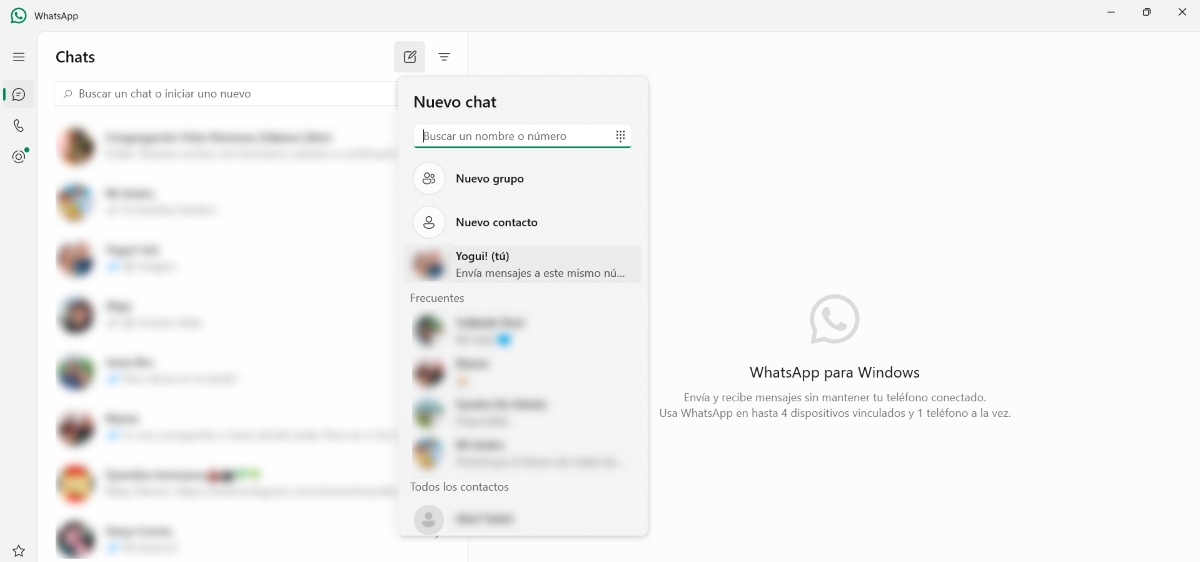
For a long time, we've been waiting for WhatsApp itself to make this useful feature available. We relied on other strategies or tricks to be able to chat with ourselves. The good thing is that the native or official feature has been around for a while, so we can get a lot of use out of it. Here are the simple tips. Steps to send messages to yourself on WhatsApp:
- Open WhatsApp on your mobile device or PC, either the web or desktop version.
- Create a new chat: on mobile, it's the + icon. On PC, it's a pencil-shaped icon.
- Find your contact: It's usually at the top of your contacts list, contains your phone number, and is labeled with the suffix (You).
- Tap on it to start the conversation.
- Done. Now you can send messages to yourself on WhatsApp easily and securely.
Add yourself as a contact
Another way to send messages to yourself on WhatsApp is creating a contact with your number and nameIn fact, this is one of the tricks we used before WhatsApp officially made the feature available. Since WhatsApp works by linking its contacts with those you have saved on your phone, when it detects yours, it will appear as another contact.
The good thing about adding your number as a contact on your phone is that Your WhatsApp chat will appear with your name and it'll be easier to locate them. Otherwise, instead of your name, you'll see your phone number and the suffix (You). But wait, there's one more way to send messages to yourself on WhatsApp.
Use the direct link in the browser
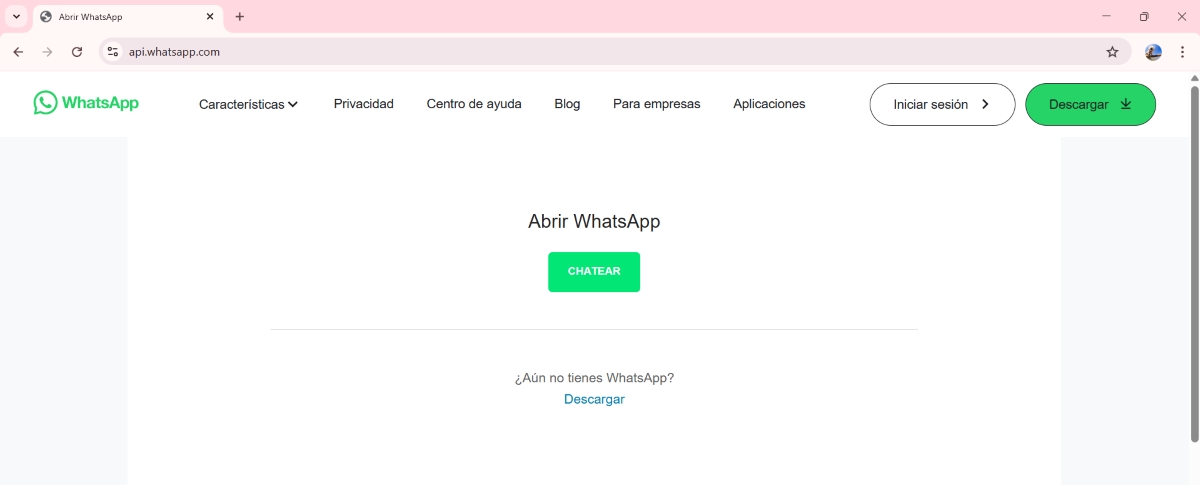
WhatsApp allows us to start a chat with any number, even if we don't have it registered in our contacts. To do this, you have to open a specific web address where the phone number you want to chat with (in this case, your own number) is entered into your browser. The link is: http://wa.me/your-number.
In this way, you can use your own number in a WhatsApp conversationNow, keep in mind that this procedure will only be necessary the first time you open the chat. After that, just log in to WhatsApp Web or the mobile app and open the previously created chat.
Creating a group with yourself
Have you ever thought that By creating a group with yourself, you can only send messages to yourself on WhatsApp.Of course, it is true that it is not possible to create WhatsApp groups It's possible with just one person, but it's possible with two participants. So, what do you have to do? Create a group with another person (a trusted person, of course) and then remove them from the group, so that only you remain.
Having a WhatsApp group for yourself has the same benefits as having a personal chat. The advantage is that You can have as many groups as you want to use them for different purposes. So you don't have to use the same personal chat for everything: you can have one for recipes, another for important dates, another as a personal cloud, among other things.
What is the purpose of sending messages to yourself on WhatsApp?

We've already discussed different ways to send messages to yourself on WhatsApp and mentioned some practical ways to use this feature. But what's the point of chatting with yourself on this app? These are some of the main functions of your own chat on WhatsApp.:
- practical uses: You can send yourself messages to save links, ideas, or to-dos.
- Sending files: This chat allows you to send files from one device to another (such as from PC to mobile) easily.
- Important documents: You can store documents in this chat for quick access.
- creative uses: Write down ideas for your projects, save inspirational or funny quotes so you don't forget them. Create lists for your most important tasks.
- Personal uses: Record significant events, keep a private diary, or write down what you want to remember.
Tips to get your personal chat up and running faster
Having one or more personal chats on WhatsApp is really useful. However, there are some tips that will help you get the most out of it. One of them is pin chat to topThis is really useful, as you don't have to search for your own chat among all your conversations.
Another tip is use emojis or stickers to organize the notes you make in the chat. This way, you'll have visual order and find what you're interested in more quickly. And one last tip: Use voice notes when you can't type so you don't miss the opportunity to save something at an important moment.
In short, having a private, personal chat on WhatsApp is very practical for countless reasons. If you aren't doing it yet, Why don't you give it a try? Having your own chat room is like having a conversation with your future self. So, what would you tell yourself today that might help you tomorrow?

Since I was very young I have been very curious about everything related to scientific and technological advances, especially those that make our lives easier and more entertaining. I love staying up to date with the latest news and trends, and sharing my experiences, opinions and advice about the equipment and gadgets I use. This led me to become a web writer a little over five years ago, primarily focused on Android devices and Windows operating systems. I have learned to explain in simple words what is complicated so that my readers can understand it easily.