- An exit node in Tailscale acts as a secure exit point to the Internet for all traffic from the devices that use it, integrating with the identity logic and ACLs of the tailnet.
- Its use is optional and especially useful in unreliable networks, regulatory compliance requirements, remote work, and region-specific exit needs.
- Advanced features such as Mullvad exit nodes, auto exit nodes, optional logging, and MDM management allow this solution to scale in distributed corporate environments.
- Proper configuration of DNS, keys, permissions, and high availability is key to preventing leaks, service outages, and privacy or performance issues.

The Exit Nodes in Tailscale These are devices that act as an internet gateway for other devices. When you use one, all your web traffic goes out to the internet through that device, as if you were physically connected to its network. For example, you can set up a computer in your office as an Exit Node and browse from your laptop or mobile device using the office connection even if you're in another country.
But instead of sticking to the typical explanation, in this article we're going to analyze all of this in detail: What advantages do Exit Nodes offer, how are they configured, and in what cases are they worthwhile?We will also review more advanced variants and some logging, DNS and high availability considerations that often go unnoticed.
What is an exit node in Tailscale and how does it differ from a classic VPN?
Default, tailscale It functions as an overlay network (overlay): It only carries traffic between devices running Tailscale within your tailnet, but it doesn't affect your normal internet traffic. In other words, when you visit Google, Twitter, or your bank, that traffic goes through your device's regular connection, as if Tailscale didn't exist.
This design is ideal for most people and businesses who only need to securely communicate between servers, computers, and sensitive deviceswithout adding latency or encryption overhead to all internet traffic. It's the simplest way to set up a WireGuard-based private network while keeping normal browsing unaffected.
However, there are situations where it is in your interest that Have all your internet traffic pass through TailscaleFor example, when you're on unreliable Wi-Fi in a coffee shop, working from an airport or hotel, or traveling to another country and need to access the internet as if you were in your home country to access geographically restricted services (online banking, certain web content, etc.).
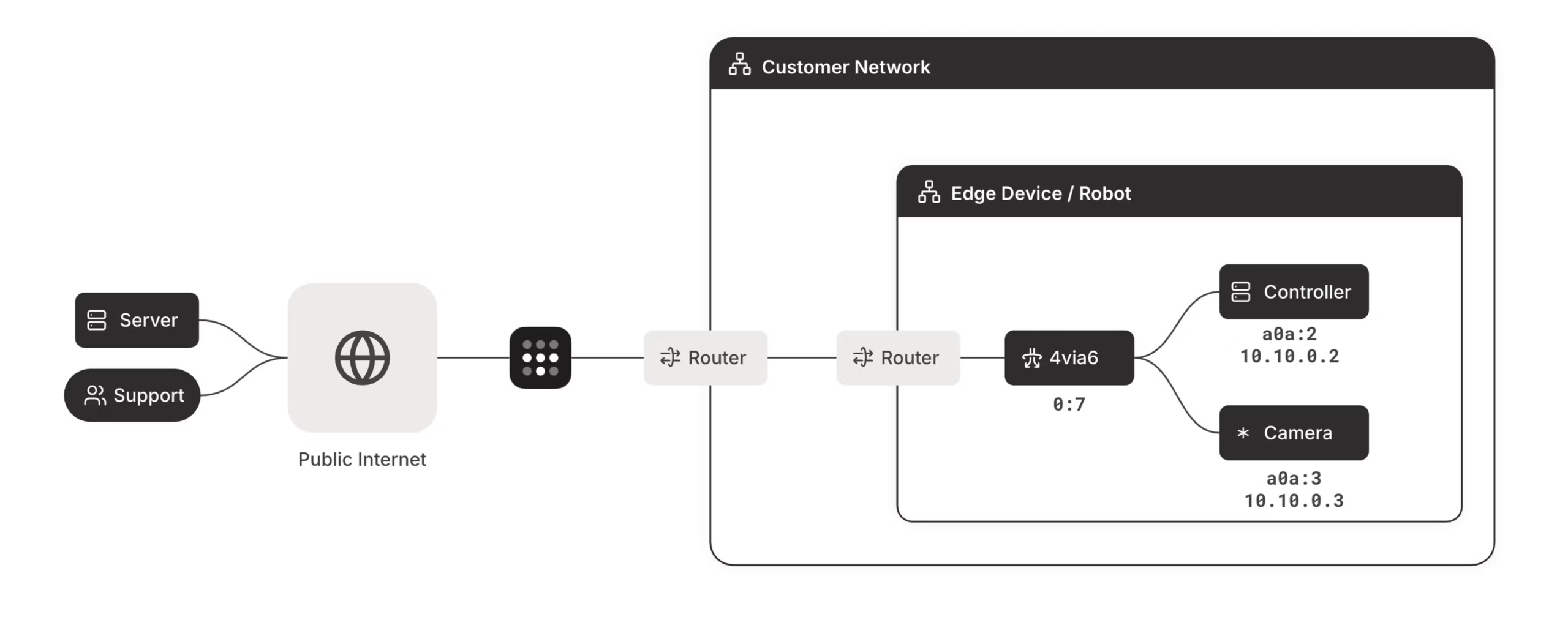
For those cases, there's the exit node function: you can designate a device in your tailnet to act as egress point to the InternetThe rest of the devices connect to that computer via Tailscale and send all their public traffic through it, using typical default routes like 0.0.0.0/0 and ::/0, just as you would with a traditional VPN.
In practical terms, An exit node turns a Tailscale device into a "VPN server" for the rest of your networkbut maintaining all the advantages of the tailnet model (centralized management, clear user identity, ACLs, integration with other Tailscale services, etc.).

What are the benefits of using an exit node in Tailscale?
The main purpose of an exit node is to protect and centralize all Internet traffic from the devices that use itBut in practice it opens up many more interesting possibilities for both personal and business use.
In environments with remote or hybrid workers, a well-placed exit node allows that All employee web browsing passes through a controlled exit pointThis allows you to enforce corporate policies, filter threats, log network traffic (in advanced plans), or comply with regulations that require VPN use for certain groups.
Additionally, by deploying exit nodes across multiple regions or clouds you can globally scale your internet outbound infrastructureThis allows you to bring the exit point closer to end users, minimize latency, and test applications from different locations without having to set up separate, traditional VPNs in each location.
Regarding security analysis, Tailscale offers the option to activate in its Enterprise plans destination logging for traffic flowing through exit nodesThis record of destinations, stored in the Network flow logs, is very useful for forensic investigations or for gaining visibility into usage patterns without inspecting the content of the traffic, which remains encrypted.
Also, in companies with strict compliance requirements, exit nodes make it possible demonstrate that all employee internet access goes through a secure channeleven when connecting from external networks, clients, coworking spaces, or highly suspicious public networks.
When does it make sense to use an exit node (and when doesn't)
Although having the option of an exit node is very powerful, It is not always necessary to activate itIf, for example, you only use Tailscale to log into your NAS, your home Mac, or a remote server, and you have no particular concerns about the network you're browsing from, you can probably continue without an exit node without any problems.
Imagine the typical case of someone who He accesses his Mac, a Synology and a Windows laptop in his apartment From the outside. If all you need is RDP, SSH, file sharing, or access to internal services, Tailscale already encrypts that traffic between devices without affecting your normal browsing. For that person, activating an exit node doesn't add much to their day-to-day experience.
On the other hand, if you usually work away from home or travel frequently, an exit node allows you to Secure all traffic from your laptop or mobile device when you're on networks you don't control.Even if you don't constantly connect to your remote devices, simply knowing that all your internet traffic goes through a trusted point can make a difference in terms of security.
Another common scenario is that of those who need access services that only work from a specific countryBy setting up an exit node on a machine in your home country (or using Mullvad via Tailscale on a server in that region), your traffic will go out as if you were physically there, without having to change the configuration of each application separately.
In summary: You are not required to use exit nodesIt's an optional feature that makes a lot of sense in unreliable networks, for regulatory compliance, or to take advantage of internet access in specific regions, but if your use of Tailscale is purely "intra-tailnet" there's nothing wrong with ignoring it.
Prerequisites and permissions needed to activate an exit node
Before any device can be converted into an exit node, Tailscale requires it to meet a series of requirements. technical and safety requirements that prevent the function from being activated accidentally or uncontrollably.
First, you need to have a tailnet already configured and operationalAll devices involved, both the one acting as the exit node and those using it, must be within the same tailnet and authenticated with the corresponding identity (email, GitHub, SSO provider, etc.).
Furthermore, both the exit node and the clients that will use it They must be running Tailscale version 1.20 or higherThe exit node functionality is not available in older builds, and it is advisable to always keep clients updated to benefit from stability and security improvements.
Regarding the operating system, the machine that will act as the exit node can be Linux, macOS, Windows, Android, iOS or even tvOSHowever, the specific routing implementation and configuration steps vary slightly on each platform, especially on Linux compared to Android.
Finally, there is a key aspect of permissions: An exit node must be explicitly announced, approved, and electedIn other words, a device must be advertised as a potential exit node, an administrator (Owner, Admin, or Network admin) must authorize it in the administration panel, and each client must manually opt in to use it. There are no surprise mass activations.
How to configure a device as an exit node step by step
The basic sequence for setting up an exit node in Tailscale can be summarized in four clear steps, although each step may have nuances depending on the operating system and your specific environment.
The first thing is install the Tailscale client on the device You want it to act as an exit node, if you don't already have it installed. This is done the same way as on any other machine in the tailnet: download the client, log in with your identity, and wait for it to appear as a registered machine in the panel.
Then you have to announce that device as an exit nodeIn most cases, this is done from the command line by adding the corresponding option when running `tailscale up`. A typical example in Linux might be using parameters like –advertise-exit-node And if you're going to receive routes from others, that too. –accept-routesIn some environments it is also combined with –ssh to enable Tailscale-managed SSH access.
Once announced, it's time to play. approve it in the administration consoleFrom the Machines page, locate the machine in the list and you will see an Exit Node icon. From that machine's menu, open the Edit route settings window and check the "Use as exit node" box to enable it as such.
Finally, each device that wants to use it must activate that exit node individuallyDepending on the operating system, this is done either through the graphical client (by selecting the exit node from a dropdown menu) or via the command-line interface (CLI). The change is immediate: from that moment on, internet traffic is routed through the exit node until you disable it, for example, by choosing "None" as the exit option.
Accessing the local network using an exit node
For security reasons, When a device sends all its traffic through an exit node, it by default loses access to its local networkThis reduces the attack surface from the local LAN (e.g., a public Wi-Fi) while the traffic is inspected or protected from the trusted exit node.
Even so, there are cases where you might want to continue being able to talk to nearby devices such as a printer, a local NAS, or a smart TV even when you're using an exit node. For these scenarios, Tailscale includes the "Allow Local Network Access" option when activating the exit node.
You can enable this option directly from the Exit Nodes section of the Tailscale client, or from the command line by passing the parameter –exit-node-allow-lan-access in the `tailscale up` or `tailscale set` command. This way, you'll maintain both the secure outbound tunnel to the Internet and the ability to communicate with your LAN.
The ideal balance depends on your context: If you're on a highly suspicious network, you might prefer to cut off access to the LAN. completely; if you are at home but want to access the Internet through another location or country, it may be more convenient to allow that mixed access.

Verification, logging, and privacy of outgoing traffic
Once the exit node is configured on your devices, it is highly recommended Verify that the traffic is actually leaving through the node you have chosenThe simplest way is to check your public IP address with any online service; if everything is okay, you will see the IP of the exit node instead of your local connection.
By default, Tailscale disables the destination logging of traffic passing through the exit nodesThis decision is made for reasons of privacy, security, and to minimize potential abuses, since recording all the destinations to which users browse can be very sensitive.
In tailnets with an Enterprise plan, it is possible to activate this logging at the network level, so that The destinations of outgoing traffic are reflected in the Network flow logsThis provides greater visibility and helps when investigating incidents, anomalous behavior, or potential security breaches.
Activation or deactivation is performed from the Logs panel of the administration console, within Network flow logs and the Logging Actions menuwhere you can specifically enable or disable target logs for exit nodes with just a few clicks.
Behavior in Android and implementation differences
In Android, the technical implementation of exit nodes is different from that of standard Linux: The exit node operates in userspace., instead of using the usual kernel-based system routing model.
This means that, although the functionality is the same at the user level, The performance and maturity of the solution may vary Regarding an exit node running on Linux with kernel integration, Tailscale documents these differences under the umbrella of “Kernel vs. netstack subnet routing and exit nodes”.
In practice, if you observe slightly different behavior or a slight penalty on Android, it's normal: The network stack in userspace introduces some nuancesTailscale continues to optimize this approach over time. For normal navigation and mobile protection uses, it is usually sufficient.
Management of expired keys and high availability of exit nodes
Exit nodes, like Tailscale's subnet routers or app connectors, depend on device keys that expire over timeWhen the key for one of these connectors expires, the routes it advertised continue to appear on other devices, but they become unreachable.
This behavior is called a policy of “fail close”Tailscale maintains configured routes to prevent traffic leaks to untrusted networks if, for example, routes that previously passed encrypted through a connector are automatically removed.
To prevent this mechanism from causing prolonged disruptions to your infrastructure, you can disable key expiration on the exit node corresponding or configure a high availability scheme, with several nodes prepared to assume the exit role if one fails or loses its validity.
If you prefer that routes be explicitly retired when a key expires, you can Manage this behavior from the administration console or via the API, disabling or enabling advertised routes based on the conditions you define (monitoring, automations, etc.).
Mullvad as an exit node within your tailnet
In addition to using your own devices as exit nodes, Tailscale offers the option to Use Mullvad VPN's infrastructure as your internet gateway using the Mullvad VPN add-on. In this setup, Mullvad servers act as exit nodes for your tailnet.
These Mullvad exit nodes function very similarly to normal exit nodes, with compatibility for features such as suggested exit nodes or required exit nodesHowever, they also have limitations and specific requirements that should be reviewed before activating them.
To begin, you must Purchase the Mullvad VPN add-on from the Tailscale consoleWithout this add-on, you won't have access to Mullvad's servers as potential exit nodes. Once activated, you can manage it from the tailnet's general settings section.
There are some important restrictions: Mullvad exit nodes They do not work with custom DERP servers.The access control policies that affect them do not integrate with groups synchronized from Google, and if you use Tailnet Lock you will have to sign each Mullvad exit node to make it part of the trusted network map.
Licensing, device management, and access control for Mullvad
Mullvad's add-on includes a basic license package that covers multiple devicesAnd it is possible to increase that number both during the initial purchase process and later from the Billing section of the console, using the manage add-ons option.
Each Mullvad license allows you to Up to five devices in the tailnet can access Mullvad's servers as exit nodesAs you add or remove devices with access, your monthly billing is automatically adjusted based on actual usage of the add-on.
Regarding access management, you have two options: the administration console interface, or advanced configuration via the tailnet policy fileIf you choose to manage Mullvad through the policy file, keep in mind that you cannot mix both methods; all the logic regarding who can use Mullvad must reside in that file.
From the console, granting access is as simple as going to the Mullvad VPN section in the general settings, clicking on Configure, Add the devices you want to be able to use Mullvad and save. To revoke it, simply remove the device from that list. If you use the policy file, management is done through nodeAttrs and mullvad attributes associated with nodes or groups of nodes.
DNS and privacy considerations when using Mullvad with Tailscale
The use of Mullvad exit nodes brings with it particularly sensitive aspects of DNS, especially with specific versions of the Tailscale client (such as 1.48.1 and 1.48.2), where Mullvad's exit nodes use the device's local DNS configuration.
If your device retains the local DNS while routing traffic through Mullvad, There is a risk of losing access to DNS or of DNS leaks occurring Outside the tunnel, which, in addition to disrupting requests, can compromise your privacy. To avoid this, Tailscale offers two alternative configurations.
On one hand, you can overwrite local DNS and have all Tailscale clients use a specific DNS server while connected, even without using an exit node. If you choose Mullvad's public DNS servers, all resolution will go through Mullvad, resulting in clean DNS leak tests. You can also opt for Configure AdGuard Home for DNS as a local and centralized alternative.
On the other hand, you have the option of allow the exit node to access the local networkThis keeps the LAN's DNS operational (local names, printers, NAS, etc.), although with the disadvantage that DNS leaks could occur if some of the requests are not routed through Mullvad.
In terms of privacy, it is important to understand that Tailscale creates and manages Mullvad accounts on behalf of usersTailscale is aware of the identity of its users (it does not support anonymous tailnets) and knows which Mullvad accounts correspond to which users, as well as which Mullvad servers they use at the metadata level.
Even so, the actual traffic sent to Mullvad's servers It travels encrypted through WireGuard tunnels Tailscale cannot read its contents; it only knows connection information, not payload details. Mullvad, for its part, does not receive user identity data from Tailscale, maintaining its philosophy of minimizing personal data.
Auto exit nodes and automatic selection of the best exit node
Another interesting feature is that of Auto exit nodes, designed to automatically connect users to the nearest and best-performing exit node for their internet access. This is especially useful in organizations with geographically dispersed employees.
With workers in offices, coworking spaces, cafes, airports, and hotels, it doesn't make sense to force everyone to exit through a single, distant point. Auto exit nodes allow for this. that each client uses an exit node recommended by Tailscale based on the measured latency, maintaining the connection until the user decides to change it or requests another recommendation.
On clients for macOS, Windows, iOS, and soon Android, users can Choose a recommended exit node option From the interface. On Linux or via CLI, you can use a command like tailscale exit-node suggest to accept the suggested node at any given time.
Additionally, if you have the Mullvad add-on, auto exit nodes can also be activated. suggest Mullvad servers as exit nodes, combining IP geolocation and the location of available servers, along with load balancing cues provided by Mullvad in its data centers.
Forced node exits and mass deployment in corporate fleets
In more demanding corporate environments, the goal is often not so much to provide an exit node option, but enforce its use across the entire fleet of devices to ensure safety and regulatory compliance, without depending on the end user manually activating anything.
Tailscale allows, in Premium and Enterprise plans, force the use of exit nodes on all devices, choosing either to always connect to a recommended exit node automatically, or to an organization-specific exit node (for example, one in the head office or in a specific cloud).
Forced configuration can be distributed using MDM tools such as Jamf, Microsoft Intune, Kandji, TinyMDM, and other similar solutionsThus, any managed device starts up already with the necessary policy to connect to the marked exit node, without user intervention.
In the event that a specific exit node becomes unavailable, Tailscale will attempt to reconnect to the next available node according to the configured logic, preventing users from losing access or from starting to leave through uncontrolled connections outside the corporate tailnet.
This type of deployment becomes especially important when it comes to Protect access to corporate SaaS, partner portals, or sensitive data which are accessed from potentially hostile networks, such as hotel Wi-Fi or customer networks where you have no visibility or control.


Editor specialized in technology and internet issues with more than ten years of experience in different digital media. I have worked as an editor and content creator for e-commerce, communication, online marketing and advertising companies. I have also written on economics, finance and other sectors websites. My work is also my passion. Now, through my articles in Tecnobits, I try to explore all the news and new opportunities that the world of technology offers us every day to improve our lives.