- Microsoft has released an official roadmap for Windows 11.
- Includes features in preview, rolling out, and available now.
- Improves transparency for IT administrators and power users.
- Allows you to better plan updates and compatibility.
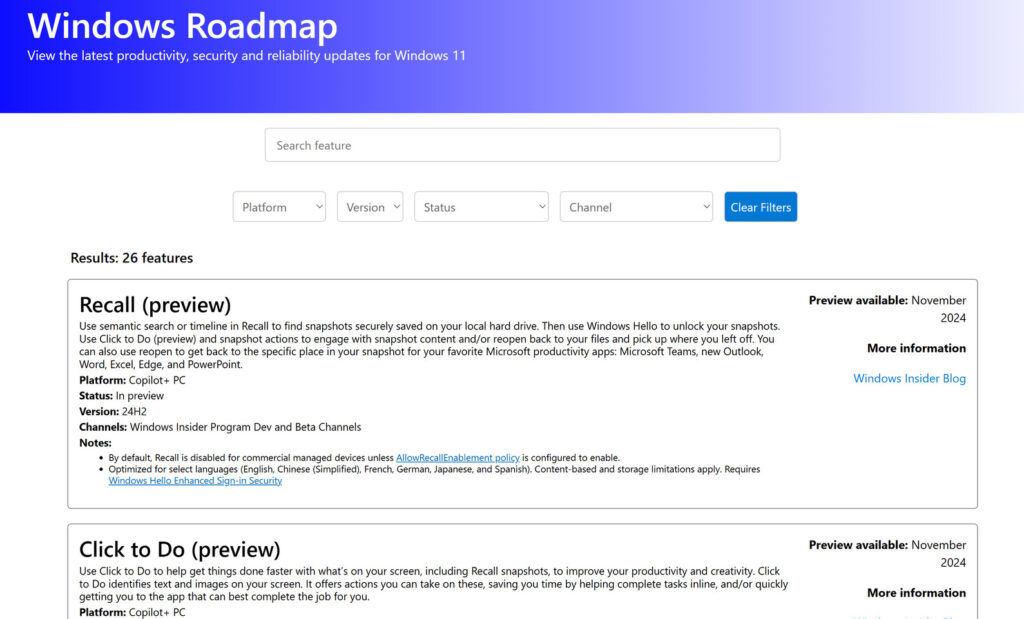
Microsoft has taken an important step towards transparency with the launch of its official roadmap for Windows 11. This tool, especially aimed at system administrators, developers and advanced users, allows you to check what new features are coming soon, which ones are in the testing phase and which features are already available.
Until now, following the evolution of Windows 11 was a constant task of research. Those interested had to scour technical blogs, Insider channels, and other disparate sources. Now, with this new update center, All information is centralized and organized intuitively.
What is the Windows 11 roadmap?
The Windows 11 Roadmap It is a web portal that shows upcoming features, improvements and changes to the operating system.. Microsoft presents it as an effort to provide greater clarity on “what is being implemented and when”. If you want more information about changes, check the What's new in update 23H2.
The platform categorizes functions into three levels:
- Preview (for Insider Program users).
- Gradual rollout (progressive release through updates).
- General availability (already activated on most systems with non-critical monthly updates).
Besides, includes instructions on how to manually activate new features on your device, even before they're enabled by default. This is especially useful for those who want to experiment with tools before they're rolled out to all users.
Custom display and filters
The site allows you to filter by system version (e.g., 23H2, 24H2), by Insider Program channel (Canary, Dev, Beta), or even by features targeted at specific devices like the new Copilot+ PCs. To learn more about the features of these versions, it's a good idea to check out What's new in build 26100.
This level of customization makes it easier to find accurate information about updates and decide whether to install or wait for a particular versionIt also helps predict hardware and software compatibility in complex corporate environments.
The business and IT management approach
For businesses, this roadmap is an essential tool for planning deployments and managing changes in advance.The platform has already been well received by IT professionals, and Microsoft is expected to expand it soon to include other areas such as Windows Server.
According to the official documentation, business functions benefit from improvements in the service strategy:
- Quality updates: monthly, with security patches and fixes.
- Feature updates: once a year, usually in the second half of the calendar.
- Life cycle: 24 months for Home and Pro versions; 36 months for Enterprise and Education.
Organizations using Microsoft Intune, Configuration Manager, or other MDM solutions can manage these features directly from their existing management tools.. In addition, for better management, you can consult How to troubleshoot Windows 11 24H2.
Featured Use Cases and Key Features
Microsoft has listed several new features or those in development on its roadmap. Some of the most significant to date include:
- Recall: AI-powered system that captures screenshots to facilitate searching and editing content. Although still in preview, it continues to be developed despite criticism over privacy issues.
- Click to Do: Allows you to perform tasks directly from notifications.
- Top Cards: New section that directly displays essential system information such as CPU, RAM or storage.
- Improvements to Task Manager: Now displays CPU usage more accurately and clearly.
Some of these features are reserved for Copilot+ PCs, devices powered by Qualcomm Snapdragon X chips that are geared toward AI experiences. For more information on the advancement of this technology, you can check out the changes in Windows 11 25H2.
Current limitations and challenges for the future
One of the main weak points pointed out by experts such as The Register or PC Gamer is the lack of medium and long-term visionThe current roadmap It barely offers forecasts beyond the following month, which limits its usefulness for companies that require semi-annual or annual planning.
Besides, Many features remain in preview phase for too long, which creates uncertainty about their actual availability. Cases like Recall have been in development since November 2024 with no clear dates for general availability. To understand the reasons for the delays, you can consult the keys to the delay of Windows 12.
Another criticized aspect is that some of the most relevant features are aimed at new equipment that is not yet widespread in the market, such as the Copilot+ PCs, which reduces the impact of many of the announced features.
Hardware and application compatibility
Before planning a migration or upgrade to new versions of Windows 11, Microsoft recommends determining the eligibility of existing devices. To do this, it provides:
- PC Health Check: for Home, Pro, and Pro for Workstations editions.
- Endpoint Analysis Tools: for business environments.
The legacy app compatibility promise of Windows 10 remains for Windows 11According to data from the App Assure program, the compatibility rate is over 99,7% for enterprise applications, including custom software. For more details on application compatibility, see .
Microsoft offers free support to organizations with more than 150 devices through the App Assure service to resolve any compatibility issues with current software.
Windows 11 availability and deployment process
The Windows 11 distribution process depends on whether the devices are managed (with enterprise policies) or not.:
- Managed devices: They are updated through solutions such as Intune or Configuration Manager.
- Unmanaged devices: Users must manually check for the update on Windows Update.
Microsoft uses a machine learning-based artificial intelligence system to deploy updates with the lowest impact and risk.This system decides which devices receive updates first based on their compatibility and expected experience. Additionally, for the latest updates, you can follow the Windows 11 news blog.
In parallel, Windows 10 devices still within the support cycle will continue to receive security updates and incremental improvements.
The roadmap, although focused on Windows 11 client, could be expanded in the future to include Windows Server and other products, according to statements from the company itself on its official blogs.
The Windows 11 roadmap represents a significant step forward in how Microsoft communicates its news and plans with users. Provides clarity, reduces uncertainty, and enables informed decisions about upgrades, testing, and deployments.
Although its scope is still limited and focused on the short term, lays the foundation for a more transparent relationship between Microsoft and the professionals who manage its ecosystemIt will be necessary to monitor it closely, especially in the context of the progressive adoption of new technologies such as AI integrated into the operating system.


I am a technology enthusiast who has turned his "geek" interests into a profession. I have spent more than 10 years of my life using cutting-edge technology and tinkering with all kinds of programs out of pure curiosity. Now I have specialized in computer technology and video games. This is because for more than 5 years I have been writing for various websites on technology and video games, creating articles that seek to give you the information you need in a language that is understandable to everyone.
If you have any questions, my knowledge ranges from everything related to the Windows operating system as well as Android for mobile phones. And my commitment is to you, I am always willing to spend a few minutes and help you resolve any questions you may have in this internet world.