- Apple is preparing an integration to share lyrics and songs from Apple Music in WhatsApp Status.
- The option appears in the iOS 26.2 beta and its rollout is gradual; not everyone sees it yet.
- For lyrics there will be preview and editing; when sharing the full song it is published directly.
- Requirements: Apple Music subscription, updated iPhone, and the latest version of WhatsApp.

Apple is testing an integration that will allow Bring what you listen to on Apple Music to your WhatsApp Status with its own visual format. The innovation aims to simplify a very common gesture: display a song or a fragment of its lyrics without having to take screenshots nor resort to third-party apps.
Until now, Apple Music on WhatsApp only shared unattractive linksWhile other platforms already offered custom-designed cards, the new feature... You can select verses, add album cover art, and post a status update with an aesthetic similar to stories., everything from the share menu from the player itself.
This is how the integration between Apple Music and WhatsApp Status works
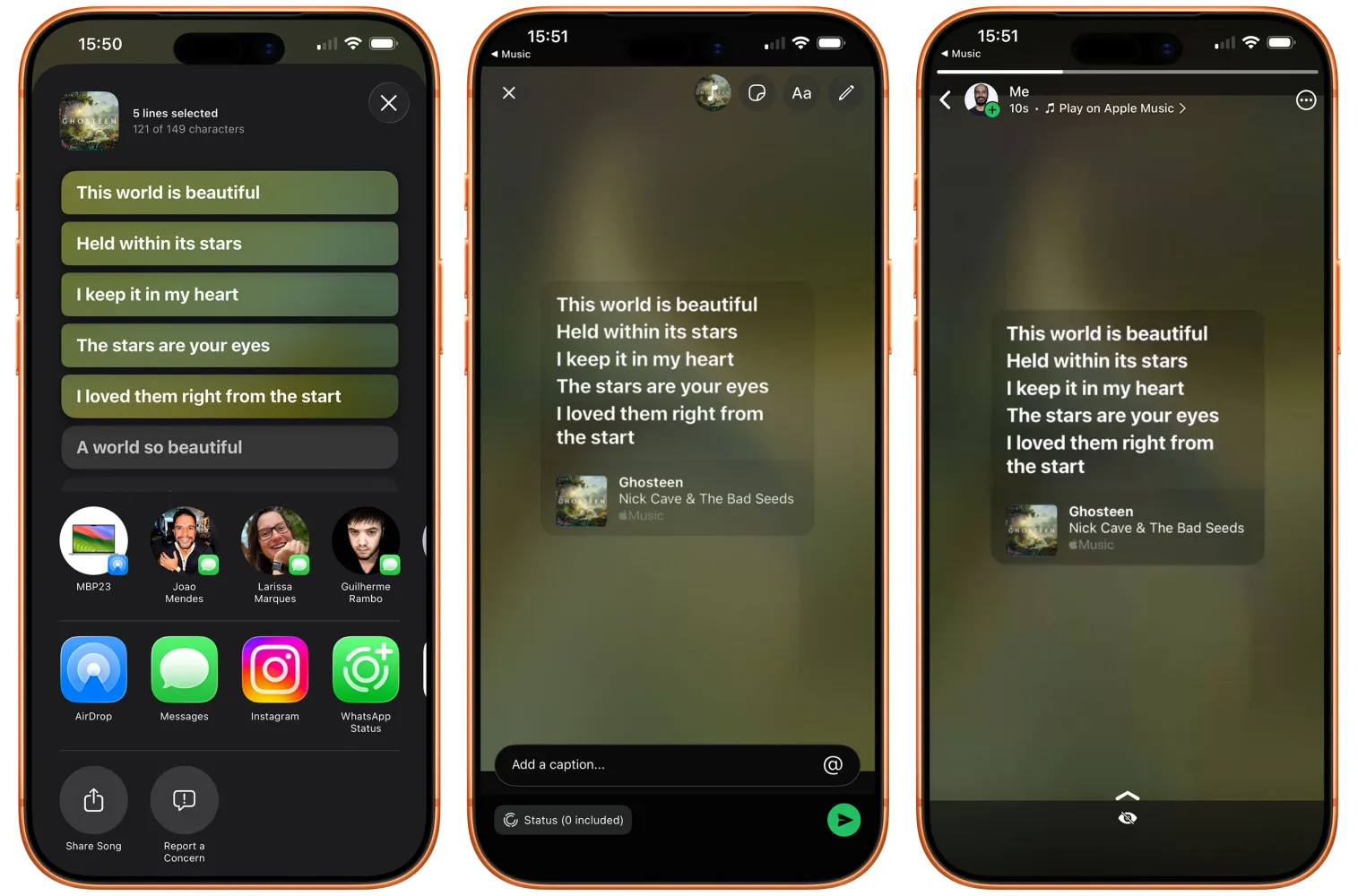
When the function is active, Simply open a song in Apple Music and tap the three dots → Share → WhatsAppIn the case of full songs, the submission is made without a preview of the status: it is published directly.
If you prefer to share the lyrics, you'll have more control: Tap the live lyrics button, Press and hold the desired verse and select WhatsApp StatusThere you will see one editable preview Before publishing, you can select several verses to accompany the card with the album cover.
This approach prioritizes the message you want to convey with the music: sharing a specific verse allows highlight the emotional fragment or the idea that best fits your status update.
Quick steps to share from Apple Music

With this option available, you'll have your status published in seconds. visual card and link to Apple MusicThe flow is very simple.
- Play a song in Apple Music and tap the three dots..
- Choose Share y Select WhatsApp.
- For letters: Open Lyrics, press and hold the verse, and select WhatsApp Status.
- Edit the preview (if you share lyrics) and publishes.
Availability, requirements and deployment in Spain and Europe
Integration has appeared in the first beta of iOS 26.2 For developers and testers, with a phased rollout. See the iOS 26.1 changesOn some devices, the option is not visible or works erratically, suggesting that Apple is still... adjusting details before general release.
To use it you will need an iPhone with compatible iOS, the updated WhatsApp app and a active Apple Music subscriptionIn Europe, development should not be affected by the regulations, although Apple has adjusted the timeline for other features due to the EU Digital Markets ActIn this case, a Stable release with the final version of iOS 26.2.
Furthermore, the focus on specific verses adds a a quick way to express a mood or contextualize what is being heard, something that until now on Apple Music was limited to flat links.
Known limitations and current behavior
In this testing phase, the WhatsApp Status option appears constantly when share lyricsHowever, this doesn't always happen when sharing the entire song. This is typical behavior for a beta version and should stabilize in the final release.
Keep in mind that when sharing a song Publish without previewWith text, you can view and edit the card before sending it. Posts in the State disappear after 24 hours And, as always, They respect privacy settings that you have on WhatsApp.
Everything points to iOS 26.2 allowing users in Spain and the rest of Europe to post songs and lyrics from Apple Music to WhatsApp. natively and directlywith more attractive cards, snippet selection, and better integration than the old simple links.


I am a technology enthusiast who has turned his "geek" interests into a profession. I have spent more than 10 years of my life using cutting-edge technology and tinkering with all kinds of programs out of pure curiosity. Now I have specialized in computer technology and video games. This is because for more than 5 years I have been writing for various websites on technology and video games, creating articles that seek to give you the information you need in a language that is understandable to everyone.
If you have any questions, my knowledge ranges from everything related to the Windows operating system as well as Android for mobile phones. And my commitment is to you, I am always willing to spend a few minutes and help you resolve any questions you may have in this internet world.