- FastCopy significantly speeds up the copying, moving, and deleting of files in Windows, clearly outperforming Explorer in speed and stability.
- It offers advanced features such as thorough verification, resumption of interrupted tasks, job queuing, and support for very long routes.
- The PRO version adds Perfect Verify, silent corruption checking, and a license for professional environments with critical data.
- Compared to alternatives like Teracopy, FreeFileSync or Ultracopier, FastCopy stands out for its extreme performance and focus on reliability.

When Windows Explorer gets stuck for minutes with that slow, staggering progress bar, many users discover there's more to life than the usual copy and paste. Among all the alternatives, Fastcopy It has gained a reputation as one of the fastest and most reliable tools For moving large volumes of data, backups, disk migrations, or massive video projects. It's quiet, it doesn't boast, but when you need to transfer hundreds of gigabytes, it's one of the few that truly makes a difference.
This program has been on the radar of specialized media, developers, and power users for years because It pushes the hardware almost to its real limit.This far surpasses what Windows Explorer itself typically achieves. Over time, it has incorporated advanced features such as data verification, antivirus exclusions, support for very long paths, and context menu integration, becoming almost indispensable if you work with fast SSDs, high-performance external storage, or servers.
What is FastCopy and what exactly is it used for?
FastCopy is A utility specialized in copying, moving, and deleting files and directories in WindowsDesigned with one very clear priority: speed and reliability above all else. While Windows Explorer tries to please everyone with a pretty interface and many intermediate layers, FastCopy gets straight to the point and eliminates much of that overhead, allowing data to travel at the maximum speed your SSD, hard drive, or network allows.
Originally, FastCopy was distributed as open source software licensed under GPLv3Although the author later announced that subsequent versions of the free program would no longer make the source code public "due to various circumstances," the philosophy of a lightweight, straightforward, and performance-focused tool has remained intact, and its reputation has continued to grow thanks to independent testing, expert articles, and the experience of thousands of users.
It works on 32-bit and 64-bit Windows, from older versions like Windows 7 to modern editions and Windows ServerEven in older versions, the executable takes up less than 1 MB in certain editions, reflecting how lightweight the program is. We're not talking about a system-wide behemoth, but a small tool you can carry with you on a USB drive.
In addition, FastCopy It can be used as a portable application and integrated with the Windows Shell.In other words, you're not required to perform a complex installation: you can simply run the file from a folder, or add it to the context menu to launch backups directly by right-clicking on files and folders. This combination of lightness and power is one of its greatest advantages over more resource-intensive alternatives.
A speed that exposes the limitations of Windows Explorer
FastCopy's biggest selling point is its raw performance. In various tests and public demonstrations, FastCopy has achieved copy speeds that far surpass Windows Explorer, even in versions with Preloading Explorer in Windows 11In professional 8K video environments, for example, FastCopy has been shown to reach over 50 GB/s on demonstration systems with extreme hardware, setting a new benchmark for high-level post-production.
In more down-to-earth scenarios, technological tools have measured very clear differences. In a real-world comparison, FastCopy reached speeds of 8,7 GB/s compared to around 3 GB/s for the Explorer When copying large blocks of data, and with the "Elevate" option enabled in FastCopy itself (which optimizes disk access based on permissions and priority), speeds can easily exceed 13-14 GB/s, approaching the physical limit of many modern SSDs. The difference isn't just a couple of seconds: for large copies, the gain translates into minutes or even hours saved.
Also in tests performed with external high-speed enclosures, FastCopy has been shown to double or even triple the performance of Windows ExplorerIn a specific test with a very fast SSD in a Thunderbolt enclosure, FastCopy reached approximately 6,2 GB/s, while Explorer hovered around 2,3 GB/s. The conclusion many analysts draw is clear: no matter how good your storage is, if you only use traditional copy and paste, you'll never see its full potential.
Specialized computer media outlets have even gone so far as to directly recommend abandon the use of Explorer for large transfers and opt for dedicated tools like FastCopyThat's precisely because the real difference is noticeable in both speed and stability. When you're working with terabytes of data, any bottleneck translates into a lot of wasted time.
Ease of use: you don't need to be an expert
One of the common fears surrounding these types of utilities is that they are complicated or designed only for administrators and advanced users. In this case, FastCopy maintains a very simple interface where the basic steps are clear. even if you don't have much experience.
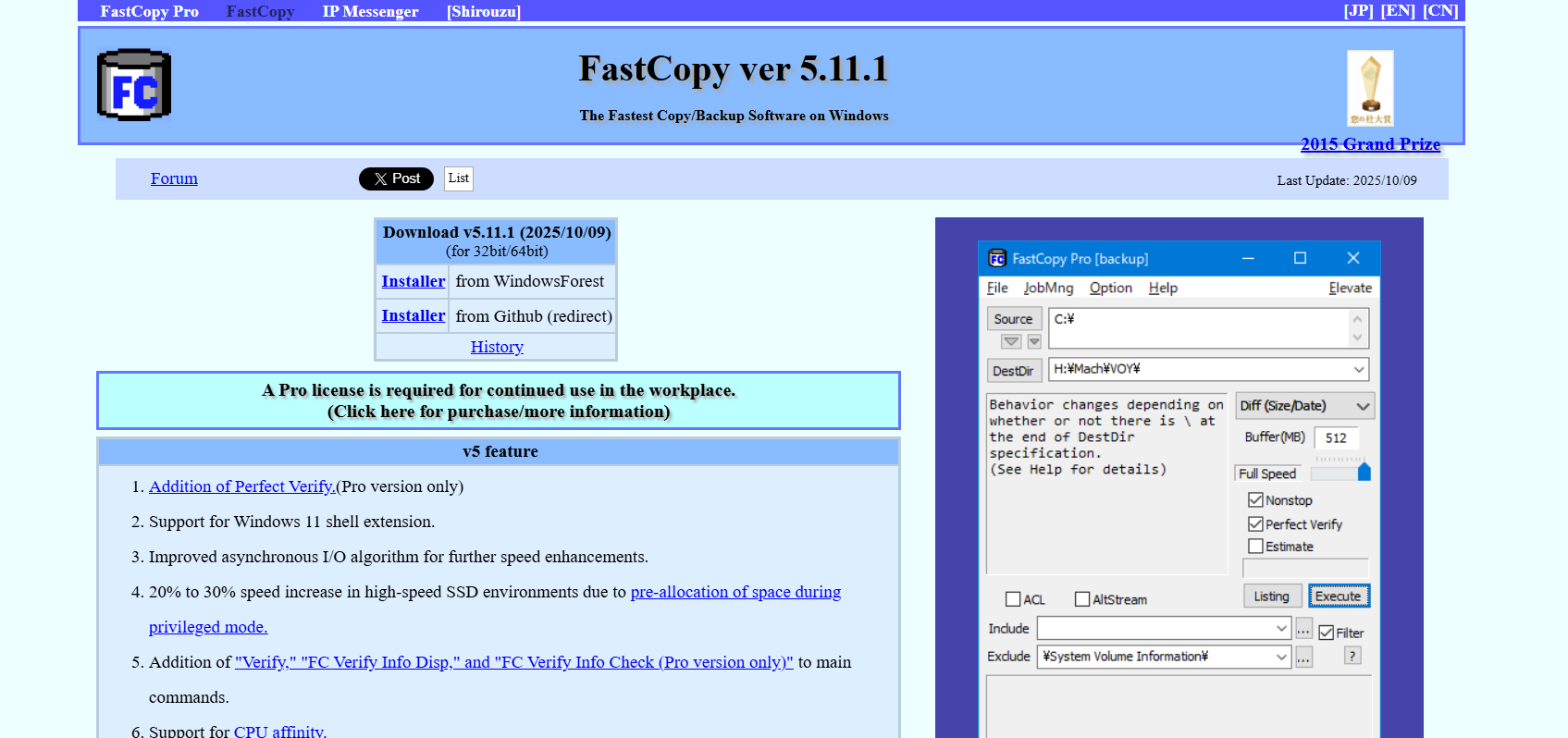
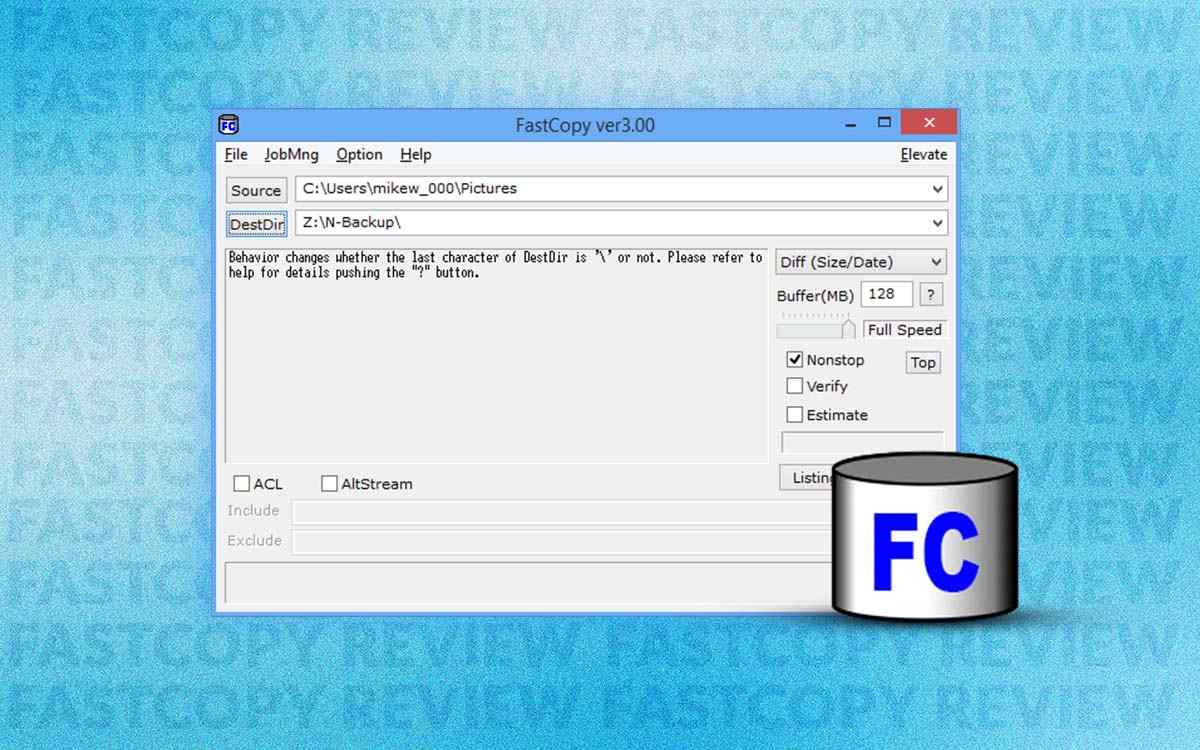
The essential function consists of choosing a Source folder or file and a destination where you want to copy or move the dataOnce selected, simply press the "Execute" button to start the transfer process, leveraging its high-performance engine. If, instead of starting the copy, you simply want to check the list of files to be processed, you can use the "Listing" button, which generates a preview of the affected content without modifying anything.
The main window shows Useful information about current speed, volume of data copied, possible errors, and estimated timeThere are no unnecessary decorations, cluttered menus, or superfluous animations: everything is placed with a highly functional, almost "engineering-like" approach. Many users appreciate this simplicity because it allows them to focus on the actual work without distractions.
If you're interested in integrating it further into the system, FastCopy can be added to the Windows context menuThis way, right-clicking on a folder or file will bring up the option to start copying with FastCopy, eliminating the need to open the program first and navigate through the directory structure. This integration is configurable in the program's settings, should you prefer to keep the right-click menu as clean as possible.
Differences between FastCopy and FastCopy PRO
In addition to the free version, there is a paid edition geared towards professional environments called FastCopy PRO, which adds advanced features and a license for business useWhile the basic version is suitable for personal or home use, the PRO version is better suited to offices, post-production studios, servers, or equipment where critical data is handled.
One of the big differences is the function Perfect Verify, designed to minimize copying errors as much as possibleThis option performs thorough checks that go beyond simply verifying file size or date, allowing you to detect inconsistencies or silent corruption that might be missed with more superficial methods. For those managing sensitive backups, databases, or production projects, this extra layer of security is crucial.
FastCopy PRO also incorporates specific checks to detect faults in your SSDA less visible but very dangerous problem, especially on hard drives that are beginning to degrade, heavily used memory, or in environments where large volumes of data are handled intensively. The tool can identify these failures and warn you before they result in the actual loss of important files.
Regarding licensing, The PRO version is intended for legal use in work environmentsThis is something many companies need to comply with internal policies or audits. The free edition is still extremely capable for individual users, but if the program becomes a key part of your professional workflow, the PRO option can be worthwhile due to its extra features and associated support.
Key features of FastCopy that make a difference
Beyond pure speed, FastCopy includes a number of features that They significantly improve the experience when moving large amounts of data.These functions are designed to solve problems that Windows Explorer handles poorly or simply ignores.
One of the most useful is the ability to dynamically adjust the copy speed during the processIf you're copying a large file and notice your computer slowing down because you're doing other tasks, you can lower the priority or limit the speed to allow the system to run smoothly again. And if you want the copy to run at full speed, simply increase the limit.
It is also possible completely pause a transfer and resume it laterThis is especially convenient when copying is impacting overall performance, or when you need to shut down a laptop and don't want to keep stressing the disk at that moment. Windows Explorer offers pauses in recent versions, but FastCopy usually handles them more reliably and predictably.
Another important advantage is the ability to continue work that has been interrupted by a failureIf, for example, a USB drive is accidentally unplugged, a network drive fails, or there's a temporary outage, FastCopy allows you to resume the process without having to start from scratch. This is vital when dealing with hundreds of gigabytes or thousands of files, where a single glitch can ruin hours of copying.
Regarding the management of multiple jobs, FastCopy incorporates a task queue that executes copies sequentially.Windows tends to slow down considerably when multiple copying processes are launched simultaneously, because the disk or network starts to compete for resources. In contrast, FastCopy organizes the jobs and completes them one after another, preventing this drastic performance drop.
La The estimate of remaining time is also much more accurate than that of the Explorer.Although this calculation isn't shown by default, it can be enabled in the options, and it usually provides a much more realistic estimate of how long the job will take to complete. This improvement is very welcome when planning large backups or when you need to know if you'll have enough time before shutting down the computer.
Compatibility, long routes and other technical features
At the system level, one of the distinctive features of FastCopy is that It does not rely on the standard Microsoft copy API (Win32) to manage filesThis has several relevant implications. For example, in versions of Windows prior to the Windows 10 1607 update, Win32-based applications were limited to 260-character UTF-16 paths, which resulted in errors with very long filenames or folder structures.
By acting independently of that API, FastCopy allows you to work with filenames and paths that exceed that 260-character limit.This is crucial for many users who manage deep folder hierarchies, projects with very descriptive names, or directories generated by other applications that aren't overly concerned with length. With FastCopy, these "impossible" paths cease to be a problem.
The tool works correctly in modern versions of Windows, both client and serverIt has also inspired adaptations in other systems. On macOS, for example, there is "RapidCopy," an implementation based on FastCopy V2.11 under the BSD license that was included in the operating system itself and is available on the App Store. A project known as RapidCopy for Linux was also launched on GitHub for Linux.
It is worth clarifying that, in the classic Windows environment, FastCopy is the main version and the one that concentrates the most advanced functions and best performanceThe variants for other operating systems follow its spirit and name, but the strength of the original tool remains on the Microsoft platform, especially in combination with NVMe SSDThunderbolt enclosures and professional storage configurations.
In terms of recognition, FastCopy has received good ratings in independent reviewsIn a Softpedia review of version 3.92, the program was described as an efficient and reliable file manager, with a rating of 4,5 out of 5 stars. Furthermore, hundreds of users who reviewed it on that platform gave it an average rating above 4 out of 5, solidifying its reputation as a robust and highly recommended tool.
Impact of antivirus software and recent performance improvements
One of the factors that often sabotages copy speed in Windows is antivirus software, especially when Microsoft Defender analyzes every file that moves in real time.This can be useful for security, but it also causes brutal bottlenecks when you transfer a lot of content at once.
In recent versions, FastCopy has incorporated a specific option to exclude its operations from Microsoft Defender.By configuring this exclusion, the antivirus stops inspecting each file that FastCopy copies so intensively, resulting in a significant performance boost. In some cases, speed increases of up to nine times have been observed compared to the same transfers without the exclusion.
Japanese trade publications highlighted this improvement as a key advance, describing FastCopy as The fastest file copying and deletion tool for the Windows platformThis improved integration with the native security system means you can get the most out of your hardware without sacrificing overall system protection, as long as you adjust the settings correctly.
Along with these improvements, the developer has explained in technical interviews The key points for achieving practical speeds exceeding 50 GB/s in very specific environmentssuch as 8K video editing systems. These scenarios combine high-performance controllers, multiple parallel-connected SSDs, ultra-fast transfer buses, and surgically optimized I/O queues. While not all users will reach that level, the fact that FastCopy can scale to those levels demonstrates its design focused on squeezing every last drop of performance from the hardware.
Reviews, accolades, and recommended use
Over the years, FastCopy has gained traction among both end users and professionals. Media outlets such as PCWorld, Japanese technology portals, and software websites have highlighted that FastCopy's speed easily surpasses that of Windows Explorer, and they have placed it among the recommended alternatives when seeking to substantially accelerate transfers.
Even within Microsoft environments, it has been mentioned positively. MSDN articles on file management best practices indicated that Tools like FastCopy, TeraCopy, and Copy Handler were among the most popular plugins used by the communityFastCopy was also presented at TechNet as an interesting product for IT professionals, demonstrating that it is not a marginal or unknown tool, but rather recognized in technical circles, and that it exists. NirSoft tools that complement these workflows.
The program has also received awards in competitions such as the Windows Forest AwardsThis reinforces its image as a mature and reliable solution. Combined with its positive ratings on download portals and expert reviews, it paints a very solid picture: this is not an experiment, but rather a software with a proven track record, active maintenance, and a demanding user base.
In practice, it is especially recommended for users who frequently copy large volumes of dataPhotographers, videographers, system administrators, 4K/8K video editors, developers who manage giant repositories, or anyone who needs to move folders full of documents, projects, or backups between different disks.
FastCopy has carved out a niche for itself as a discreet yet extremely effective toolIt transforms a routine and often frustrating task into something quick, predictable, and reliable. In a landscape saturated with programs that promise much but deliver little, this small backup manager stands out precisely for the opposite reason: it's virtually silent, but when you need it, it performs exceptionally well.

Editor specialized in technology and internet issues with more than ten years of experience in different digital media. I have worked as an editor and content creator for e-commerce, communication, online marketing and advertising companies. I have also written on economics, finance and other sectors websites. My work is also my passion. Now, through my articles in Tecnobits, I try to explore all the news and new opportunities that the world of technology offers us every day to improve our lives.