- Data Tables allows you to create complex tables in NotebookLM using natural language and export them to Google Sheets.
- The feature is initially available to Google AI Pro and Ultra subscriptions, with a phased rollout to all other users.
- The system synthesizes information from multiple sources, identifies patterns, and organizes data into custom columns.
- Journalists, researchers, students, and business teams can turn scattered notes into structured and analyzable information.
The research platform with artificial intelligence NotebookLM, developed by Google, It incorporates a new feature called Data Tables which directly addresses one of the biggest headaches in digital work: going from piles of disorganized notes to clear and structured informationInstead of struggling with formulas or spreadsheet templates, now you just need to describe the type of table you need in natural language.
With this update, Google aims to make it possible for anyone to Organize, compare, and analyze data from documents, notes, transcripts, or web pages already loaded into NotebookLMThe tool relies on advanced AI models to interpret the context of the sources, select what is relevant, and display it in tables ready for use or export.
What are Data Tables and how do they work within NotebookLM?
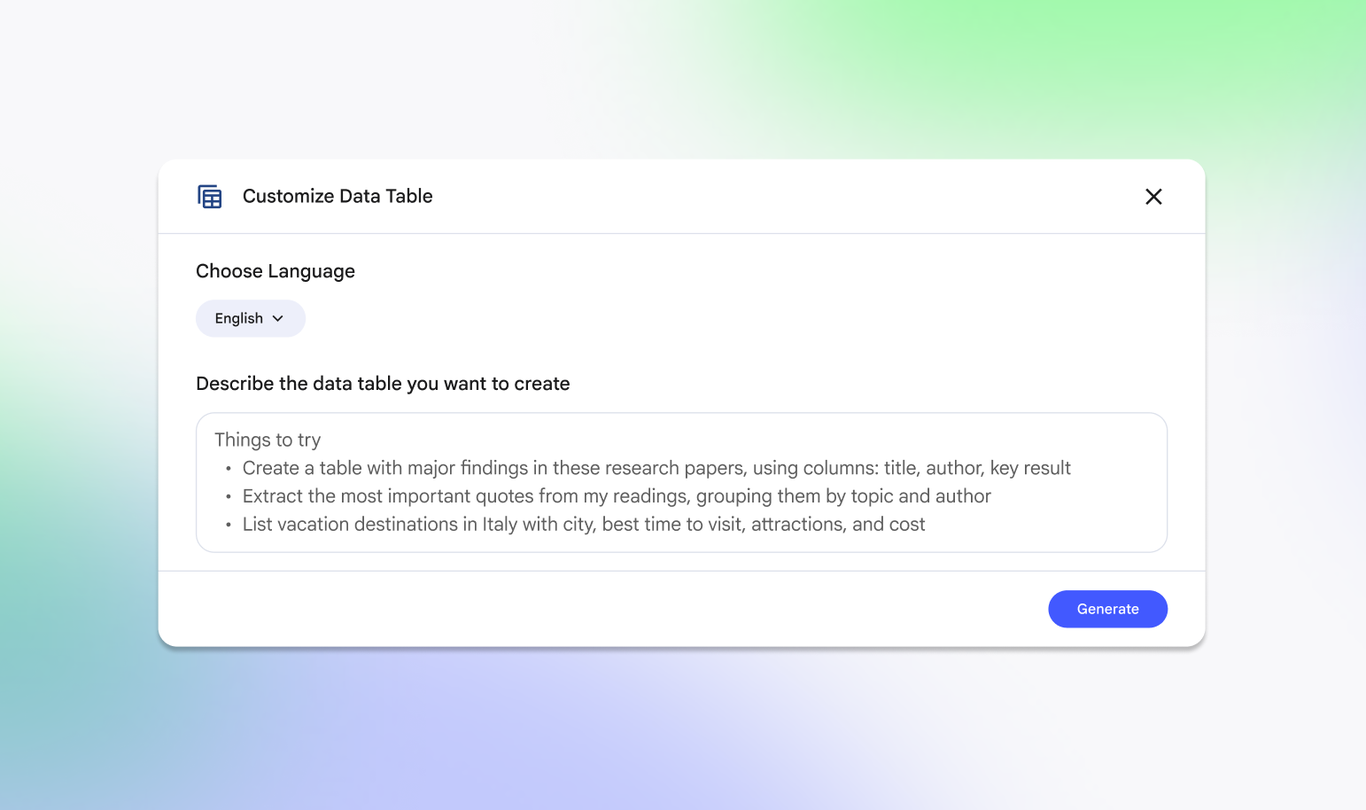
The new feature of Data Tables in NotebookLM It acts as an automatic table generator based on the information the user has in their notebook. In practice, you can write instructions like: "Create a table that compares prices and features of the laptops mentioned in my notes," and the system will take care of finding the information, grouping it, and presenting it in well-defined columns.
NotebookLM analyzes the available texts —from transcripts of meetings, clinical studies, or academic work It even extracts personal notes and web pages—and extracts key entities such as names, dates, figures, locations, or responsible parties. From there, it builds a coherent table, in which each row represents an element and each column an attribute relevant to the task.
For professionals like journalists, market researchers, data analysts, or university students, this capability can drastically reduce the time spent on repetitive tasks. Instead of copying and pasting snippets and manually formatting them, the AI itself takes care of it. synthesize scattered information and convert it into comparable data.
The Data Tables option It is integrated into the NotebookLM Studio area....along with other outputs such as Audio Overview, Video Overview, mind maps, reports, flashcards, quizzes, infographics, or presentations. In other words, It joins a repertoire of formats generated from the same source materials, but focused specifically on structured analysis.
The user can refine their preferences by specifying, for example, which fields should appear in the table, what filtering criteria to apply, or how to classify the information. These instructions are also given in natural language, so that You don't need to know how to program or master advanced functions of spreadsheets to obtain a useful result.
Practical examples: from chaotic notes to ready-to-use tables
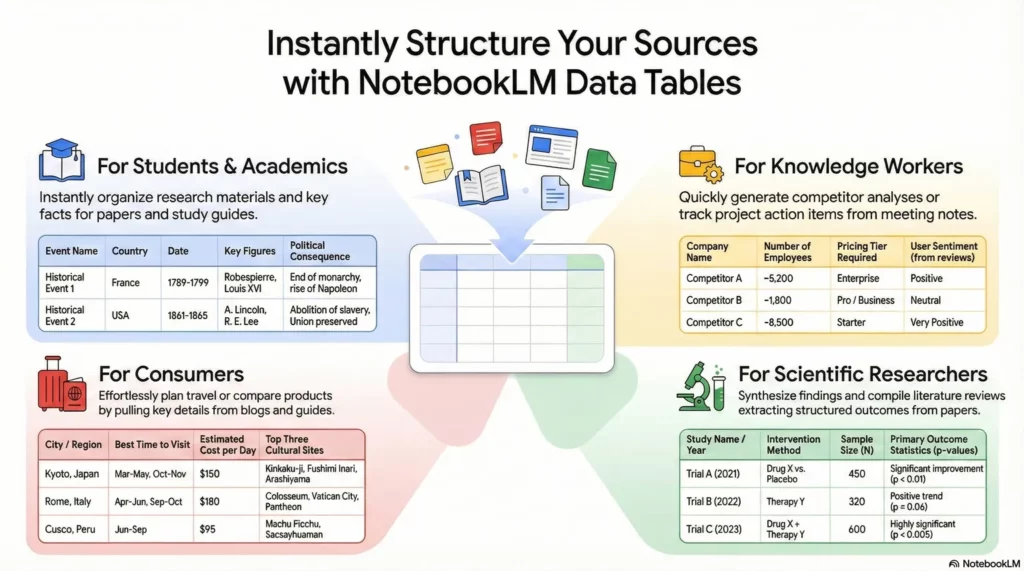
Google presents several specific scenarios in which Data tables can make all the difference in everyday use. One of the clearest examples is meetings: from a long transcript, NotebookLM can generate a table with pending actions, assigning responsibilities, priorities, and deadlines. The result is very similar to a task tracking board, but created automatically.
In the business world, the same logic applies to Compare competitorsPrices, features, launch strategies, or target markets can be organized into columns, which It facilitates both the detection of gaps in the market and the preparation of reports for management.Similarly, product teams can convert bug reports into an incident table, sorted by impact and status.
The academic and scientific sector also appears as one of the beneficiaries. NotebookLM allows, For example, summarize clinical trial results collected in several articlesby building a table with the year of each study, the sample size, the type of intervention, and key statistics. In disciplines where "literature matrices" were previously compiled by hand, AI can streamline this process to a matter of minutes.
For students of History, Law or Social Sciences, the tool It can generate study tables that relate dates, people, causes, consequences, and key concepts.This transforms a set of linear notes into an easy-to-review visual outline. The same applies to those preparing for multiple-choice exams or final degree projects who need to have their information well-organized.
In more everyday contexts, Google even suggests using Data Tables to plan tripsCompare destinations, recommended seasons, estimated costs, or visa requirements. The key point is that AI doesn't just summarize; it structures the data so that it can be filtered, sorted, and reused in other contexts.
Integration with Google Sheets and the Workspace ecosystem
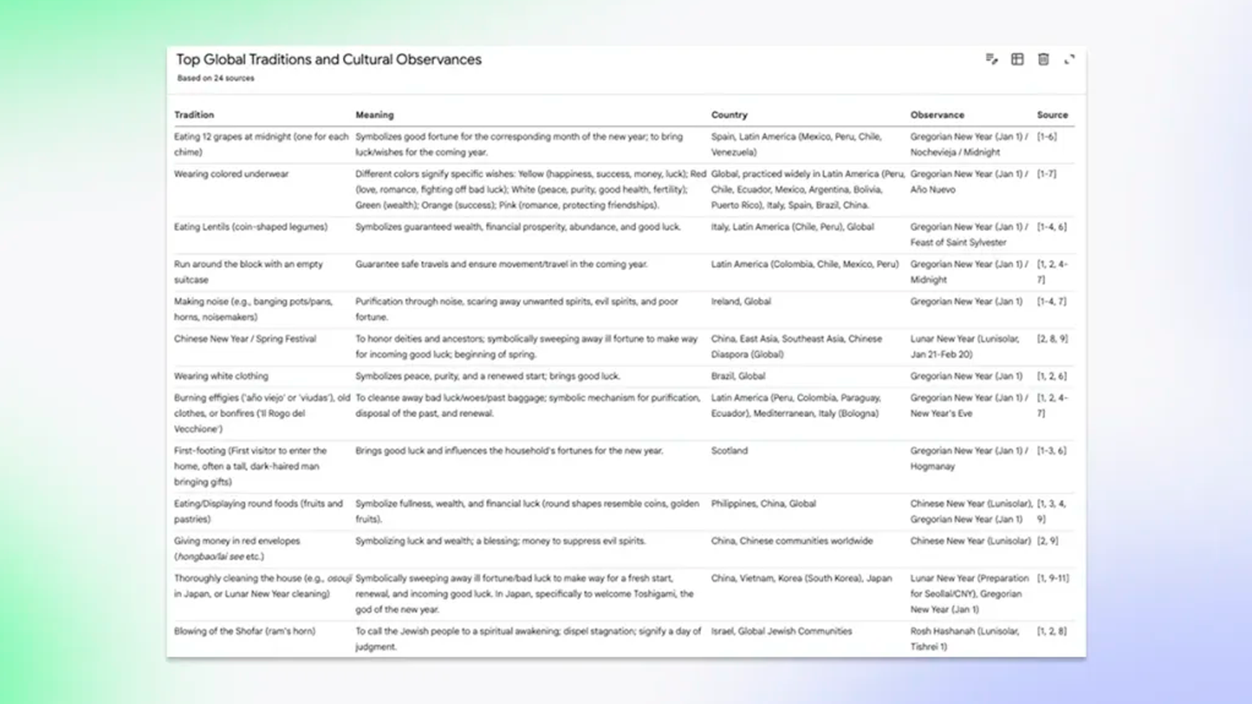
One of the keys to this new feature is its direct integration with Google SheetsOnce the table has been generated in NotebookLM, With a single click, you can export to spreadsheet formatThis allows you to continue working with formulas, filters, pivot tables, charts, or even connectors to tools like Looker Studio.
For teams in European companies that already rely on Google Workspace, this means that The gap between the research phase and the analysis or reporting phase is significantly shortenedTables created by AI can be shared with other team members, reviewed, leverage version history, and fit into established workflows.
In addition to the tables, Google has added the option to export other content generated in NotebookLM —such as study guides or briefing documents— directly to Google Docs or Sheets from the three-dot menu next to each item. This way, The platform's exits are not "locked up" in an isolated environmentbut rather they are integrated with the usual editing and calculation tools.
This approach reinforces the idea that NotebookLM acts as a bridge between diverse information sources and the existing analytical ecosystem. Rather than replacing spreadsheets, the tool focuses on prepare the data so that they can then be treated with traditional control and review methods.
For organizations working with regulatory compliance frameworks in the European Union, the fact that the result ends up in Sheets is also It facilitates the application of the same data governance and retention policies. which are already used in Workspace, something relevant when managing sensitive information or projects subject to audits.
Regarding access, the company recommends Pay attention to the options in the Studio section and the product notes.This is where the corresponding button or menu usually appears when the feature is activated for each account. If it doesn't appear yet, it's usually just a rollout delay.
AI model, deep research, and under-the-hood improvements

Alongside the arrival of Data Tables, Google has confirmed that NotebookLM now runs on Gemini 3Its next-generation AI model. Although the company hasn't specified which particular variant the service uses, it has historically opted for lighter versions designed for quick responses and intensive use.
This change in model translates, according to Google itself, into notable improvements in multimodal reasoning and comprehensionIn practice, this should help Data Tables not only collect numbers or names, but also understand contextual nuances: for example, distinguishing between preliminary and final results data in a study, or between a promotional price and a standard rate.
NotebookLM already had a Deep Research modeThis approach is geared towards complex queries that require analyzing multiple documents simultaneously and providing a reasoned summary. The addition of Data Tables complements this approach, as it allows for a shift from a narrative view to a structured representation where patterns or gaps can be identified.
The platform is also becoming increasingly integrated with the overall application of GeminiGoogle has announced that users can upload notebooks directly to the Gemini web environment, and that this capability will be available on mobile devices later. From there, it's possible to combine multiple notebooks, generate images, or small applications inspired by its content or continue the research online.
All these changes point to an evolution in which NotebookLM ceases to be just an "AI note-taking assistant" and becomes a artificial intelligence services ecosystem from Google, with cross-flows between research, content creation and data analysis.
Availability, payment plans, and phased rollout
The new feature of Data Tables It's being rolled out in stages. Google has indicated that it's available now for those with subscription plans. Google AI Pro y Google AI Ultra, including Google One users who have subscribed to these plans.
In a second phase, the company plans to extend the feature to all users, including those using the free version of NotebookLM. This type of phased rollout is common in updates connected to Workspace and AI services, and allows testing the tool in demanding environments before opening it to the general public.
For those working from Spain or other European countries, the rollout follows the same global pattern, with the usual exception that features may arrive in waves. Google has also indicated that the tool supports multiple languages—including Japanese—and that requests in natural language They adapt to the language in which the user communicates with the system.
For now, Data Tables is offered as part of NotebookLM itself, at no additional cost within existing AI plans. It remains to be seen how it will fit into future European regulations on artificial intelligence, but in practical terms, the company emphasizes that users with compliance requirements can rely on the security and privacy documentation of [Company Name/Website/etc.]. Google Workspace.
Regarding access, the company recommends paying attention to the options in the Studio section and the product notesThis is where the corresponding button or menu usually appears when the feature is activated for each account. If it doesn't appear yet, it's usually just a rollout delay.
Precautions, verification, and best practices for use
As with any content generated by artificial intelligence, the data that NotebookLM produces through Data tables require supervisionAlthough the tool automates much of the extraction work, it remains the user's responsibility to review a sample of the rows and compare them with the original sources, especially when important decisions are at stake.
A good practice is to formulate precise instructionsSpecify which columns are needed, what criteria should be followed to include or exclude elements, and ask the system to indicate any doubts or missing information. This reduces ambiguous interpretations and makes it easier to detect where the AI may have made a mistake.
For organizations with compliance requirements in Europe, it is advisable to review Google's documentation on data processing, encryption, and administrator controls Before storing sensitive information in shared spreadsheets derived from Data Tables, adjusting access permissions and retention policies helps keep the tool's use within regulatory limits.
In cases such as scientific research, the preparation of legal documents, or the management of personal data, it is especially important compare the results with the original sources, either by direct review in PDF or by comparing with the source data on the corresponding websites or internal systems.
If this prudent approach is combined with the advantages of automation Offered by NotebookLM, Data Tables can be a useful tool for modernizing analysis processes without sacrificing human control or the quality standards required in professional and academic settings.
With the arrival of Data Tables, NotebookLM is clearly moving towards a terrain where Long documents cease to be an end in themselves and become raw material for building actionable data. Between its integration with Sheets, support for Gemini 3, and progressive rollout to different types of users, the tool is emerging as a practical resource for those in Spain and Europe who need to move, ever more quickly, from reading to making decisions based on well-structured information.


I am a technology enthusiast who has turned his "geek" interests into a profession. I have spent more than 10 years of my life using cutting-edge technology and tinkering with all kinds of programs out of pure curiosity. Now I have specialized in computer technology and video games. This is because for more than 5 years I have been writing for various websites on technology and video games, creating articles that seek to give you the information you need in a language that is understandable to everyone.
If you have any questions, my knowledge ranges from everything related to the Windows operating system as well as Android for mobile phones. And my commitment is to you, I am always willing to spend a few minutes and help you resolve any questions you may have in this internet world.