- Cancellation of Claude Pro depends on the platform where you subscribed (web, App Store or Google Play) and takes effect at the end of the billing period.
- On web and desktop, cancellation is done from Settings > Billing; on iOS and Android, management is done through Apple and Google Play subscriptions.
- To delete your account, you must first have actually cancelled your subscription, and data management varies between personal use, APIs, mobile apps, and business accounts.

If you've made it this far, you're probably considering Cancel Claude Pro, change your plan, or even unsubscribe completely. of the platform. It could be because you're no longer getting as much use out of it, due to usage limits, an annual commitment that's become too much for you, or simply because you've found another alternative like Cursor, Gemini, or another AI tool. Whatever your situation, it's important to understand... How cancellation works depending on where you subscribed (web, iOS or Android), what deadlines apply and what common problems you might encounter.
Throughout this guide you will find a detailed explanation about How to cancel Claude Pro and other payment plans step by step on each platformWhat to do if the cancel button doesn't seem to work, how this affects account deletion, what happens to your data, and what real-world experiences other users are having. All explained in clear, straightforward language. Practical information so you don't get driven crazy with the subscription.
How does the cancellation system on Claude Pro and Max work in general?

Before going into each device, it's helpful to understand the basic concept: You can cancel your paid subscription (Pro or Max) at any timeRegardless of whether you signed up online, through the iOS app, or on Android, you're not tied to a contract for life, but there are some details you should keep in mind regarding timeframes and billing.
When you cancel the plan, the cancellation It does not take effect immediately, but at the end of the current billing period.In other words, if you pay monthly and decide to cancel today, you'll still have access to the Pro or Max plan until the end of the month you've already paid for. The same applies if you have an annual plan: you'll have access until the annual expiration date, even if you decide to cancel before then.
This system means that, after pressing the cancel button, You don't lose your instant pay benefitsDuring the remaining time, you can continue using Claude within the limits of your current plan, managing your projects, conversations, and files as before.
The key point is that the process of leaving the company is not handled the same way in all cases: The platform you signed up through controls the subscription and payments.That means that:
- If you registered on the Claude website (claude.ai) or on Claude DesktopEverything is managed from Claude's own account.
- If you signed up through the App Store (iOS)Your subscription is managed by Apple.
- If you purchased the plan through Android (Google Play)Google Play controls it.
That's why it's so important that you remember Where exactly did you hire Claude Pro?Because depending on that, you'll have to go to one place or another to cancel it correctly.
Cancel Claude Pro from the web (claude.ai) or Claude Desktop
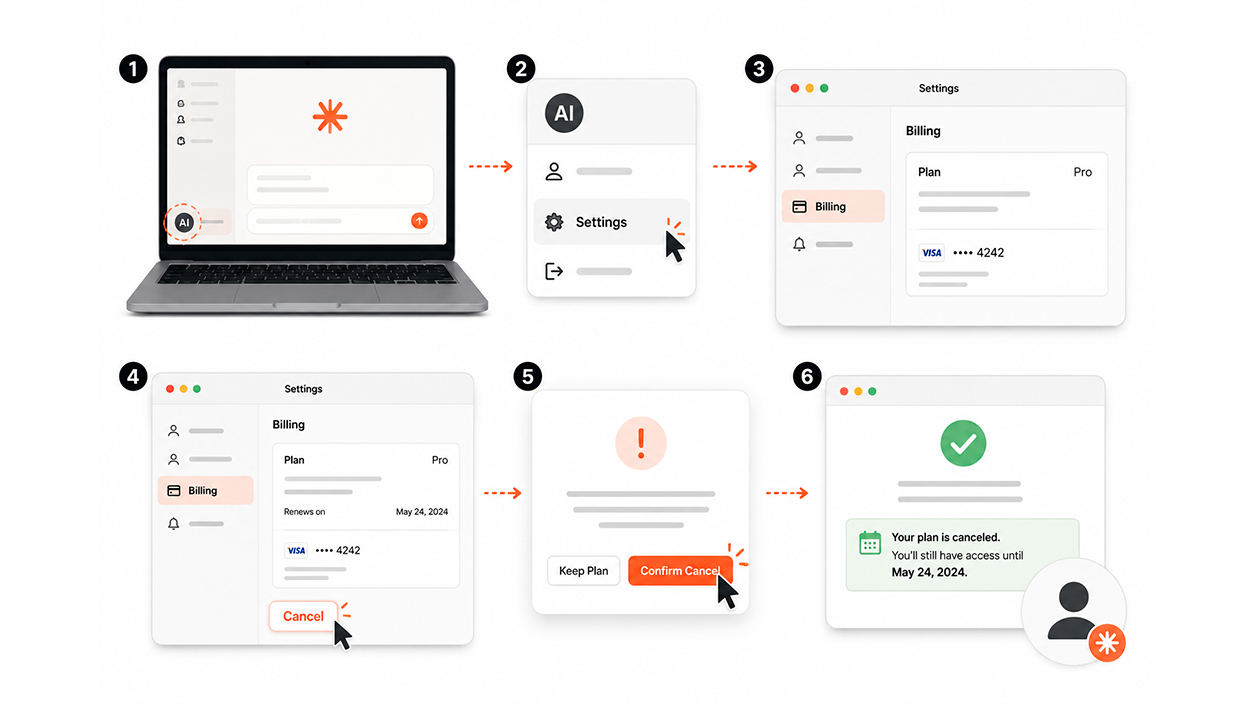
When you subscribe directly through the web version of Claude (claude.ai) or from the desktop app for Mac or Windows, The subscription is linked to your Anthropic accountand not Apple or Google. In this scenario, the cancellation process is relatively simple, provided you follow the correct steps.
The first thing is Log in to your accountYou can do this either by opening a web browser and going to claude.ai, or by launching the Claude Desktop application on your computer. Once inside, look in the interface for the area where your initials or username appear, usually located in the bottom left corner from the screen.
Click on those initials or your name, and a context menu will appear. Within that menu, you will need to select the option "Settings" (Configuration)This will take you to the main panel where your account settings are centralized, including those related to billing.
On the left side of that settings screen you'll find several sections. The one you're interested in here is Settings > Billing (Settings > Billing). Go to that section and you should see the details of your current plan, the type of subscription you have active (Pro or Max), the billing period, and the associated payment method.
Within that same section, a button will appear clearly identified with the text "Cancel"Clicking this will initiate the cancellation process for your paid subscription. You will typically be asked to confirm your decision, again indicating that you agree. stop renewing the plan for the next cycle.
From that moment on, your subscription will be marked as cancelled, but You can use Claude Pro or Max until the end of the period you have already paid for.From there, if you do nothing else, your account will automatically switch to the free level once that date arrives.
Cancel Claude Pro from iOS (App Store and Claude app)
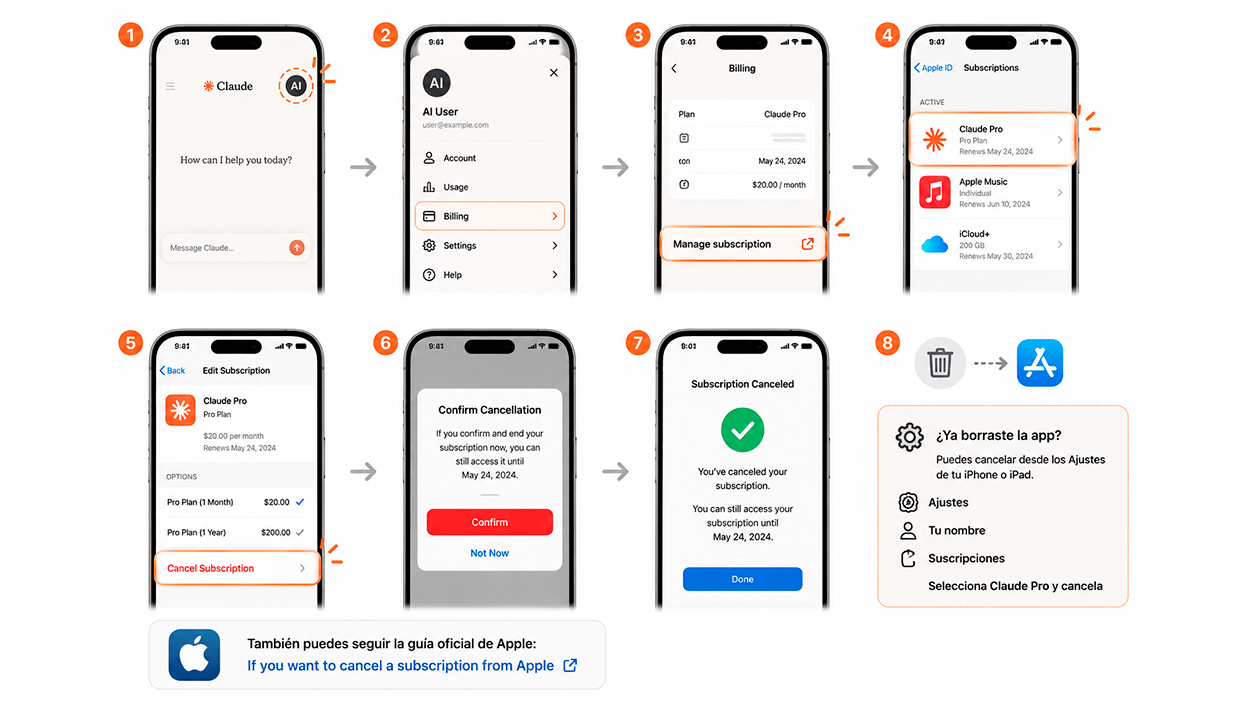
When you subscribe to Claude Pro or Max through the iOS app, The subscription becomes an Apple-managed subscription.This means that payments, renewals, and cancellations are controlled by the Apple App StoreNot Anthropic directly. That's why any changes you have to make from your iPhone or iPad, or through the Apple interface.
Within the Claude app for iOS, the first thing you should do is Open the application and make sure you are logged in with the correct accountOnce on the main screen, look for your initials in the top right corner; pressing them will display your profile options.
In that menu, select the section BillingFrom there you will see a shortcut to managing your subscription, usually through a button or option called "Manage subscription" (Manage subscription). Tapping it will redirect you to the Apple subscriptions panel, where all the services you pay for through the App Store are listed.
Within that panel, look for the entry corresponding to Claude Pro or Max and, once you have located it, you will see the option to cancel subscriptionConfirm the cancellation by following the on-screen instructions. Apple will usually remind you. Until what date will you continue to have access? before the termination takes effect.
You may have already deleted the Claude app from your iPhone or iPad and now want to cancel your subscription as well. In this case, even if you don't have the app installed, You can still cancel from Apple settingsTo do this, you'll need to follow the official App Store instructions for these situations, through the subscription management section in your Apple account. Apple provides a guide called «If you want to cancel a subscription from Apple», where it explains step by step how to access and cancel any active service.
Cancel Claude Pro from Android (Google Play)
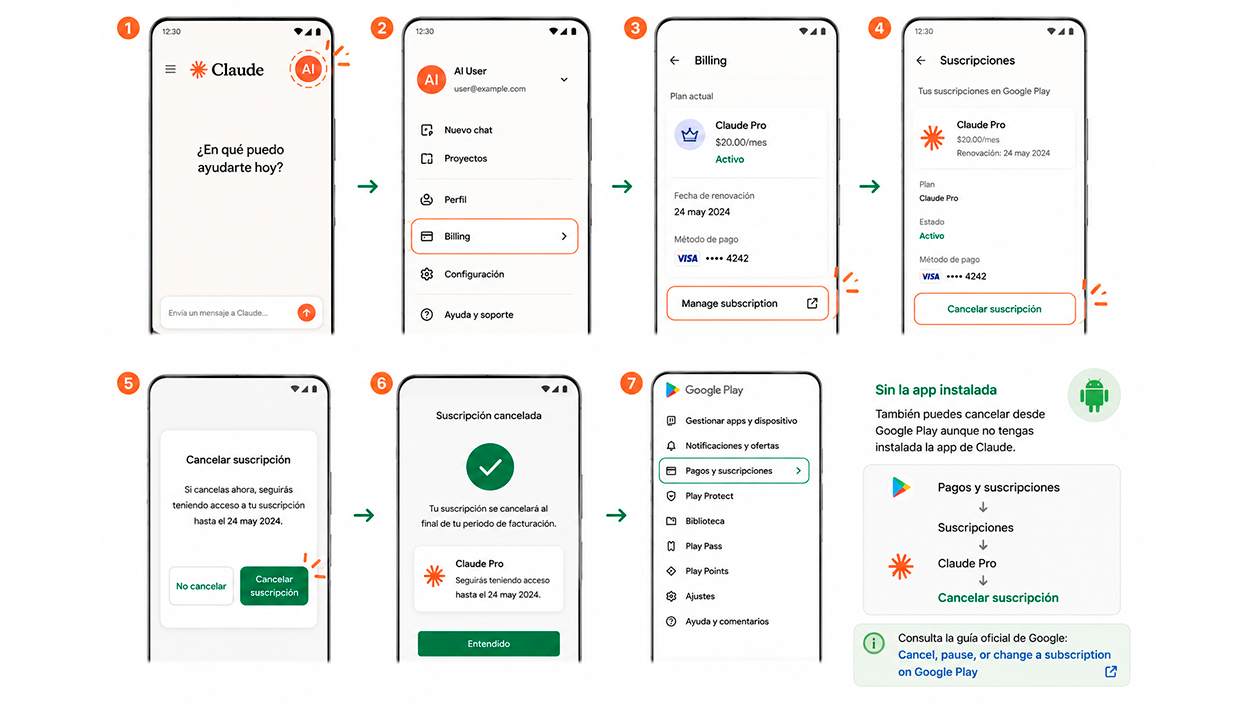
If you signed up for Claude Pro or Max using the Android app, your subscription It remains linked to Google PlayJust like with Apple, this means that payments are centralized in the Google account you used to sign up, and any changes must go through that account.
In the Claude app for Android, start by clicking on your initials in the upper right cornerThis action will display the profile menu, where different sections related to the account, settings, and payments are grouped.
In that list, enter the option BillingYou will see a link or button identified as "Manage subscription"This will take you directly to Claude's Google Play subscriptions menu. From there, you can check the current plan status, renewal date, and payment method.
To stop paying, select the option Cancel subscription and follow the instructions that Google Play displays on the screen. As in other cases, canceling the service does not cut off immediately. You will continue to enjoy Claude Pro or Max until the end of your current subscription period.From then on, it will no longer be automatically renewed.
If you've already uninstalled the Claude app from your Android phone or tablet, simply deleting the app doesn't automatically cancel your subscription. You'll have to Go to Google Play > Payments and subscriptions > Subscriptions and cancel manually from there. Google has an official guide under the title «Cancel, pause, or change a subscription on Google Play» which explains these options without needing to have the original app installed.
Use Claude with Android apps and register on Claude Pro
Besides the cancellation, many users are wondering How does Claude integrate with other Android applications, and how exactly is the Pro plan activated within the mobile ecosystem?This part is important, because if you registered on Android, Google Play will maintain control of the subscription and will appear on your bank charges.
To register for Claude Pro from Android, the usual procedure is that, once the app is installed, Access your free account and navigate to the plan upgrades section.From there you can choose between the different levels available (for example, Pro or Max) and, upon confirming the payment, the system will redirect you to the Google Play purchase flow.
This process will link your subscription to the Google account you have configured on your device. Therefore, if you have multiple Google accounts on the same phone, it is essential that Check which one you are using to make the purchaseso you know where to cancel it if you change your mind.
From there, you will be able to Use Claude both on the Android app and on other devices where you log in with the same Claude account. Having subscribed to the plan via mobile doesn't prevent you from using it on the web or desktop version; the only difference is who handles the billing.
This integration with the Android ecosystem also means that when you want to cancel or modify the plan, You will always have to go through Google PlayDeleting the app isn't enough, and changing your phone won't save you from renewal: if you don't cancel from the store, the system will continue to charge automatically until you indicate otherwise.
Common problems when cancelling Claude Pro and system errors
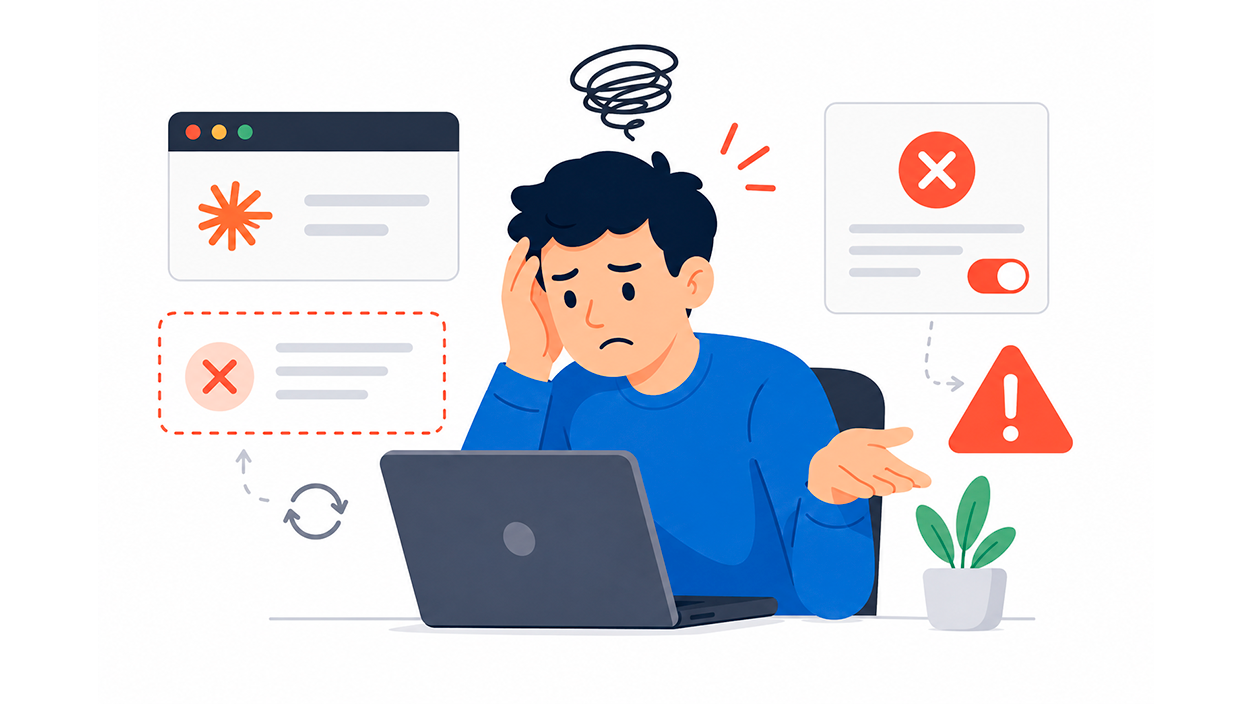
Some users have reported quite frustrating situations when trying to unsubscribe. One of the most striking cases is that of those who They click on "Cancel" within the billing section, everything seems fine, but when they reload the page the subscription still appears as activeIn other words, the system does not correctly register the cancellation.
This type of error is especially problematic when what the user wants is not just to stop paying, but delete your account completelyAnthropic typically requires that the associated subscription be canceled before deleting an account. If the cancellation button malfunctions, the user is trapped in a loop: they can't delete the account because an active subscription appears, but they also can't cancel that subscription from the dashboard.
A real-world example perfectly describes this scenario: the person clicks cancel, it seems like everything has been processed, but upon logging back in... the annual subscription is still listed as validIn parallel, the system does not allow account deletion until plan cancellation is confirmed. And to top it all off, the user explains that Technical support took almost a month to respond to their last ticket, which further increases the feeling of being stuck.
In these cases, the practical recommendation is that, if you see that the cancellation is not reflected after a few minutes and a complete page reload (or after closing and reopening the session), Take a screenshot of the entire process (subscription status, button clicks, messages that appear) and open a support ticket attaching that evidence. The more information you provide, the easier it will be for the team to verify that you tried to cancel within the deadline.
If your subscription is managed by Apple or Google Play, also check their native dashboards. Don't leave an active subscription thereSometimes, people mistakenly cancel within the app without completing the final step in the store, and until that step is done, the renewal remains active. Confirming the status in the App Store or Google Play is crucial to ensure that no further charges are incurred.
Annual commitments, email changes, and experiences of dissatisfied users
Beyond the purely technical problems, there are users who have felt deceived or trapped after signing up for a Claude Pro annual planSome comment that, with the new limitations and restrictions in the Pro plan, they feel that the service no longer offers what it promised when they subscribed, especially after the introduction of stricter speed limits.
In a fairly straightforward testimony, one user acknowledges that She regrets having committed to ClaudeAI for a whole year.According to him, the latest changes make Pro perform much worse than before, and he has the impression that they are deliberately degrading the experience to push people towards the Max plan. He conveys a sense of frustration, to the point of saying he feels like an "idiot" for supposedly falling into the trap.
Another case describes how, after using Claude Pro for several months, especially for web development and VPS managementThe user was satisfied with the tool, even highlighting the usefulness of the projects function, although they missed being able to upload entire folders at once. However, the Recent speed limits have proven so restrictive which end up appearing almost an hour after use, forcing him to wait several hours to continue working normally.
This same user comments that, having encountered these new limits, He opted to try alternatives like Cursor IDEwhich has proven much more useful in his specific use case, although he acknowledges it's not perfect either. He compares the situation with other AI companies, mentioning that while Anthropic focuses on things like new security classifiers to prevent leaks, the user community is eager for new powerful models and fewer restrictionsfearing that competitors like OpenAI or DeepSeek will take the lead.
Added to this is the problem of those who, beyond performance issues, encounter administrative blocks such as not being able to change the email address associated with the accountOne of the testimonials recounts that he is about to lose access to the email he registered with and, since there is no easy option to change it, he has decided to simply delete the account and cancel the remaining months of his annual subscription, just to avoid having this access problem in the future.
This whole set of experiences generates a clear perception: there are users who, faced with changes in service conditions, usage limits, and rigidities in account management, prefer to cancel their subscription and migrate to other models like Gemini or similar tools. Many summarize their position in a simple idea: "wallets speak," meaning that if they are not satisfied, they will stop paying and go to the competition.
Relationship between subscription cancellation, account deletion, and data
One aspect that often goes unnoticed until you want to leave the platform is the relationship between canceling the subscription and completely deleting the account and dataAnthropic handles various types of information, both in the use of the web and apps, as well as in business or educational environments, and through the API.
In the case of standard personal accounts (those using claude.ai or mobile apps), the first step is usually ensure that there is no active subscription associated with itAs long as there is a payment plan in effect, the system tends to block the complete deletion of the account, precisely to avoid billing problems or subsequent claims related to services already paid for.
Once the subscription is actually cancelled (either from the website, or from Apple or Google Play), you can request the deletion of the account and certain associated informationFor business or education environments, Anthropic has specific policies on who owns and manages the data: for example, in Claude for Education accounts, it is usually the institution that largely controls the administration of that data, and not always the individual user.
Regarding the API, Anthropic is considering the possibility of delete data that customers have sent through integrationsHowever, the exact conditions depend largely on the contracts, data processing agreements, and policies in force at any given time. Similarly, there are mechanisms to manage and, in some cases, delete data submitted through the direct use of Claude on the website or apps, within the limits set by the relevant privacy regulations.
It is also relevant to know that, when used the dictation function in Claude's mobile applicationsCertain personal data necessary for transcribing speech to text and improving the user experience is collected. Anthropic documents what type of information is collected and for what purposes, which is worth reviewing if you are particularly concerned about privacy before deciding whether to continue using the app after canceling your paid subscription.
In the business world, there is also the figure of the Anthropic business accountsIf you work with Claude at a corporate level, there are likely specific procedures for deleting accounts and data that differ from those for individual users. These procedures typically include deleting business accounts, managing project-related records, and handling sensitive data sent through controlled environments.
All of this means that if your goal is not only to stop paying, but also erase your traces from the platform to the extent permitted by law and policiesSimply clicking the unsubscribe button is not enough. You will need to follow the additional steps for account deletion and, if applicable, review the documentation on how the data you submitted via API, dictation, or enterprise integrations is handled.
Looking at the sum of experiences, it is clear that cancelling Claude Pro or Max is not just a matter of finding a button and that's it: It's important to distinguish whether the subscription is managed on claude.ai, the App Store, or Google Play.It's important to understand that cancellation takes effect at the end of the contracted period, and to know that to completely delete the account, you must first ensure that no plans remain active. Furthermore, it's advisable to be prepared for potential system errors or support delays, document your cancellation attempts, and be aware of your data deletion options for both personal and business use. Add to that the changes in usage limits, email management, and the emergence of alternatives like Cursor and Gemini, and it becomes clear why so many users are scrutinizing whether continuing to pay for Claude Pro is truly worthwhile.

Index
- 1 How does the cancellation system on Claude Pro and Max work in general?
- 2 Cancel Claude Pro from the web (claude.ai) or Claude Desktop
- 3 Cancel Claude Pro from iOS (App Store and Claude app)
- 4 Cancel Claude Pro from Android (Google Play)
- 5 Use Claude with Android apps and register on Claude Pro
- 6 Common problems when cancelling Claude Pro and system errors
- 7 Annual commitments, email changes, and experiences of dissatisfied users
- 8 Relationship between subscription cancellation, account deletion, and data
