
Have you noticed that some people have a very distinctive font in their bio or Instagram name? Honestly, this really draws attention and adds an authentic and unique touch to a profile. For that reason, this time we'll teach you how to use it. How to change the font in your Instagram bio using two methods: with an online tool and with a mobile application.
Now this means that On Instagram you won't find an option that allows you to change the font type.However, changing the font in your Instagram bio isn't difficult if you know how to use the right tools. Below, we'll show you step-by-step instructions to create an Instagram bio that stands out from the rest.
How to change the font in your Instagram bio

Knowing how to change the font in your Instagram bio can make the difference between an ordinary profile and a completely original oneWhether you're using this social network to promote your business or as a personal account, it's always a good idea to add a personalized touch. And this can be achieved by making a simple change to the font in your bio.
The best thing about it is that You can change the font in your Instagram bio as many times as you want.But be careful! You can't do the same with your name. Instagram has set a limit of two changes every 14 days for users. Therefore, it's best to be cautious with the number of changes you make, because if you exceed this limit, you'll have to wait that time to change it again.
Using an online tool that generates fonts

The first way to change the font in your Instagram bio is using a page that generates compatible letters with the social network. Keep in mind that not all font types are suitable for copying to your profile. To do this, type "Fonts for Instagram" into the search engine.
One of the first results that will appear is the website LingoJam. To explain the procedure, we will use this tool as an example. Below, we leave you the Steps to change the font in your Instagram bio with a website to generate different fonts:
- Open the tool as LingoJam.
- There you'll find two boxes. In the first, write what you want to appear in your bio.
- In the second box, you'll see the text in different fonts. Swipe until you find the one you like best.
- Once you've chosen your font, copy it to the clipboard by sliding your finger to cover the entire text.
- Now open your Instagram profile.
- Click the Edit Profile button just below your bio.
- Now tap on the bio or “introduction” to open a text box where you can edit it.
- Erase what you have written and paste the writing you copied.
- And that's it. Finally, tap the confirmation icon in the top right corner to apply the changes you made to your bio font.
A tip: when choosing the font you will use in your Instagram bio take into account its sizeWhy? Because if you choose a font that's too large, your entire post might not fit in the Instagram bio space. But if you still want that font, you'll have to shorten your bio.

Change the font in your Instagram bio with a keyboard app

The other way to change the font in your Instagram bio is using a keyboard app on your mobile. Although Gboard remains the most popular Android keyboardThese keyboards have a ton of font types that you can use in almost any app or web page.
One of the available options is called Fonts Keyboard. These are the Steps to change the font in your Instagram bio with Fonts Keyboard:
- Download and open the application Fonts Keyboard (or the app you have chosen).
- The next step is to enable the app in your device's settings before you can use it. If this is your first time using it, tap OK.
- Now, click on the option “Step 1: Enable Font Keyboard”.
- Tap the switch to accept.
- This will take you to the “On-screen keyboard available” mobile settings and enable the new app’s keyboard by tapping on it and pressing OK.
- Tap the back button and click Step 2 to select the new font keyboard.
- Choose the font you want by tapping the magnifying glass and you're done! You've got a new keyboard.
- Now go to your Instagram profile and tap on Edit Profile.
- Click Slideshow to change the font in your Instagram bio.
- Write whatever you want and you'll see how it comes out in a different font and that's it.
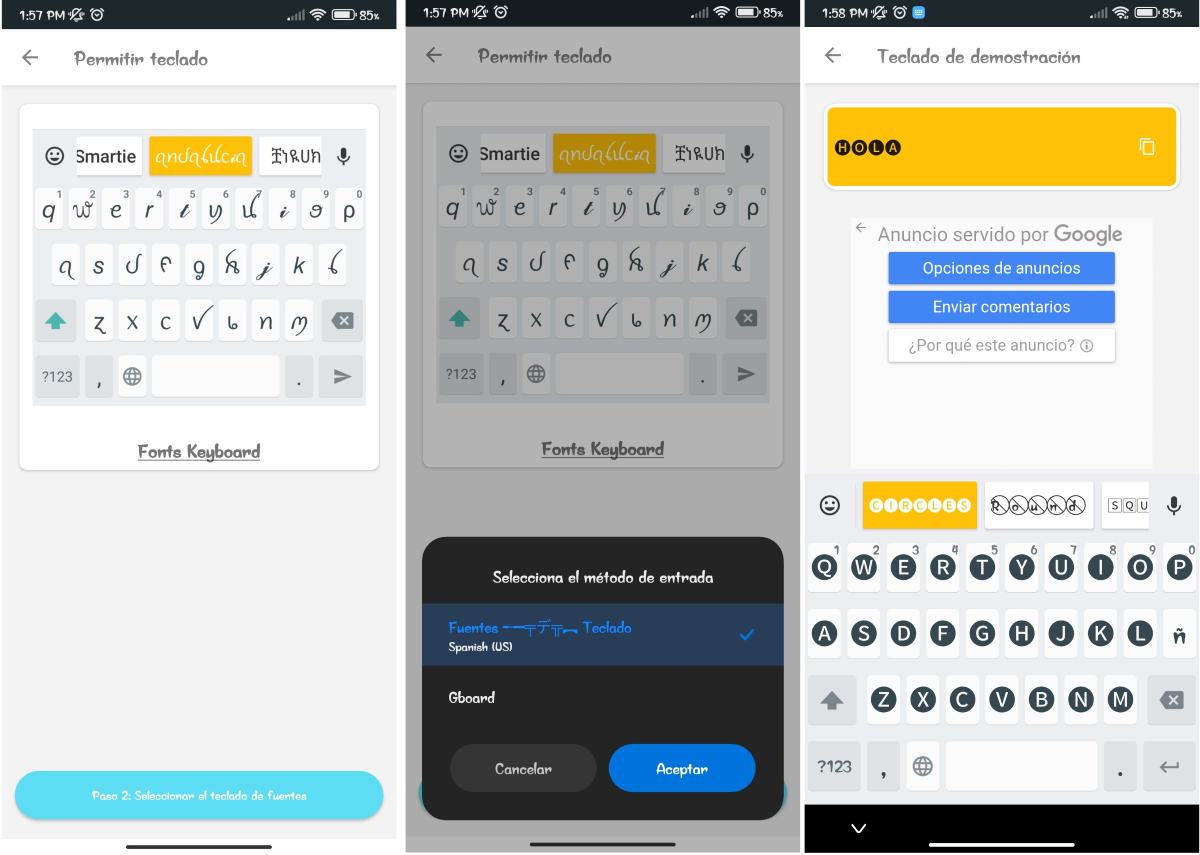
The great thing about keyboard apps is that you can use them not only to change the font in your Instagram bio, but for anything else you want. Plus, when you enable that keyboard, It is possible to change the font at any time and in the application you are using..
This in particular is what marks the Difference between keyboard apps and online tools that generate different fonts. The latter require you to log in each time you need to choose the font you want, copy the text, and then paste it into your Instagram bio or whatever app you're using.
In conclusion, Which of the two methods is better for changing the font in the Instagram bio? The truth is, this It will depend on the frequency If you need to change your phone's font, you might want to use the web tool. If you just want to change the bio, use the web tool. But if you like using different fonts on your phone, it's best to download an app.

From a young age, I've been fascinated by all things scientific and technological, especially those advancements that make our lives easier and more enjoyable. I love staying up-to-date on the latest news and trends, and sharing my experiences, opinions, and tips about the devices and gadgets I use. This led me to become a web writer a little over five years ago, focusing primarily on Android devices and Windows operating systems. I've learned to explain complex concepts in simple terms so my readers can easily understand them.