When sharing a video, one of the most important aspects is its resolution. If you've made the effort to acquire materials that allow for this, you don't want to lose that investment due to low compression. That's why, in this article, we'll explain how to do it. How to edit 4K videos from your mobile phone with Edits without losing quality.
This is how you can edit 4K videos from your mobile with Edits without losing quality.
Is it really possible to edit 4K videos on your phone with Edits without losing quality? Simply put: yes. The editing tool allows you to edit and extract videos in high resolution, including 4K. Well, in another of our articles we already explained it to you. How to use Meta Edits and the benefits of using it. But today, we'll focus on how to edit high-resolution videos from there.
First things first: enable the “Upload in highest quality” option on Instagram.
Meta Edits is designed to be used alongside Instagram. In fact, to log in, you'll need to log in through your Instagram account. So, you'll likely use it to create and edit the Reels you upload to Instagram. Now, before editing 4K videos from your phone with Edits, It is important that the quality settings are correct on your Instagram account..
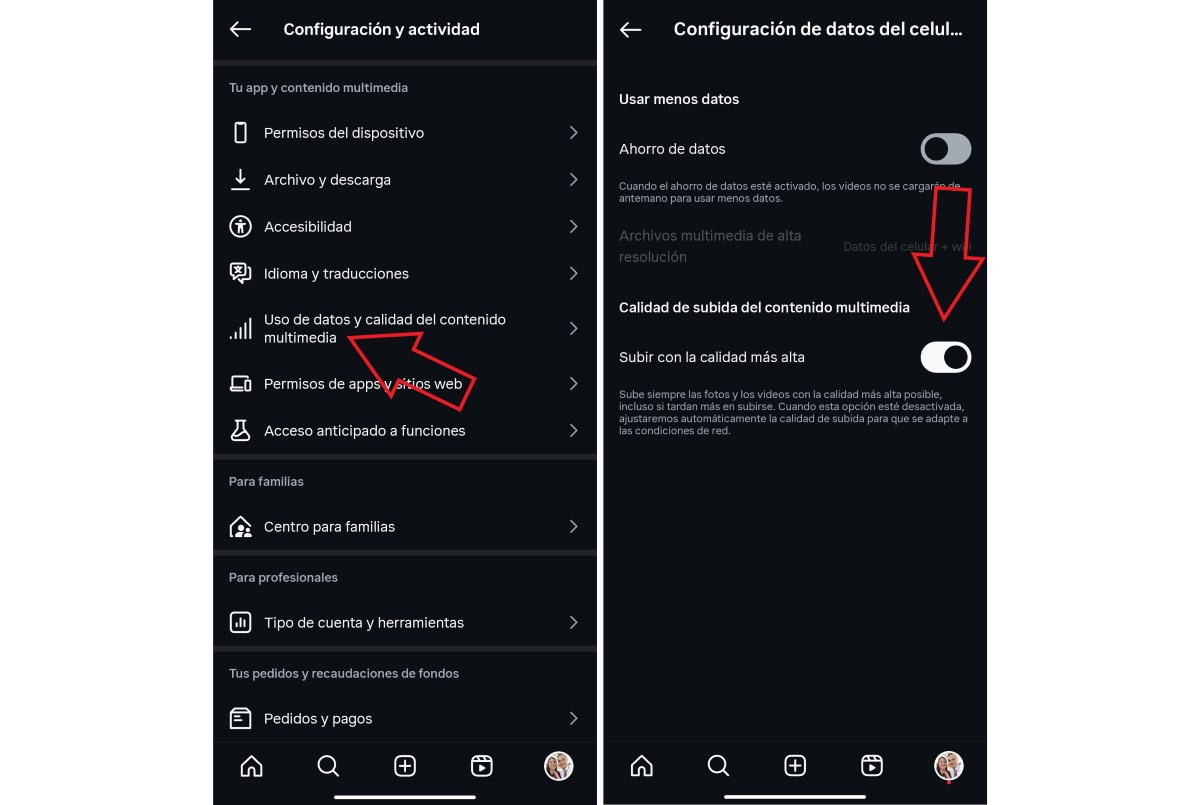
For allow your videos to be published in the highest possible quality on Instagram, do the following:
- Log into your account Instagram.
- Tap on your photo profile.
- Access Configuration and click on “Data usage and multimedia content quality"
- Once there, uncheck Data Saver and activate the option “Upload with the highest quality"
- Done. This way, Instagram will upload your videos with the highest possible image quality, even if it takes a little longer.
Record in 4K from your mobile
The next step is equally important for editing 4K videos from your mobile with Edits: record your videos in 4K. And it doesn't do anything if we set the highest quality on a platform, but not on our camera. So, make sure the resolution you record your videos with is set to 4K or 3840 x 2160.
Import the video into Edits
Once you have your videos ready, it's time to import them into Edits. You can do this creating a new project without forgetting that the tool is focused on Reels, so your videos must be vertical. On the other hand, keep in mind that It is possible to record from the tool itself and choose the highest resolution.
Edit 4K videos from your mobile with Edits
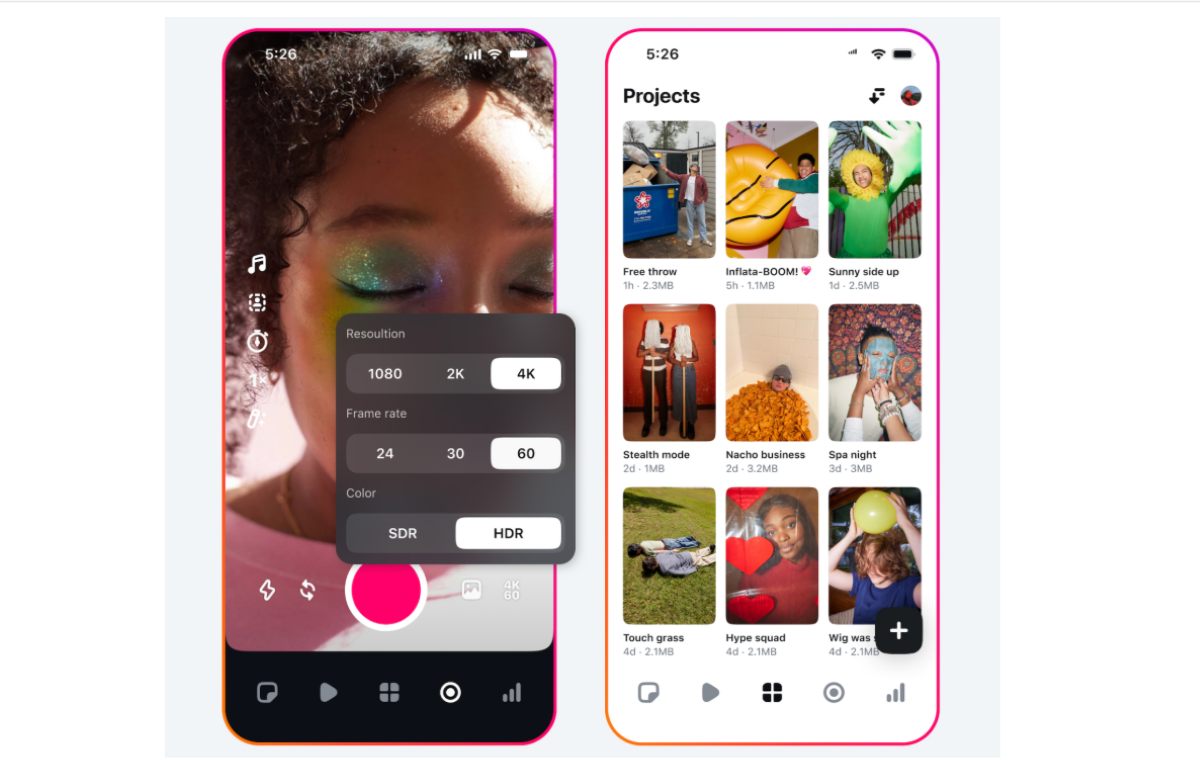
The time has come to Edit 4K videos from your mobile with EditsIf you've used other vertical video editors, then its interface will be quite familiar. At the top, you'll find the video preview, and at the bottom, you'll find the timeline where you can add videos, audio, images, or any other elements you want.
Besides, You can add other elements such as:
- Text.
- Voice.
- Subtitles.
- Sound effects.
- Cutout
- Stickers.
Export the video in 4K
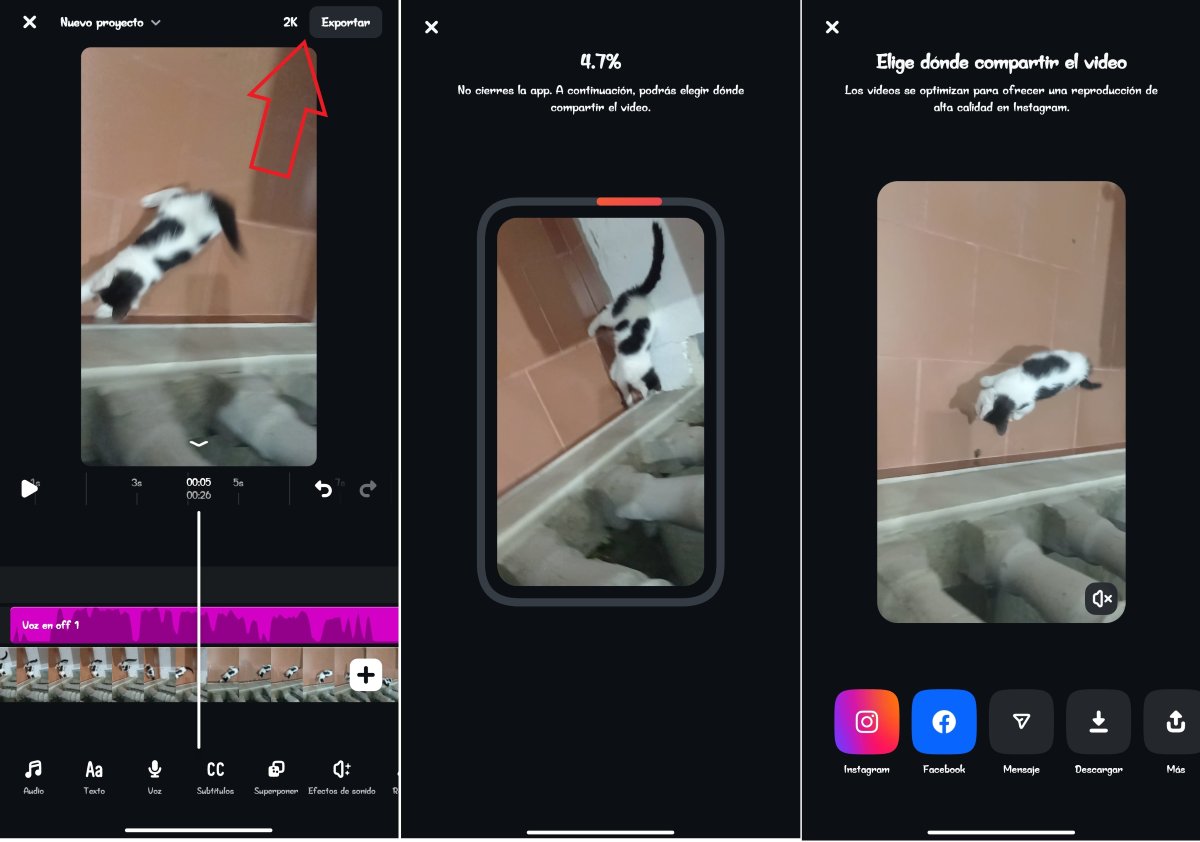
After editing 4K videos on your phone with Edits and making all the necessary adjustments, you need to export them. But before you click the Export button, Tap the option right next to it to choose the quality of the video. after downloading. The tool usually adapts to the original video quality and will mirror it there.
However, if it doesn't, make sure the resolution is set to maximum: in 4K and with the highest number of frames per second: 30 or moreOnce you've selected the highest quality, you can then click the Export button to continue to the next step.
Upload it to Instagram or other platforms
From the same Edits tool, you can publish the video to Instagram or Facebook. These are the first options. But it also allows you to save it on your mobile to upload it to other platforms or schedule it to be published at a predetermined time.
The best thing about it is that When editing 4K videos from your mobile phone with Edits, you get rid of the watermark.So you can use the video on any channel or social network, work for other people, or even build a personal brand. Well, you can actually use it however you want once you've saved it to your phone's gallery.
Keep in mind the quality supported by Instagram when editing 4K videos from your mobile with Edits
Now, at this point, there is a very important aspect that is worth clarifying: The maximum resolution quality supported by Instagram for uploading Reels is 1080 x 1920 pixels.This means that even if you've made a great effort to keep your videos in 4K even after editing, Instagram optimizes them to 1080p.
This is the format supported by mobile devices and is the standard used to display Reels on Instagram. However, this It does not mean that your videos will be published in low quality.This is actually the best resolution you can view videos at on a mobile screen. If you want to see and enjoy 4K or higher quality, you'll need to watch the video on a much larger screen, such as a TV.
Editing 4K videos from your mobile phone with Edits without losing quality is possible.
In short, if you want to edit videos for your Instagram Reels, you can do so from Edits, a free tool, easy to use and leaves no watermarkRemember, you can post them directly from Edits on Instagram and Facebook or save them to your phone to upload later.
Finally, while it is true that Instagram supports a maximum resolution quality of 1080, Don't forget that Edits allows you to edit them up to 4KThis will be very useful if you want to publish your video on platforms like YouTube, which supports a maximum quality of up to 8K.

From a young age, I've been fascinated by all things scientific and technological, especially those advancements that make our lives easier and more enjoyable. I love staying up-to-date on the latest news and trends, and sharing my experiences, opinions, and tips about the devices and gadgets I use. This led me to become a web writer a little over five years ago, focusing primarily on Android devices and Windows operating systems. I've learned to explain complex concepts in simple terms so my readers can easily understand them.