
ING is a popular online banking institution with numerous clients all over the world. Among the reasons that explain its success, it is worth highlighting its flexibility and versatility. In particular, the possibility of topping up the balance of a telephone account from a computer or from the same mobile phone, quickly and easily. In this post we are going to see how to recharge your mobile phone from ING.
As you will see below, adding credit to our mobile phone through ING is a fairly easy process to carry out. The only requirements They must be a client of the bank and have sufficient balance in the account to be able to make the payment.
Below we explain the steps to follow to recharge your mobile from ING: both from the web, through a computer, such as from a smartphone, using the official app of the entityThe steps to follow in both cases are very similar, although the way to access the option is different. We explain everything below:
Recharge your mobile phone from ING using a computer
The ING website has a special section for clients ("Customer Area") which can be accessed via the button of the same name. This is located in the upper right corner of the screen, marked in blue. When accessing it, a screen like this appears:
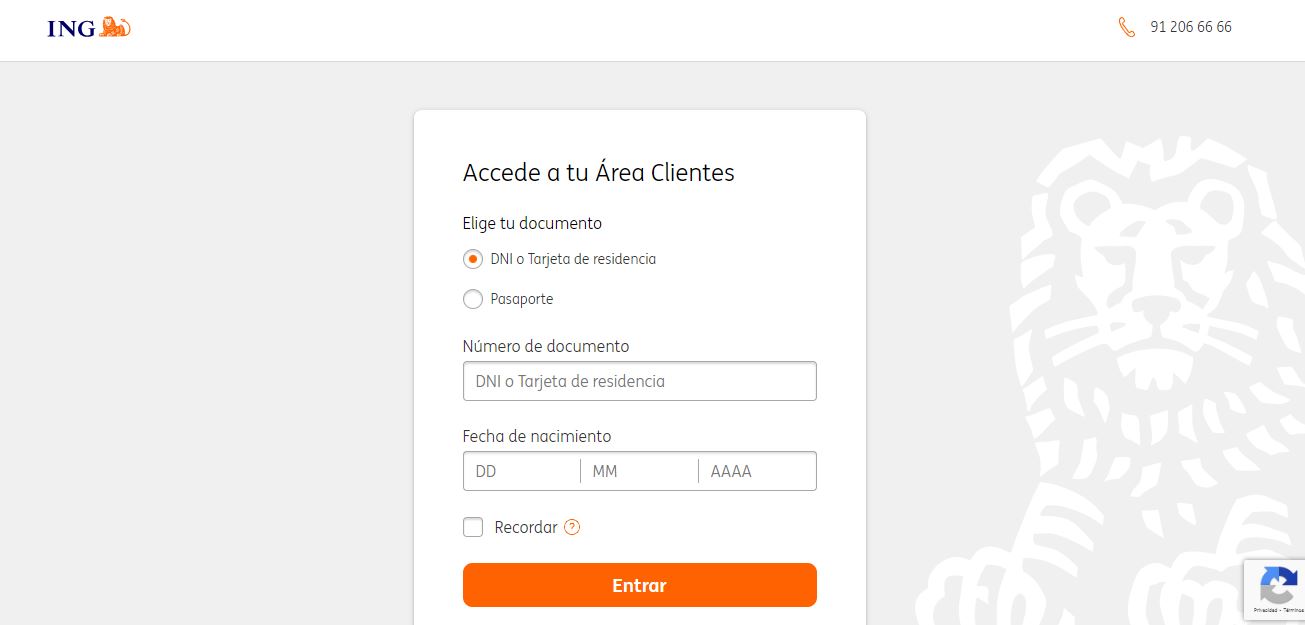
To enter, we must select the type of identity document (DNI/Residence Card or Passport), then enter the number and our birthdate in the corresponding fields. Then, click on the button "Enter". All of this is valid only if we are already clients of the bank. Otherwise, an error message will be displayed.
After pressing "Enter", we will have to enter our user key. This is a six-digit code, of which ING asks us for only three positions to confirm that we are the ones accessing the account. After completing this step, we can proceed to top up as follows:
- On the ING user home page, go to the tab “My products”.
- There we click on "Card".
- Next we select “Operate”.
- Then we'll “Options/Mobile top-up”.
- At this point we have to write the phone number we want to recharge, followed by the amount we want to charge.
- Finally, we press the button "Confirm".
It is important to remember that there is no additional charge or fee for recharging your mobile phone from ING's online banking.
Recharge your mobile from ING using the app
Almost all ING users already know that there is a practice mobile application with which they can manage their finances. In fact, most of them carry out their procedures and management through it, comfortably from their smartphone. These are the download links for iOS and for Android.
The first step, obviously, is to open the application on our mobile phone. As in the previous case, it will be necessary first identify ourselves with our access code (we will be asked for three positions of the six-digit code). After this, once inside the application, we must follow these steps:
- On the home page of the application, click on the tab "My products."
- In the list that drops down below, we select "Card".
- Then we click on the option "Operate."
- Next, we're going to «Options/Mobile top-up».
- Finally, we write the phone number we want to recharge plus the amount to recharge.
With these simple steps, the amount entered will be immediately charged to your mobile balance.
In addition to recharging your mobile phone from ING, there are many other useful actions that you can perform through the website or app of this well-known online bank. That is why more and more people are encouraged to open an account and enjoy advantages that are impossible to find in traditional banking.
About ING in Spain

ING, which is part of the Dutch financial group ING Bank NV, began operating in Spain in 1999 as a branch of the international group. Despite this, its activity is subject at all times to the regulations of the Bank of Spain.
Over this time, it has launched various financial products that have achieved great acceptance among small savers and investors in our country. Among them, it is worth mentioning the Orange Account, the Payroll Account and, more recently, an interesting range of mutual funds and securities accounts with different degrees of risk.
Another interesting product that ING offers us is Twyp, a free application for the bank's clients that allows them to make payments, order transfers and withdraw money from more than 4.000 establishments throughout Spain. As you can see, being a client of this online banking entity there is much more to do than simply top up your mobile phone from ING.

Editor specialized in technology and internet issues with more than ten years of experience in different digital media. I have worked as an editor and content creator for e-commerce, communication, online marketing and advertising companies. I have also written on economics, finance and other sectors websites. My work is also my passion. Now, through my articles in Tecnobits, I try to explore all the news and new opportunities that the world of technology offers us every day to improve our lives.