If you see messages on your screen that say “Windows is not activated”, “Activate Windows” or “This copy of Windows is not genuine”, there are clear signs that your operating system is not properly licensed. Next, let's look at other signs that warn us that Windows is not working properly and what you should do if you encounter this situation.
Windows activated “invalidly”: signs that something is wrong
There are several signs that help us identify an invalidly activated Windows. For example, you might see that Your device is exhibiting the following symptoms:
- You may see a watermark with clear messages on your screen.
- You may also have customization restrictions.
- You cannot update the operating system correctly.
- There are functions that have expired for no reason.
- Your PC is starting to have compatibility problems.
Watermark: a direct sign of an invalidly activated Windows.
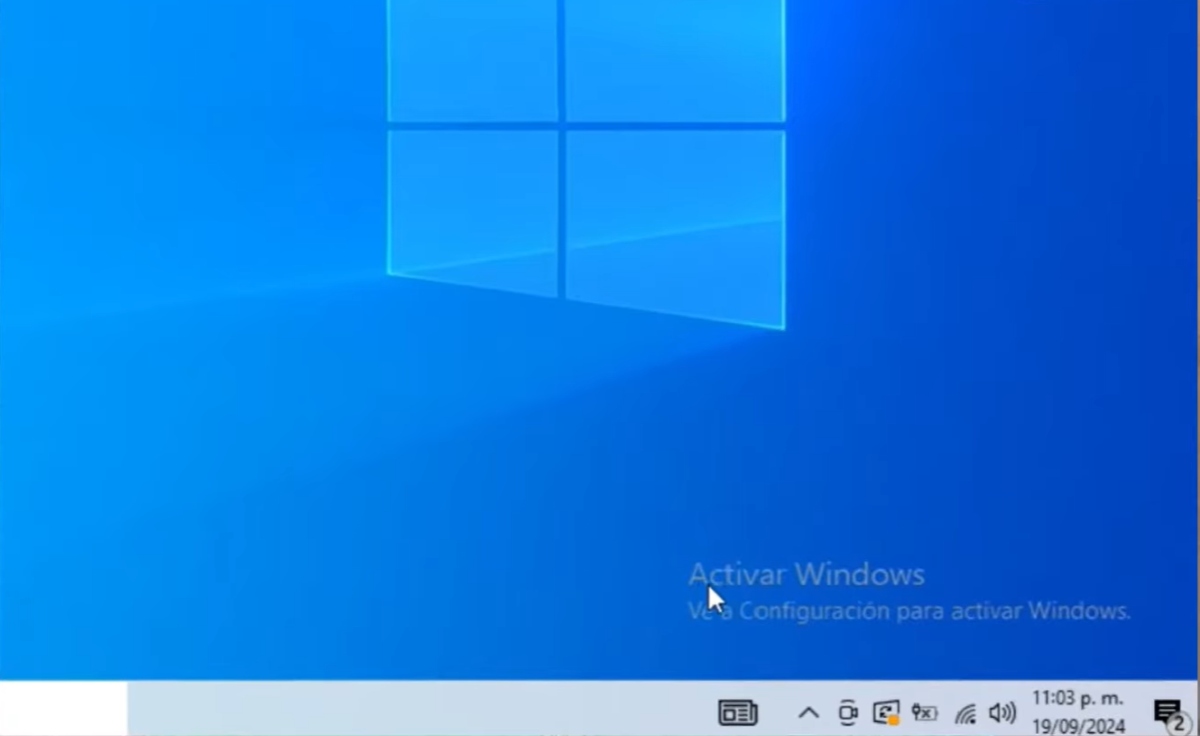
Do you see a message in the bottom right corner of your screen that says “Activate Windows” “Windows is not activated" either "This copy of Windows is not genuine"This is an unmistakable sign that your operating system is not legally activated or that your license is not valid."
Customization restrictions
Watermarks aren't the only sign of an invalidly activated Windows. Having customization restrictions or limitations is also a cause for concern. For example, if you can't change the wallpaperIf the colors, themes, or other customization options in Windows Settings are not being changed, start to suspect the authenticity of your operating system.
Activation errors
Some error codes can also help you determine if your Windows is not legally activated. If you see codes like 0xC004F050 (invalid key), 0xC004F211 (hardware change) o 0x803F7001 (digital license not found) You may be being alerted about issues related to Windows activation.
Restricted updates
Are you finding it impossible to perform updates on your device, even when they appear as available? Windows Update may block certain critical security updates If the operating system is not properly activated, this poses a risk to your security and privacy, as these essential measures are not in place.
Expiration of functions
The expiration of some features can also be a sign that you have Windows activated "invalidly." For example, advanced features such as BitLocker or Remote Desktop may be disabledThis happens because Microsoft "finds out" that Windows was not properly activated on your computer.
Compatibility issues
The compatibility issues They are also an indication that something is wrong. If official Microsoft software (Office or Defender) displays warnings or operates with restrictions, then you should start to suspect something is amiss. Of course, seeing one of these signs doesn't necessarily mean that Windows isn't activated correctly. However, if your PC exhibits several of these signs simultaneously, then you may need to check its activation sooner rather than later.
Windows activated “invalidly”: common causes
Why hasn't your Windows activated properly? Actually, there isn't a single culprit for your operating system not activating optimally. If the operating system had been activated with KMS38, Here you can find out what's happeningBelow, we list the most frequent causes of this problem:
- Incorrect or counterfeit product keyUsing an invalid key or one that does not correspond to the installed edition may result in an invalidly activated Windows.
- License used on multiple devicesMicrosoft may block keys that exceed the allowed number of activations. If that happened with your computer, then you know where the problem is coming from.
- Major hardware changeIf you replaced the motherboard or other critical components of your computer, this may invalidate the digital license.
- Incorrect Windows versionIf you install Windows Pro with a Home key, for example, you will not achieve proper activation.
- Internet connection problems or incorrect date/timeThese drawbacks may prevent the system from validating the license with the servers optimally.
What to do if you suspect Windows is "invalidly" activated
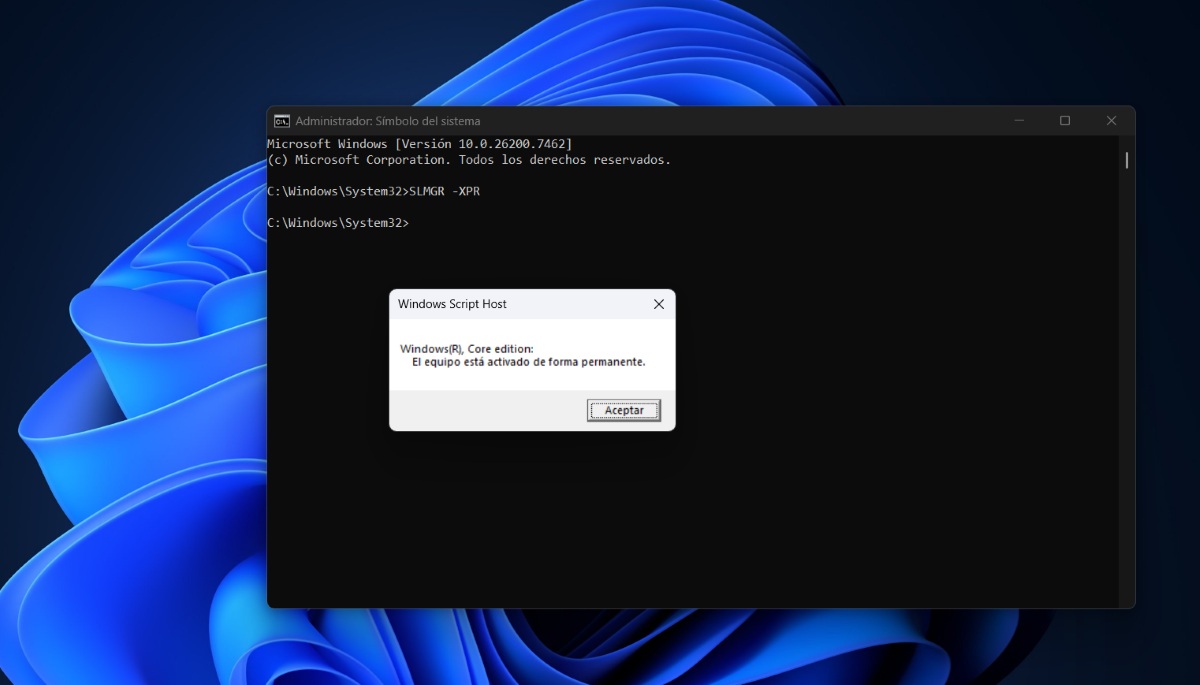
If you suspect an invalidly activated copy of Windows, there are some steps you can take. First, you should do the following: check activation statusYou can do this by typing cmd and logging in as administrator. Then, type the command: SLMGR -XPR and press Enter.
To do this, go to Configuration – System – Activation And check if it says “Activated” or “Windows is activated with a digital license.” If it says something like “Activate Windows,” then it’s not activated correctly. These are other things. Steps you can take if your Windows is incorrectly activated:
- Run the Activation TroubleshooterIf Windows displays an activation error, run the troubleshooter. If it doesn't appear, go to Troubleshoot – Other troubleshooters – Windows Update.
- Check your product key: make sure it matches the installed edition.
- Reactivate after hardware changeIf you've made a significant hardware change to your computer, you'll need to sign in again with the Microsoft account linked to your license. From there, you'll need to select the "I've recently changed hardware" option.
- Contact Microsoft supportIf the error persists, you may need direct assistance from Microsoft or to purchase a new, valid license.
Invalidly activated Windows: the risks involved
So, what are the real risks of using an invalidly activated Windows? For one thing, Your digital security is reduced.Since you don't receive full updates, your PC is vulnerable to viruses that wouldn't be able to get in if Windows were properly activated. Furthermore, using pirated keys or cracks... may involve legal penaltiesFurthermore, without a legally activated Windows system, you lose stability. You have a higher risk of errors, crashes, and data loss.
In conclusion, if you suspect an invalidly activated Windows installation, you can confirm it through signals such as watermarksCustomization restrictions or limited updates. And, if your Windows is definitely activated incorrectly, it's best to find a way to activate it legally as soon as possible.

From a young age, I've been fascinated by all things scientific and technological, especially those advancements that make our lives easier and more enjoyable. I love staying up-to-date on the latest news and trends, and sharing my experiences, opinions, and tips about the devices and gadgets I use. This led me to become a web writer a little over five years ago, focusing primarily on Android devices and Windows operating systems. I've learned to explain complex concepts in simple terms so my readers can easily understand them.