Do you need to verify that a copied file is exactly identical to the original? In the digital world, trust is a luxury we sometimes can't afford. Fortunately, there's an effective method for verifying file integrity and to ensure that they are perfect clonesWe'll tell you everything below.
What does it mean for two files to be identical?

We've all been there: moving 50GB of family photos to an external drive or downloading a distribution to install on our main machine. The copying process finishes, the progress bar disappears, and We assume everything is fineBut what if it isn't?
A corrupt bit, a bad sector on the destination disk, or a network outage can ruin a file without us even noticing. Is there a way to verify that a copied file is exactly identical to the original? Yes, there is, and it's called checksum or checksums.
But what does it mean for two files to be identical? It's not enough to compare their name or size, or even for them to display the same content when opened. For one to truly be a clone of the other, There can be no difference between its binary contentThey must be identical bit by bit. And this is where the functions come into play. hash.
What is a hash And why should you care?
Suppose you have to verify if two documents A thousand pages are identical. Reading them word for word would take days. Instead, you could count the number of "A"s, the number of "B"s, and so on, and compare those totals. If the totals match, it's almost certain that the documents are exactly the same.
Well, a cryptographic hash (or digest function) does something similar, but with extremely complex mathematics. It takes a file of any size and processes it to produce a fixed-length character stringThis string is known as a "hash value" or "checksum".
For example, the SHA-256 hash of the phrase "Hello World" is always: 7f83b1657ff1fc53b92dc18148a1d65dfc2d4b1fa3d677284adc4478c4f6f2b1. If you change even just one point (a pixel in an image, a space in a document), the resulting hash changes drasticallyThis is known as the avalanche effect.
To generate the hash value of a file, there are different algorithms, including SHA-256 (and the SHA-2 family) The most widely used. This algorithm is fast, robust, and very stable, which is why it's used by technologies like Bitcoin and most Linux distributions to verify their installation images. It's virtually impossible to find two different files that produce the same SHA-256 hash.
How to verify that a copied file is exactly identical to the original

It's clear that the best way to verify that a copied file is exactly identical to the original is by comparing their hash values. There's no need to open the file or manually check hundreds of megabytes or gigabytes. The algorithm processes its entire content and produces a unique digital footprint that we can compare.
So how do you verify that a copied file is exactly identical to the original? You have two options: using the command line and through a testing application or programLet's see how to use the first method on Windows, macOS, and Linux; then, we list the best programs available.
In Windows using PowerShell
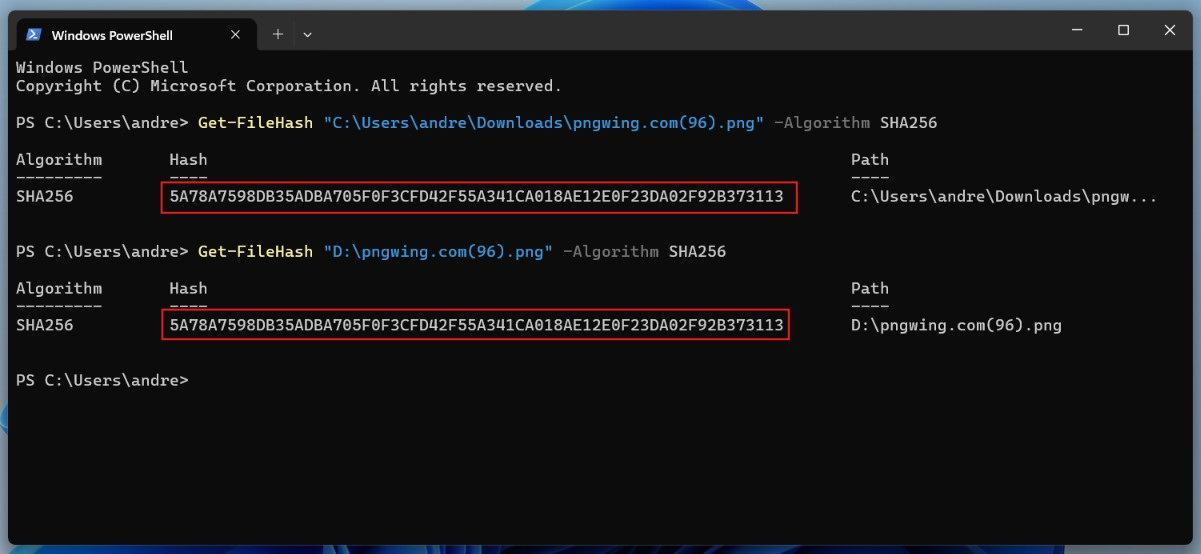
For years, Windows lacked a native tool for this, forcing users to rely on third-party software like HashTab or HashCalc. Now, it includes the tool. Get-FileHash integrated into PowerShell Since version 4.0. Let's see how to use it:
- Open the Start menu, search for PowerShell, and open it.
- Use the following command, replacing the path with the path to your original file:
Get-FileHash "C:\Ruta\De\Tu\Archivo.zip" -Algorithm SHA256To copy the path without errors, you can drag the file from the Explorer window to the PowerShell instance. - PowerShell will process the file and display the algorithm, path, and hash string.
- Use the same command with the copy of the file to generate its hash value.
- Finally, compare both values. You can copy one into a notepad and use the search function (
Ctrl + FoCmd + F) to paste the other one and verify that the editor finds it.
On macOS and Linux, from the terminal
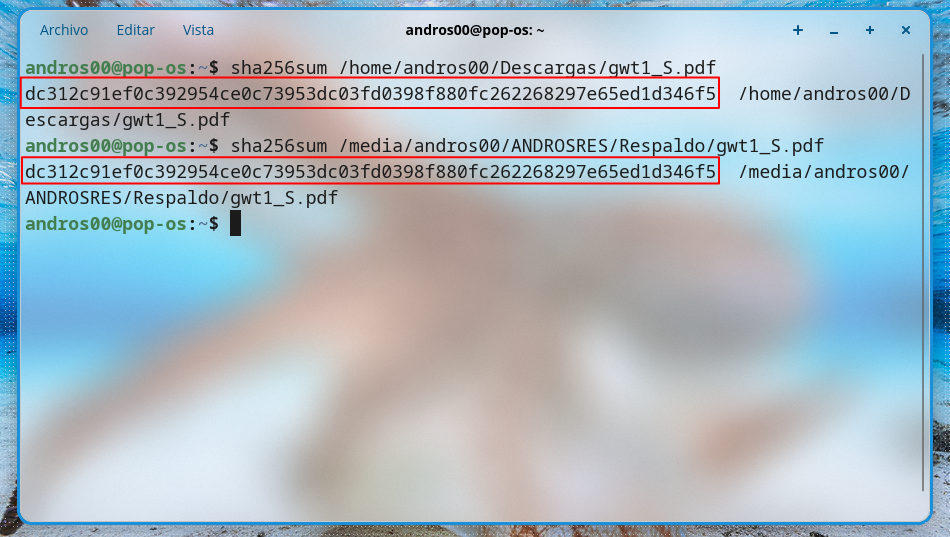
The Unix-like operating system is a command-line paradise. Here, tools are part of the system, including one to verify that a copied file is exactly identical to the original. Just open the terminal and use the command sha256sum (on Linux) or shasum -a 256 (on macOS). For example, on Linux it would look like this: sha256sum ruta_archivo_original.iso.
Similarly, you need to generate the hash value for both files: original and copy. Then, you need to compare them Using the Notepad method. If they are the same, it means the copy is a clone of the original; if not, there was an error in the copying process. Now let's look at other ways to check that a copied file is exactly identical to the original.
Tools with a graphical interface to verify that a copied file is exactly identical to the original
If you find the command line cumbersome or need to check dozens of files simultaneously, there are excellent options available. free graphic alternativesWe've listed the best ones:
- 7-Zip (Windows): This popular compression program integrates into the Windows context menu. Right-clicking on any file will display the 7-Zip – CRC-SHA option, allowing you to instantly calculate hash values.
- HashMyFiles (Windows): A portable utility developed by NirSoft that allows you to drag and drop entire folders to instantly obtain the hashes of all the files contained within.
- QuickHash GUI (Windows, macOS, and Linux): This is an open-source, cross-platform application specifically designed for computer forensics and backups. It allows you to verify that a file is exactly identical to the original, or even entire directories.
What do I do if the hashes don't match?
If, after verifying that a copied file is exactly the same as the original, you discover that their hashes are different, what should you do? Don't panic. The destination disk may have bad sectorsOr the package may have been corrupted by a network error. It can also happen that intermediary software, such as antivirus or backup software, ends up slightly modifying the file.
Were you copying a file that was being actively written to? If so, it's normal for the original hash to be different from the copy because the original is no longer the same. Solution? Copy the file againAnd if the problem persists, Check the health of your disks with tools like chkdsk (Windows) or fsck (Linux), or check the integrity of the network you are using.

From a young age, I've been fascinated by all things scientific and technological, especially those advancements that make our lives easier and more enjoyable. I love staying up-to-date on the latest news and trends, and sharing my experiences, opinions, and tips about the devices and gadgets I use. This led me to become a web writer a little over five years ago, focusing primarily on Android devices and Windows operating systems. I've learned to explain complex concepts in simple terms so my readers can easily understand them.