
In many films, series, documentaries and social media recordings it is common to see time-lapse videos. It is a very original and entertaining way to see how time passes before our eyes. Would you like to create your own videos time lapse from your mobile device? Well, it is possible to make time lapse on Android, and in this post we show you the best applications to achieve it.
To create a time-lapse video on Android, you don't need to have specialized photography or recording knowledge. In fact, most mobile phone cameras have this eye-catching feature built in. The problem is that they offer few configuration options, so it is advantageous to install an Android time lapse app if you want to capture impressive videos.
Android time lapse: How to create one using your Android mobile
Surely you already know that a time lapse, or span of time, It is a recording technique that allows an event that lasts over time to be captured in a very short video.. Sunrises and sunsets, the traffic on a busy street, the movement of clouds or the growth of a plant are just a few examples. These events take hours, days or even weeks to complete, but with this technique they can be seen in just a few seconds.
For create a time lapse, in general hundreds or even thousands of photographs of an event are captured, and then reproduced at high speed. Another option is to record a video and then accelerate its playback speed. However, experts in the field assure that this last technique does not obtain professional or high-quality results. All in all, it may be enough if you want to record an Android time lapse from time to time or for fun.
As you might expect, to create a time lapse you are going to need at least three things: a mobile phone whose camera has this function, a support to fix it and an event or event to capture. Regarding the second element, you can use a tripod or some other stabilizer to keep the phone stationary while recording. As for mobile phones, you will be happy to know that most modern devices have the time lapse function among the video options.
How to make an Android time lapse without third-party apps
To make an Android time lapse without using third-party applications, you just have to activate that function in the camera settings. The steps are detailed below:
- Open the camera app on your Android device
- Look for the option Further sliding the options panel to the left
- You can choose the capture speed and recording time. Depending on the event to be captured, there are appropriate speed values. For example, to record a street you can use a speed between 4X and 30X; for moving clouds, 60X and 90X; for the opening of a flower, 900X and 1800X.
- Once the values have been adjusted, you just have to put the mobile phone on a fixed support and click on the record button.
- While recording, the phone displays two timers: the one on the left indicates the recording time, and the one on the right indicates the duration of the resulting video.
Even though the native camera application on Android phones incorporates the function to record time lapses, it usually has limited configuration options. That's why, It is better to download a third-party app if you want to obtain more professional results. In addition, these applications tend to be more intuitive when configuring capture options, and even offer previews of each setting to choose the most convenient one.
The best time lapse Android apps
Let's take a look at the best time lapse Android applications that you can download from Google Play. With them you can make the most of the features of your mobile camera and capture impressive videos.
Framelapse
One of the best time lapse Android apps is Framelapse, with thousands of downloads and very good reviews from users. This app stands out for its simple and intuitive interface that allows you to create high-quality image sequences. It also gives you access to various advanced features for more professional results.
The free version of this app is more than enough for most users. But if you are really passionate about photography or need high-level recordings, you can pay the subscription to unlock all its features.
Time Lapse Camera
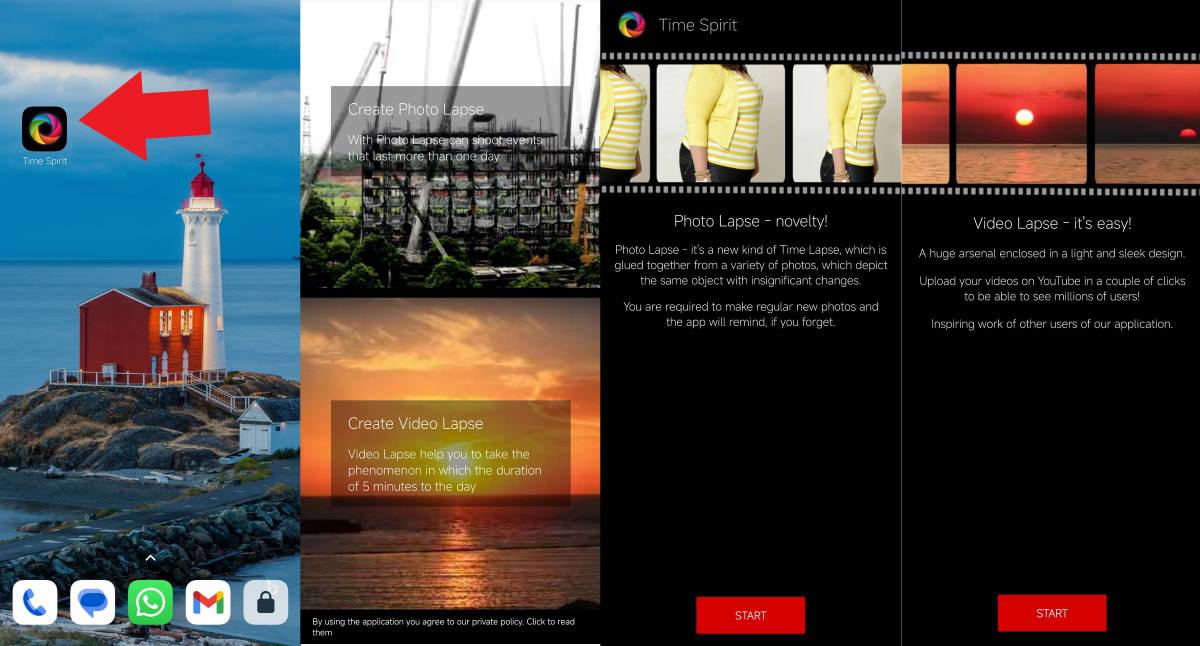
Here is another time lapse Android application designed to create time lapse videos, edit them and share them on YouTube and social networks. Although its name on Google Play is Time Lapse Camera, when downloading it shows as Time Spirit.
When you open it, you see that There are two main options to choose from: 'create photo lapse' and 'create video lapse'. With the first you can capture images of events that last more than a day, and then combine them into a sequence. The second option works better with events that are a little more dynamic, such as moving clouds or traffic on a street.
Velocity Lapse: Time lapse
With more than 100 thousand downloads on Google Play, Velocity Lapse It is a good tool to make time-lapse videos from your Android mobile. Among the advantages offered by this app, its ability to capture with the screen off to save battery. It also offers other interesting features such as adding timestamps, delay captures, previews and numerous editing options.
TimeLab - Video Rendering
We end up with this time lapse Android app that works quite well for making time lapse videos. The free version of TimeLab - Video Rendering gives you access to various options to create and edit videos from your mobile. An outstanding feature is the motion blur, which eliminates involuntary movements when you record while holding your phone in your hand.
If you upgrade to the paid version, you unlock premium features like more extensive editing features and zero ads. The app has a well-kept and easy-to-understand interface for those who have little photography knowledge.

From a young age, I've been fascinated by all things scientific and technological, especially those advancements that make our lives easier and more enjoyable. I love staying up-to-date on the latest news and trends, and sharing my experiences, opinions, and tips about the devices and gadgets I use. This led me to become a web writer a little over five years ago, focusing primarily on Android devices and Windows operating systems. I've learned to explain complex concepts in simple terms so my readers can easily understand them.