- Luma Dream Machine allows you to generate realistic videos from text or images.
- The system stands out for its speed, visual quality, and ease of use.
- It has multiple creative applications, from marketing to educational content.

The world of artificial intelligence is making huge strides, especially in the field of creating realistic videos from text descriptions or static images. In this context, a powerful and innovative tool has emerged: Dream Machine by Luma LabsStill not sure what this revolutionary system is all about, how it works, or if it's really making a difference compared to other AI video generators? Here's the lowdown, straightforward explanation.
With Dream Machine, anyone can turn ideas into stunning visual clips or transform a simple image into a mini-movie with results that go far beyond anything previously available. Plus, it does it quickly, doesn't require any technical video editing knowledge, and best of all, you can try it for free right from the start. This is how Luma Labs is changing the game of audiovisual creativity. Let's get started. What is Luma Labs' Dream Machine and how to generate realistic videos from text.
What is Luma Labs' Dream Machine?
Dream Machine is an artificial intelligence system developed by Luma Labs, a company known for its innovative AI projects applied to the visual world. Unlike other solutions, Dream Machine allows you to create Ultra-realistic videos from descriptive text or static imagesThat is, you type what you want or upload a photo, and after a brief AI-generated process, you get a high-quality animated clip with realistic movements and cinematic effects.
Its operation takes advantage of training models based on large amounts of videos, which allows him to fully understand the physical relationships between characters, objects and settings, thus recreating credible movements, coherent actions and even fluid camera movements worthy of a film.
It is not just an experimental tool, but an online platform open to everyone.You can easily access it from its official website, lumalabs.ai/dream-machine, and start trying it out in minutes, without paying or downloading complex programs. If you'd still like to know more, here's an article about What is Luma Dream Machine?
Why is Dream Machine so special?
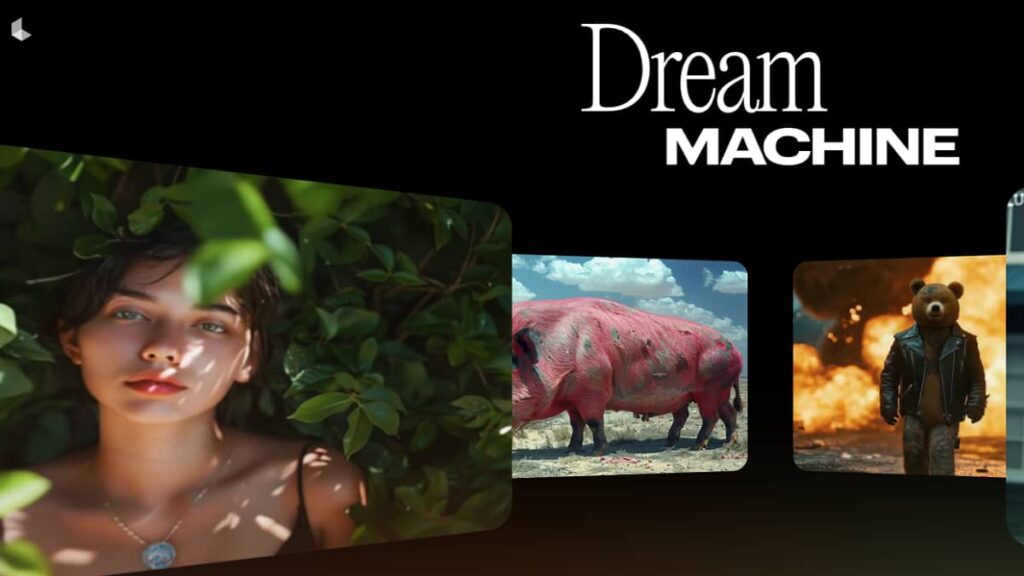
There are already several AI video generators, but Dream Machine stands out especially for the quality of the results and the user experience it has managed to offer since its launch. Among its strengths are:
- Generation speed: It can produce a video of about 5 seconds (120 frames) in just a couple of minutes, which speeds up experimentation and developing ideas.
- Professional results: The generated videos have a level of realism and coherence far above average, with well-defined characters and believable scenes.
- Natural camera movements: AI understands how the camera should move to tell the scene in a cinematic or naturalistic way.
- Physics and global coherence: It manages to emulate how people, animals and objects interact in the real world, respecting the physical laws and proportions of the elements on the screen.
Furthermore, users themselves highlight the system's ease of use and the attention it pays to contextual details and prompts or the start image.
Dream Machine is also presented as a real alternative to other tools that have caused a stir but remain in limited access, such as OpenAI's Sora. Here, on the other hand, you can freely access and experiment, which has led to a flood of viral videos and experiments by creatives, businesses, and curious people.
How does video generation work with Dream Machine?
Using Dream Machine is really easy, whether you want to create videos from text descriptions or animate a static image. The process, step by step, is as follows:
- Registration and loginVisit the official Dream Machine website. All you need to do is create a free account or sign in with Google.
- Prepare the prompt or choose the image: You have two input options: write a detailed prompt (preferably in English, since you understand these descriptions better by now) or upload an image that will serve as the basis for the animation.
- Personalize and improve the message: You can leave the 'Improve Message' option enabled to let the AI add creative details, or disable it if you prefer to define every aspect of the scene yourself, from characters to movements.
- Video generation: Click 'Generate' and wait one to two minutes (although it may take longer during peak hours). You'll see a progress bar on the screen indicating the status of the process.
- Download and evaluation: The generated clip will appear with options to preview it, rate the quality (thumbs up or down), download it, and, if desired, request a duration extension.
Typical Dream Machine results are 5 second videos and 120 frames by default., although the length can be extended by adding additional instructions. The videos maintain a very high resolution and visual finish, suitable for social media, presentations, educational materials, or marketing campaigns.
Dream Machine plans, prices and terms of use
Dream Machine can be used from scratch at no cost, making it easy for everyone to access. If you're looking to create more videos or remove limitations, there are paid plans that vary based on your needs:
- Free Plan: allows you to generate up to 30 videos per month, ideal for testing and experimenting.
- Subscription plans: They offer a larger number of videos per month (from 70 to 2000), with advantages such as faster generation, unbranded downloads and commercial rights.
Free access makes Dream Machine one of the most accessible options for independent creatives, businesses, and educators.
Practical tips to achieve the best results
To maximize the quality of your videos, it's a good idea to follow a few tricks that can make the difference between a simple test and an impressive result:
- Create clear and detailed prompts: Accurately describe the scene, characters, movements, and environment. The more relevant information you provide, the better the AI will understand what you're trying to achieve.
- Better in English: For now, the most accurate results are obtained by typing in English, although you can use automatic translators if necessary.
- Use quality imagesIf you upload photos, choose sharp, well-lit images with well-defined elements for best results. You can also provide a start and end image for smoother transitions.
- Don't be afraid to experiment.: Try different variations on text, images, or movement instructions. The AI learns and improves with practice.
Current limitations and areas for improvement
Dream Machine is still in development, and although it is one of the most advanced systems, it has some limitations that should be taken into account:
- For now, it generates videos of a maximum of 5 seconds, although it is possible to extend the duration by requesting more time from the system.
- It may present inconsistencies in complex movements or in animations of animals and humans in fast actions.
- It is not able to integrate legible texts into the video.
- Some objects or figures may deform during rapid transitions or movements.
- It does not allow you to adjust the aspect ratio, although more options are planned for future versions.
The developers are working to address these issues and expand customization features. They also have a Discord channel for users to share feedback and suggestions.
What kind of videos can you create and what is Dream Machine used for?
Dream Machine applications are as broad as the user's creativity, covering:
- Content creators: for original clips on platforms like YouTube, TikTok or Instagram.
- Designers and digital artists: to bring illustrations to life or create quick visual demos.
- Marketing companies and agencies: for promotional videos, advertisements and product materials without high production costs.
- Teachers and trainers: to make teaching materials more visual and attractive.
- Individuals: to create memes, animate photo memories, or explore the artistic capabilities of AI.
Its main value lies in the speed, quality, and simplicity of obtaining results that previously required a lot of time and technical knowledge.
What do users and experts think about Dream Machine?
The community has received Dream Machine very positively, highlighting above all its accessibility and the quality of the videos generated. Many appreciate that the AI maintains physical and aesthetic consistency across frames, with characters and backgrounds showing no noticeable distortions.
On the other hand, some comment that generation may be slower during peak hours and that certain movements, such as animal movements, are even better. However, almost everyone agrees that it represents one of the best available options for open access, surpassing other high-cost or restricted-access generators.
Alternatives to Dream Machine: Is there real competition?
While Luma Labs' Dream Machine is enjoying recognition, there are other solutions in development or on the market that also deserve attention:
- Sora (OpenAI): in closed phase, it promises advanced results although it is not yet open.
- I SEE (Google): another notable project, still out of reach of the general public.
- Kling (China): specialized in anime style, with certain limitations in the international version.
- Pika and Runway: platforms with varied capabilities in AI video generation and editing.
- Dreamina: Free and fast alternative, with additional features such as frame interpolation and soundtrack generation.
The choice will depend on the type of video you're looking for, your budget, and the control you want over the animation. Dream Machine has undoubtedly democratized access to these tools.
This breakthrough in AI-powered audiovisual creation technology has marked a turning point, making it easier for anyone to turn a simple idea into a realistic, high-quality video in a matter of minutes, with little investment and no specialized knowledge.

Passionate about technology since he was little. I love being up to date in the sector and, above all, communicating it. That is why I have been dedicated to communication on technology and video game websites for many years. You can find me writing about Android, Windows, MacOS, iOS, Nintendo or any other related topic that comes to mind.