- Microsoft introduces AI features to Windows 11 Notepad to improve productivity.
- The new automatic summary feature allows you to condense long texts with a simple command.
- Access to recent files makes it easy to get back to work without having to search manually.
- Improved cropping tool with draw-and-hold functionality for greater precision.
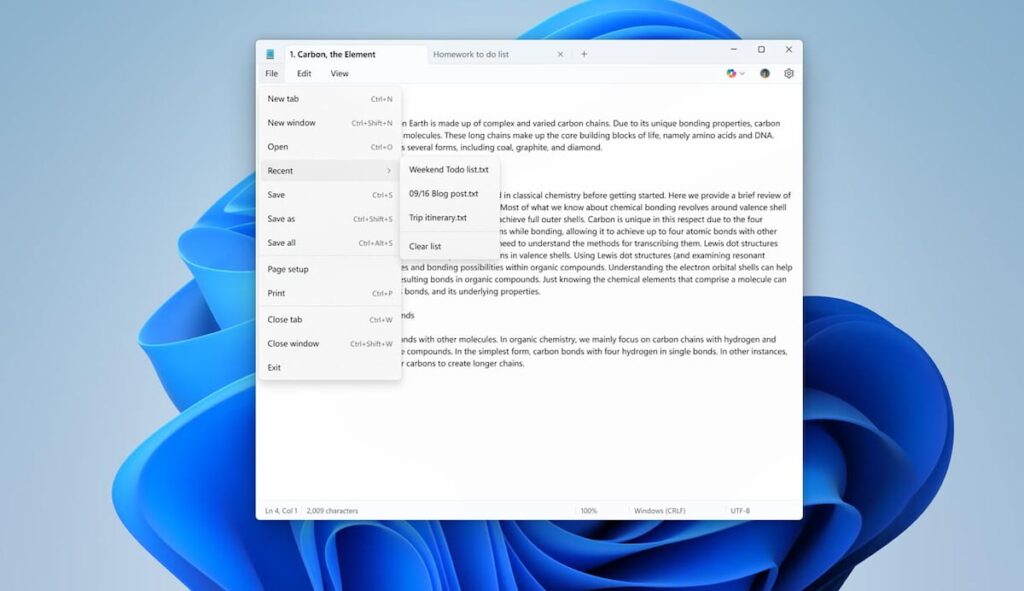
Microsoft continues to improve the classic applications of its operating system with the artificial intelligence integrationOn this occasion, the Windows 11 Notepad has received a series of updates that seek to make it more useful and efficient for users. Among the most striking new features is the ability to generate automatic summaries of long texts, as well as improvements in the management of recent files and in the Crop tool.
Automatic summaries with artificial intelligence

One of the most notable features of this update is the addition of summaries generated by artificial intelligence. Now, users can select a piece of text within Notepad and choose to automatically summarize it.
This process can be done in two ways: by right-clicking on the text and choosing the "Summarize" option, or by using the keyboard shortcut Ctrl + M.
In addition, users can customize the summary length according to your needs, allowing you to obtain a more condensed or more detailed version of the original text. To use this feature, it is necessary Sign in with a Microsoft account, although it is possible to disable it in the application settings if you do not wish to use it.
Quick access to recent files
Another important novelty is the incorporation of an option that allows quickly access recently opened files. From the File menu in Notepad, you can now view a list of documents used in previous sessions, making it easier to resume work without having to manually search for files.
For those concerned about privacy, Microsoft has clarified that this list It will only display the file titles without exposing their contents.Additionally, users can choose to clear the list or disable the feature entirely from their settings.
If you want to learn more about how write notes on the desktop for free, this Notepad update will be particularly interesting for you.
Improved Snipping Tool

Along with improvements to Notepad, Microsoft has also updated the Crop tool of Windows 11 to include the feature called "draw and hold». This feature allows users to create more precise shapes on your screenshots. Simply draw a line, rectangle, or any other shape and hold down the cursor for the tool to automatically straighten it.
In addition, the function allows edit the size and the location of each figure, making it easier to create clearer, more professional annotations. This improvement is comparable to solutions already available in other operating systems and markup applications.
Microsoft has begun to deploy these updates gradually for users enrolled in the Windows Insiders program in the Canary and Dev channels. While an exact date for general release has not yet been announced, these features are expected to reach all users in the coming months.
With these improvements, Microsoft continues its commitment to making Windows 11 a more productive operating system, integrated with new artificial intelligence technologies. Notepad, one of the most basic applications of the system, now offers advanced tools that can be very useful for those who work with large volumes of textMeanwhile, the Snipping Tool becomes a more versatile option for those who need to make quick annotations or edits to their screenshots.

I am a technology enthusiast who has turned his "geek" interests into a profession. I have spent more than 10 years of my life using cutting-edge technology and tinkering with all kinds of programs out of pure curiosity. Now I have specialized in computer technology and video games. This is because for more than 5 years I have been writing for various websites on technology and video games, creating articles that seek to give you the information you need in a language that is understandable to everyone.
If you have any questions, my knowledge ranges from everything related to the Windows operating system as well as Android for mobile phones. And my commitment is to you, I am always willing to spend a few minutes and help you resolve any questions you may have in this internet world.