- The January KB5074109 update is causing serious errors in Windows 11, from startup crashes to shutdown and performance problems.
- Faults have been detected in basic functions: power button, hibernation, Start menu, taskbar, File Explorer and applications such as Outlook or remote Office.
- Microsoft has responded with out-of-the-box emergency patches (KB5077744, KB5077797, KB5077796, among others) that must be manually downloaded from the Microsoft Update Catalog.
- Users can choose to uninstall KB5074109, apply the new patches, or temporarily pause Windows Update if they experience these problems.
The final round of January patches for Windows 11 This has once again raised concerns among users, especially in Europe and Spain, where many devices have been affected in one way or another. What should have been a routine security update has become, for some, a major headache. failures in basic functions such as shutting down, starting up, or using everyday applications.
The focus is on the cumulative update KB5074109The update was deployed mid-month as part of Microsoft's regular "Patch Tuesday." Since then, bug reports have been appearing on forums, social media, and support channels. PCs that won't start, computers that won't shut down, Outlook crashes, and remote connection failuresThe situation has forced the company to react with several emergency updates outside of its usual schedule.
KB5074109: The January update that has set off all the alarms
The security package KB5074109Intended to strengthen the system and improve compatibility, it has ended up causing a long list of problems on certain computers running Windows 11, especially version 23H2Although not all users are affected, documented cases show critical failures in several areas of the system.
Among the most striking incidents are those related to the system bootSome physical computers have stopped booting correctly after installing the update, displaying the error UNMOUNTABLE_BOOT_VOLUME and causing the dreaded Blue Screen of Death (BSOD)In practice, this renders the PC unusable until recovery procedures are performed or the changes are undone.
In parallel, the following have been detected: serious desktop stability problemsWindows 11 users have reported that, after applying KB5074109, the Task Manager stops working, the taskbar freezes, he Home menu She doesn't respond and resource monitoring It becomes inoperable. For those who use the device daily for work, study, or play, these incidents are especially annoying.
There have also been reports of games ceasing to run or closing immediately after launching. In addition, application and the NVIDIA control panel They stop starting, and some users have reported similar behavior with AMD graphics cardsThis points to a broader problem with graphics driver compatibility.
Symptoms range from black screens that appear every few seconds until crashes during restart which require holding down the physical power button on the chassis to force a shutdown. In other cases, the system simply becomes slower, with endless startups and degraded overall performance, even though, in theory, it was a security update.
The shutdown failure: when the "Power Off" button stops working to turn off

If there is one mistake that has caused a stir in Spain and the rest of Europe, it is the one related to the shutdown and hibernation of the team. After the January update, many users with Windows 11 version 23H2 have seen how their computer It doesn't turn off or go into sleep mode normally.
On affected devices, selecting "Shut down" or "Sleep" does not complete the action: It gets stuck during the process, restarts instead of shutting down, or turns back on after a few seconds.In some cases, not even the physical power button manages to stop it cleanly, forcing users to resort to forced shutdowns that are not recommended in the long term.
Microsoft has linked this behavior to specific security features, such as Secure Launch and Secure Bootdesigned for Protect the firmware and boot process from malwareParadoxically, this additional layer of security seems to be behind the failure in certain devices with these functions enabled.
The impact is not limited to domestic use. professional and corporate environmentsIn environments with energy policies, scheduled shutdowns, or centrally managed device fleets, such an error complicates both daily work and maintenance tasks, generating unnecessary interruptions and wasted time.
During the first few days, the only official solution was to resort to an alternative method: running the command shutdown /s /t 0 from the command prompt (CMD) to force a complete shutdown. This emergency measure, while functional, was far from practical for the average user and made it clear that the problem was serious.
Outlook, File Explorer, and classic applications also suffer
The January update hasn't just affected power management or startup. Several reports indicate that Outlook Classicespecially when using POP accountsIt behaves strangely after installation KB5074109Among the symptoms described are program crashes when opening, and closures that do not fully complete. processes that remain active in the background even after the window has been closed.
In certain situations, the user has the feeling that Outlook fails to start...when in reality the application is already running invisibly. This situation is especially inconvenient in small businesses and offices where Outlook remains a central email and calendar tool, forcing you to restart the computer or manually kill processes to regain control.
Another less well-known but relevant side effect for those who pay attention to detail is the one that affects the File ExplorerThe update seems breaking the behavior of the LocalizedResourceName parameter in the files desktop.ini, which causes stop respecting the localized folder namesInstead of displaying the custom or translated name, the system shows generic names.
In addition to all this, there are reports of blank screens, minor freezes, and occasional crashes in Outlook and in some remote connection applications. These errors are more isolated and less devastating than a blue screen, but they reinforce the feeling that, With this January update, Windows 11 has lost stability. more than is recommended.
Errors in remote connections and Microsoft 365 Cloud PC

Another area where the consequences of the January updates have been noticed is that of the remote connections and access to Microsoft cloud services. Some Windows 11, Windows 10, and Windows Server users have experienced Failures to connect to Microsoft 365 Cloud PC sessions and other remote environments.
After the mid-month security patches were installed, they began to appear credentials errors when using remote connection applications, including Remote Desktop, Azure Virtual Desktop and Windows 365In practice, the system would ask to log in repeatedly, reject valid passwords, or interrupt the session for no apparent reason.
This type of incident particularly affects companies, startups and professionals who depend on remote access to work, whether from home or from other offices. If the authentication mechanism fails, Teleworking and remote team management become more difficult.which in some cases has forced the postponement of tasks or the search for temporary alternatives.
Although the problem does not occur on all computers or in all applications, the frequency of reports has been sufficient for Microsoft to recognize it as Error caused by January updates and include it in the list of issues to be corrected with priority.
In this context, system administrators in Europe have opted for different strategies: from temporarily block the installation of problematic patches on their networks, even manually deploying the emergency solutions that the company has been publishing in the following days.
Microsoft's response: emergency patches and out-of-box updates
Given the accumulation of reports and the severity of some failures (especially those related to the Shutdown, startup, and remote sessionsMicrosoft has decided to go beyond its usual monthly patch schedule. The company has released out-of-band (OOB) updatesThat is, out-of-cycle emergency patches to try to correct the most critical errors.
In total, the following have been published up to six new updates targeted at different versions of Windows 10, Windows 11, and Windows Server. The main objective is Resolve the bug that prevented some computers running Windows 11 23H2 from shutting down correctly and the problems of access to Microsoft 365 Cloud PC and other remote desktop solutions.
These updates are not delivered automatically through Windows Update, at least not yet. Microsoft It is recommended to install them only if the user is experiencing any of the problems described.which explains why they have chosen to distribute them through the Microsoft Update Catalog instead of pushing them on everyone indiscriminately.
Among the patches released, the following stand out:
- KB5077744 for Windows 11 25H2 and 24H2focused on resolving remote desktop connection failures in the cloud.
- KB5077797 for Windows 11 23H2which addresses both the problem of shutdown and hibernation on computers with Secure Start enabled, such as Cloud PC errors and remote connections.
- KB5077796 for Windows 10, aimed at correcting the errors with remote sessions.
- KB5077793 for Windows Server 2025, KB5077800 for Windows Server 2022 y KB5077795 for Windows Server 2019, all focused on solving problems with Microsoft 365 Cloud PC and remote credentials.
In the specific case of Windows 11 23H2, the patch KB5077797 This is especially relevant, since Correct at once the two major open frontsThe PCs that don't shut down properly and errors when accessing cloud environments are addressed. This aims to tackle the sense of instability left by the initial January update.
How to install the patches and what to do if you have problems
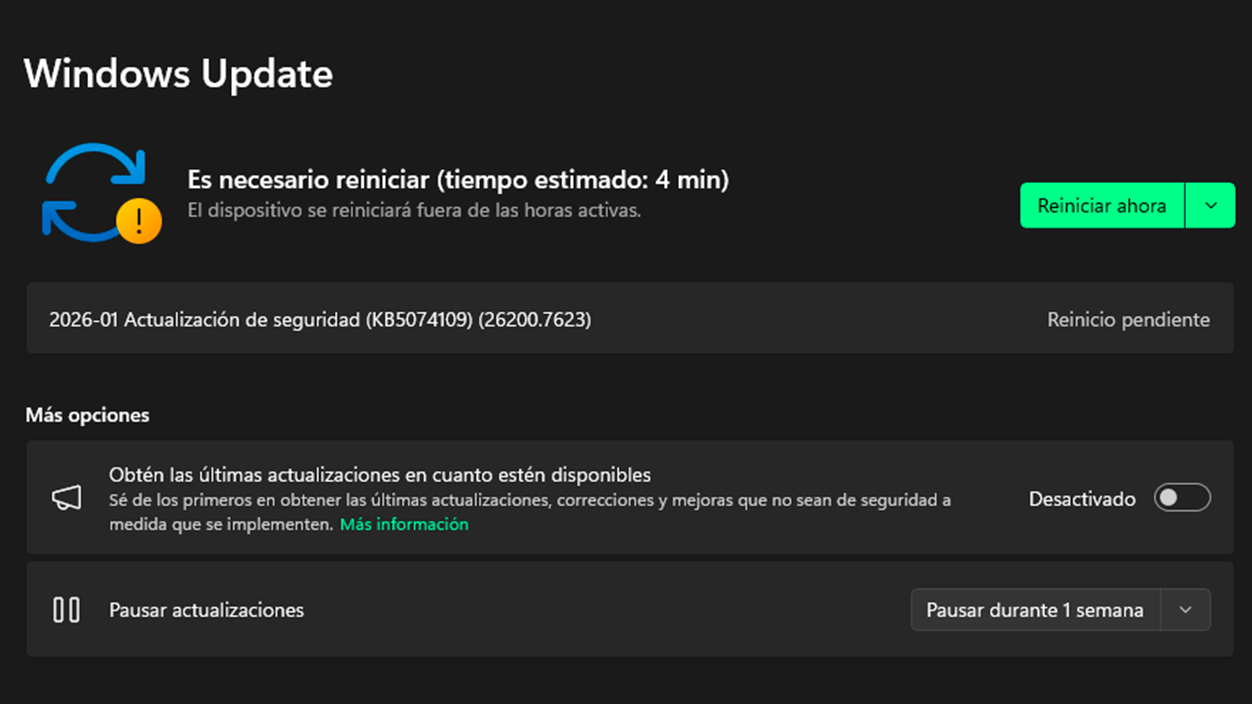
Those experiencing issues after the January update have several options. The first, and most direct, involves Uninstall the problematic update KB5074109 from within the system itself, as long as it remains accessible.
To do this, you can use the classic Windows 11 route: press the Windows key, type "view update history" and access the first result; from there, go to the section "uninstall updates", locate KB5074109 and proceed to remove it. After restarting the computerMany of the problems described disappear, especially those related to recent failures.
The second option consists of Apply the OOB emergency updates which Microsoft has made available to users. Since these do not appear in Windows Update, it is necessary to access the Microsoft Update CatalogLook there for the corresponding update code (for example, KB5077797 for Windows 11 23H2) and download the appropriate package for your system architecture.
Once the file is downloaded, simply Run it as administrator and follow the wizard. To complete the installation, it's important to first check which exact version of Windows you're using to avoid trying to install an incorrect patch that might not apply or could cause further problems.
Meanwhile, those who haven't yet installed the January update and wish to proceed cautiously can temporarily pause automatic updates from the section of Windows UpdateThis measure allows us to buy time until the emergency patches are more widespread and it is confirmed that they have stabilized the situation on most systems.
In more extreme scenarios, where the team It doesn't even start. due to errors such as UNMOUNTABLE_BOOT_VOLUMEThe options involve using the Windows recovery tools, restoring the system to a previous point or using installation media to repair or reinstall the operating system, something that in professional environments is usually coordinated with the IT department.
The picture left by the January updates to Windows 11 is one of a system that, despite receiving regular security patches, It continues to stumble over stability problems after some of themBetween blue screens of death, PCs that won't shut down, Outlook crashes, and remote connection errors, many users have been forced to spend time troubleshooting instead of using their computers normally. Microsoft's quick response with emergency patches helps contain the damage, but it also reinforces the feeling that, these days, it's wise to pay attention to every major update, review the release notes, and not rely solely on automatic installation if you want to avoid surprises, especially in work environments in Spain and Europe where Windows 11 is already the foundation of many daily-use computers.

I am a technology enthusiast who has turned his "geek" interests into a profession. I have spent more than 10 years of my life using cutting-edge technology and tinkering with all kinds of programs out of pure curiosity. Now I have specialized in computer technology and video games. This is because for more than 5 years I have been writing for various websites on technology and video games, creating articles that seek to give you the information you need in a language that is understandable to everyone.
If you have any questions, my knowledge ranges from everything related to the Windows operating system as well as Android for mobile phones. And my commitment is to you, I am always willing to spend a few minutes and help you resolve any questions you may have in this internet world.