- KB5074109 is the January cumulative security update for Windows 11 24H2 and 25H2.
- It fixes over a hundred vulnerabilities, improves stability, and resolves bugs in WSL, Azure Virtual Desktop, and battery.
- It includes visible new features such as battery icons, "Share with Copilot" and improvements to the File Explorer.
- It can be installed via Windows Update or manually from the Microsoft Update Catalog.

The cumulative update KB5074109 for Windows 11 It has become the star of the first Patch Tuesday of the year, with a clear focus on strengthening security and polishing system performance. Although it may seem like just another update, behind this package There are changes that affect both home users and businesses.
This version doesn't bring a revolution in features, but it does represent an important step for Closing critical vulnerabilities, improving stability and finish deploying small new features that Microsoft had been testing since the end of 2025It's worth taking a few minutes to do this, because leaving it unfinished can open the door to problems ranging from annoying glitches to serious security risks.
What is update KB5074109 and which versions does it affect?
KB5074109 is the January security and quality update for Windows 11as part of Microsoft's classic "Patch Tuesday" program. It is specifically available for devices with Windows 11 24H2 and 25H2, which are the most recent branches of the operating system.
After installing the patch, the teams move on to the builds. 26100.7623 (for branch 24H2) and 26200.7623 (for branch 25H2). For practical purposes, both versions share the same base and the change log is the sameSo it doesn't matter which one you have installed: you'll receive the same fixes and improvements.
This cumulative update It relies on the previous large service base, identified as KB5043080which served as a starting point for Windows 11 25H2. Although it didn't bring any major visible new features, It now serves as the foundation upon which the KB5074109 package is built..
For most users, especially in home and small business environments in Spain, KB5074109 is a mandatory update which Windows will download and install automatically, unless Windows Update has been manually paused.
Security: Why KB5074109 is more important than it seems

The most sensitive aspect of this update is the security component. Microsoft has leveraged the KB5074109 package to to cover up more than a hundred vulnerabilities that affected different components of Windows 11. These included bugs that, under certain circumstances, could allow remote control of the equipment without user interaction.
In a context where attacks targeting European individuals and companies are becoming increasingly frequent, leaving the system without this patch means maintaining open potential doors to data theftThis could include data hijacking or malware installation. For the average user, this might simply mean file loss, but in a corporate environment, it can directly impact business continuity.
In addition to purely technical vulnerabilities, KB5074109 updates internal components such as WinSqlite3.dllThis file was flagged as a potential vulnerability by some antivirus programs. Microsoft clarifies that this component is not the same as the sqlite3.dll file included with some third-party applications, but has nonetheless opted to strengthen it to reduce false positives and risks.
It's important to remember that security also has an economic impact: a gap that allows Unauthorized access to sensitive accounts or documents It can end in financial fraud or paying digital ransoms. Taking a few minutes to install a patch like this is usually much cheaper than dealing with the consequences of an attack.
Main quality fixes in KB5074109
Although Microsoft presents KB5074109 as a security update, the package includes several system stability and performance improvements which are noticeable in everyday life, especially in professional and system administration environments.
One of the highlights has to do with Windows Subsystem for Linux (WSL)A bug in "mirrored networking" has been fixed, which in some cases caused "No route to host" errors when trying to access network resources. local accessespecially when working through corporate VPNsThis problem could be very annoying for developers and technical teams who rely on WSL for their daily work.
Incidents have also been addressed in Azure Virtual Desktop (AVD)Specifically, connection errors in RemoteApp that some users experienced after previous updates. With KB5074109, these remote sessions should behave more reliably, which is relevant for European organizations that use virtual desktops for teleworking or remote access.
In the energy section, the update corrects strange behavior on devices with NPU (neural processing unit), such as the new Copilot+ PC. Some devices could remain virtually "active" and to come out of bed inappropriatelyThis results in increased battery and energy consumption. The patch adjusts this behavior to improve efficiency, which is important for laptops used on the go.
Finally, the managing legacy modem driversWindows removes very old drivers (such as agrsm64/agrsm and smserl64/smserial), which may cause certain very specific hardware to stop working. In practice, this will affect very few users, but it's worth keeping in mind if you're still using legacy communications equipment.
Visible new features: battery, Copilot, and File Explorer
Although the main focus of January's Patch Tuesday is on bug fixes, KB5074109 also finishes rolling out some features that Microsoft had been gradually activating Starting in late 2025. Not all users will see them at the same time, but after applying this update, they are more likely to start appearing.
One of the most striking is the Updating the battery icons in the taskbarThese changes now display information more clearly and, in some cases, with color indicators. If you haven't seen this change yet, it may appear after installing the new package.
The option also gains prominence "Share with Copilot" in the taskbarHovering over certain pinned applications may display a button that allows you to share the active window directly with Copilot. This feature relies on a Windows API originally designed for communication applications like Teams, but which Microsoft is now extending to its assistant.
In practice, this means you can open, for example, Outlook and ask Copilot for help drafting an email reply, organizing messages, or suggesting actions based on the content displayed on the screen. The assistant displays a simulated cursor which indicates where it would act, although it still needs user confirmation and supervision.
For those who prefer a more classic approach, this option can be disabled by going into Settings > System > Taskbar > Taskbar behavior and adjusting the section related to sharing windows from the bar itself.
Changes to File Explorer and the visual experience
El Windows 11 File Explorer It also receives some tweaks with KB5074109, especially regarding suggestions and appearance. It's not a complete redesign, but rather adjustments that may slightly change the workflow.
One of the new features is the suggested files sectionThis functions as a kind of recommended feed, displaying recently opened or downloaded documents and prioritizing those that are frequently used. The idea is to facilitate access to what the system considers most relevant to the user at any given time.
This feature is intended for those who use Microsoft accounts In Windows 11, to activate it, open File Explorer, go to Options, and enable the Recommended Items section. Once done, suggested files will begin to appear based on your actual computer usage.
Another expanding area is the dark mode in Explorer dialog boxesMicrosoft had already begun rolling it out in December 2025, but KB5074109 is reaching more users. This affects confirmation windows, such as those that appear when deleting large folders, moving files, or managing items in use, which are now displayed with an aesthetic that matches the system's dark theme.
The intention is to achieve a a more visually coherent experience and reduce abrupt changes between light and dark windows, something that was quite noticeable when working at night or with dark mode active throughout the system.
Advanced settings, gaming, and performance
Beyond security and interface, KB5074109 continues to consolidate New configuration options and performance improvements which Microsoft has been gradually rolling out. Many of them are of particular interest to advanced users and PC gamers.
On the one hand, the application of Windows 11 Setup It includes a section on "Advanced settings" within the System section. From there you can manage features such as sandbox environments, virtual workspaces, or tools like Hyper-V, which were previously scattered throughout the old Control Panel via the optional features menu.
On the playing field, the company is deploying a new full-screen experience initially designed for Windows gaming laptopsWhen activated, the system hides the taskbar and other elements so that the Xbox app (and games) occupy the entire screen, reducing background processes to free up resources.
This function is in Settings > Gaming > Fullscreen Experience > XboxAlthough it's currently only available on certain portable devices, the idea is that it will eventually be available on more conventional computers as well.
In addition, a change introduced in December 2025 that improves the system remains in place. performance when starting demanding games and applications on high-resolution monitors. KB5074109 helps make this setting available to more users, reducing stuttering or micro-stuttering when a game attempts to negotiate display modes on startup.
Download size and integrated AI models
Something that catches the attention of many users is the considerable size of monthly updatesKB5074109 is no exception: the packages exceed 4 GB in several of its variants, both for x64 and ARM64 architectures in Windows 11 24H2 and 25H2.
This growth is due, in part, to Microsoft including in these updates artificial intelligence models like Phieven on systems that can't yet take full advantage of them. Although these AI capabilities are designed for compatible hardware, the models are generally integrated into the packages, increasing the download size for everyone.
In tests carried out with a connection of about 200 MbpsDownloading build 26200.7623 took about five minutes, and the entire installation process took between seven and ten minutes on various computers. Times may vary depending on connection speed and hardware performance.
To avoid surprises, it is advisable have enough free disk space And, in the case of laptops, keep the equipment plugged into a power source during installation, especially if it is run during working hours or in environments where an unexpected restart could interrupt tasks.
How to install KB5074109 from Windows Update or manually
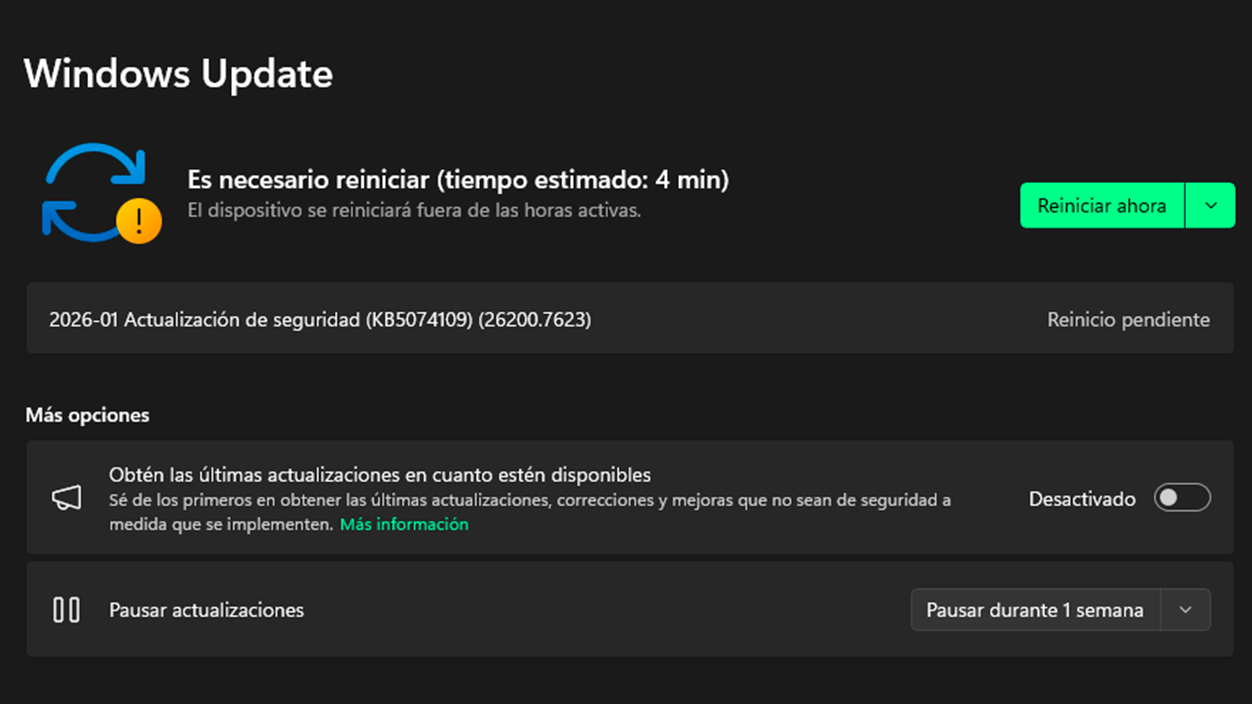
The simplest way for most users in Spain and Europe is to let Windows Update manages update KB5074109 automatically. In many cases, the system will have already downloaded the package in the background and only a restart will be required.
To check it out, just go to Settings > Windows Update and check if a similar entry appears "Security Update 2026-01 (KB5074109)" next to the corresponding build number. If it is awaiting installation, you can force the process manually from that same screen.
In professional environments or for advanced users who prefer to control the deployment, Microsoft offers the option to Download the offline installers (.msu) from the Microsoft Update Catalog. This alternative is useful when there are problems with Windows Update, when managing a large fleet of computers, or when you want to apply the patch to machines without a direct internet connection.
Once downloaded file suitable for the architecture (x64 or ARM64) and system version; simply run it and follow the wizard's steps. The process is similar to other updates, except that the package is applied locally without needing to be downloaded again.
How to check if KB5074109 is installed correctly
After any upgrade of this magnitude, it's a good idea verify that the patch has been applied correctlyThis is especially relevant if you are managing equipment in companies or if errors have been observed during installation.
To confirm that KB5074109 is present, go to Settings > Windows Update > Update History and find the code KB5074109 in the list. If it appears as correctly installed, the computer should already be on the corresponding build.
Another way to check is to look up the Windows 11 build number. You can type it into the search box. "winver" and open the System Information tool. The builds will be displayed there. 26100.7623 o 26200.7623Depending on whether it is 24H2 or 25H2. That figure indicates that the January patch has been applied.
If the system indicates that there is a pending restartIt's best not to leave it for later. Having an update only partially installed means that some components are already up to date while others are not, which can cause strange behavior or leave vulnerabilities that attackers could exploit. When the problem persists, it can be helpful to run the Windows Update troubleshooter or resort to the manual package from the Microsoft Update Catalog.
In case errors appear during installation, such as specific fault codes, one of the first recommended checks is check the free space on the diskIf the problem persists, it may be helpful to run the Windows Update troubleshooter or use the manual package from the Microsoft Update Catalog.
Known issues and password icon behavior
As is usually the case with monthly updates, KB5074109 has a known problem which Microsoft has already identified. In this case, the most striking is a flaw that affects the password icon on the lock screen.
In certain scenarios, especially in managed and enterprise environmentsThe icon that allows you to choose the password option may not display correctly. The clickable area still exists, but the icon appears invisible, so the user can hover the mouse over it and click, even though they don't see anything.
This is a bug that Microsoft first detected in August 2025 and, according to official notes, has not yet been fully resolved. To mitigate its effects, the company uses the following function: Known Issue Rollback (KIR), which allows you to revert problematic changes without uninstalling the entire update.
In practice, system administrators can deploy a group directive that this KIR is applied to affected systems. In home environments or on standard Windows 11 Home and Pro installations, the chances of encountering this vulnerability are considerably lower.
Furthermore, Microsoft indicates that it has no record of New relevant issues introduced by KB5074109 Beyond this behavior with the password icon, provided that the system was already up to date with the updates from the end of 2025.
Taking into account all these new features, fixes, and technical details, KB5074109 falls into that common middle ground in Windows: it's not a revolution, but it is a Key patch to strengthen security and polish annoying bugs and to finally activate features that had been appearing in previous months. For users in Spain and Europe, both at home and professionally, it's worth installing it as soon as possible and verifying that everything is in the correct build, thus avoiding unnecessary surprises in the coming months.

I am a technology enthusiast who has turned his "geek" interests into a profession. I have spent more than 10 years of my life using cutting-edge technology and tinkering with all kinds of programs out of pure curiosity. Now I have specialized in computer technology and video games. This is because for more than 5 years I have been writing for various websites on technology and video games, creating articles that seek to give you the information you need in a language that is understandable to everyone.
If you have any questions, my knowledge ranges from everything related to the Windows operating system as well as Android for mobile phones. And my commitment is to you, I am always willing to spend a few minutes and help you resolve any questions you may have in this internet world.