- KB5058506 brings Quick Machine Recovery feature
- Includes integration improvements between Windows 11 and iOS/Android and strengthens AI
- Fixes serious stability and security issues, but has known limitations

When a new Windows update arrives, the tech community buzzes and user concerns skyrocket. Windows 5058506 update KB11 has become one of the most talked about recently., especially among those who are part of the Windows Insider program and want to stay up to date with all the improvements, new features, and, of course, any issues that have been detected.
In the fascinating and sometimes complicated world of Windows updates, patch KB5058506 marks a milestone in everything it entails: from new recovery options to improved mobile integration and internal fixes affecting performance, security, and usability.
What is Windows 5058506 update KB11 and who gets it?
Update KB5058506 corresponds to the compilation 26120.4230 de Windows 11 24H2 and it is primarily aimed at users of the Beta channel of the Windows Insider program. Microsoft uses this channel to test all the new features that could be released to the general public in the future with a relatively wide circle of users, allowing it to identify bugs, fine-tune changes, and gather feedback from those who most experience Windows on a daily basis.
Those who have activated the “Get the latest updates as soon as they're available” option in Windows Update You'll be the first to receive it and test its experimental features. Many of the features described will be gradually released to other Beta channel users and, later—if all goes well—to the general public.
This Windows 5058506 update, KB11, is significant because it introduces not only improved recovery features but also business-friendly tweaks, improvements to the mobile experience, and AI enhancements, among many other fixes.
New Features: Quick Machine Recovery and Disaster Resilience
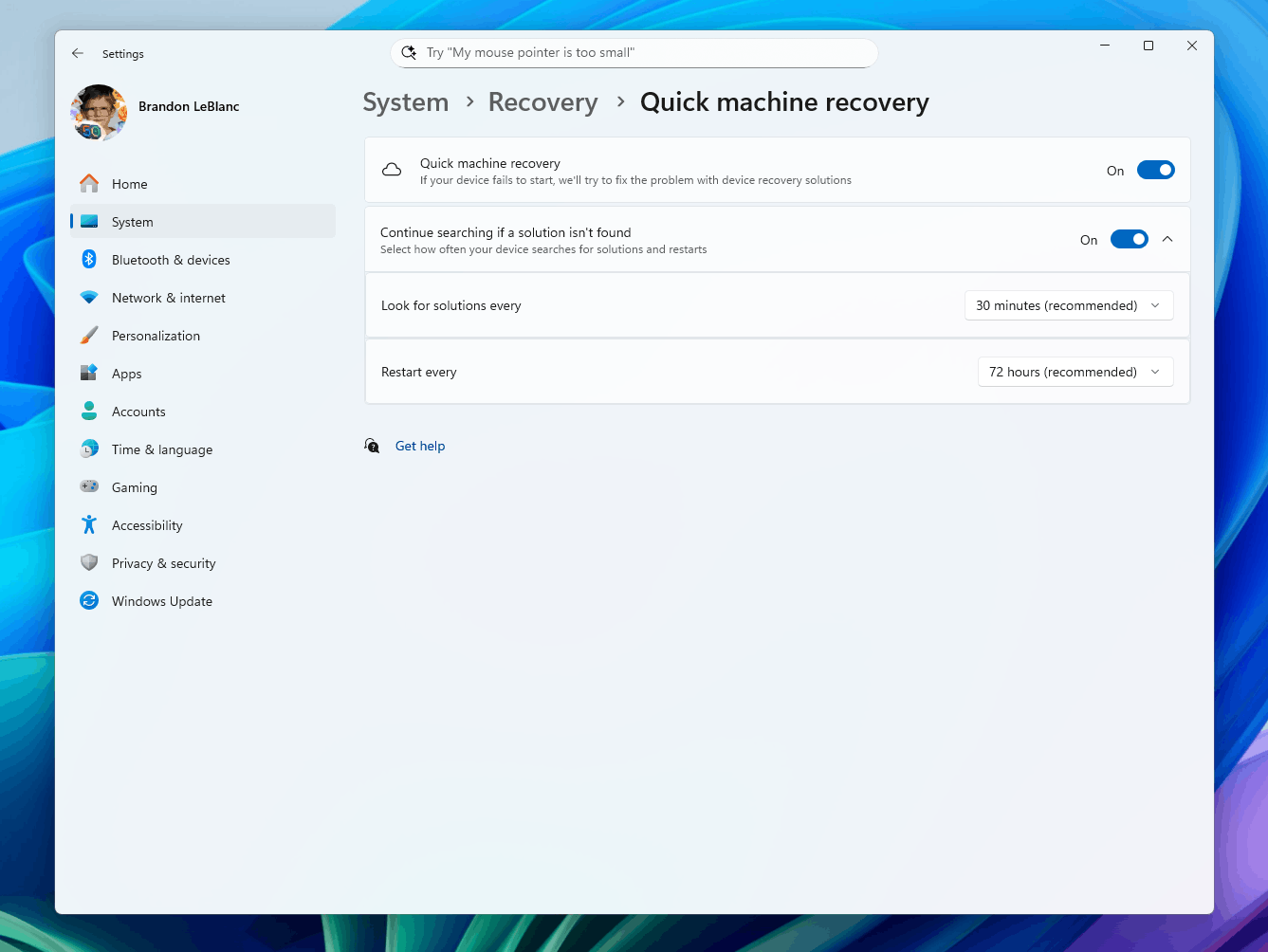
The star point of the Windows 5058506 KB11 update is, without a doubt, the arrival of the Quick Machine Recovery (QMR) feature, a solution that aims to change the way users and businesses recover computers affected by serious boot errors and crashes.
This development is Microsoft's response to recent incidents – such as the failure after a CrowdStrike Falcon update faulty in July 2024, which left thousands of computers locked out – and is part of a broader strategy dubbed the “Windows Resilience Initiative.”
QMR is now integrated as a dedicated section within Settings > System > Recovery, visible to Insiders with build 26120.4230. What exactly does this new implementation enable?
- Check at a glance if Fast Recovery is active on your device, in a very accessible way.
- Configure automatic problem checks and fixes and decide how often to check for such emergency updates.
- Choose when your computer restarts to apply critical patches, without depending on the user, minimizing downtime in productive and domestic environments.
For IT administrators and businesses, this feature can also be centrally managed from Intune, making life much easier in large deployments and facilitating remote device recovery. When a mass boot failure is detected, the feature Quick Machine Recovery activates the Windows Recovery Environment (WinRE) and applies the remedies directly, avoiding the dreaded formatting or manual restorations.
Mobile Experience Enhancements: Notifications and Features for iPhone and Android
The Windows ecosystem continues to strengthen its ties with mobile devices, and this update introduces significant progress in integration. These are the most notable changes:
- You can now see notifications from your mobile apps directly in the Windows 11 Start menu.They are grouped by application, making it easier to manage and check messages or alerts without having to constantly look at your smartphone.
- The option to share the screen of Android devices is enabled from the Start menu, which greatly speeds up viewing and controlling the mobile phone from the PC.
- For iPhone users, the “iPhone Memories” section appears in the Home menu. If you have the iCloud app for Windows installed, allowing access to synced photos and memories, all without leaving the Windows environment.
'Click to Do': AI and intelligent actions on text
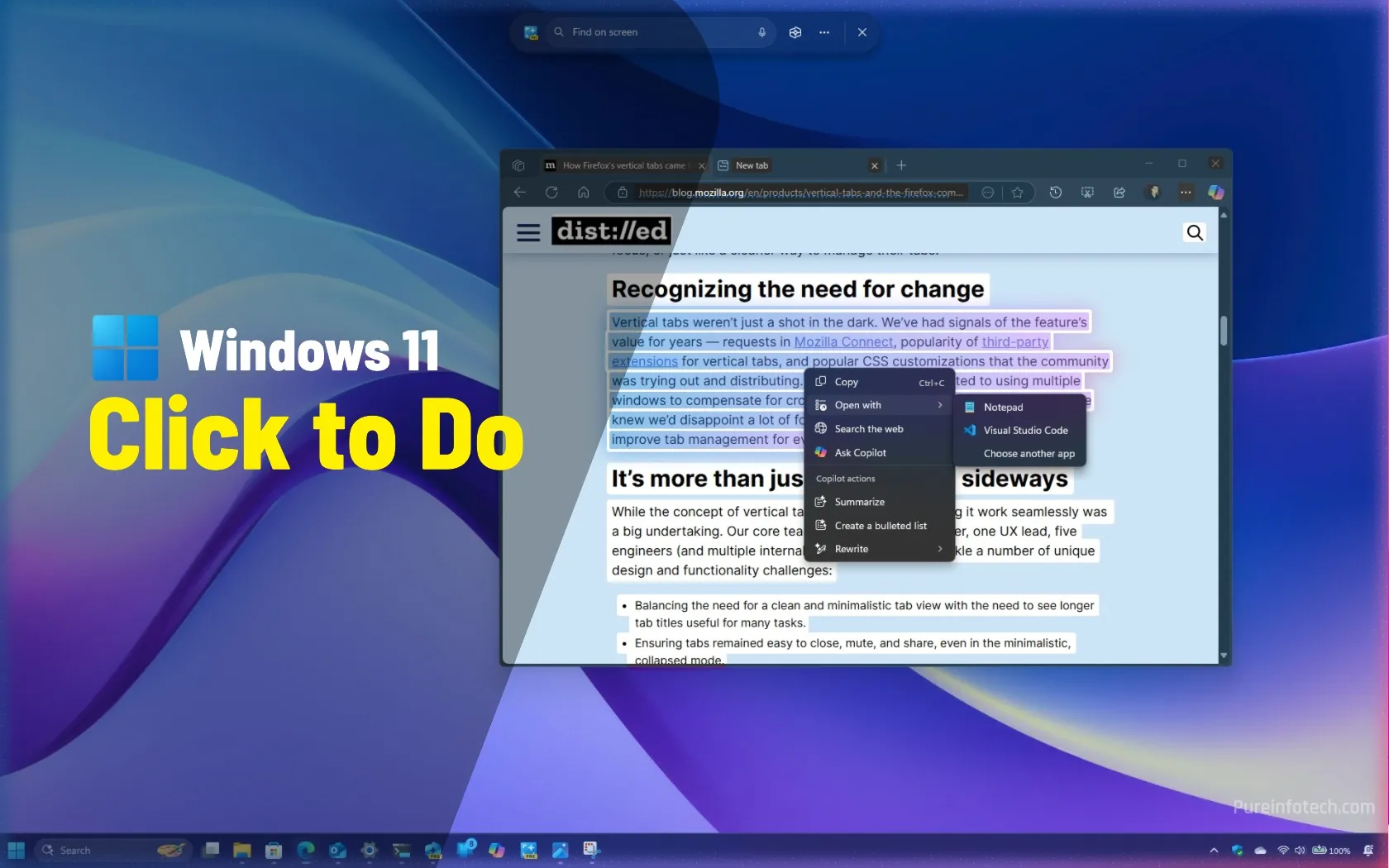
Click to Do is a preview feature that expands the AI capabilities of Windows 11, making it possible to perform intelligent actions on selected texts in the operating system.
This feature includes, among other possibilities, the ability to rewrite, refine, or translate text fragments from within the system itself, and is now expanding to new languages. Insiders using the system in French or Spanish will regain the "Rewrite" and "Refine" options, and smart actions have been added for German, Italian, and Portuguese.
On Copilot+ PC devices, which integrate AI-specific hardware (such as Snapdragon or Intel/AMD processors with advanced capabilities), Click to Do can speed up these actions.
However, Microsoft has detected that after certain updates or on certain architectures, users may experience delays the first time they try to use these features. The company is investigating a solution for this issue.
Visual and usability improvements in Settings and Start
In addition to the technical updates, the Windows 5058506 KB11 update introduces interface improvements and user experience to make daily use of the system easier.
- In Settings, a new device information card is added on the main screen (currently only visible to Insiders in the US), which summarizes the device's key features and allows you to quickly jump to advanced information or discover new devices recommended by Microsoft.
- The Settings finder is now better visually centered on Copilot+ devices with AI enabled, improving visual harmony.
- In the Start menu, a bug that caused unexpected closures has been fixed. in some scenarios when launching the menu.
- The Recommended Files section in Explorer now responds better to keyboard controls. and several accessibility issues have been fixed.
Technical fixes and stability improvements
One of the fundamental sections of any major update is the list of fixed bugs. KB5058506 is no exception and focuses on fine-tuning various aspects for both home and business users.
- Fixed an issue where Virtualization-Based Security (VBS) prevented applications such as VMware Workstation from running if the optional Windows Hypervisor Platform component was not installed.
- Fixed unexpected File Explorer crashes when performing various actions (deleting files, using drop-down menus, etc.).
- Fixed a bug that caused duplicate access keys to appear in the Explorer context menu.
- Performance improvements and no crashes in apps like Sticky Notes and Dxdiag when running on systems configured in Arabic or Hebrew.
- Fixed a bug that caused some apps to not work properly with Bluetooth devices and could cause Settings or Quick Actions to close automatically.
- Fixed the behavior of the top buttons in Quick Actions so that they respond correctly when clicked.
These improvements aim to optimize system performance and prevent seemingly minor issues that affect the daily work of many users.
Known issues and limitations of the update
Like any testing release, KB5058506 comes with a list of known issues that you should be aware of before deciding to install it.
- After performing a PC reset from Settings > System > Recovery, the build number may be displayed incorrectly. as Build 26100 instead of Build 26120. This does not block future updates and is expected to be fixed later.
- Resetting the device from the current configuration may not work correctly., which poses a risk to those who rely on this feature to restore the system.
- Some users with an Xbox Controller connected via Bluetooth may experience critical errors (GSOD or bugcheck). It is recommended to uninstall the “oemXXX.inf (XboxGameControllerDriver.inf)” driver from Device Manager as a temporary solution.
- On Copilot+ PCs with Intel or AMD processors, more time may be required for the first use of AI after an update.
- In File Explorer, Narrator's scanning mode may fail when reading bulleted lists in AI actions. It is suggested to navigate with Caps Lock + right arrow.
- Icons on the taskbar may appear excessively small even if the small buttons option is disabled.
- The Widgets Experience reverts to previous formats when trying to dock new widgets, as the new interface does not yet support that functionality.
- When connecting older Dolby Vision displays, severe color distortion may occur.. It is recommended to disable “Use Dolby Vision mode” in Settings > System > Display > HDR as a temporary solution.
These limitations highlight the importance of testing releases in controlled environments rather than on production machines if critical functions depend on them.
The KB5058506 update on Windows 11 represents A key advance in Microsoft's strategy to make the system more resilient and adaptable to critical incidents, balancing innovation, AI technology integration, and system stability. While it still has its challenges and limitations, the focus on automatic recovery, usability improvements, and mobile integration indicates the path forward in the coming months.

Editor specialized in technology and internet issues with more than ten years of experience in different digital media. I have worked as an editor and content creator for e-commerce, communication, online marketing and advertising companies. I have also written on economics, finance and other sectors websites. My work is also my passion. Now, through my articles in Tecnobits, I try to explore all the news and new opportunities that the world of technology offers us every day to improve our lives.