- Disable the independent processes option in the folder options menu.
- Use the tab system built into Windows 11 to centralize navigation.
- Run DISM and SFC repair commands in case of system file corruption.
Have you ever tried to browse your files only to have your computer fill the screen with windows and you don't know how to stop it? It's quite annoying, especially when you just want to move a couple of documents and end up with a chaotic desktop. To solve this problem... Windows opens each folder in a new window. A simple configuration adjustment is usually enough. But in rarer cases, a system error needs to be corrected.
The truth is, depending on the system version you are usingThe solution varies considerably. While older versions dealt with processes, more recent versions have implemented much more modern ways of organizing workflow. Let's take a look at all the ways to control the opening of folders so that your computer stops behaving erratically and you regain full control of your interface.
Windows opens each folder in a new window: How to prevent it
If you notice that File Explorer isn't behaving as it should and Windows opens each folder in a new window every time you double-click, you likely have a specific view option enabled. To fix this, the first thing you should do is open any folder and look at the top, where you'll find the tab for ViewOnce there, look for the button. Options and select the option to change folder and search settings.
When the settings window opens, go to the tab called SeeScroll down the list until you find a box that says Open folder windows in a separate processIf it's checked, uncheck it immediately. Doing so will stop the system from isolating each folder in its own process, which usually fixes the infinite windows problem and makes browsing much smoother.
Taking advantage of tabs in Windows 11
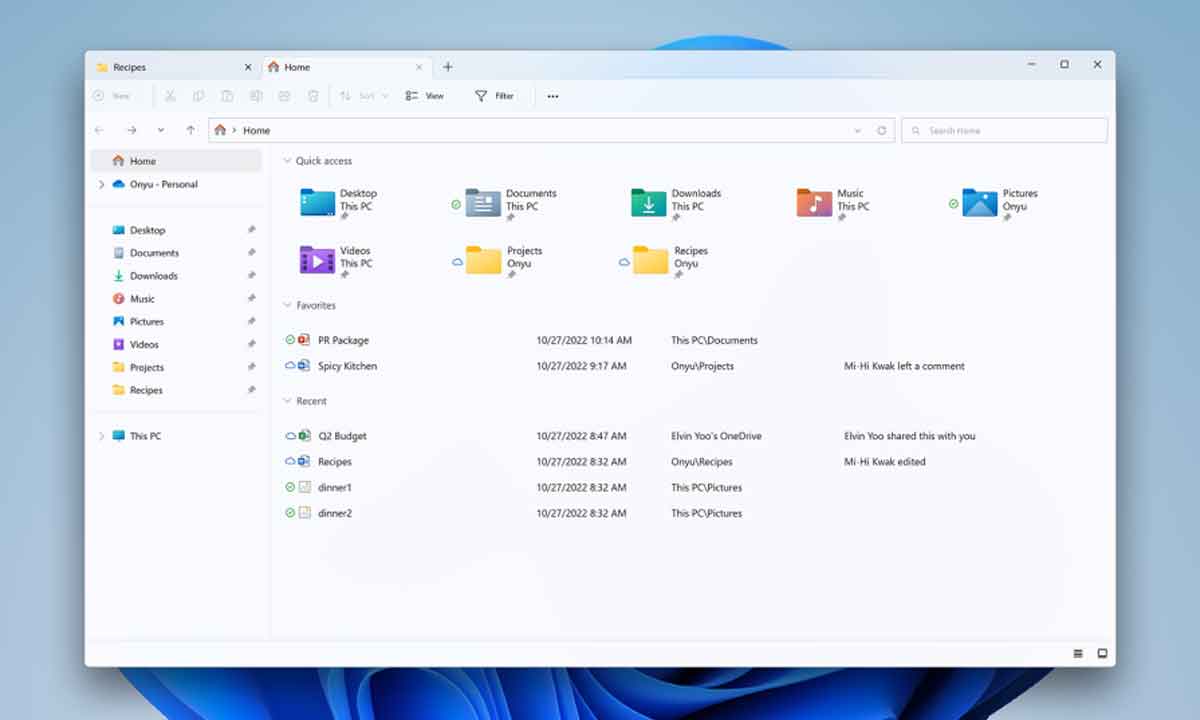
If you're lucky enough to be using the latest version of the system, you no longer have to struggle with dozens of open windows. Microsoft has imported the logic of web browsers into the file explorer, allowing us manage multiple folders in a single window Thanks to tabs. It's a brilliant feature for those of us who manage many files at once and don't want the taskbar to get cluttered.
To use this system, simply open your browser and look for the icon of plus sign (+) which appears at the top, right next to the current tab. Clicking it will open a new home tab where you can quickly access your downloads, documents, or images. Best of all, you can organize your work intuitively, moving tabs or closing them individually, and even extracting a tab to turn it into a separate window if at any point you need to compare two folders side by side.
What to do if the problem persists: System repair
Sometimes, no matter how much you adjust the view settings, the problem persists. Windows opens each folder in a new window, and nothing seems to fix it. This could be a sign that some Internal Windows files have become corruptedThis causes applications to malfunction according to the established settings. When this occurs, the only option is to use system maintenance tools to clean and repair the errors at their root.
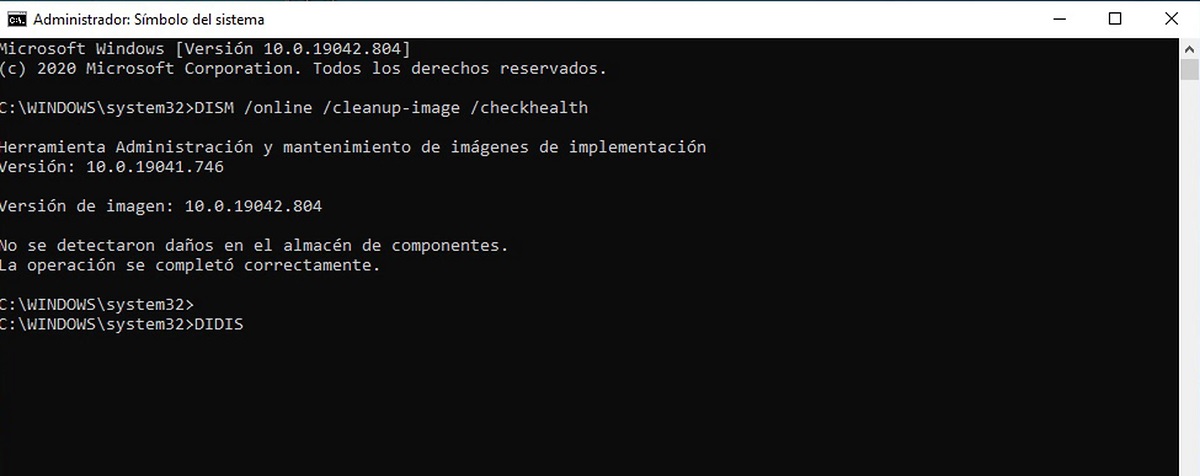
The most effective way to fix this is through the command prompt. You should search for CMD in the start menu and run it as administrator. Once inside the black console, it's recommended to run a series of repair commands. First, use DISM.exe /Online /Cleanup-image /Scanhealth to analyze the image state, followed by Restorehealth to repair the damage found and StartComponentCleanup to clean old components. To finish the job, run the command SFC /Scannow, which will analyze the integrity of all protected system files and replace them if they are corrupted.
Difference between applications and the browser
It's important not to confuse the behavior of folders with that of certain programs. There are applications that are designed to allow... multiple open instancesAs with Notepad, where each file you open will generate a new window by default. However, there are other programs, such as the old media player, that are programmed to only one active copy existsNo matter how many times you try to open a second file, the system will simply bring the already open window to the foreground.
Ultimately, the key to preventing Windows from opening each folder in a new window is maintaining order on your computer. This requires a combination of configuring independent processes, making smart use of tabs in modern versions, and, finally, maintaining system health through repair commands to prevent technical errors from interfering with your daily productivity.
Frequently Asked Questions
Where do I change the option to prevent separate windows from opening?
You need to go to the View tab of any folder, enter Folder and Search Options, and in the View section, uncheck the box to open folder windows in a separate process.
Is it possible to have multiple folders in the same window in Windows 11?
Yes, Windows 11 allows you to add new tabs using the plus (+) button located at the top of the file explorer, working similarly to a web browser.
What commands can be used to repair the file explorer if it malfunctions?
It is recommended to run the commands DISM.exe /Online /Cleanup-image /Restorehealth and then Sfc /Scannow in CMD as administrator to repair damaged files.
Why do some programs always open a new window and others don't?
This depends on the programming of each application; some allow multiple independent instances and others are restricted to a single active window that is positioned in the foreground.
How can I separate a tab into a separate window in Windows 11?
The system allows you to drop any open tab so that it becomes an independent window, making it easier to manage content when you need more visual space.
Index
