
OpenAI has finally released the Windows version of ChatGPT, a tool that was already presented in May for macOS, but users of this operating system have only had to wait about five months to be able to start using it. Although it is a highly anticipated release, there are some limitations that are important to highlight and that differentiate this preliminary version from the version for Apple computers.
Although the application is now available for download from the Microsoft Store, currently only those who have a subscription to OpenAI's paid plans can use it, i.e. ChatGPT Plus, Team, Enterprise or Edu. Users of these plans can now enjoy a series of features and functionality, although it is worth noting that this is a preliminary version. Therefore, it does not yet offer the full experience that we can find in macOS.
Main features and limitations
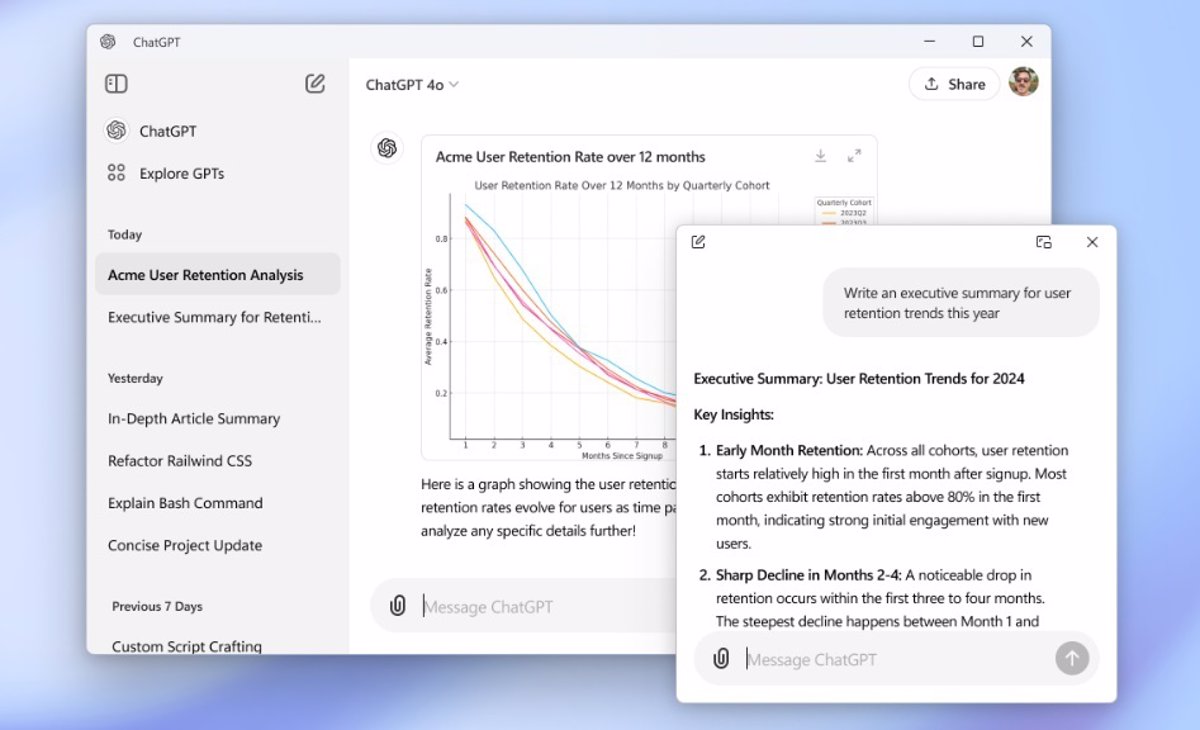
One of the main areas where ChatGPT shines on Windows is in its direct integration with the operating system. This allows users to can invoke the chatbot with the simple keyboard shortcut Alt + Space, opening a separate window where you can interact with the artificial intelligence quickly and effectively. This capability allows the OpenAI chatbot to always be accessible while you work in other applications. In addition, the window can be effortlessly minimized and reopened using the same command.
ChatGPT on Windows also has the ability to upload files and photos, which can be useful if we want AI to analyze or summarize documents, or help us with more creative tasks, such as creating images using DALL-EThis functionality was already available on macOS, so Windows users are now on par in this regard.
Despite these features, the preview version of ChatGPT for Windows It has some limitations regarding the macOS version. At the moment, it is not possible to use the advanced voice mode to interact using voice commands or dictation, an option that is particularly useful for professionals who want a more fluid interaction.
Comparisons with the macOS version

It is inevitable to make a comparison between both versions, since ChatGPT on macOS has been a pioneer in incorporating key features that are not yet present in this preview version for Windows. For example, one of the most important points to note is that the macOS app not only allows the use of voice mode, but integrates a specific button to start spoken conversations, something that Windows users will have to wait until the end of the year to use, as reported by OpenAI.
Another interesting aspect is that, although both versions allow uploading files and photos, some Advanced features such as integration with the GPT store, are also not available at this stage for Windows. The company has promised that the full experience will arrive before the end of 2024, which will surely bring parity between both platforms.
In any case, the launch of ChatGPT for Windows marks an important milestone for the users of this operating system. Not only is it the most widely used operating system in the world, but it is also owned by Microsoft, one of the main investors in OpenAI. This raises quite high expectations for the future development of this application.
Why use the ChatGPT app and not Copilot?
Some users might wonder why they should use this new application when Windows already has Copilot, your own assistant with artificial intelligence. The truth is that, although both systems use the same set of language models From OpenAI, Copilot comes loaded with a number of Microsoft-specific integrations that can sometimes be annoying or infeasible for some users' daily workflow.
The advantage of having an application dedicated exclusively to ChatGPT is that it is not limited by the functionalities that Microsoft offers in its products. In addition, being designed by OpenAI, it is more focused on the maximum use of its models, such as the o1-preview, which is the most recent version of the system and is available in this beta.
So for those who prefer a purer, more direct experience with OpenAI's artificial intelligence, without having to deal with distractions or limitations imposed by other integrations, you will find in ChatGPT for Windows a more useful and versatile tool.
For those interested, the application is now available for download at Microsoft Store. Of course, remember that currently only users with a paid subscription can access this preliminary version, but OpenAI has promised that users of the free version will be able to access a full version before the end of the year.
It is clear that the arrival of ChatGPT on Windows represents a significant advance for those who depend on this technology in their daily lives. Although there are still several functionalities that we will see in the coming months, it is already possible to explore this preliminary version and enjoy its many benefits.

I am a technology enthusiast who has turned his "geek" interests into a profession. I have spent more than 10 years of my life using cutting-edge technology and tinkering with all kinds of programs out of pure curiosity. Now I have specialized in computer technology and video games. This is because for more than 5 years I have been writing for various websites on technology and video games, creating articles that seek to give you the information you need in a language that is understandable to everyone.
If you have any questions, my knowledge ranges from everything related to the Windows operating system as well as Android for mobile phones. And my commitment is to you, I am always willing to spend a few minutes and help you resolve any questions you may have in this internet world.