
If you like to travel and are always looking for bargains and offers, this Guide to finding cheap flights with Google Flights you will be interested. It is curious to see how this tool has become an essential instrument for travelers from all over the world in less than ten years.
When Google launched its flight search and comparison site, this segment was dominated by big names such as Expedia, Kayak and Skyscanner. Today, it can be said that Google Flights (Google Flights) has matched them all and is even starting to surpass them in many ways.
Can we say that Google Flights is currently the best flight search engine on the market? It is certainly one of the best, as it has the advantage of having access to a huge amount of data, as well as a series of really useful functions. In addition, from the website itself you can do direct flight bookings on almost all airlines.
Reasons to use Google Flights

If you are wondering why you should use this option as a flight search engine instead of the others, it is best to take a look at the list of advantages it offers us:
- Comparison of round trip dates, with the option to search for flexible dates, as well as filters by airline and destination.
- Personalized alertsFor example, alerts when the price of a ticket falls below a maximum threshold that the user has set.
- Price comparison of flights to the same destination from different nearby airports. It is also possible to perform simultaneous searches from two or more airports.
- Integration with Google search engine, for ease of use.
All these advantages put Google Flights a step above other services like the ones we mentioned at the beginning of the post. However, it is fair to say that There are still some aspects that can be improved. For example, small ones delays (delays) between actual information and that provided by the platform.
This is the main reason why, on some occasions, the price shown at the time of purchasing the ticket is different from that which appeared in the offer. It must be said, in any case, that this is a problem that all flight search engines suffer from.
Using Google Flights step by step
Let's move on to practical information: How to use Google Flights? We explain it to you below from the beginning:
Home screen
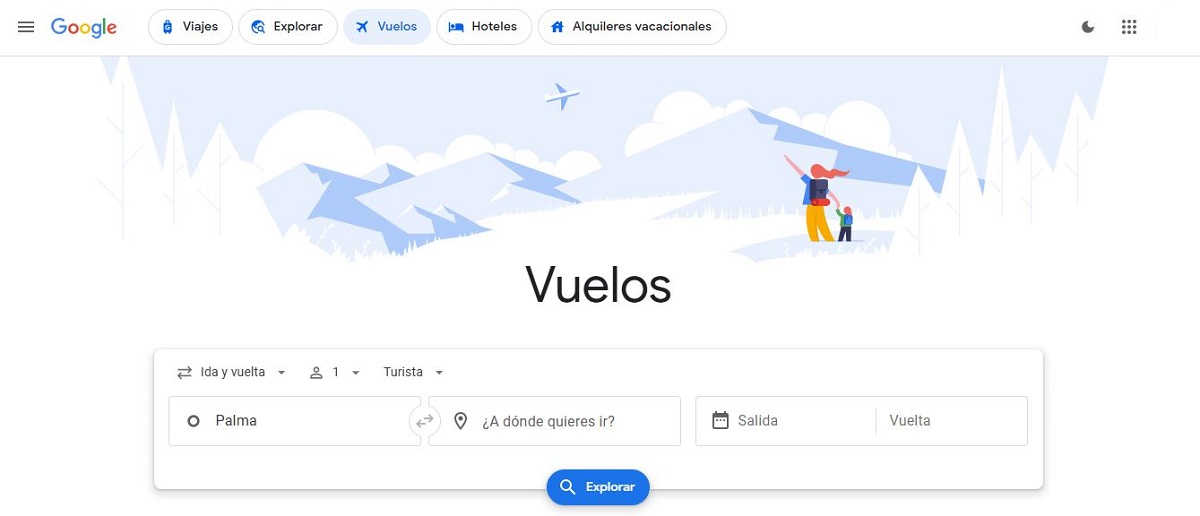
Al acceder a la homepage In this service, what we find is the typical thing that appears in any search engine: the spaces where Dates and destination are entered, plus a button "Explore" which we must click to obtain the results. Other details can also be chosen such as number of passengers, type of seat or whether the trip is one-way or round trip.
In the top bar appear other related options, of great interest to travelers: hotels, vacation rentals and, above all, the “Explore” tab, where you can find suggestions and recommendations on places to visit or activities to do at your destination.
Resultados de búsqueda
After pressing the button, almost immediately (Google Flights stands out for its speed) the resultados de la búsqueda are presented in a list ordered by default by relevance. Obviously, the user can filtrar los resultados by other criteria such as departure and arrival times, price, flight duration, baggage policy, etc.
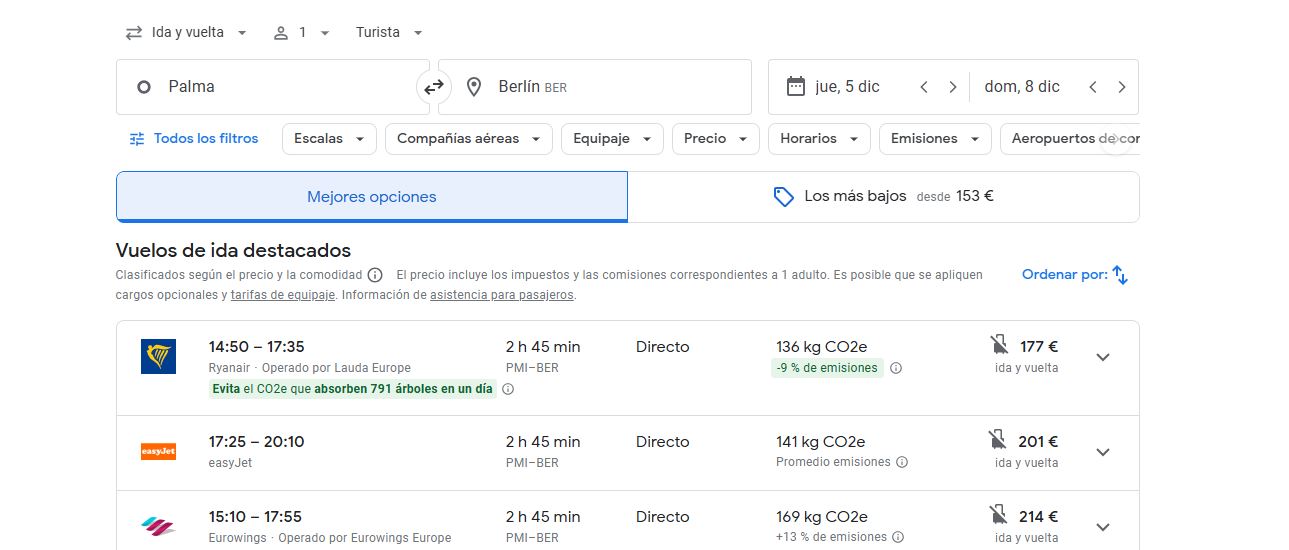
At the bottom of the list, in addition to a brief comment from Google on whether the prices shown are more expensive or cheaper than usual, there are two interesting buttons:
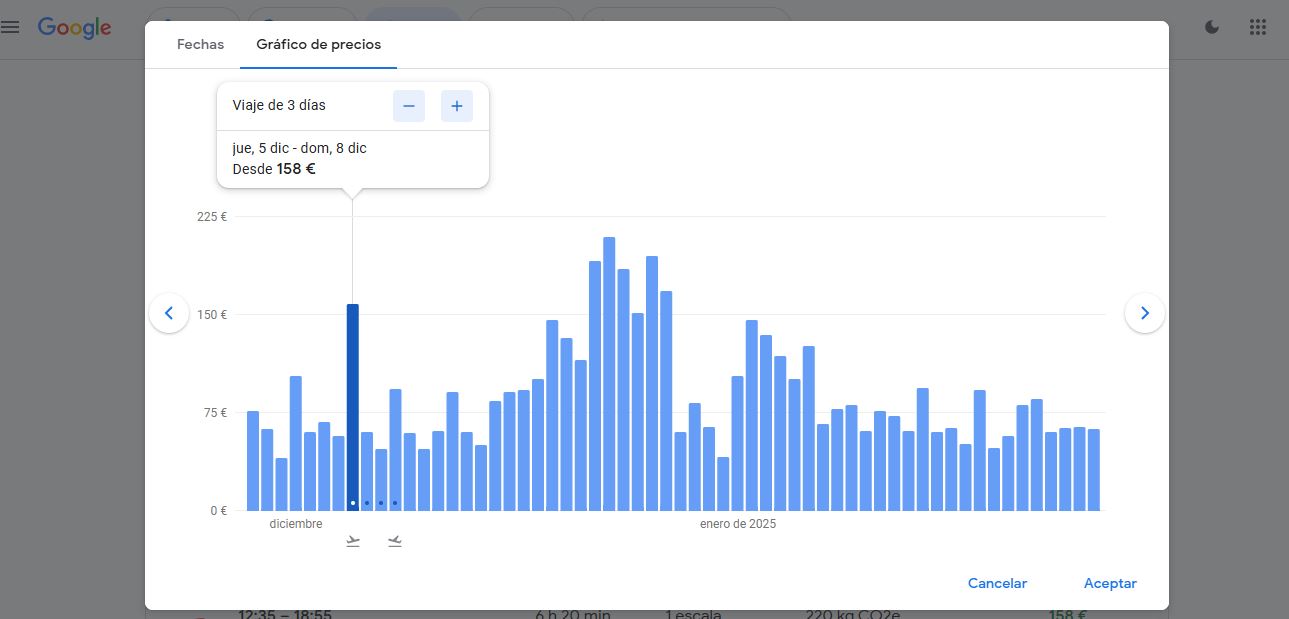
- Fechas, which opens a calendar where you can compare price differences between one day and another.
- Gráfico de precios, which offers exactly the same information, although with a clearer display mode, as shown in the image below:
Confirmation and purchase of tickets
Once we have found the flight that interests us, we confirm it using the button "Select". Con esta acción, The platform will redirect us to the airline's website., where we will be able to complete the purchasing process and make the payment.
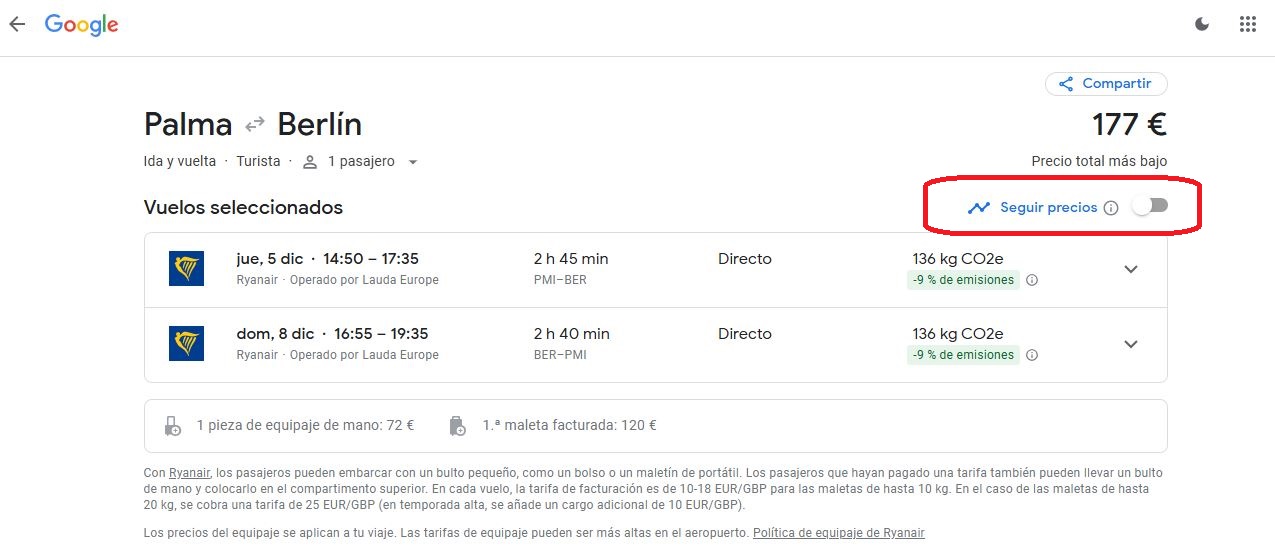
If we want to wait a little longer before buying the ticket, we have the option of «Follow prices» (see image), which allows us to receive updates on any changes that may occur in the rate that has been monitored.
Tips to get the most out of Google Flights
Finally, let's go over some practical tricks that are worth using to get the most out of Google's flight search engine.
- Look for the “green days”, which are marked in that color on the Google Flights calendar. These are the days when flights are cheaper than usual.
- Utiliza la función de seguimiento to receive notifications when there are changes to a particular flight: schedule changes, price changes, etc.
- Enter the page at incognito mode. Often, ticket prices are more or less expensive depending on the location from which the search is made.
In summary, we can say that Google Flights is one of the most complete and reliable flight search engines. Probably the best of all. The tool we need to plan our trips easily and safely.

Editor specialized in technology and internet issues with more than ten years of experience in different digital media. I have worked as an editor and content creator for e-commerce, communication, online marketing and advertising companies. I have also written on economics, finance and other sectors websites. My work is also my passion. Now, through my articles in Tecnobits, I try to explore all the news and new opportunities that the world of technology offers us every day to improve our lives.