- WhatsApp is preparing banner-style cover photos that complement the classic profile picture.
- The feature, seen in betas for iOS and Android, will arrive on personal accounts after its debut on WhatsApp Business.
- Covers can be configured from the profile, chosen from the gallery, repositioned and hidden with advanced privacy settings.
- The change reinforces the visual identity and opens the door to new uses of the profile and cover image in Spain and Europe.

La WhatsApp profile picture is about to stop being the only star from our profile in the messaging app. Meta is working on a feature that adds a new visual element: cover photos, a banner-like format that will change how we appear to our contacts.
After years with a virtually unchangeable design—a circular photo, a name, and a status phrase—, WhatsApp is preparing one of the biggest changes to profile presentation.The new feature follows in the footsteps of networks like Facebook, Instagram or X (formerly Twitter) and seeks to give more space to personalization without sacrificing the simplicity that characterizes the application.
WhatsApp cover photos: how they change the classic profile picture
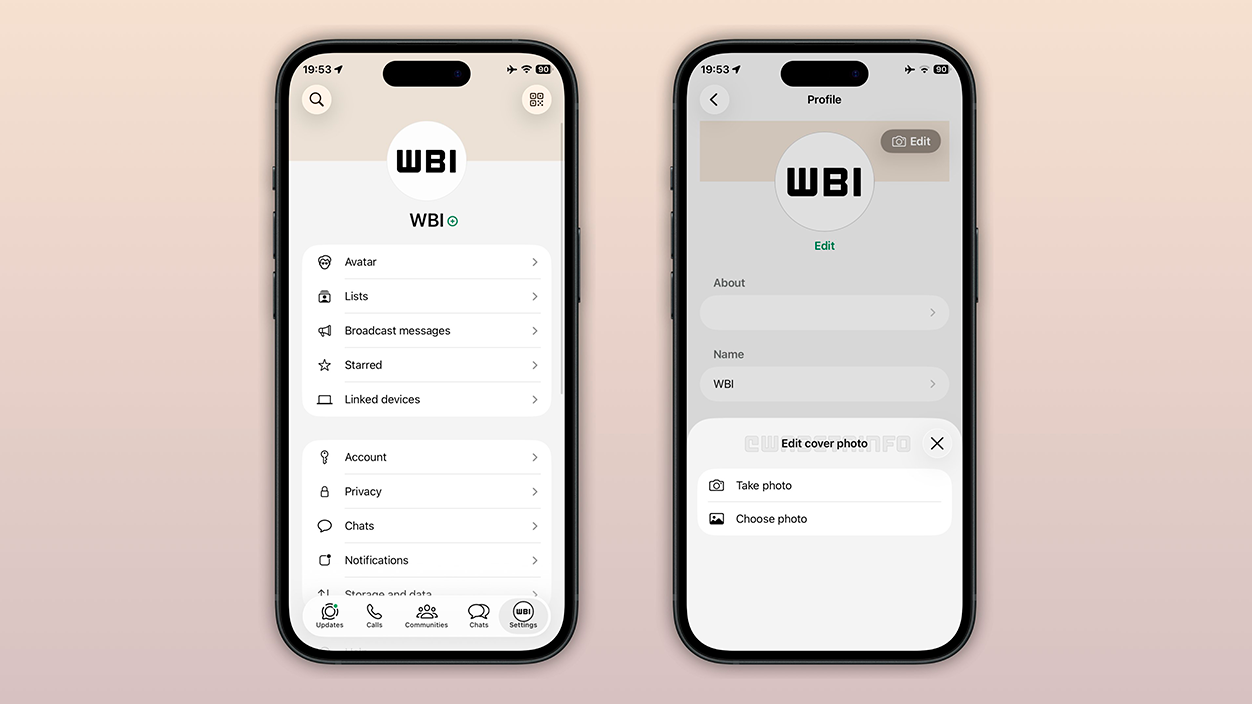
According to the captures and references located by WABetaInfo, WhatsApp will add a cover image to the top of your profile.This new image is similar to the headlines already seen on other social media platforms. It appears as a wide band above the profile picture and user dataso that both elements complement each other.
Until now, The front pages were reserved for WhatsApp Business accountswhere many companies use them to showcase products, basic information, or reinforce their brand identity. The novelty lies in the fact that this same possibility will be extended to personal accountsThis represents a significant leap in how the profile is understood within the app.
The cover photo does not replace the traditional profile picture. The circular photo will continue to be the main reference for identifying each userespecially in the chat list and conversations. The cover photo acts as a background or visual header when someone opens a contact's information, adding context, style, or a more personal touch.
In practice, this means that the profile will no longer be a static block with only occasional changes and will be able to function as a short introductionThis is especially useful in a WhatsApp that is increasingly used for work, mixed groups, and new contacts.
Where is the feature being tested and at what stage of development is it?

The first clues come from the test versions. On iPhone, the feature has been seen in beta version 26.1.10.71 distributed through TestFlightwhere a new editing section appears within the profile that allows you to add a cover photo. Something similar has been detected in developments for the Android update 2.25.32.2, which indicates that the The rollout is planned for the two major mobile platforms..
Integration is not limited to an isolated experiment: The cover is shown already placed over the profile details, with a practically final structure.This layout is very reminiscent of Facebook or X headers, with the profile picture superimposed and the basic information right below the banner.
Although the feature has been seen in the code and in screenshots of the betas, For now, it remains in the internal development phase.Not all beta users have this feature enabled, and there's still no official release date for the stable version. WhatsApp's usual strategy is to refine design details, stability, and compatibility before rolling out these kinds of changes to the general public.
From Europe, and specifically in countries like Spain, where the app is practically a communication standard, These tests are especially relevantAny modification to the profile has a direct impact on how contacts, groups, and even business accounts operating in the local market are perceived.
This is how your cover photo will work alongside your profile picture

Everything points to the fact that Setting up your cover photo will be as easy as changing your profile picture.From the profile section, a specific option will appear to add or edit the cover photo. By tapping it, you can choose an image from your phone's gallery or take a new photo to use as a banner.
Tests show that the app will allow reposition the photo to fit the panoramic format of the header, similar to how it's already done on Facebook. This way, each user can adjust which part of the image is visible and avoid awkward cropping.
Once the changes are saved, The cover photo will be displayed when any contact opens the profile information.This applies whether accessed from a conversation or the contact list. It will also be visible to the user when entering their account settings, reinforcing the idea that it's not just a hidden embellishment, but a central element of the profile experience.
WhatsApp maintains the philosophy of not forcibly imposing changes: The feature will be completely optional.Those who do not want a cover photo can continue using only the traditional profile picture, without the interface being filled with unnecessary elements.
Privacy controls: who will see your cover photo and profile picture
One of the key points of this change is that The covers will come with specific privacy settings.As with profile pictures or statuses, the user will be able to decide quite precisely who sees their cover image.
The options presented follow the familiar scheme in the app: Everyone, My contacts, My contacts except… and NobodyIn this way, it is possible to have a cover visible to everyone, restrict it only to the agenda, hide it from specific people, or simply not show it to anyone.
These controls will be integrated into the privacy section of the profile, as explained How to configure WhatsApp for maximum privacy, with a layout very similar to that of the current settings
The approach seeks to address a common concern: How to balance personalization and privacy in an app that is used both personally and professionallyBeing able to show a carefully curated cover photo to friends and family, but hide it from certain work contacts or unknown numbers, is especially useful in markets like Spain, where the use of WhatsApp has spread to almost all areas.
More profile personalization: from image to visual identity
Beyond the aesthetic novelty, The cover photos fit into a broader WhatsApp trend towards greater interface customizationIn recent years, themes, custom chat backgrounds, new dark modes, and minor visual tweaks have arrived; now it's time to reinforce the public part of the profile.
The idea is that the user can better express your mood, interests, or projects through the combination of profile picture and cover photoWhile the circular photo remains the reference point for quickly recognizing the person, the header opens up a wider space to display landscapes, illustrations, designs, or any other image that provides context.
For those who cultivate their personal brand, this feature offers room for create a more consistent visual identity within the appCorporate colors, logos, short messages, or images related to their professional activity. Something similar happens with freelancers and small businesses that already used WhatsApp extensively and can now unify the experience with what they did in Business.
At the same time, WhatsApp is trying not to lose its essence. The app isn't becoming a traditional social network full of public posts, but it is It takes a small step towards a more expressive modelwhere the profile ceases to be a mere formality and becomes a more vibrant space.
Relationship with other new features: usernames and profile evolution

The rollout of the covers is not an isolated event. The company is working in parallel on the entry of usernamesA new feature will allow users to contact people without directly sharing their phone number. This change, still under development, fits with the idea of a more visually rich profile.
In a scenario where interacting with new or unknown contacts will be more common, Having a clear cover photo and profile picture helps avoid confusion. It already provides a minimal sense of context. It's harder to impersonate someone else if their profile is well-defined and combines an image, cover photo, and username (and avoids problems like this). WhatsApp security flaw).
WhatsApp also has other aesthetic improvements underway, such as the wider rollout of Liquid Glass and new interface tweaksThese updates modernize the app's appearance without changing its core functionality. The cover images are part of the same set of changes aimed at making the app more up-to-date and visually appealing.
All of this reinforces the feeling that The profile picture ceases to be an isolated element and becomes part of a larger set.where each component (photo, cover, username, statuses) adds up to the perception that others have of our account.
How to take advantage of the new cover photo to improve your profile picture

With the arrival of the covers, many users will wonder How to get more out of your WhatsApp profile pictureBeyond the function itself, there are several ways to combine image and header to achieve a more polished profile, without needing to be a design expert.
One option is to play with images that converse with each otherA simple portrait as a profile picture and a background that represents hobbies, favorite landscapes, or colors that match the tone of the main photo. Also It is possible to use illustrations, cartoon-styles, or even anime versions generated with artificial intelligence tools.
Anyone wishing to go a step further can resort to mobile editing apps or online tools to prepare both your profile picture and cover photo. Features include Text to Image, AI-powered artistic filters, automatic cropping, and custom avatars. They allow you to create eye-catching images without too many technical complications.
The key, in the end, will be finding a balance: a recognizable and practical profile for everyday lifethat remains useful in family groups, work conversations and chats with strangers, but that allows for a better reflection of each person's personality.
Everything points to the fact that, when cover photos arrive in the stable version of WhatsApp for iOS and Android, The classic profile formed only by a circular image will definitely fall short.The combination of a homepage, advanced privacy controls, and future features like profile usernames a more visual and flexible space, designed for both personal life and the professional environment, without the app giving up its usual simplicity.


I am a technology enthusiast who has turned his "geek" interests into a profession. I have spent more than 10 years of my life using cutting-edge technology and tinkering with all kinds of programs out of pure curiosity. Now I have specialized in computer technology and video games. This is because for more than 5 years I have been writing for various websites on technology and video games, creating articles that seek to give you the information you need in a language that is understandable to everyone.
If you have any questions, my knowledge ranges from everything related to the Windows operating system as well as Android for mobile phones. And my commitment is to you, I am always willing to spend a few minutes and help you resolve any questions you may have in this internet world.