- NotebookLM now displays chat history with date and time on web, Android, and iOS.
- Users can completely delete conversations from the three-dot menu.
- In shared notebooks, chats are only visible to each user individually.
- The new AI Ultra plan increases the usage limits tenfold compared to AI Pro.
Google has completed the General display of chat history in NotebookLM, one of its most powerful artificial intelligence tools and integrated with GeminiThis feature, which had been in testing for months, It is now available to virtually all users both in the web version and in the mobile applications.
Until now, one of the One of NotebookLM's weaknesses was the inability to resume conversations. once the app or browser tab was closed. With the new history active for 100% of accounts, Past sessions are accessible again, making ongoing work much easier. with documents, notes, and sources.
How the new NotebookLM chat history works
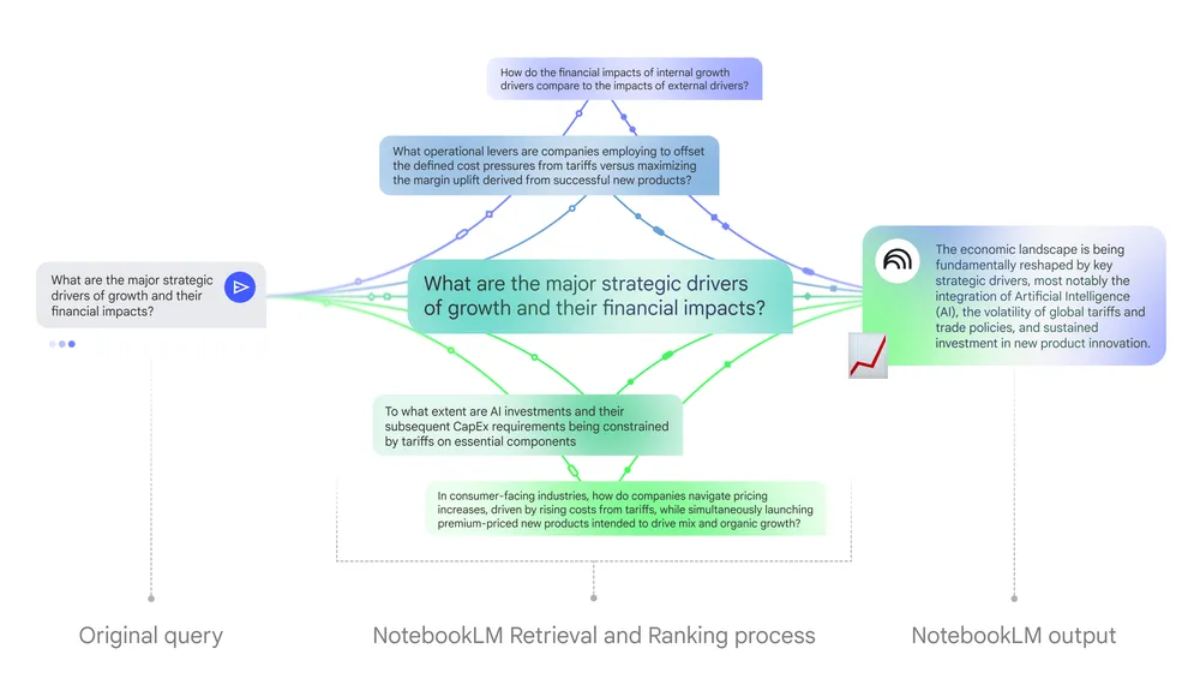
The history allows Continue a conversation in NotebookLM from any deviceYou can start a chat on the web and continue it later on Android or iOS, or vice versa, without losing the previous context. Each assistant response is now displayed with a date and time stamp, making it easier to locate when each query was made.
The option to add the following has also been added from the three-dot menu that appears in the chat interface: “Delete chat history” to erase all content associated with that conversation. Thus, anyone who wants to start from scratch with new questions or change approach can do so quickly without having to go message by message.
Another important new feature affects shared notebooks: Chats within a collaborative notebook are only visible to each userAlthough several people may work on the same sources and documents, the interactions that each person has with the assistant remain private and do not appear to the other participants.
Google has confirmed via the official NotebookLM account on X (formerly Twitter) that this capability has been Now activated for all users on mobile apps and on the webThis addresses one of the shortcomings that most limited the intensive use of the tool in medium and long-term projects.
A key change for everyday use of NotebookLM
Having access to Chat history represents a significant leap forward in how we work with NotebookLMInstead of having to reconstruct previous questions or review external notes, it is now possible to resume a conversation right where it left off, even if days have passed or you have changed devices.
Prior to this deployment, the tool tended to “forget” the context as soon as the session endedThis meant that part of the process had to be repeated each time the user logged in. With the new feature, conversations become a continuous thread that can be consulted and reused as many times as needed.
This change is especially useful for students, researchers and professionals They use NotebookLM to help them summarize documents, generate outlines, create flashcards, or prepare extensive reports. Being able to review questions asked on previous days, as well as the answers received, makes it easier to continue working on complex projects.
Furthermore, the fact that each answer is accompanied by a clear time reference It helps to better organize queries and identify at what stage of the project each part was worked on. For those who handle large amounts of material, this small detail can make all the difference when it comes to locating information.
Available on web and mobile
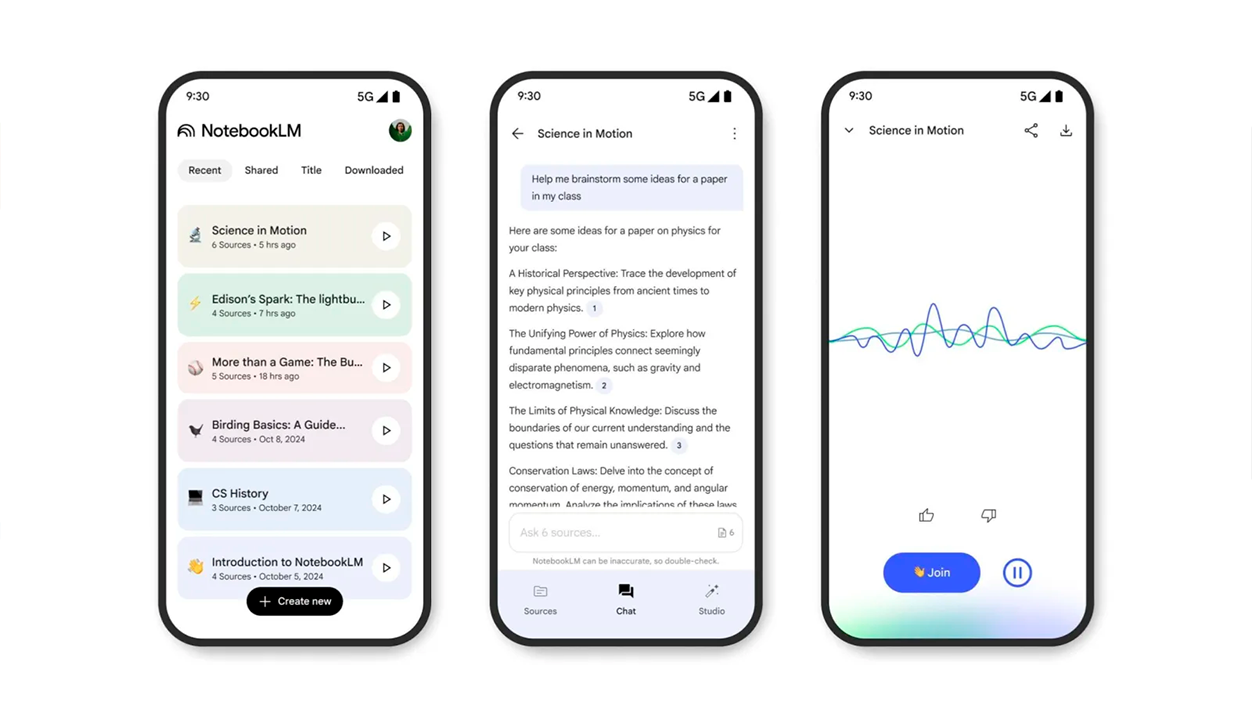
Google has been activating chat history gradually since October...until now completing the rollout for all users. The function It can now be used both in the web version of NotebookLM and in the Android and iOS apps.This allows you to switch between computer and mobile without interruption.
On desktop, accessing history is especially convenient for those who use NotebookLM in conjunction with other productivity tools. Meanwhile, on mobile, the possibility of continuing the conversation “on the fly” This makes the app more practical for quick queries or last-minute reviews.
Although the company has not detailed specific differences for the European Union or Spain in this feature, the global rollout implies that European users also now enjoy the history feature., always within the privacy and data protection policies that govern in the region.
Overall, this update puts NotebookLM in a stronger position compared to other AI assistants that already offered a persistent record of conversations, thus adjusting the experience to what many users took for granted.
Subscription plans and new AI Ultra tier
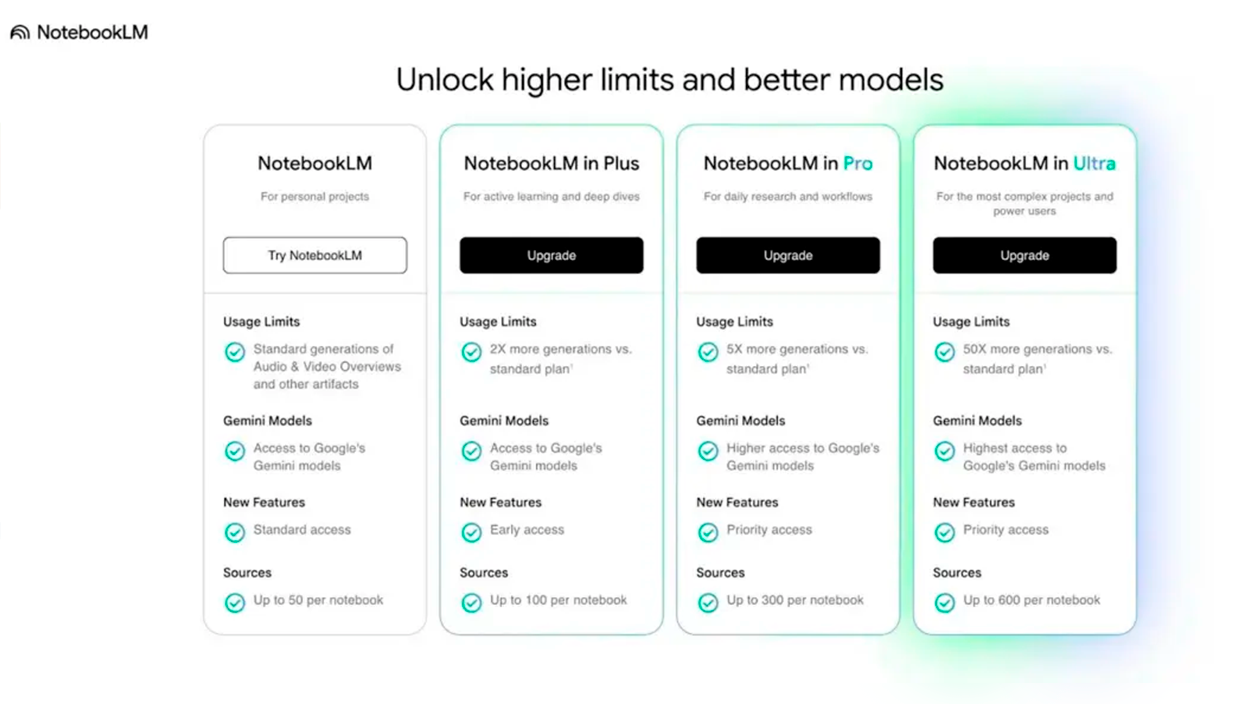
Along with the expansion of chat history, Google has introduced a New tier in NotebookLM payment plans: AI UltraThis level is in addition to the basic free plan and the already known AI Plus and AI Pro plans, and is designed for those who need very intensive use of the platform.
In the United States, the NotebookLM AI Pro plan starts at around $250 per monthIn return, it offers 5.000 chats, 200 audio summaries, 200 video summaries, 1.000 reports, 1.000 study cards, 1.000 quizzes, and up to 200 generations of Deep Research per day, according to data released by specialized media outlets such as 9to5Google.
AI Ultra significantly raises these numbers: broadly speaking, it represents multiply by ten the usage limits available in AI ProThis expansion is aimed directly at teams that need to process huge volumes of information or continuously generate materials such as reports, presentations, or educational resources.
Regarding fonts, the new level allows you to go from 300 in AI Pro to up to 600 fonts per notebookThis is key for those working with extensive bibliographies, documentary databases, or large archival collections. Furthermore, the maximum number of users per collaborative notebook increases from 500 to 1.000, expanding the capacity for group work.
Google has been refining its subscription offering for NotebookLM for months, with New levels and options have been added since the Plus plan was announced.AI Ultra is part of this strategy to offer a wider range of features tailored to the level of demand of each profile, from individual students to large organizations.
Extended limits and exclusive AI Ultra features
The limits of the AI Ultra plan aren't limited to the number of chats or sources. They also expand the maximum limits for generating infographics and slidesas well as access to the various Gemini models integrated into NotebookLM, geared towards more complex or demanding tasks.
One of the most striking features of this level is that Only AI Ultra users can remove watermarks in infographics and presentations generated by the tool, something that already happens in a similar way in other Google applications. For those who use these materials in professional settings, this option can be especially relevant.
El AI focus Ultra It is clearly placed on those who need a high daily production volume and fine control over the final resultFrom training departments to communications or applied research teams. However, for more moderate use, the free or intermediate plans will still be sufficient.
Although exact prices and conditions may vary by country and a specific table for Spain or the rest of Europe has not yet been detailed, the tiered structure that Google is consolidating It sets the course for how NotebookLM wants to monetize. in the coming months, combining basic free access with advanced paid capabilities.
Between the full arrival of chat history and the appearance of AI Ultra, NotebookLM is ceasing to be a mere curiosity and becoming something else entirely. a more mature and flexible work platform, which tries to adapt both to the user who only wants to make a few quick queries and to the teams that live connected to the tool daily.


I am a technology enthusiast who has turned his "geek" interests into a profession. I have spent more than 10 years of my life using cutting-edge technology and tinkering with all kinds of programs out of pure curiosity. Now I have specialized in computer technology and video games. This is because for more than 5 years I have been writing for various websites on technology and video games, creating articles that seek to give you the information you need in a language that is understandable to everyone.
If you have any questions, my knowledge ranges from everything related to the Windows operating system as well as Android for mobile phones. And my commitment is to you, I am always willing to spend a few minutes and help you resolve any questions you may have in this internet world.