- Beautiful.ai stands out for its automation, smart templates, and cloud collaboration.
- Tools like Gamma, Presentations.AI, or Pitch offer complementary approaches (personalization, frameworks, integration, and branding) that may be better suited to certain needs.
- Price, level of customization, and compatibility with the Office/Google ecosystem are key when choosing the best platform for creating professional presentations with artificial intelligence.

Do you want to create professional presentations without being a designer? Tools that leverage artificial intelligence to design slides have completely changed the way we work in marketing, education, and business. One of the platforms that stands out the most in this landscape is Beautiful.ai, recognized for its ability to simplify and optimize the process of creating visually striking presentations.
Below, we explain what Beautiful.ai is, why it's so interesting, and what its strengths have made it such a popular tool.
What is Beautiful.ai?
Beautiful.ai is A solution that allows any user, without prior design experience, to create attractive and professional presentations in minutes. Thanks to its artificial intelligence engine, the design of each slide automatically adapts to the content, achieving uniformity, aesthetic coherence, and a high-impact visual finish.
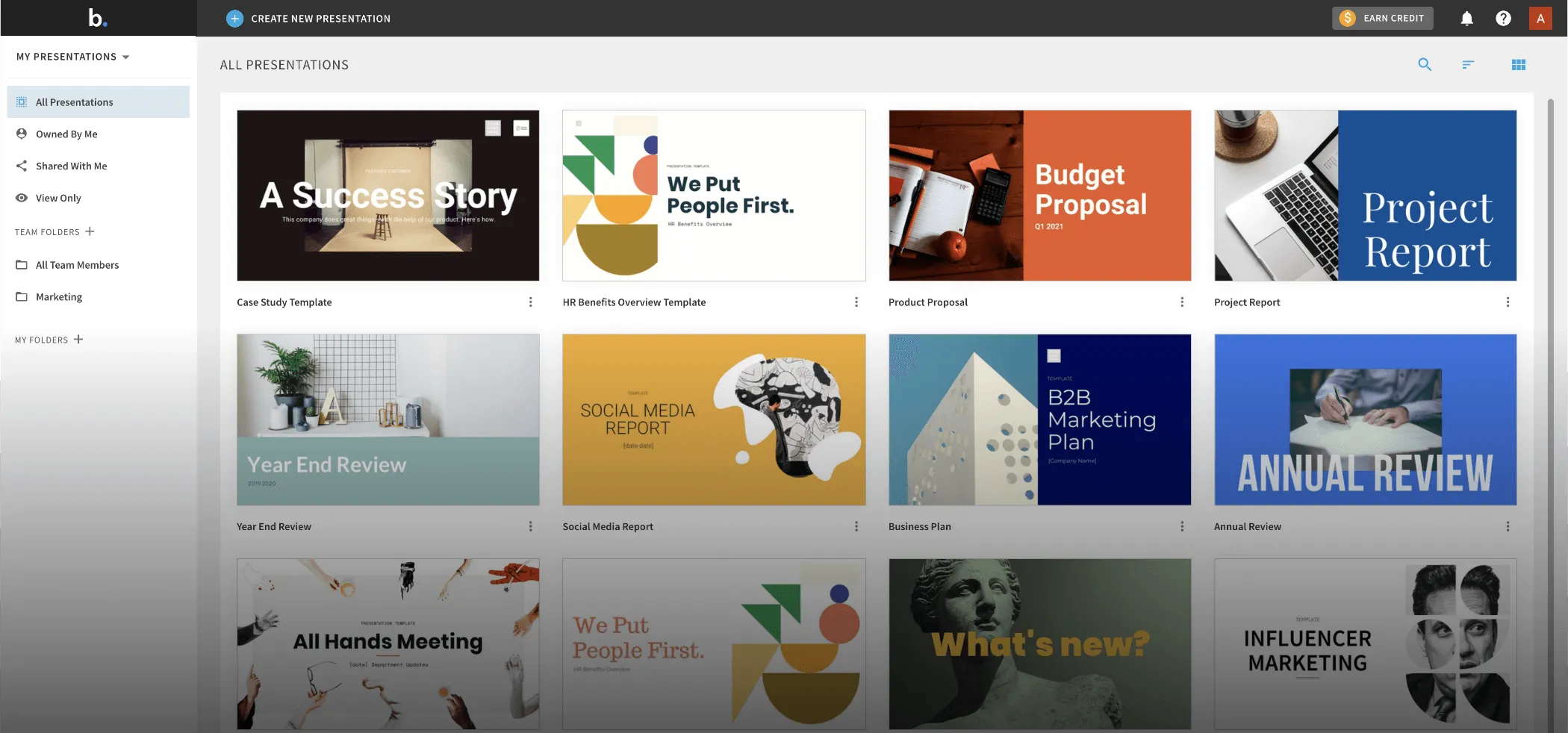
His proposal is simple: You provide the information and the platform takes care of the design, offering smart templates and simple customization options. These are some of the functionalities Beautiful.ai highlights:
- Smart and customizable templates: Choose from a wide variety of responsive layouts that dynamically adjust to the text, images, and graphics you need to display.
- Collaborative tools in the cloud: Work as a team in real time, add comments, assign slides, and easily track changes.
- Focus on business and teams: The platform is optimized for businesses, marketing teams, consultants, educators, and professionals who need fast, effective results without the hassle of advanced editors.
- Flexible export: Present from the web, share links, or export your documents to PowerPoint, PDF, or images.
Beautiful.ai has a minimal learning curve. You don't need any technical knowledge or prior design experience. The interface is simple, editing tools are kept to a minimum, and slide management is practical, especially thanks to the distinction between classic slides (static) and smart slides (dynamic for graphics and visual data).
What are the advantages and limitations of Beautiful.ai?
As with all tools, Beautiful.ai has both strengths and some important limitations. that you should take into account before choosing it:
- Main advantages:
- Professional Design Automation: Save hours of manual work with slides that maintain visual consistency and corporate style across all pages.
- Trabajo colaborativo: Ideal for teams, it allows you to comment, assign tasks and edit in real time, even recording audio or video for each slide.
- Differentiation between classic slides and smart slides: facilitates the updating of data and dynamic graphics.
- Ease of use: intuitive environment, with well-organized editing and collaboration tools.
- Main limitations:
- Limited customization options compared to rivals like Gamma or PowerPoint: If you're looking for complete editing freedom, this may fall short.
- Less extensive template library compared to some alternatives: Although the focus is on simplicity and speed, some advanced users may miss more variety.
- Higher price for large equipment: The monthly subscription model can be expensive if you need a lot of licenses (starting at $45 per month, though it drops to $12 per month if paid annually).
- Export to PowerPoint with certain quality limitations: Some visual effects and animations are not fully preserved when exported to PPT.
- AI still requires supervision: Although automatic generation is useful, the results sometimes need manual adjustments to avoid errors or unattractive slides.
Why is Beautiful.ai the benchmark for AI-powered presentations?
Despite growing competition, Beautiful.ai remains a benchmark because combines automation, ease of use and professional results in a short time. It is ideal for those who want to focus on the message, delegate the design to AI and ensure a flawless finish, without the hassle of complex tools or endless customization options.
Selecting the best tool will depend on your context, budget, team size, and how much you value customization versus speed. Whichever option you choose, Artificial intelligence is here to stay and transform the way we communicate ideas in any professional environment.

Editor specialized in technology and internet issues with more than ten years of experience in different digital media. I have worked as an editor and content creator for e-commerce, communication, online marketing and advertising companies. I have also written on economics, finance and other sectors websites. My work is also my passion. Now, through my articles in Tecnobits, I try to explore all the news and new opportunities that the world of technology offers us every day to improve our lives.