- Instagram allows you to manage up to five simultaneous accounts in the same app, switching between them without logging out.
- On Android and iOS, official functions can be combined with a browser, secure spaces, and, with caution, third-party apps.
- Meta's account center makes it easy to link profiles and share data, but requires extreme security and strong passwords.
- It is possible to delete or deactivate secondary accounts without affecting the main one, maintaining full control over each profile.

If you've ever wondered if it's possible to carry multiple Instagram accounts on the same mobile phone at the same timeThe answer is a resounding yes. These days it's very common to separate personal and professional life, manage client profiles, test new projects, or maintain a "serious" account and a more informal one.
The good news is that you don't need to be a tech guru to achieve this, but it is helpful to have a good understanding of the subject. all ways to use multiple simultaneous profilesFrom Instagram's official functions to tricks with cloned apps, secure spaces on your mobile device, web browser, professional tools, and some security precautions you shouldn't overlook.

How many Instagram accounts can be used on the same mobile phone?

The first thing you should understand is that the official application itself allows manage up to five different accounts at once from the same phone, without having to constantly log out and log in, something that years ago was a real nuisance.
With this limit of five profiles, you can receive notifications, messages and posts From all those accounts, you can switch between them on the fly and publish content without changing devices or installing anything extra, which is very convenient for community managers or users with multiple projects.
However, although you can create more than five profiles in total, after that number you will have to Log out of one account to log in to anotherbecause the app only keeps five active simultaneously on the mobile device.
Official method: Add and switch between multiple accounts from the Instagram app

The simplest, safest and most recommended way to have simultaneous Instagram profiles on the same mobile phone It is to use the native function of the application itself, available on both Android and iOS for several versions.
To begin with, it's important that you have Instagram updated to the latest versionBecause the management of multiple accounts arrived in relatively recent versions and has been refined over time to ensure a quick and stable transition.
Once updated, you just need to access your Instagram profile and open the three-line menu (the classic “hamburger” menu) at the top of the screen, where you will find the configuration options and, among them, the possibility of adding more accounts.
At the bottom of that menu you will see the option “Add account”From there you can log in with another profile you've already created or create a new one from scratch, all without leaving the app and without any strange tricks.
When you finish adding credentials, the application will ask you if you want remember the data on that deviceIf you accept, the phone will keep both profiles saved and you can switch between them in a matter of seconds.
How to create a new Instagram account from your mobile phone

If you don't yet have that additional profile, you can register a new account from within the app, without needing to enter the browser or another device, which makes it much easier to set up a thematic or professional profile on the go.
To do this, repeat the previous process until you reach the option “Add account” and select “Create new account”At that point, the application will ask you for a username that is not already in use, so you may have to try several combinations until the available checkmark appears.
Then you will have to establish a secure and difficult to guess passwordThis is key if you're going to manage business accounts, customer accounts, or profiles where you share personal information; never use the same password for everything, because it greatly increases the risk.
As you proceed, Instagram will offer you two paths: Link the new account to the details (email and phone number) of the main account or enter a different email or phone number, so that the profiles are more separated from each other.
If you choose “Complete registration” without touching anything else, the platform will use the email and phone number that were already associated with your main account and will leave both linked in the same account center; if you prefer to separate them, tap “Add phone or email” and enter different details.
Advantages of having a second Instagram account
There are many reasons why more and more users are choosing to Use multiple Instagram profiles on the same mobile phoneboth on a personal and professional level, and it's not just about fashion or posing.
One of the most common reasons is to have a separate professional or business account from personal profileThis is highly recommended if you serve customers, sell products, or want to maintain a more polished and consistent image in the workplace.
It is also very common to create specific thematic accountsProfiles about books and reviews, movies, football, historical curiosities, study (#studygram), travel photography, illustration, graphic design, or artistic projects where you can showcase your portfolio without mixing it with your private life.
Another clear advantage is playing with the Privacy settings and the circle of people who can see your contentYou can keep one account open and public, and another closed one only for family, close friends or people you trust deeply.
From the social network's own perspective, Instagram has explained that offering the option of secondary accounts helps users to feel that they have more control over what and who they teach, reducing the pressure of "taking care" of the main feed and allowing for more intimate and sincere spaces.
How to switch from one Instagram account to another without complications
Once you have several profiles added to the app, what interests you most is switch from one account to another quickly to post, reply to messages, or check notifications without getting bogged down with credentials.
The most direct way is to go to your profile and Tap your username at the topA list will appear with all the accounts you have open on that mobile phone, and you will just need to select the one you want to use at that moment.
From that moment on, everything you do (posting posts, stories, comments, messages, etc.) will be done from the account you have activeOnce you want to return to another profile, repeat the same gesture on the username and choose the next profile.
You must keep in mind that the app It always keeps open the last account you interacted with.Therefore, it's advisable to check which profile you're using before uploading content, as it's quite common to make mistakes and post in the wrong place.
There's also an even faster shortcut: if you only manage two accounts, you can Double-tap your profile picture in the bottom bar And the app will automatically switch to the other profile you have registered on the device, a very useful trick if you switch often.
Meta account center, linked accounts, and shared data
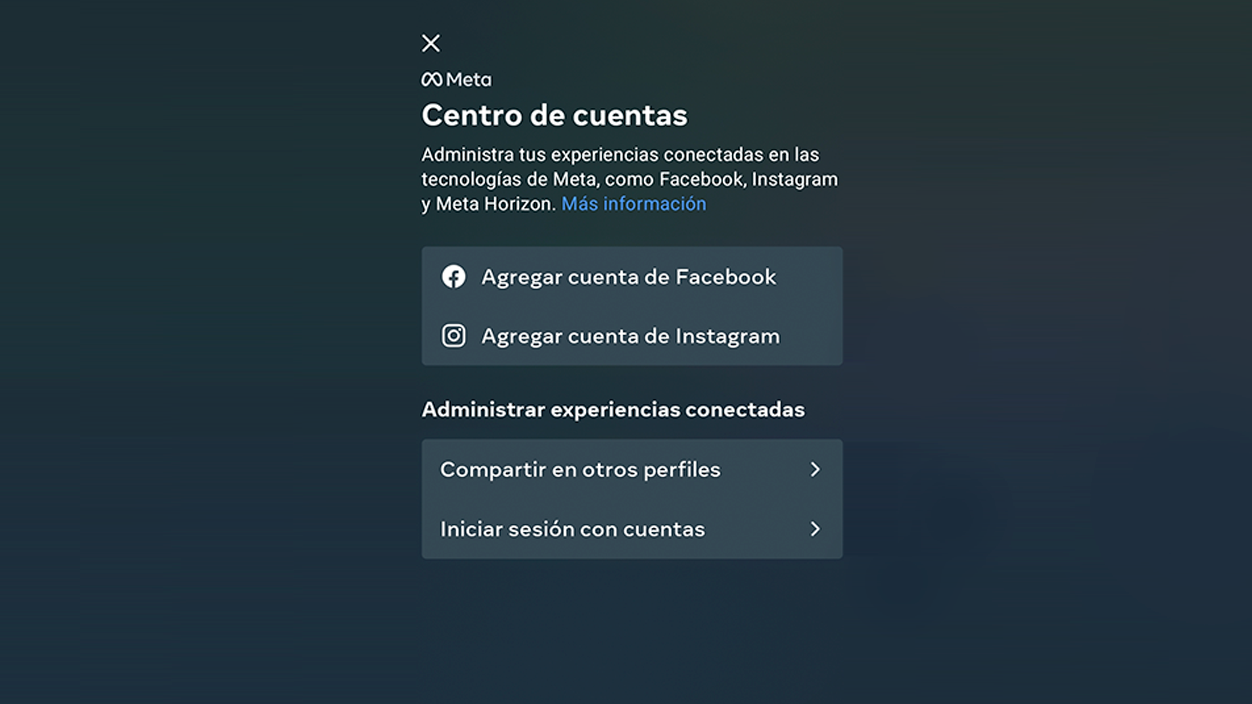
Another key aspect when working with simultaneous Instagram profiles on the same mobile phone It's how they relate to each other within the Meta ecosystem, something that is managed through what is called “accounting center”.
When you link multiple profiles, it opens up the possibility of Share stories, reels, and posts between Instagram and Facebook almost automatically, as well as using the "Log in with accounts" option to access different profiles with the same basic credentials.
In addition to that, the account center can synchronize elements such as name, profile picture, avatar, or even part of purchase activity between different accounts, simplifying management a bit, especially if you manage both a personal brand and a company page.
Although it is no longer officially possible to create multiple accounts from scratch with exactly the same single sign-onMany users have managed to link up to four profiles to the same email address or phone number, adjusting those details after registration.
However, the general recommendation regarding safety is Avoid overusing the same email or phone number for everything.And, if you do, make sure you maintain absolute control over those addresses and can regain access if any problems arise.
Security: passwords, third-party apps, and protecting your accounts

When you start managing multiple accounts simultaneously from the same device, it's crucial strengthen the security of each profilebecause a failure in one of them can compromise the rest if they share access data.
The first thing is to always use strong and different passwords for each accountAvoid repeating the same password or using minimal variations; ideally, you should combine letters, numbers, and symbols, and use a password manager if you find it difficult to remember them.
It is also advisable to activate the Two-step authentication (2FA) on all accountsThis means that even if someone gets hold of your password, they will need an additional code sent via SMS, an authentication app, or email, which greatly complicates unauthorized access.
Regarding third-party apps and cloning solutions, it is important Only download tools from reputable sources that are frequently updated. and, if possible, verified or recommended by trusted users, avoiding dubious sources.
Finally, don't forget Keep Instagram and your mobile operating system always up to datebecause each new version corrects security flaws and improves the stability of features such as account switching or active session management.
How to delete or deactivate a secondary account without touching the main one
If at any point you get tired of an extra profile, it's possible delete a secondary account without affecting the main oneprovided you are clear on which is which and follow the appropriate steps from the browser.
Complete removal must be done via the web: you must log in instagram.com with the username and password of the account you want to delete, access the specific deletion page and confirm the reason why you are getting rid of it.
Once you choose the reason and click on “Delete account permanently”Instagram sets a period during which you must not log in to that profile again; if you respect it, after that time photos, comments, followers and all associated data will be deleted.
If you just want a break, you have the option of temporarily disable the secondary accountThis can also be done from the browser, by entering the profile, going to settings and using the option "Temporarily deactivate my account".
During the time it is disabled, Your profile and posts will remain hidden.But they won't be deleted; as soon as you log back in normally, the account will be reactivated, although it may take a few hours for everything to appear as before.
How to detect if someone has multiple Instagram accounts
Although Instagram does not provide an official list of all the accounts managed by the same personYes, you can do some basic checks using the search engine and comparing seemingly related profiles.
From the app itself, all you have to do is search for the person's username or real name and review the results that appear, paying attention to similar profile pictures, similar descriptions, or links that point to the same website.
If you suspect that an alternate account belongs to someone you know, you can Enter their profile and analyze the gallery, bio, location, or contact information to see if they match the identity of the person you have in mind.
If the additional account is private, you will need to Send a follow-up request or a direct message If you want to confirm your suspicion, or simply have it located to check its activity from time to time from outside.
There is no foolproof method to discover all of a user's accounts, but with a smart use of the search engine and a little common sense Secondary profiles that share certain common patterns can be detected with relative ease.
Today, managing multiple simultaneous Instagram profiles on the same mobile phone This is something fully accepted by the platform and the users themselves, and thanks to the combination of the official app, the system's secure spaces, the browser and, if necessary, professional external tools, it is possible to separate personal life, projects and work without going crazy, as long as security aspects are not neglected and you keep track of which account you are publishing from at any given time.

I am a technology enthusiast who has turned his "geek" interests into a profession. I have spent more than 10 years of my life using cutting-edge technology and tinkering with all kinds of programs out of pure curiosity. Now I have specialized in computer technology and video games. This is because for more than 5 years I have been writing for various websites on technology and video games, creating articles that seek to give you the information you need in a language that is understandable to everyone.
If you have any questions, my knowledge ranges from everything related to the Windows operating system as well as Android for mobile phones. And my commitment is to you, I am always willing to spend a few minutes and help you resolve any questions you may have in this internet world.