- A personal AI search engine combines language models, proprietary data, and the open web to provide contextual and actionable answers.
- Google AI Mode, Personal Intelligence, and Deep Research-type systems show how to integrate email, photos, and documents into search.
- Platforms like amarsia.com or Jenova allow you to add web search and real-time contact discovery without programming.
- Success depends on preparing the data well, training the search engine with real queries, and applying GEO to gain visibility in generative search engines.

Imagine being able Ask your own personal search engine anything And that, instead of bombarding you with an endless string of links, it gives you a clear, contextual answer, supported by your Gmail inboxes, your photos, your documents, and, moreover, the entire web. That's no longer science fiction: it's the new generation of AI-powered search engines, capable of blending global knowledge with your private data (if you allow it) to help you make better decisions and save hours of work.
In this article you will see, in considerable detail, how these systems work, and what players like Google are doing with their AI Mode and Personal IntelligenceHow can you leverage platforms like amarsia.com or Jenova to add real-time web search to your own agents without writing code, and what implications all this has for SEO, B2B marketing, and creating a truly your own AI search engine. It's a lengthy overview, but by the end, you'll have a fairly comprehensive roadmap for creating, using, and optimizing one. AI-powered personal search engine that it works in your favor, not against you.
What exactly is a personal AI search engine?
When we talk about a personal search engine with AI, we're not just referring to Google with a few new tweaks, but to a system capable of Understand natural language, reason about your questions, and combine public sources with your private contextThe big difference with classic search engines is that it no longer just matches keywords with pages, but interprets your intent, remembers what you have asked before and even takes your preferences into account.
A modern AI-powered search engine also introduces capabilities of semantic understanding and multimodalityIt processes not only text, but also images, voice, and even entire PDFs. This allows for queries like "find me". all contracts that contain this clause"or "which suppliers appear in this comparative PDF" without having to open the documents one by one.
Another key leap is the real-time customizationThe results are no longer "the same for everyone" and are adapted to your history, location, role, and how you interact with the system. That's precisely where the Personal Intelligence from Google and where, on a private scale, you can build your own personal AI search engine connected to your tools.
Google AI Mode and Personal Intelligence: Your information integrated into search
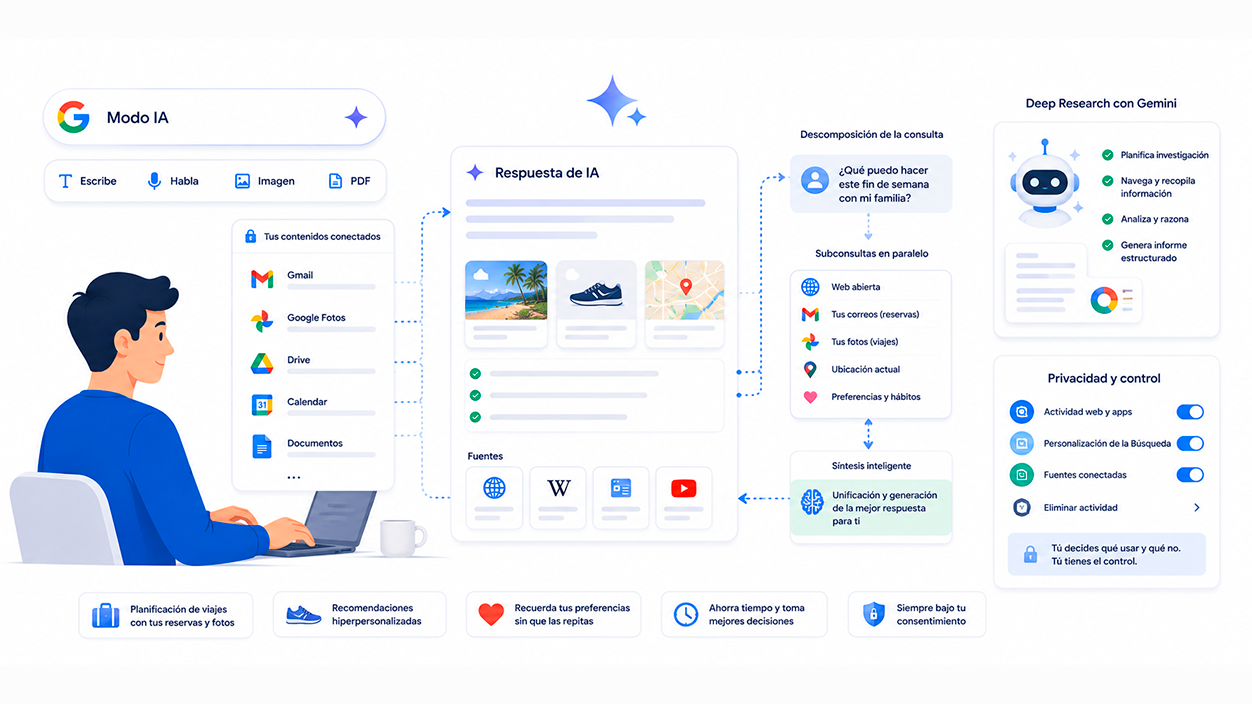
Google is using its massive Search infrastructure to deliver an experience that feels almost like a personal assistant embedded in the search engineThe so-called AI Mode or AI Overviews It is the most advanced layer: there you can write, speak or even upload images and PDFs, and you get a response generated by Gemini models with relevant links to the web.
The most powerful new feature for creating a personal search engine is the function of Personal IntelligenceIf you enable it, Google can securely connect your content apps (starting with Gmail and Google Photos, and extending to other Workspace services) with AI Mode. This allows things like:
- Plan tripsYou ask what to do with your family on the weekend, and the system checks your hotel booking in Gmail and your photos from previous trips to recommend activities that match your tastes.
- Hyper-personalized recommendationsIf you've recently bought a pair of shoes from a certain brand, AI Mode takes that into account to suggest similar models without you having to explain it again.
- Remember your preferences without you having to repeat them: diets, schedules, leisure styles… all of that is reflected in the answers.
The key technical point here is that AI Mode breaks down your query into parallel subconsultationsIt divides the question into subtopics, throws them against different sources (the open web, your connected services, location data, etc.) and then synthesizes everything into one answer: a kind of automated “meta-research”.
For more complex questions, Google has developed Deep Research, an agent system on top of Gemini that can plan multi-step investigations, browse the web, compile hundreds of pages, reason, and generate a structured reportThis agent relies on techniques such as:
- Iterative planning: breaks down a large problem into smaller tasks and decides what to do first, what can be done in parallel, and what depends on what.
- Persistent inferenceIt maintains a shared state and can execute multiple model calls for minutes without losing context if something fails.
- Huge context windows and RAG: combines a window of up to one million tokens with Augmented Recovery (RAG) to "remember" what has already been read throughout the session.
All of this, from your point of view as a user, means that you A personal search engine based on Google can end up behaving like a full-time researcher that not only looks at the web, but also at your email, your documents and your photos, always with your consent and with configurable privacy controls (Web and app activity, Search customization, etc.).
No-code platforms to add web search to your own AI
If you want to go a step further and build your own personal AI search engine outside of the Google ecosystem, platforms have emerged that allow you to do so. Connect AI models to the web in real time without writing codeOne example is amarsia.com, which has launched a "Tools v2" system to give your agents or chatbots online search capabilities and implement them as an API.
The approach of these types of tools is usually very practical: you define what type of tasks you want to solve (for example, chatbots with fresh data, information verification, automated research) and the platform is responsible for:
- Provide a web search connector that the model can invoke when it needs external information.
- Orchestrate calls to different services (Google, news, documentation, etc.) and consolidate results.
- Expose the agent as an API or widget to embed it in websites, products, or internal flows, all without setting up your own infrastructure.
For non-technical users, this is pure gold, because it solves the main bottleneck: moving from a "closed" model that only knows what it was trained to, to an assistant connected to the real worldFurthermore, such platforms provide the ideal bridge if you want to create a personalized AI search engine specializing in a specific topic (your industry, your product, your document database) but with the ability to supplement the information with live data from the internet. If you prefer alternatives outside the traditional ecosystem, there are guides available on alternatives to Google search that can help you decide.
People and contact search engines: a practical case study of a personal search engine
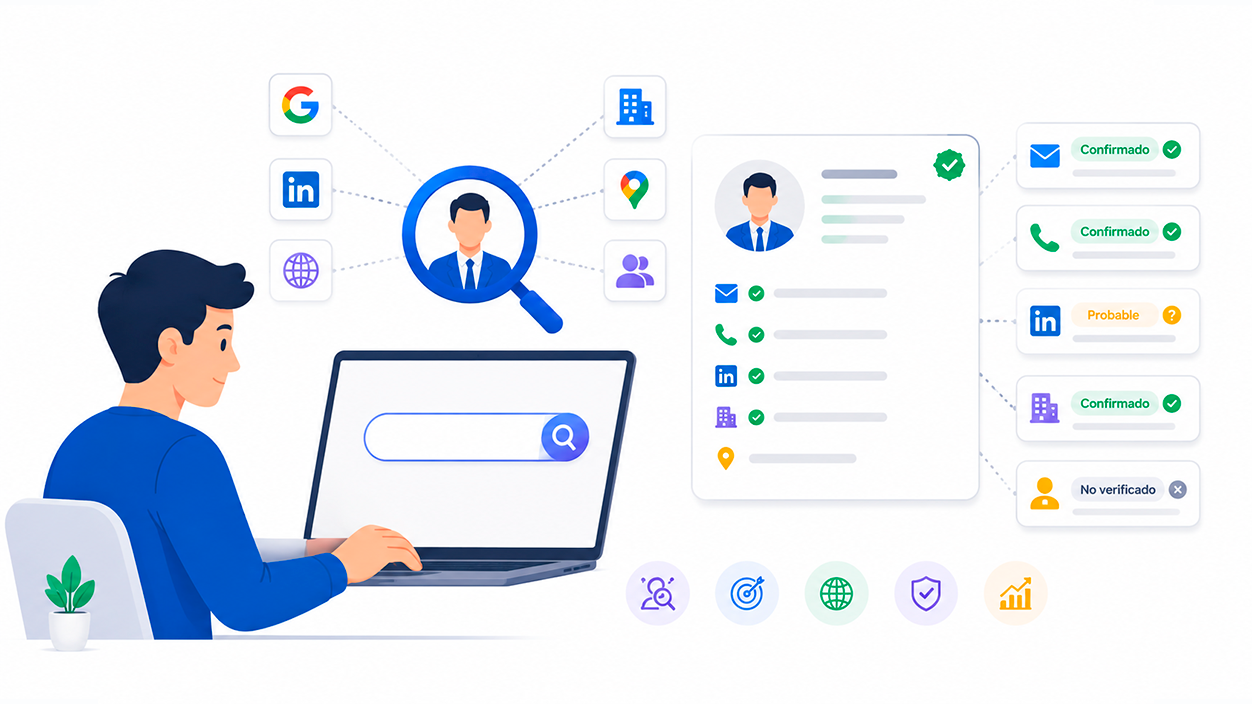
Another very specific example of a personal search engine with AI are tools like AI-powered People and Contacts Finder, such as the one offered by the Jenova platform. This system focuses on a very specific problem: Find up-to-date contact information for people and businesses in seconds.
Instead of using a static database (like many traditional B2B tools such as ZoomInfo or Rocket Reach), this search engine works on the open web in real timeIt crawls Google, LinkedIn, corporate websites, Google Maps, social networks and directories, and adds:
- Professional emails and likely email patterns.
- Direct phone numbers and business phone numbers.
- LinkedIn profiles and other professional networks.
- Business information: addresses, hours, reviews, recent activity.
What's interesting for you, if you want to build your own personal search engine, is the adaptive search strategy which uses AI. Instead of always launching the same generic query, it adjusts its plan based on what you provide:
- Name + company → prioritize LinkedIn, team pages, and press releases.
- Name + city → Mixes social profiles and local directories by filtering by location.
- Business + Location → First, use Google Maps to get the listing, reviews, and phone number.
- Email or phone (reverse lookup) → attempts to locate the identity associated with that identifier in public sources.
- Non-English names → infers likely language and performs searches in both English and the native language.
Each piece of data returned comes with a confidence indicator (confirmed, probable, or unverified), so you not only get information, but also a clear indication of how much you can trust it. This approach to transparency is fundamental in any AI-powered personal search engine that aims to be useful in the long run.
The use cases are varied: sales prospecting, recruitment, local business development, reconnecting with old contacts, locating international profilesetc. And, at a business level, it tackles a huge problem: the constant deterioration of contact databases (estimated at 2,1% per month) and the hours lost in researching leads that then turn out to be disconnected phones or bounced emails.
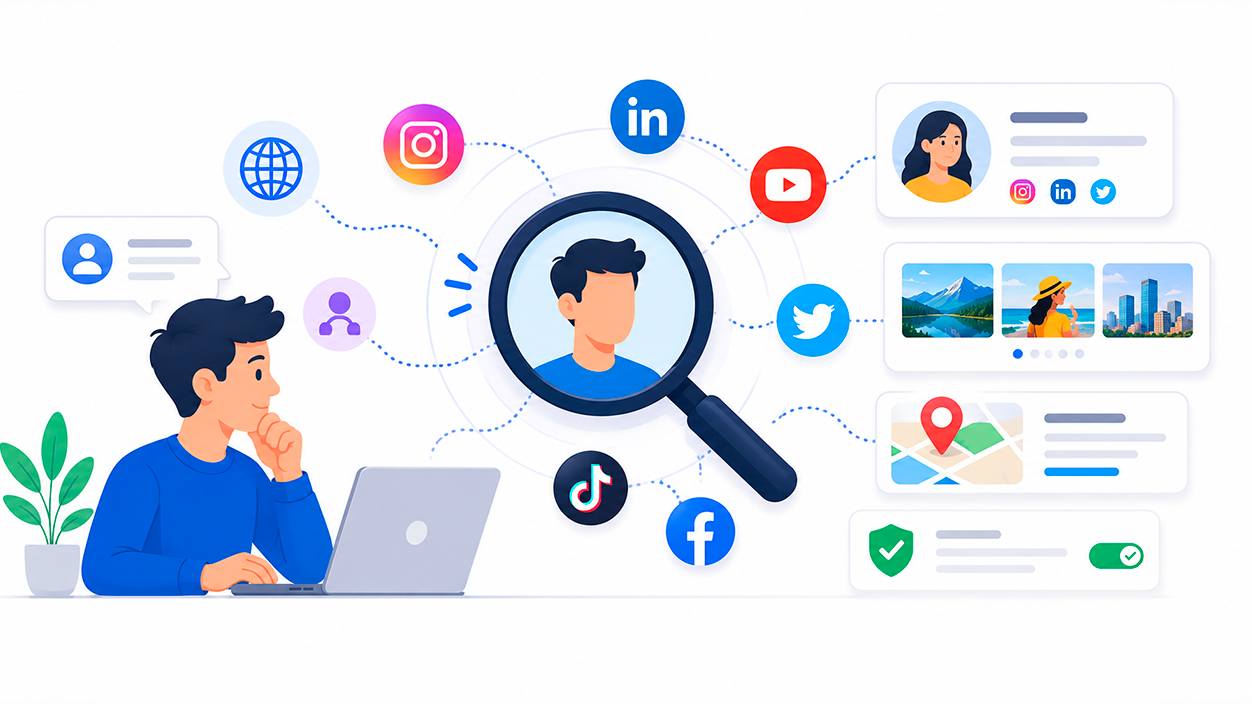
Beyond B2B, mobile applications have emerged for people search and social lookup These apps function as a kind of "personal people finder" focused on social media profiles and public footprint. They use AI to locate, based on a name or alias, the social networks where someone has a presence, images, videos, and public mentions.
Their proposal is usually very clear: save yourself the trip through twenty different platformsYou enter your name or username, and the AI cross-references:
- Public profiles on general and professional social networks.
- Search engine results, associated images, tagged videos.
- Basic public records that are legally available.
All of this with an interface designed for networkers, recruiters, journalists, curious people, or even users of dating apps who want to verify minimal public presence before moving forward in a relationship. Just like in the case of the B2B search engine, these applications promise to work only with public data and emphasize the importance of a ethical use, without stalking or harassment.
From the perspective of "creating a personal search engine with AI", this type of app demonstrates how powerful it is to combine multi-platform search, results consolidation, and an AI layer to filter out noiseConceptually, there isn't that much difference between a search engine that finds social profiles and one that finds technical documents or internal emails.
How AI-powered search engines work on the inside
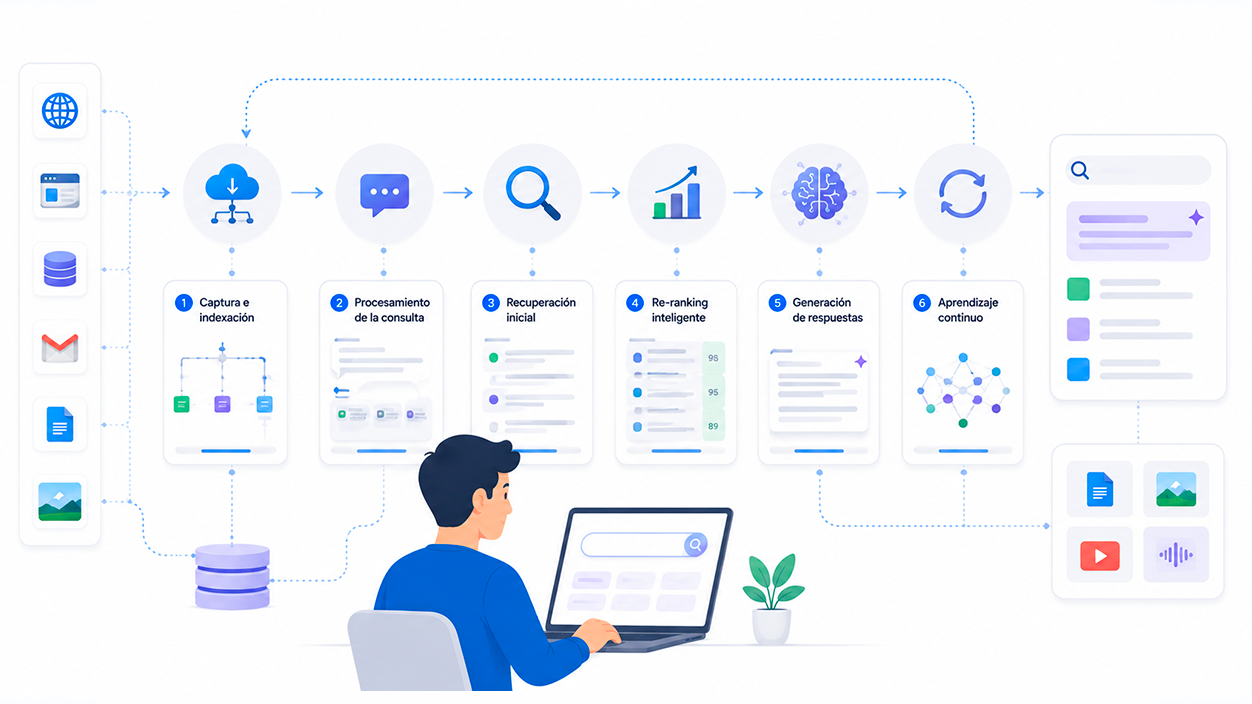
If you want to build your own personal search engine, it's worth understanding the inner workings. A modern AI-powered search system combines several components:
On the one hand, the Machine Learning It analyzes patterns: which results are typically useful for which type of query, what behavior indicates satisfaction, and which documents tend to be relevant for certain user profiles. This feeds ranking models that "learn" what to show first.
On the other hand, the Natural Language Processing (NLP) It transforms the query into something the system can understand semantically. The text is tokenized, entities (people, companies, places) are identified, the intent (informational, transactional, navigational) is detected, and synonyms, spelling errors, and ambiguous expressions are handled.
Then the engine comes in Information RetrievalIndexes are data structures that allow for the rapid location of relevant documents. Techniques such as BM25 are combined with BERT-type models or similar to measure semantic similarity between the query and the documents, not just keyword matching.
In practice, the typical flow of an AI-powered search engine includes:
- Data Capture and Indexing from websites, intranets, knowledge bases, emails, multimedia files.
- Query processing, with semantic analysis and identification of intent.
- Initial candidate recovery based on the indices.
- Intelligent re-ranking using ML models and behavioral signals.
- Generating responses by an LLM who summarizes, explains and cites sources.
- Continuous learning based on what results were selected and how the user interacted.
This applies equally whether your personal search engine runs on the open web, your company's internal systems, or your personal data (email, documents, photos, etc.). The difference lies in which sources you index, how you label the data, and what privacy controls you implement.
Business use cases: intranets, e-commerce, and data analytics
Many organizations are already using AI-powered search engines such as core of its internal productivityIn intranets and knowledge bases, these systems allow an employee to type questions in natural language such as "send me the latest vacation policy" or "installation guide for product X version 2.1" and for the search engine not only to find the PDF, but also to respond with a summary and a direct link.
In e-commerce, the combination of AI and search results in much smoother experiences: predictive search, smart filters, and personalized recommendationsThe search engine learns from your history, your purchases, and patterns of similar users, and shows you first what is most likely to interest you, reducing friction and increasing conversion.
Another scenario where a personal search engine with AI shines is in the analysis of unstructured dataContracts, emails, reports, images, videos, and social media mentions. An advanced system can find specific clauses, locate visual patterns in video recordings (for example, whether safety regulations are being met), or track sentiment and brand mentions on social media.
All of this is based on a previous phase of data preparation and labelingCleaning, normalization, categorization, and, in many cases, manual or semi-automatic annotation of entities and relationships. The better you structure and label your internal sources, the better your custom search engine built on them will perform.
How to know if you need a personal AI search engine
Not all businesses or individual users need the same level of sophistication, but there are clear signs that your current system is falling short. If your teams are complaining that They find nothing, they waste a lot of time looking for documents.If your internal searches return irrelevant results, or you have mountains of untapped PDFs and emails, it's probably worth investing in a smart search engine.
Some useful questions to ask yourself:
- Do you manage large volumes of data, especially unstructured data (docs, emails, multimedia)?
- Are search times critical for sales, support, logistics, or legal?
- Do different profiles within the organization need personalized results according to their role?
- Do your current metrics show many unsuccessful searches, abandonments, or recurring complaints?
You can also support your decision with harder data: percentages of no-click searches, average time to find the necessary information, rate of repeat support tickets due to not locating help articles, etc. When you see that internal search becomes a bottleneck, the idea of setting up a AI-powered personal search engine tailored to your organization It ceases to be a technological whim.
Configure and train your personal AI search engine step by step
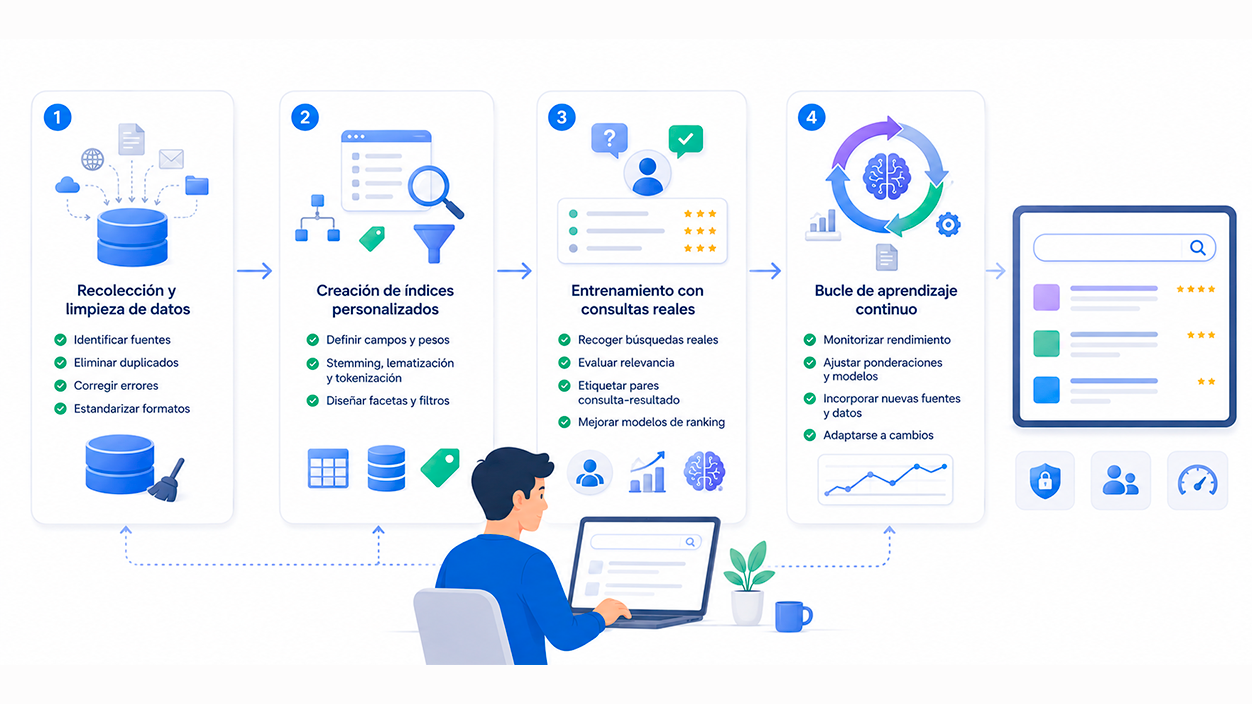
Building a well-functioning AI-powered personal search engine isn't simply a matter of plugging in a model and calling it a day. It requires prior work. data preparation, index creation, and training with real queriesIn broad terms, the process includes:
First, the data collection and cleaningYou need to identify all relevant sources (web, intranet, CRM, document management system, emails, etc.), remove duplicates, correct formatting errors, and standardize structures. It's not a glamorous job, but if you fail here, search engines will forever drag up the results.
Second, the creation of custom indexesIndexing e-commerce products is not the same as indexing legal clauses. You need to decide which fields carry the most weight (title, summary, body, tags, date), apply techniques like stemming, lemmatization, and tokenization, and design facets and filters that are useful for your specific case.
Third, the training with real user queriesCollect existing search queries (and the results people expect), assess relevance, label query-correct result pairs, and feed supervised models that improve rankings. A/B testing and direct feedback from key teams are very helpful here.
Finally, a loop must be established continuous learningIt's not enough to train once and forget about it. Data changes, products evolve, and new regulations come into play. Your personal search engine must adjust its weightings, sources, and models as your needs change.
Impact on user experience: personalization and less friction
When an AI-powered search engine is well-built, the user's impression is that the system He understands you immediately and anticipates your needs.This is achieved through behavior-based personalization: search history, pages spent the most time on, answers marked as helpful, etc.
The reduction in friction is incredible: more natural queries, automatic suggestions that complete what you were going to ask, spelling corrections without you having to rewrite, and automatic prioritization of the results that make the most sense to you at that momentAll of this reduces time, lowers frustration, and increases the actual use of the tool.
In business contexts, this has a direct impact on productivity and employee or customer satisfactionA support technician who finds the right solution on the fly responds faster; a salesperson who locates the right decision-maker in seconds generates more leads; an end user who sees accurate results stays with you longer.
This same principle applies to the B2B side of marketing and sales: many buyers now research weeks before speaking with a supplier, and they do so on AI search engines like ChatGPT Search, PerplexityCopilot or Google's AI Mode. If your content is optimized to be cited there, The responses they receive already include you as a reliable reference., which shortens the sales cycle.
SEO, GEO, and how to make your search engine and website appear in AI search engines
All this change in the search has sparked a new discipline: the Generative Engine Optimization (GEO)Unlike classic SEO, which focuses on ranking your page in the top ten, GEO aims to ensure your content is the one AI models choose to build their generative responses.
Key GEO tactics for B2B companies (and, by extension, for nurturing your own personal search engine) include:
- Structuring content in format question-answer, aligned with the real doubts of your buyer persona.
- Include quantitative data and real caseswith clear sources that models can cite with confidence.
- Implement schema markup advanced (Article, FAQPage, Organization, Product/Service) so that the engines can identify entities and relationships.
- Build subject matter authority with internally interconnected deep content clusters.
According to academic studies, applying well-designed GEO techniques can significantly increase visibility in generative responses. For you, that means that when someone asks on ChatGPT, Perplexity, or Gemini for solutions in your niche, Your brand has a much higher chance of being mentioned. and to be the starting point for the funnel.
Obviously, it's not all advantages. There are risks of hallucinations, reduction of classic organic traffic (fewer clicks, more direct responses) and a lack of standard metrics. But, at the same time, the value of a qualified mention in a well-positioned generative response is often greater than that of a cold click from a generic Google result.
If you combine an external GEO strategy (to appear in public AI search engines) with a well-trained internal personal search engineYou have the perfect storm: you capture better qualified leads from outside and, inside, your teams can make the most of all the knowledge you have already produced.
Ultimately, creating a personal search engine with AI involves three mutually reinforcing layers: choosing the right infrastructure (Google AI Mode, no-code platforms, custom engines)Prepare and properly label your data (both internal and public) and design workflows where AI not only responds but also streamlines processes and generates real business. The sooner you start integrating these elements, the sooner you can leverage search that truly works in your favor, both in your daily operations and in increasing your brand's visibility on new generative search engines.

Index
- 1 What exactly is a personal AI search engine?
- 2 Google AI Mode and Personal Intelligence: Your information integrated into search
- 3 No-code platforms to add web search to your own AI
- 4 People and contact search engines: a practical case study of a personal search engine
- 5 Personal search engines for productivity and social use: people search apps
- 6 How AI-powered search engines work on the inside
- 7 Business use cases: intranets, e-commerce, and data analytics
- 8 How to know if you need a personal AI search engine
- 9 Configure and train your personal AI search engine step by step
- 10 Impact on user experience: personalization and less friction
- 11 SEO, GEO, and how to make your search engine and website appear in AI search engines
