
Seeing part of a reply appear in purple in Gmail can be confusing and annoying, especially if you didn't do anything to cause it. Don't worry, It's not that your screen is damaged or that you accidentally pressed anything.In this article, we'll look at why this happens, whether you should be concerned, and how to prevent it. Let's begin.
Why does part of the text of a reply appear in purple in Gmail?
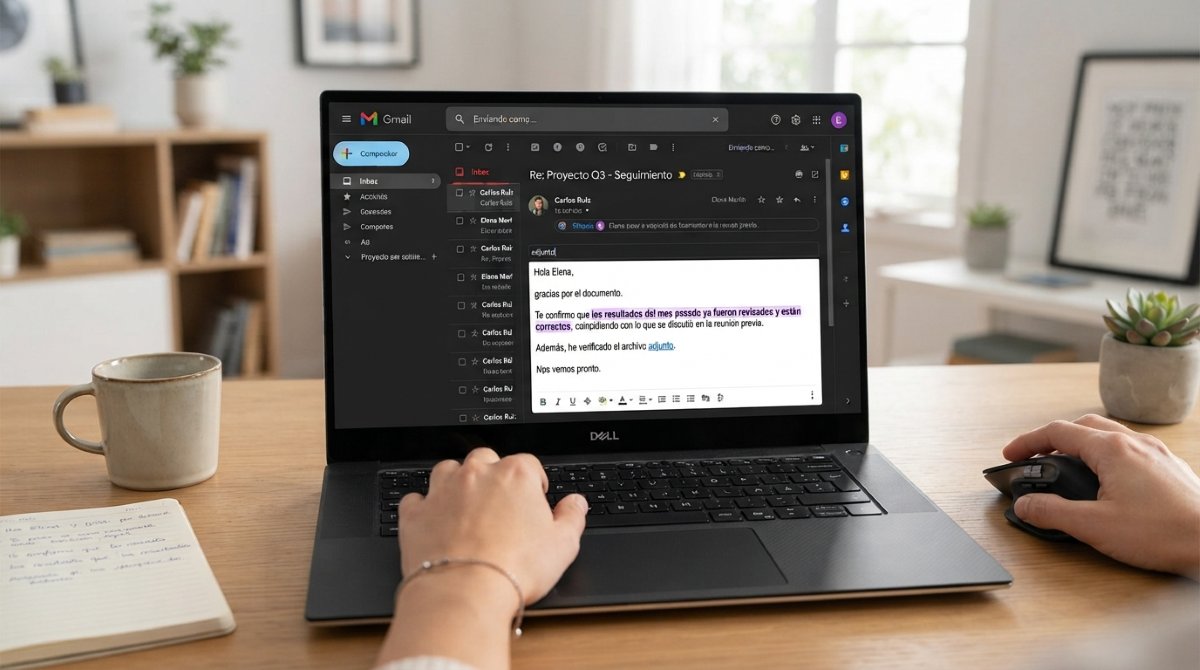
When part of the text of a reply appears in purple in Gmail, it's usually because The email includes a text quote.The information was either copied from previous messages or retained the previous formatting if you copied and pasted. So, if you're looking for a clean and organized format, that purple color can be quite annoying. Let's look in more detail at the reasons behind this behavior and how to combat it.
Text repeated or copied from the same thread
The first thing you should keep in mind is that the purple color you see on screen normally It's only visible to you and is not sent as a font color to the recipient.Actually, when part of the text of a reply appears in purple in Gmail, it's because the platform marks the content as "duplicate" within a conversation.
One of Gmail's main features is its "Conversation View" layout. To help users follow a thread of emails on the same subject, Gmail automatically indents previous messages. When you re-enter text that already appeared in previous messages, Gmail identifies it as "quoted content"To visually differentiate what you write from the old content, the system paints the text purple.
This explains why, without having done anything differently or changed any settings, part of the text in a reply appears in purple in Gmail. Gmail's analyzer scans the entire conversation and, if it determines that a certain fragment matches a part of the history, it automatically activates the highlighting.
Legacy format when copying and pasting
The other reason why part of the text of a reply might appear in purple in Gmail is because You copied the text from another emailYou copied a document or webpage and pasted it in its original format. This can cause a purple color or a previous link/quote style to appear. How can you check this?
- Go to the "Sent" folder: Open the email you just sent and look at the text (or send it to another email client like OutlookIf part of it is purple, then it means you pasted it in its original format, including its color.
Gmail's algorithm can be too sensitive
As we mentioned, when Gmail considers a snippet of text to be a quote, it highlights it in purple. However, sometimes the algorithm can be overly sensitive. In fact, you might not have even copied a phrase exactly as it appeared elsewhere in the conversation. But if the text you pasted has a specific indent or line break, or if the structure is similar to that of a previous email, can be misinterpreted as "content quoting".
Some users have reported that, even if The issue happens very often.The system confuses the message with the same thread, which is why part of the text is highlighted in that color. Therefore, we understand how frustrating this can be if you worked hard on writing an email and Now it's a complete mess painted a color you hadn't thought of.
What if the text remains purple after sending?
There's another situation that can occur after sending the message: you open the email in your Sent folder and see that, indeed, part of the text has turned purple. For example, if you wrote using Chrome on a laptop and everything looked normal, but when you open the sent email in the app on your mobile device certain words appear in purple, it's usually due to... rendering differences between mobile and desktop.
It's even more frustrating if the text of a reply appears in purple in Gmail and your signature has "infected" your signature with that color. If, when replying to the email, you find yourself in a purple state, your signature will also be affected. Your signature is located near the area that the system considers an appointmentIt can also be colored purple. This can make a professional email appear to have a flaw.
How to combat "purple"?
What can you do if part of the text in a reply appears in purple in Gmail? Unfortunately There is no switch that directly says "Turn off quote highlighting"You can't make the purple color disappear with a single click in the settings. However, there are some steps and habits you can adopt to prevent this behavior from occurring.
The first thing you can do to prevent the color purple from appearing in paste without formattingWhen you need to quote the content of a previous email, don't use Ctrl + V directly, but Ctrl+Shift+V (or the "Paste as plain text" option in the context menu). This removes all HTML tags and styles that the image text carries over, reducing the likelihood that Gmail will identify it as a quote.
Another option you have if the text of a reply appears in purple in Gmail is clean its formatTo do this, select the purple text within the Gmail composer, click on the More formatting options icon (the T with an x through it or the formatting menu at the end of the bottom bar) and choose Remove formatting or manually change it to black from the text color picker.
Final considerations if the text of a reply appears in purple in Gmail
In conclusion, if part of the text of a reply appears in purple in Gmail, remember that it's a feature designed to help you. Identify the points mentioned or repeated in a conversationUnderstanding this will help you stop worrying about having damaged something or sent an unprofessional email. As long as your recipient receives it in black, you don't need to dwell on it.
