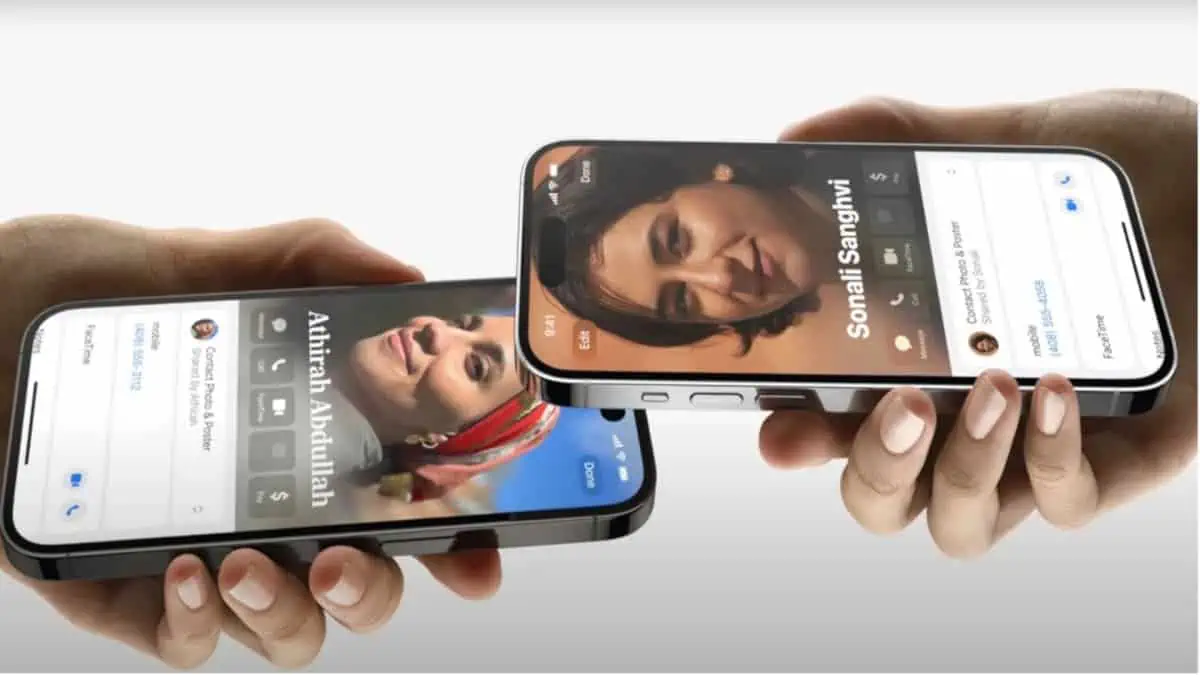
- Android is developing a contact sharing feature using gestures and NFC similar to iOS's NameDrop.
- The new 'Tap to Share' technology will allow the transfer of not only personal data, but also files and photos by bringing the terminals together.
- Implementation through Google Play Services will make it easier for the feature to reach most devices without relying on global system updates.

Have you ever been at an event or meeting someone and had to dictate your phone number digit by digit to avoid mistakes? It's a somewhat outdated and, frankly, quite slow process. But there's an easier way: Share your contact by bringing two Android phones close together. Toco is a simple touch between devices.
The idea is simple: to mimic that fluid experience we already know in the Apple ecosystem, allowing information fly from one screen to another Almost like magic. It's not just about sending a number, but about exchanging a complete digital business card, making connecting with other people as natural as shaking hands.
The arrival of 'NameDrop' on Android: Gesture Exchange
Google has been quietly working on a feature internally known as Gesture Exchange or Contact Exchange. Essentially, it allows you to share contacts by simply bringing two Android phones close together. It is the direct answer to NameDrop of iOSThe goal is that, by bringing the tops of two Android phones close together, the system will detect the movement and display an interface where you can choose what data to share, such as your email, profile picture, or phone number, thus avoiding having to navigate through complicated menus.
The most interesting thing is that this feature doesn't seem to be tied exclusively to a specific version of the operating system, but is being integrated into the Google Play ServicesThis is great news because it means the rollout could be much faster and more massive, reaching a huge number of devices, including the Samsung Galaxy, without the user having to wait for their manufacturer to update the customization layer or the Android core.
Beyond contacts: The future of 'Tap to Share'
But be warned, it doesn't stop at contact cards. Recent leaks, especially in versions of Samsung's One UI 9 and in the code of Android 17They have revealed the existence of a service called TapToShareThis tool would broaden the range of possibilities, allowing the simple gesture of bringing phones together to send messages. photos and large files instantly.
This system would function like an AirDrop for Android, optimizing data transfer through a combination of sensors and wireless connectivity. The intention is to eliminate any friction when sharing multimedia content, making the process seamless. visual and extremely intuitive for any user, regardless of their technological skills.
The fundamental role of NFC in the exchange
To make it possible to share your contacts by bringing two Android phones close together, the main engine is the Near Field Communication (NFC)This technology, which we already use daily to pay at the supermarket with our mobile phones, allows two devices to recognize each other when they are just a few centimeters apart. To take advantage of these features, it is essential that the NFC hardware is active in the device's connection settings.
If you have a modern Android device, you probably already have this option. Just go to your settings. connected devices and make sure the NFC switch is turned on. Depending on the age of your device, you might use methods like the older Android Beam or the more recent one. Nearby Share (now integrated into Quick Share), which is the current standard for sending files wirelessly.

Current limitations and comparison with iOS
While the promise is exciting, let's be realistic: NFC has its limitations. The main drawback is the extreme proximity necessary; if the phones aren't almost touching, the magic doesn't happen. Furthermore, historically there has been a significant barrier in the interoperability between brandsThis means that sharing a contact between an Android and an iPhone remains a headache that requires third-party applications or the use of QR codes.
While Apple has polished NameDrop to be a visually stunning experience with fluid animations, sharing your contact by bringing two Android phones close together is a gamble on the universality and integration in their cloud services. Furthermore, for those who need something more professional than a simple casual exchange, there are corporate contact management platforms that allow synchronize data in real time, something that NFC, when sending static files, cannot do.
Share your contact by bringing two Android phones close together step by step
If you don't want to wait for the new Android 17 betas and want to share a contact now, the most reliable method is to use the share menu. Open your Contacts app, select the person, and tap the share icon. From there, choose Nearby Share and select the recipient's device from the list. It's a quick process, although it requires a couple more clicks that the future system of bringing mobile phones closer together.
Technology is evolving towards a model where hardware disappears and only action remains. The transition from manual methods to exchange through gestures It will mark a turning point in how we manage our personal and professional schedules, transforming the act of passing the phone into an experience dynamic and modern which saves time and avoids annoying mistakes.
It's that simple to share your contacts by bringing two Android phones close together. The industry is moving towards a standard where simply bringing two devices close together is enough to transfer anything from a simple business card to complex files, relying on NFC and deep integration with Google Play Services to ensure that almost any Android device can participate in this ecosystem. Instant, wireless connectivity.

Editor specialized in technology and internet issues with more than ten years of experience in different digital media. I have worked as an editor and content creator for e-commerce, communication, online marketing and advertising companies. I have also written on economics, finance and other sectors websites. My work is also my passion. Now, through my articles in Tecnobits, I try to explore all the news and new opportunities that the world of technology offers us every day to improve our lives.